
Introduction
This manual provides essential instructions for the safe and efficient operation of your Panasonic NNST676SC Genius Mid-Size Inverter Microwave Oven. Please read this manual thoroughly before using the appliance and retain it for future reference.

Front view of the Panasonic NNST676SC Microwave Oven.
Important Safety Instructions
When using electrical appliances, basic safety precautions should be followed, including the following:
- Read all instructions before using the appliance.
- Do not operate the oven if it is damaged or malfunctioning.
- Ensure proper ventilation around the oven. Do not block any ventilation openings.
- Do not heat liquids or other foods in sealed containers as they are liable to explode.
- Do not use corrosive chemicals or vapors in this appliance.
- Close supervision is necessary when the appliance is used by or near children. This model includes a Child Safety Lock feature to prevent unintended operation.
- Only use utensils suitable for microwave ovens.
- Do not overcook food.
Product Features
The Panasonic NNST676SC microwave oven incorporates several features designed for convenient and efficient cooking:
- Inverter Technology: Provides continuous power delivery for even cooking and defrosting, preventing cold spots or overcooked edges.
- Genius Sensor: Automatically adjusts heating levels and cooking time for various food types.
- 14 Auto Cook Programs: Pre-set options for common dishes, simplifying meal preparation.
- Inverter Turbo Defrost: Optimized thawing based on food weight.
- Child Lock: A safety feature to prevent accidental use.

Overview of key features: Inverter Technology, Genius Sensor, 14 Auto Cook Programs, Inverter Turbo Defrost, and Child Lock.
Setup
- Unpacking: Remove all packaging materials from inside and outside the oven. Inspect the oven for any damage.
- Placement: Place the oven on a flat, stable surface. Ensure there is adequate space for ventilation (at least 10 cm / 4 inches at the rear, 5 cm / 2 inches at the sides, and 20 cm / 8 inches above). Do not place the oven near heat sources or in areas of high humidity.
- Turntable Installation: Place the roller ring in the center of the oven cavity. Position the glass tray securely on the roller ring. Ensure the glass tray rotates freely.
- Power Connection: Plug the power cord into a grounded electrical outlet.
- Setting the Clock: Upon initial power-on, the display will show '0:00'. Press the 'Clock' button, then use the number pads to enter the current time. Press 'Clock' again to confirm.

Side view of the microwave, illustrating its compact design and power specifications.
Operating Instructions
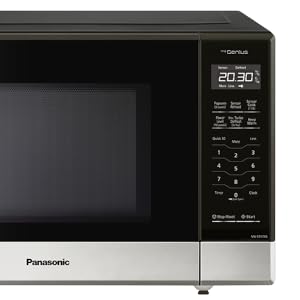
Detailed view of the microwave's control panel.
Basic Cooking (Time Cook)
- Place food in a microwave-safe container on the glass tray.
- Enter the desired cooking time using the number pads.
- Press 'Start'.
Power Level Adjustment
To cook at a power level lower than 100%:
- Enter the desired cooking time.
- Press 'Power Level' repeatedly until the desired power level (e.g., P-7 for 70%) is displayed.
- Press 'Start'.
Inverter Turbo Defrost
This feature allows for efficient defrosting of various foods.
- Press 'Inverter Turbo Defrost'.
- Enter the weight of the food in kilograms or pounds using the number pads.
- Press 'Start'. The oven will calculate the defrosting time.

Inverter Technology ensures consistent heating for thorough cooking.
Genius Sensor Cooking (Auto Cook Menus)
The Genius Sensor automatically detects humidity levels and adjusts cooking time for optimal results. The oven features 14 pre-programmed auto cook menus:

The 14 available Auto Cook Programs for various food types.
- Oatmeal
- Breakfast Sausage
- Omelet
- Quinoa
- Soup
- Frozen Entrees
- Frozen Pizza (single)
- Potatoes
- Fresh Vegetables
- Frozen Vegetables
- Rice
- Frozen Dinners
- Pasta
- Fish Fillets
To use an Auto Cook Menu:
- Place the food in the oven.
- Press the 'Auto Cook' button (or corresponding menu button) repeatedly until the desired menu number appears.
- Press 'Start'. The sensor will detect the food's condition and cook accordingly.

The Genius Sensor feature automatically adjusts cooking for various food types.
Child Lock
To activate the Child Lock:
- Press and hold the 'Stop/Reset' button for approximately 3 seconds until 'LOCK' appears on the display.
To deactivate the Child Lock:
- Press and hold the 'Stop/Reset' button for approximately 3 seconds until 'LOCK' disappears from the display.
Quick 30
Press the 'Quick 30' button to instantly start cooking for 30 seconds at 100% power. Each additional press adds 30 seconds to the cooking time.
Maintenance
Cleaning the Interior
- Wipe the interior with a damp cloth after each use.
- For stubborn stains, use a mild detergent or a solution of baking soda and water.
- Do not use abrasive cleaners or scouring pads.
Cleaning the Exterior
- Wipe the exterior surfaces with a soft, damp cloth.
- Avoid getting water into the ventilation openings.
Cleaning the Turntable and Roller Ring
- The glass tray and roller ring can be washed in warm, soapy water or in a dishwasher.
- Ensure they are completely dry before placing them back in the oven.
Troubleshooting
| Problem | Possible Cause | Solution |
|---|---|---|
| Oven does not start | Door not closed properly; Power cord unplugged; Child Lock activated. | Ensure door is latched; Check power connection; Deactivate Child Lock. |
| Food not cooking evenly | Improper stirring/rotating; Food placed incorrectly on turntable. | Stir or rotate food during cooking; Ensure turntable is clean and rotating freely. |
| Display shows 'LOCK' | Child Lock is active. | Press and hold 'Stop/Reset' for 3 seconds to deactivate. |
| Oven light not working | Bulb needs replacement. | Contact qualified service personnel for bulb replacement. |
Specifications
- Model Number: NNST676SC
- Brand: Panasonic
- Capacity: 1.2 Cubic Feet
- Wattage: 1200 watts
- Material: Stainless Steel
- Installation Type: Countertop
- Product Dimensions (External): 310 x 525 x 401 mm (12 1/4 x 20 11/16 x 15 13/16 in)
- Oven Dimensions (Internal): 251 x 355 x 365 mm (9 15/16 x 13 15/16 x 14 3/8 in)
- Included Components: Microwave Oven, Glass Tray
Warranty and Support
For warranty information, technical support, or service inquiries, please refer to the warranty card included with your product or visit the official Panasonic Canada website. Do not attempt to repair the appliance yourself.


