
1. Introduction
Thank you for choosing the Essager 80W Super Fast Car Charger. This device is designed to provide efficient and safe charging for multiple electronic devices simultaneously in your vehicle. It features advanced charging protocols, a durable aluminum alloy shell, and a real-time voltage display to monitor your car battery's health. Please read this manual carefully before use to ensure proper operation and to maximize the lifespan of your product.
2. Safety Information
- Do not disassemble, repair, or modify the product. Unauthorized modifications may cause damage, electric shock, or fire.
- Keep the product away from water, moisture, and high temperatures.
- Ensure the car charger is securely inserted into the cigarette lighter socket. A loose connection may cause overheating or poor performance.
- Do not use the product if it is damaged or has been dropped.
- Avoid exposing the product to direct sunlight for extended periods, especially in a closed vehicle.
- Use only compatible charging cables with your devices to ensure optimal charging and safety.
- The product is designed for 12-24V vehicle cigarette lighter sockets. Do not use it with incompatible voltage sources.
3. Product Overview
The Essager 80W Super Fast Car Charger is equipped with multiple charging ports and a digital display for enhanced functionality.

Figure 3.1: Front view of the Essager 80W Super Fast Car Charger, showcasing its sleek design and digital display.

Figure 3.2: Close-up view of the charger's ports (USB-A1, USB-A2, Type-C) and the integrated digital voltage display.
Key Features:
- 80W Total Output: Capable of fast charging up to three devices simultaneously.
- Multiple Fast Charging Protocols: Supports PD3.0/PPS (36W Max), QC3.0 (18W Max), and Huawei 22.5W protocols.
- All-Aluminum Shell: High-density aluminum alloy for efficient heat dissipation and enhanced durability.
- Intelligent Safety Systems: Built-in protection against over-current, over-voltage, overcharge, overload, overheat, and short circuit.
- Real-time Voltage Detection: LED digital display shows your car battery voltage, helping you monitor its health.
4. Setup
Setting up your Essager Car Charger is a simple process:
- Locate the cigarette lighter socket in your vehicle. This is typically found in the dashboard or center console.
- Ensure the vehicle's engine is off before inserting the charger.
- Insert the Essager Car Charger firmly into the cigarette lighter socket until it is fully seated.
- Once inserted, if the vehicle's ignition is on, the LED digital display on the charger will illuminate, showing the current car battery voltage.
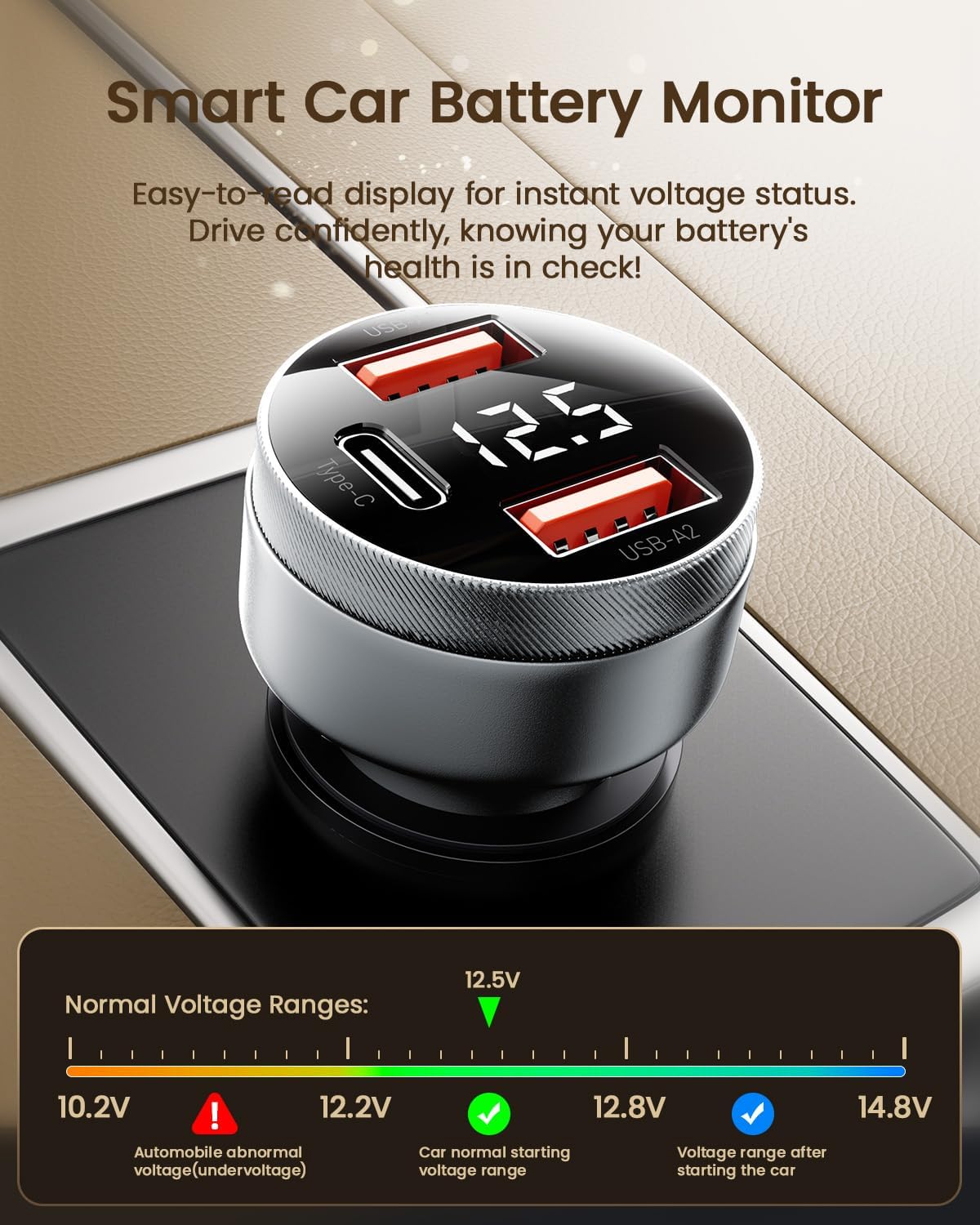
Figure 4.1: The Essager Car Charger properly installed in a vehicle's cigarette lighter socket, displaying the battery voltage.
5. Operating Instructions
5.1 Charging Devices
The Essager Car Charger allows you to charge up to three devices simultaneously using its USB-A1, USB-A2, and Type-C ports.

Figure 5.1: Diagram illustrating the power distribution and maximum output for one, two, and three devices charging simultaneously.
- Connect your device's charging cable to the appropriate port (USB-A or Type-C) on the car charger.
- The charger will automatically detect your device and deliver the optimal charging efficiency based on supported protocols (PD3.0, PPS, QC3.0, etc.).
- For best fast charging performance, use high-quality cables that support the fast charging protocols of your device and the charger.
5.2 Voltage Monitoring
The integrated LED digital display provides real-time monitoring of your car battery's voltage. This feature helps you understand the health of your vehicle's electrical system.

Figure 5.2: The car charger displaying the current vehicle battery voltage on its LED screen.
- Normal Voltage Range (Car Running): Typically between 13.2V and 14.8V.
- Normal Voltage Range (Car Off): Typically between 12.2V and 12.8V.
- Abnormal Voltage (Low): Readings below 12.0V when the car is off, or below 13.0V when running, may indicate a weak battery or an issue with the charging system.
Monitoring the voltage can help you take timely measures to avoid potential breakdowns during driving.
5.3 Device Compatibility
The charger is widely compatible with various devices and vehicle types.

Figure 5.3: Visual representation of the wide range of compatible devices, including Apple and Android smartphones, tablets, laptops, and other digital accessories.
6. Maintenance
- Cleaning: Use a soft, dry cloth to wipe the surface of the charger. Do not use liquid cleaners or abrasive materials.
- Storage: When not in use for extended periods, store the charger in a cool, dry place away from direct sunlight and extreme temperatures.
- Inspection: Periodically check the charger for any signs of damage, such as cracks in the casing or bent connectors. If damage is found, discontinue use.
7. Troubleshooting
| Problem | Possible Cause | Solution |
|---|---|---|
| Charger not powering on/no display. | Loose connection; Vehicle cigarette lighter fuse blown; Vehicle ignition off. | Ensure charger is fully inserted. Check vehicle's fuse box for blown fuse. Turn vehicle ignition on. |
| Device not fast charging. | Cable not fast charge compatible; Device does not support fast charging; Multiple devices drawing too much power. | Use a high-quality, fast-charge compatible cable. Verify device supports fast charging. Try charging fewer devices or one at a time. |
| Voltage display seems inaccurate. | Normal fluctuation; Charger not fully seated; Vehicle electrical issue. | Slight fluctuations are normal. Re-insert the charger firmly. If concerns persist, consult a vehicle technician. |
| Charger gets warm during use. | Normal operation; High power draw. | It is normal for the charger to get warm during high-power charging. The aluminum shell aids heat dissipation. If it becomes excessively hot, disconnect and allow to cool. |
8. Specifications
| Feature | Detail |
|---|---|
| Model Number | ES-CC10 |
| Input Voltage | 12-24V DC |
| Total Output Power | 80W Max |
| USB-C Output | PD3.0/PPS 36W Max |
| USB-A1 Output | QC3.0 18W Max |
| USB-A2 Output | QC3.0 18W Max |
| Connector Type | USB Type A, USB Type C |
| Material | Aluminum Alloy |
| Special Features | Fast Charging, Voltage Display, Multi-Protection |
| Dimensions | 5.31 x 4.37 x 1.73 inches (Package) |
| Item Weight | 1.44 ounces |
9. Warranty and Support
Essager products are manufactured with high-quality materials and undergo rigorous testing. For specific warranty information and customer support, please refer to the product packaging or contact Essager customer service directly through their official website or the retailer where the product was purchased.
For further assistance or inquiries, please visit the ESSAGER Store on Amazon.


