
Introduction
This manual provides detailed instructions for the assembly, operation, and maintenance of your DWVO Vanity Desk with Mirror and Lights, Model MADWVJbnQl. Please read this manual thoroughly before beginning assembly or use to ensure safe and correct operation of the product.
The DWVO Vanity Desk is designed to enhance your daily routine with its integrated mirror and lights, a convenient charging station, and ample storage provided by multiple drawers. It also includes a dedicated hair dryer rack for organization.
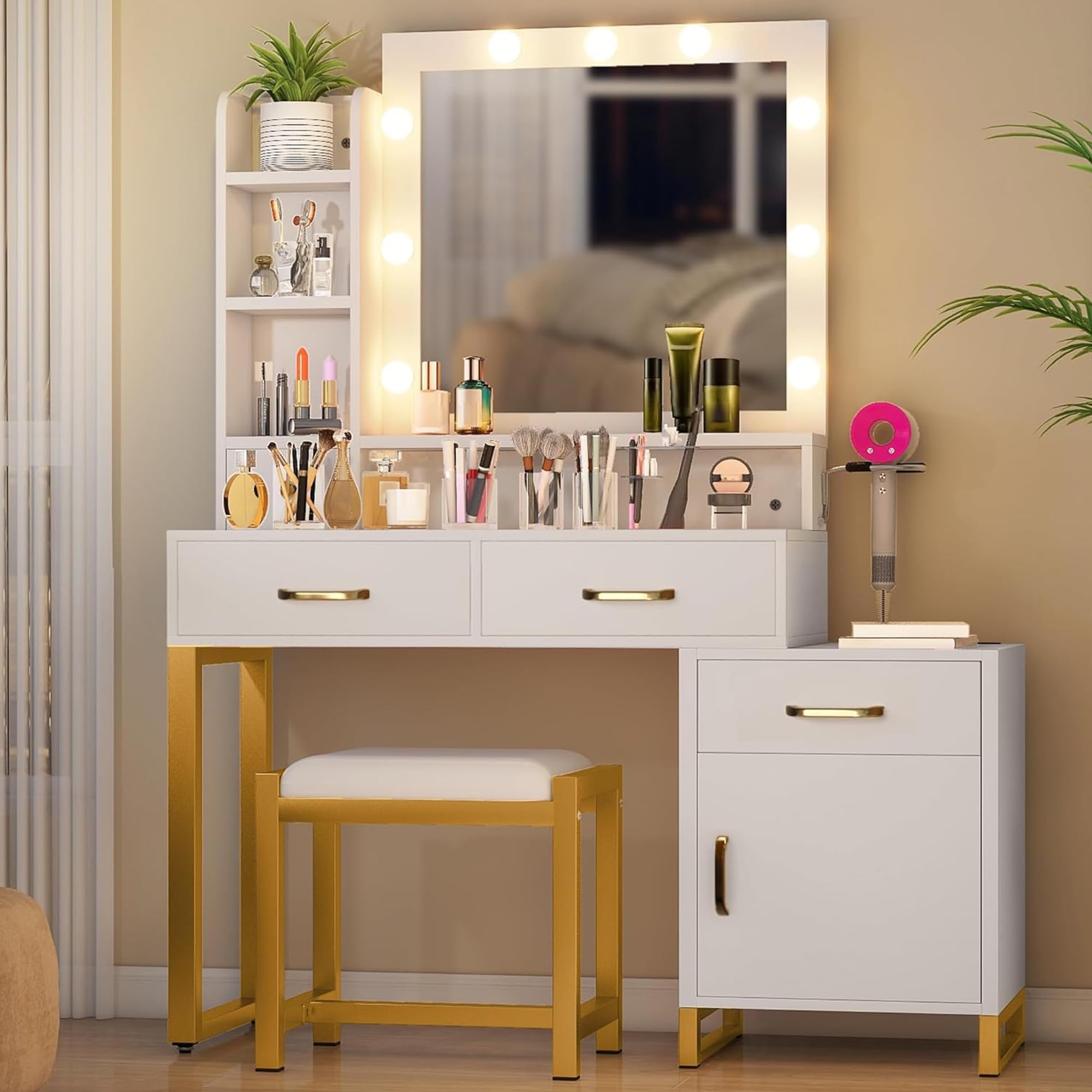
Figure 1: Overview of the DWVO Vanity Desk with Mirror and Lights.
Safety Information
Please observe the following safety precautions to prevent injury or damage to the product:
- Sharp Edges: Exercise caution during assembly and handling, as some components may have sharp edges. Wear protective gloves if necessary.
- Ensure all screws and fasteners are securely tightened before use. Periodically check for loose connections and tighten as needed.
- Do not overload drawers or shelves. Distribute weight evenly to maintain stability.
- Keep electrical components (lights, charging station) away from water or excessive moisture.
- Place the vanity desk on a flat, stable surface to prevent tipping.
- Keep small parts and packaging materials away from children to prevent choking hazards.
Assembly Instructions
Assembly is required for this product. It is recommended to have two people for assembly. Please ensure all parts are present before beginning. Refer to the included "Instructions & Accessories" for a detailed step-by-step guide and component identification.
- Unpack Components: Carefully remove all parts from the packaging and lay them out on a clean, soft surface to prevent scratches. Verify all hardware and panels are accounted for against the parts list in your accessory pack.
- Assemble Base Frame: Attach the metal frame components using the provided screws and tools. Ensure all connections are firm.
- Construct Desk Top and Drawers: Follow the instructions to assemble the desk surface and drawer units. Insert drawer slides and ensure smooth operation.
- Install Mirror Unit: Securely attach the mirror unit to the desk top. Connect the wiring for the lights and charging station as directed.
- Attach Handles: Install the handles on the drawers and cabinet door.
- Final Check: Once assembled, gently move the desk to its desired location. Ensure all connections are tight and the desk is stable.
Note: No seller-provided assembly videos were available for embedding. Please refer to the printed instructions for visual guidance.
Operating Instructions
Mirror Lights
The integrated mirror lights feature 3 lighting modes and adjustable brightness. To operate:
- Power On/Off: Locate the touch sensor on the mirror surface. Tap once to turn the lights on or off.
- Change Lighting Mode: With the lights on, tap the touch sensor repeatedly to cycle through the 3 available lighting modes (e.g., cool white, natural, warm yellow).
- Adjust Brightness: To adjust brightness, press and hold the touch sensor. The brightness will gradually increase or decrease. Release when the desired brightness is reached.
Charging Station
The vanity desk is equipped with a power strip featuring USB ports and standard outlets. This allows you to conveniently charge mobile devices or power styling tools.
- Connect to Power: Plug the vanity desk's main power cord into a standard wall outlet.
- Use USB Ports: Insert your device's USB charging cable into one of the available USB ports.
- Use Outlets: Plug your hair dryer, curling iron, or other electronic devices into the standard power outlets.
Note: Ensure the total power draw of connected devices does not exceed the charging station's maximum capacity.
Maintenance
To keep your DWVO Vanity Desk in optimal condition:
- Cleaning: Wipe the surfaces with a dry cloth. Avoid abrasive cleaners or harsh chemicals that could damage the finish.
- Mirror Care: Clean the mirror surface with a soft, lint-free cloth and a glass cleaner. Do not spray cleaner directly onto the mirror; apply it to the cloth first.
- Hardware Check: Periodically inspect all screws and fasteners to ensure they remain tight. Tighten any loose hardware to maintain structural integrity.
Troubleshooting
If you encounter issues with your vanity desk, refer to the following common solutions:
- Lights Not Turning On:
- Ensure the vanity desk is properly plugged into a working power outlet.
- Check if the power switch on the charging station (if applicable) is turned on.
- Verify that the touch sensor on the mirror is clean and unobstructed.
- Drawers Not Sliding Smoothly:
- Check for any obstructions in the drawer slides.
- Ensure the drawer slides are correctly aligned and securely attached.
- Lightly apply silicone spray to the slides if friction persists.
- Desk Instability:
- Confirm that all assembly screws are fully tightened.
- Ensure the desk is placed on a level surface.
Specifications
| Feature | Detail |
|---|---|
| Brand | DWVO |
| Model Number | MADWVJbnQl |
| Color | Snowy |
| Size | Medium |
| Material | Wood (Frame Material Type: Metal) |
| Product Dimensions (D x W x H) | 15.3"D x 24.3"W x 53.9"H |
| Item Weight | 96 Pounds |
| Number of Drawers | 4 |
| Mirror Style | Bulbs, 3 Lighting Modes, Brightness Adjustable |
| Power Features | Integrated Power Strip with USB Ports and Outlets |
| Assembly Required | Yes |
| Included Components | Instructions & Accessories |
Warranty and Support
For customer support, warranty information, or to report any issues with your DWVO Vanity Desk, please contact the manufacturer directly through their official channels. Refer to the product packaging or the DWVO brand store on Amazon for contact details.
DWVO Store Link: Visit the DWVO Store on Amazon