
1. Introduction
Thank you for choosing the FLYBIRD 4D Vibration Plate. This manual provides essential information for the safe and effective operation, maintenance, and troubleshooting of your new fitness equipment. Please read this manual thoroughly before initial use and retain it for future reference.
2. Safety Instructions
To ensure safe operation and prevent injury, please adhere to the following safety guidelines:
- Consult a physician before starting any new exercise program, especially if you have pre-existing medical conditions.
- Do not use the device if you are pregnant, have a pacemaker, or suffer from acute thrombosis, severe diabetes, epilepsy, or recent surgery.
- Ensure the vibration plate is placed on a stable, level surface.
- Maintain a clear area around the device during operation.
- The maximum user weight capacity for this device is 500 pounds (226 kg). Do not exceed this limit.
- Keep children and pets away from the device during operation.
- Always hold onto a stable support if you feel unsteady during use.
- Stop using the device immediately if you experience pain, dizziness, or discomfort.
- Unplug the device from the power outlet when not in use or before cleaning.
3. Package Contents
Verify that all components are present in the package:
- FLYBIRD 4D Vibration Plate
- Remote Control (requires 1 Lithium Metal battery, included)
- 4 Resistance Bands
- 2 Loop Bands
- Exercise Mat
- User Manual

Figure 3.1: The FLYBIRD 4D Vibration Plate shown with its complete set of accessories, including resistance bands, loop bands, an exercise mat, and the remote control.
4. Setup
Follow these steps for initial setup:
- Unpack: Carefully remove all components from the packaging.
- Placement: Place the vibration plate on a firm, level, and non-slip surface. Ensure there is adequate space around the device for safe movement.
- Power Connection: Connect the power cord to the vibration plate and then to a grounded electrical outlet.
- Remote Control: Insert the included Lithium Metal battery into the remote control.
- Exercise Mat: Place the exercise mat under the vibration plate for added stability and floor protection.
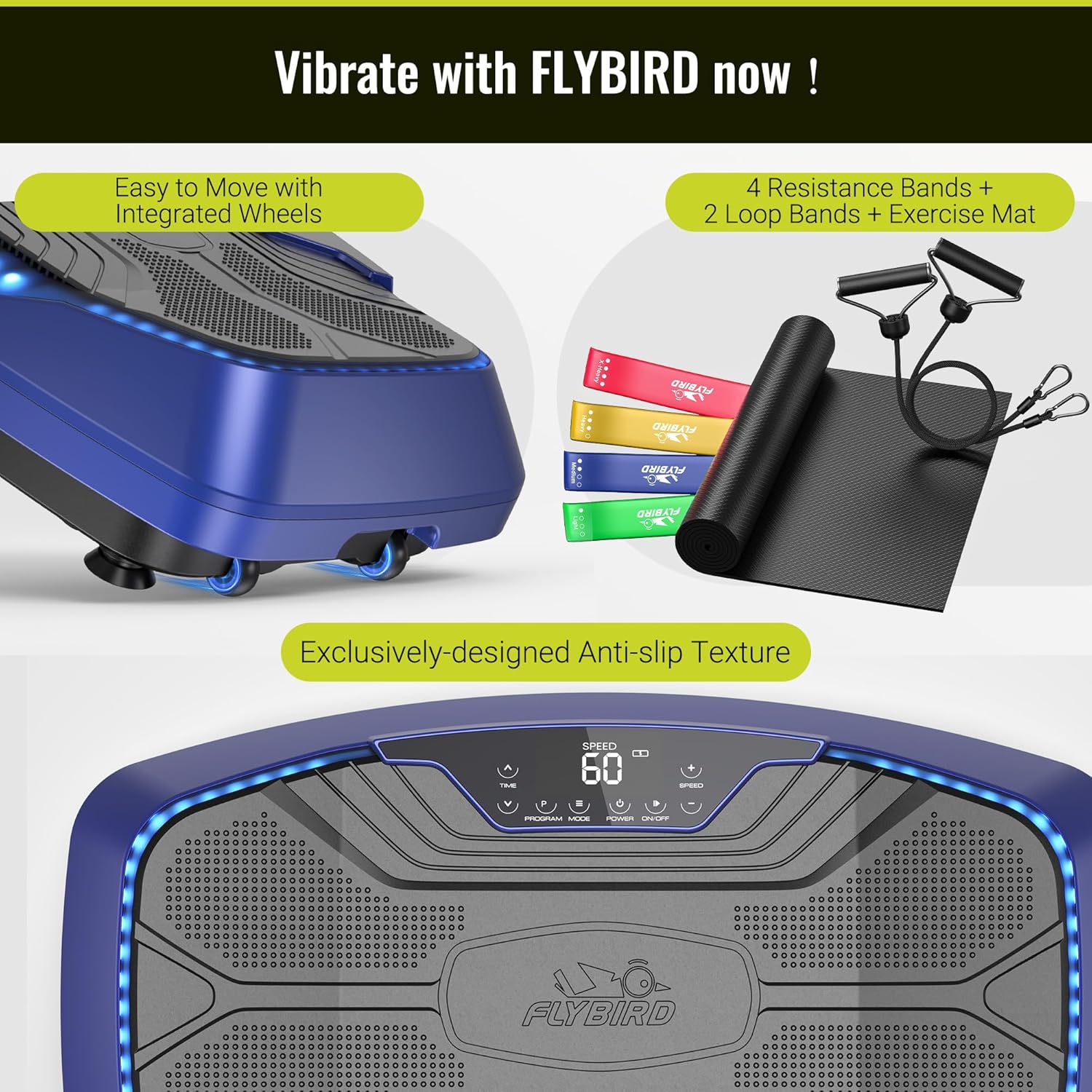
Figure 4.1: The vibration plate features integrated wheels for easy relocation and an exclusively designed anti-slip texture on the platform for user safety during exercise.
5. Operating Instructions
The FLYBIRD 4D Vibration Plate offers multiple modes and settings for a versatile workout experience.
5.1 Power On/Off
- Press the POWER button on the LED touch screen or the remote control to turn the device on or off.
5.2 4D Vibration Modes
The device features triple high-performance motors, providing 7-in-1 4D vibration modes. These modes can be operated individually or in combination:
- Oscillation: Up-down motion.
- Linear: Side-to-side motion.
- Pulsation: Wave-like motion.
- Combinations of Oscillation + Linear, Oscillation + Pulsation, Linear + Pulsation, and Oscillation + Linear + Pulsation.
Use the MODE button on the control panel or remote to cycle through the available vibration modes.
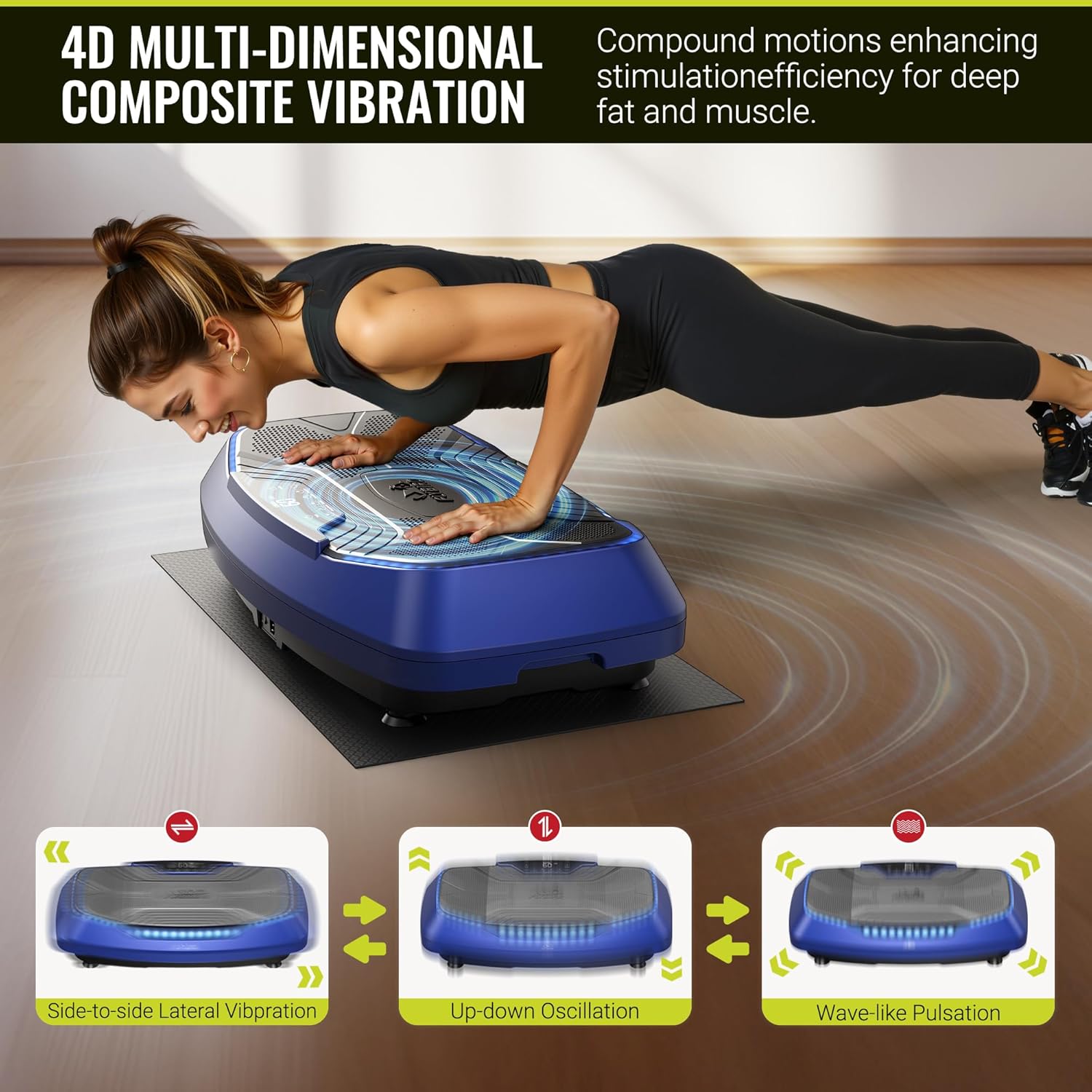
Figure 5.1: Visual representation of the three primary vibration types: side-to-side lateral vibration, up-down oscillation, and wave-like pulsation, which can be combined for 4D effects.
5.3 Speed Levels and Preset Programs
The vibration plate offers 99 speed levels and 9 preset programs for diverse training:
- Speed Adjustment: Use the SPEED +/- buttons on the control panel or remote to increase or decrease the vibration intensity.
- Preset Programs: Press the PROGRAM button to select from the 9 pre-programmed workout routines.
- LED Indicators: Three LED light colors indicate the current speed level:
- Green: Speed 1-30
- Blue: Speed 31-60
- Red: Speed 61-99
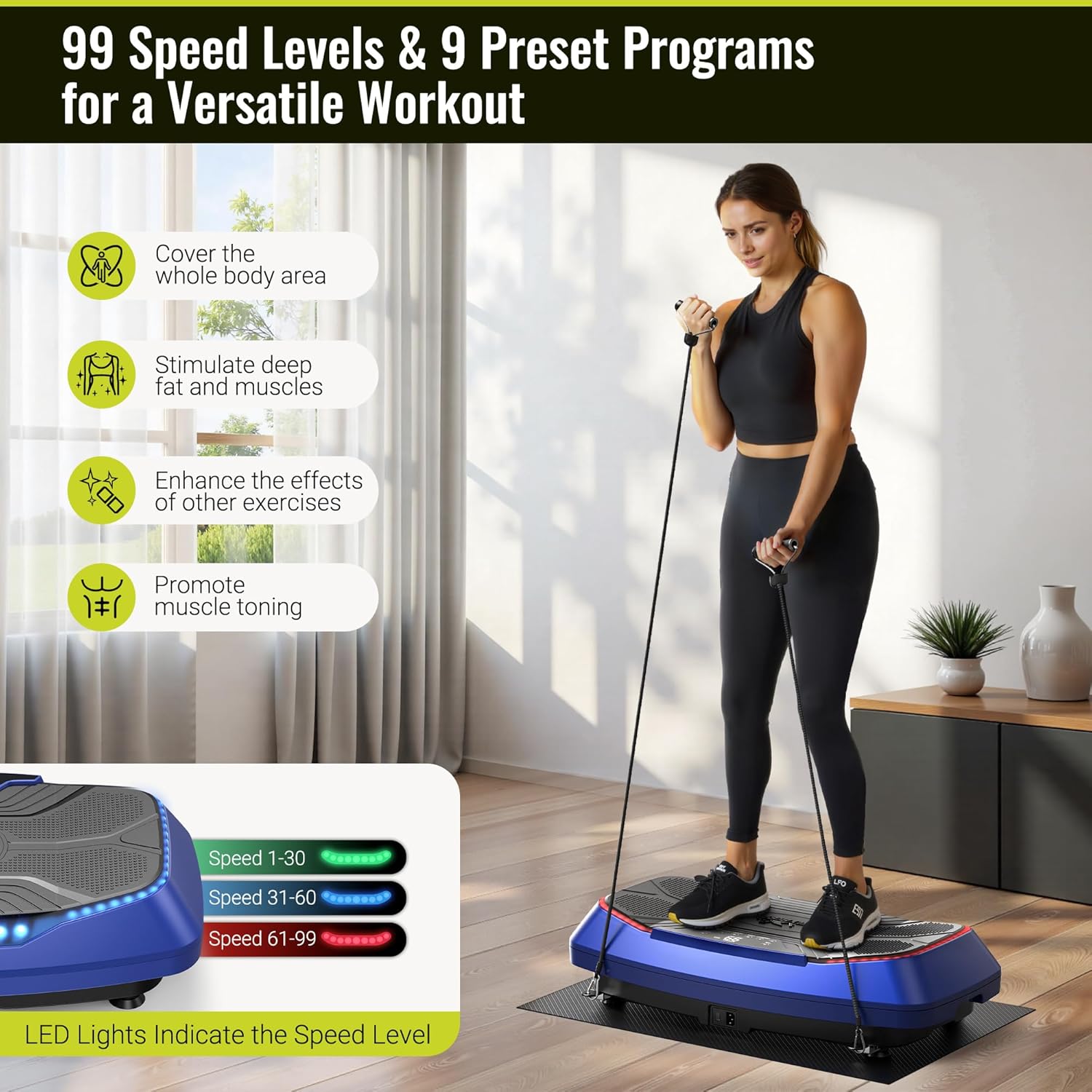
Figure 5.2: A user demonstrates an exercise on the vibration plate, highlighting the LED lights that change color to indicate the current speed level, ranging from 1 to 99.
5.4 Remote Control and Bluetooth Speaker
- Remote Control: The included remote allows for convenient adjustment of power, mode, speed, and program settings without interrupting your workout.
- Bluetooth Speaker: The built-in Bluetooth speaker allows you to connect your smartphone or other Bluetooth-enabled devices to play music during your exercise session. Refer to your device's Bluetooth pairing instructions to connect.

Figure 5.3: A user operates the vibration plate via the intuitive LED touch screen and remote control. The image also illustrates the built-in Bluetooth speaker functionality, allowing for music playback from a connected smartphone.
6. Exercise Guide
The FLYBIRD 4D Vibration Plate can be used for various exercises to stimulate muscles and improve circulation. The large pedal area (31.5" x 17.7") accommodates different stances and movements.
6.1 Basic Stances
- Standing: Stand with feet shoulder-width apart, knees slightly bent. Adjust foot placement to vary intensity. Wider stance increases vibration intensity.
- Squats: Perform squats on the plate to engage leg and glute muscles.
- Calf Raises: Stand on your toes to target calf muscles.

Figure 6.1: A man demonstrates a squat exercise on the vibration plate, highlighting the spacious 31.5" x 17.7" pedal area that allows for flexible foot positioning and various movements.
6.2 Using Resistance Bands
Attach the included resistance bands to the designated anchor points on the plate for upper body and full-body exercises. The loop bands can be used for lower body resistance.
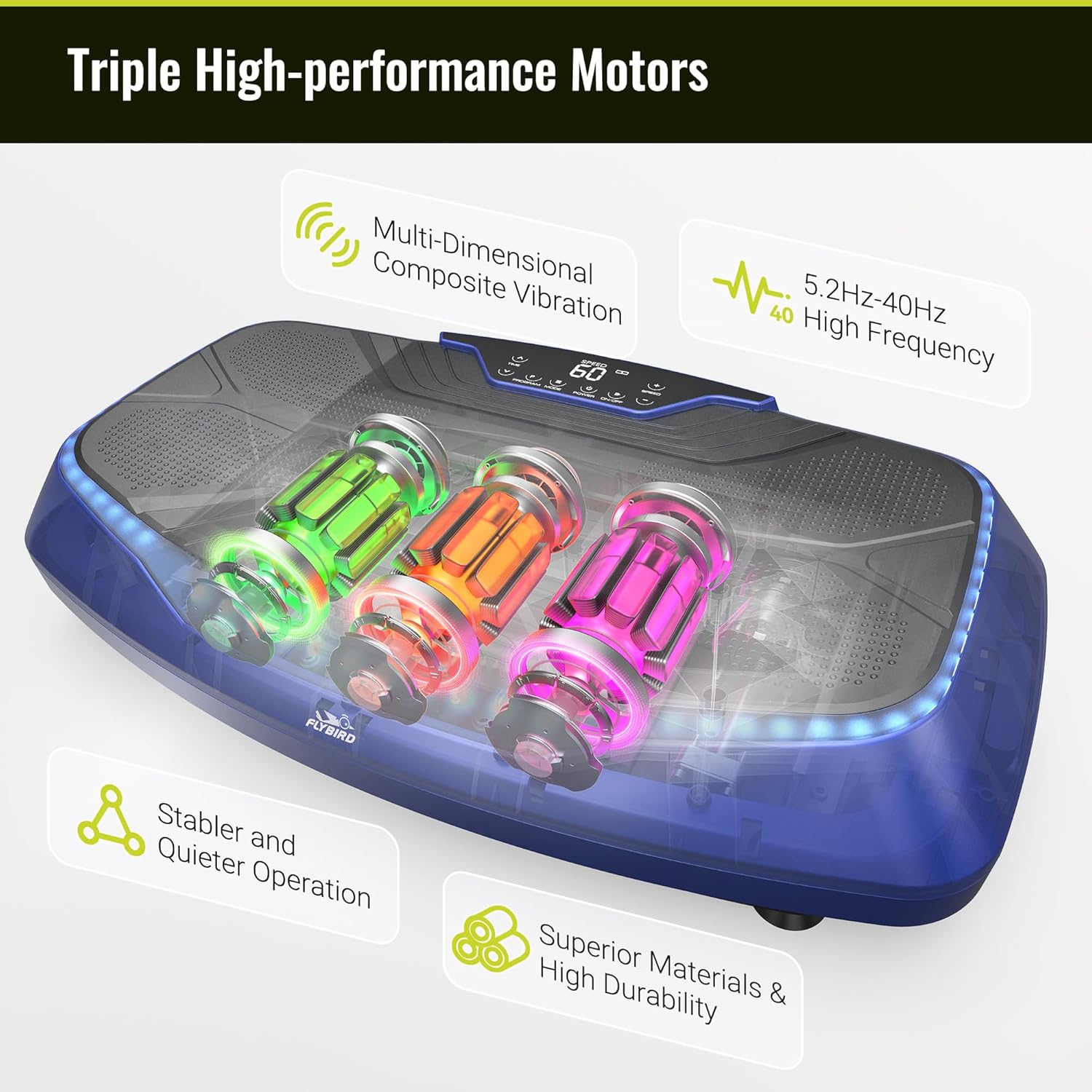
Figure 6.2: A man uses the vibration plate while incorporating resistance bands for a comprehensive full-body workout.
6.3 Benefits of Use
Regular use of the vibration plate may contribute to:
- Relief of back and leg pain.
- Accelerated recovery.
- Improved stability and flexibility.
- Increased blood and lymphatic circulation.
- Muscle toning and enhanced exercise effects.

Figure 6.3: An elderly man uses the vibration plate while seated, demonstrating its potential for gentle stimulation to aid in relaxation, recovery, and improved circulation.
7. Maintenance
Proper maintenance ensures the longevity and optimal performance of your vibration plate.
7.1 Cleaning
- Wipe the surface of the vibration plate with a soft, damp cloth after each use.
- Do not use abrasive cleaners or solvents, as these can damage the finish.
- Ensure the device is unplugged before cleaning.
7.2 Storage
- Store the vibration plate in a cool, dry place away from direct sunlight and moisture.
- Avoid placing heavy objects on the device.
- The integrated wheels allow for easy movement and storage.
8. Troubleshooting
If you encounter any issues with your FLYBIRD 4D Vibration Plate, refer to the following table:
| Problem | Possible Cause | Solution |
|---|---|---|
| Device does not power on. | Power cord not properly connected. No power from outlet. | Check power cord connection. Test outlet with another device. |
| Remote control not working. | Battery depleted or incorrectly inserted. Obstruction between remote and device. | Replace remote battery. Ensure clear line of sight to the device's receiver. |
| Vibration feels weak or inconsistent. | Incorrect mode or speed setting. Device overloaded. | Adjust speed and mode settings. Ensure user weight is within limits. |
| LED lights not functioning. | Internal electrical issue. | Contact customer support for assistance. |
| Bluetooth speaker not connecting. | Bluetooth not enabled on external device. Device too far from plate. | Ensure Bluetooth is active on your device. Keep devices within range. |
If the problem persists after attempting these solutions, please contact FLYBIRD customer support.
9. Specifications
Key technical details of the FLYBIRD 4D Vibration Plate:
| Feature | Detail |
|---|---|
| Model Name | FBVP-4D-BLX |
| Controls Type | Remote, LED Touch Screen |
| Display Type | LED |
| Number of Resistance Levels | 99 |
| Operation Mode | Automatic |
| Power Source | Corded Electric |
| Item Package Dimensions | 32 x 19 x 10 inches |
| Item Weight | 43.4 Pounds (19.68 kg) |
| Material | Plastic |
| Maximum Weight Recommendation | 500 Pounds (226 kg) |
| Vibration Frequency Range | 5.2Hz-40Hz |
10. Warranty and Support
FLYBIRD offers a lifetime warranty for this product, ensuring long-term reliability and customer satisfaction.
For technical support, warranty claims, or any questions regarding your FLYBIRD 4D Vibration Plate, please contact FLYBIRD customer service through the official brand website or your retailer's support channels. When contacting support, please have your model name (FBVP-4D-BLX) and purchase information readily available.


