
Introduction
Thank you for choosing the Waillynice TF-T08 Bluetooth 5.3 Gaming Music Earbuds. This manual provides detailed instructions on how to set up, operate, and maintain your new earbuds. Please read this manual carefully before use to ensure optimal performance and longevity of your device.
Package Contents
Please verify that all items listed below are included in your package:
- 2 x Bluetooth Earbuds (Left and Right)
- 1 x Charging Case
- 1 x USB Charging Cable
- 1 x User Manual
- 3 x Eartip Sets (Sizes S, M, L)
Product Overview
The Waillynice TF-T08 earbuds feature Bluetooth 5.3 connectivity, designed for both gaming and music with high-fidelity sound and passive noise cancellation. The transparent case design highlights the internal components.

Image: Waillynice TF-T08 Bluetooth Earbuds and Charging Case. This image displays the blue earbuds and their transparent charging case, showcasing the overall design.
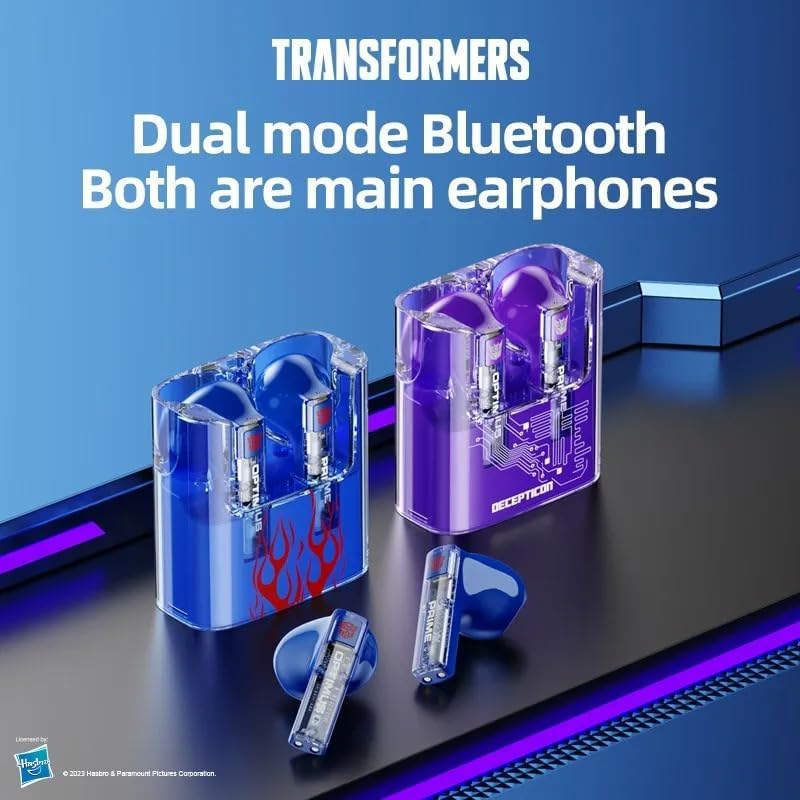
Image: Waillynice TF-T08 Earbuds in Charging Case. This image shows the blue earbuds securely placed within their transparent charging case, illustrating how they are stored and charged.
Specifications
| Model Name | Transformers TF-T08 |
| Bluetooth Version | V5.3 |
| Speaker Unit | 13 mm |
| Earbud Battery Capacity | 33 mAh x 2 |
| Usage Time (Earbuds) | Approximately 4 hours |
| Charging Time (Earbuds) | Approximately 1.5 hours |
| Charging Time (Case) | Approximately 1 hour |
| Frequency Range | 20Hz - 20KHz |
| Transmission Distance | 10 meters |
| Noise Control | Passive Noise Cancellation |
| Control Method | Touch Control |
| Microphone | Integrated Microphone |
| Water Resistance | Not water resistant |
Setup
1. Charging the Earbuds and Case
Before first use, ensure both the earbuds and the charging case are fully charged.
- Place the earbuds into the charging case.
- Connect the USB charging cable to the charging case and a power source.
- The charging indicator on the case will show charging status.
- Charging time for earbuds is approximately 1.5 hours. The charging case takes about 1 hour to fully charge.
2. Pairing with Your Device
The earbuds will automatically connect to your device after the first successful pairing.
- Open the charging case. The earbuds will automatically enter pairing mode.
- On your device (smartphone, tablet, etc.), enable Bluetooth.
- Search for available Bluetooth devices and select "TF-T08" from the list.
- Once connected, you will hear a confirmation sound, and the earbuds will be ready for use.
Operating Instructions
Touch Controls
The TF-T08 earbuds feature intuitive touch controls for various functions:
- Play/Pause: Single tap on either the left or right earbud.
- Next Song: Triple tap on the right earbud.
- Previous Song: Triple tap on the left earbud.
- Answer/End Call: Double tap on either the left or right earbud.
- Reject Call: Press and hold either the left or right earbud for two seconds.
- Activate Voice Assistant (Siri): Press and hold the left earbud for two seconds.

Image: Waillynice TF-T08 Earbuds Dual Mode Bluetooth. This image illustrates the earbuds' dual-mode Bluetooth capability, allowing for flexible connection options.
Maintenance
To ensure the longevity and optimal performance of your earbuds, follow these maintenance guidelines:
- Keep the earbuds and charging case clean and dry.
- Wipe the earbuds with a soft, dry cloth. Do not use abrasive cleaners.
- Avoid exposing the earbuds to extreme temperatures, humidity, or dust.
- Store the earbuds in their charging case when not in use to protect them and keep them charged.
- The earbuds are not water resistant; avoid contact with liquids.
Troubleshooting
If you encounter any issues with your TF-T08 earbuds, please refer to the following common solutions:
- Earbuds not pairing or connecting:
Ensure Bluetooth is enabled on your device and the earbuds are charged. Try turning Bluetooth off and on again on your device, or reset the earbuds by placing them back in the case and then taking them out.
- No sound or low volume:
Check the volume levels on both your device and the earbuds. Ensure the earbuds are properly seated in your ears. Confirm they are connected to the correct device.
- Sound leakage:
While the volume is not at maximum, there should be no sound leakage. For ear health, avoid using maximum volume for extended periods.
- Discomfort during use:
The earbuds are designed for comfort and come with three sizes of eartips (S, M, L). Experiment with different eartip sizes to find the best fit for your ears, which can improve both comfort and sound quality.
- Charging issues:
Ensure the charging cable is securely connected to both the case and the power source. Check if the charging contacts on the earbuds and inside the case are clean and free of debris.
Warranty and Support
Waillynice offers a 7-day no-reason return policy and a 90-day quality guarantee for customers who purchase these Bluetooth earbuds. If you have any questions, suggestions, or encounter any issues with your product, please contact Waillynice customer support for assistance.
For further support, please refer to the contact information provided with your purchase or visit the official Waillynice website.