
Lamshaw G8 Smart Watch Charger
User Manual for Lamshaw Magnetic Replacement Charger
Compatible with Joautrial G8 Smart Watch-1.39 Inches
Product Overview
The Lamshaw Magnetic Replacement Charger is specifically designed for the Joautrial G8 Smart Watch (1.39 Inches). This charger provides a convenient and safe way to power your smartwatch, featuring built-in protection mechanisms against overvoltage and overcurrent.

Image: The Lamshaw magnetic charger connected to a smartwatch, illustrating the charging process.
Its compact and portable design makes it ideal for use at home, in the office, in your car, or while traveling. The charger features a Micro USB interface for connection to various power sources.
Safety Features
This charger incorporates an advanced built-in Short-circuit Protection IC to ensure the safety of your device during charging. Key safety features include:
- Overvoltage Protection: Prevents damage to your smartwatch from excessive voltage.
- Overcurrent Protection: Safeguards against damage caused by excessive current flow.
- Automatic Circuit Cut-off: In the event of a short-circuit, the protection IC automatically cuts off the circuit.
- Continuous Safety Monitoring: The protection IC maintains safety even if the charger is left plugged in after charging is complete.
Setup and Connection
- Unpack the Charger: Carefully remove the charger cable from its packaging.
- Identify Components: The charger consists of a USB-A connector on one end and a magnetic charging dock with two pins on the other.
- Connect to Power Source: Insert the USB-A connector into a compatible USB power source such as a computer USB port, laptop, power bank, or a wall charger with a USB output.
- Attach to Smartwatch: Align the magnetic charging dock with the charging contacts on the back of your Joautrial G8 Smart Watch. The magnets will automatically snap into place. Ensure the connection is secure and the magnets attract, not repel.

Image: Detailed view of the charger cable, highlighting the USB connector and the magnetic charging interface.
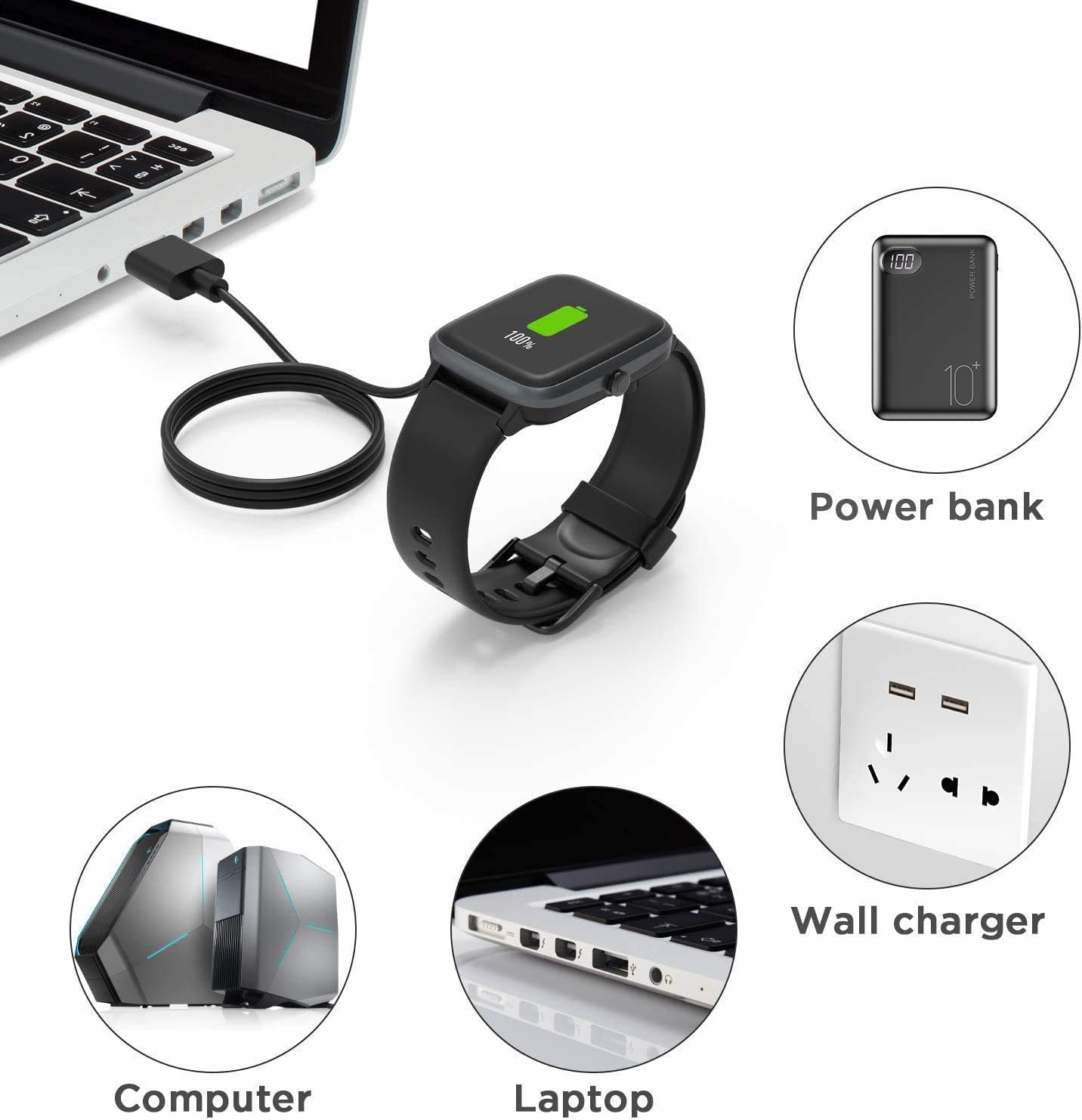
Image: Illustration of different methods to power the charger, including laptops, power banks, and wall adapters.
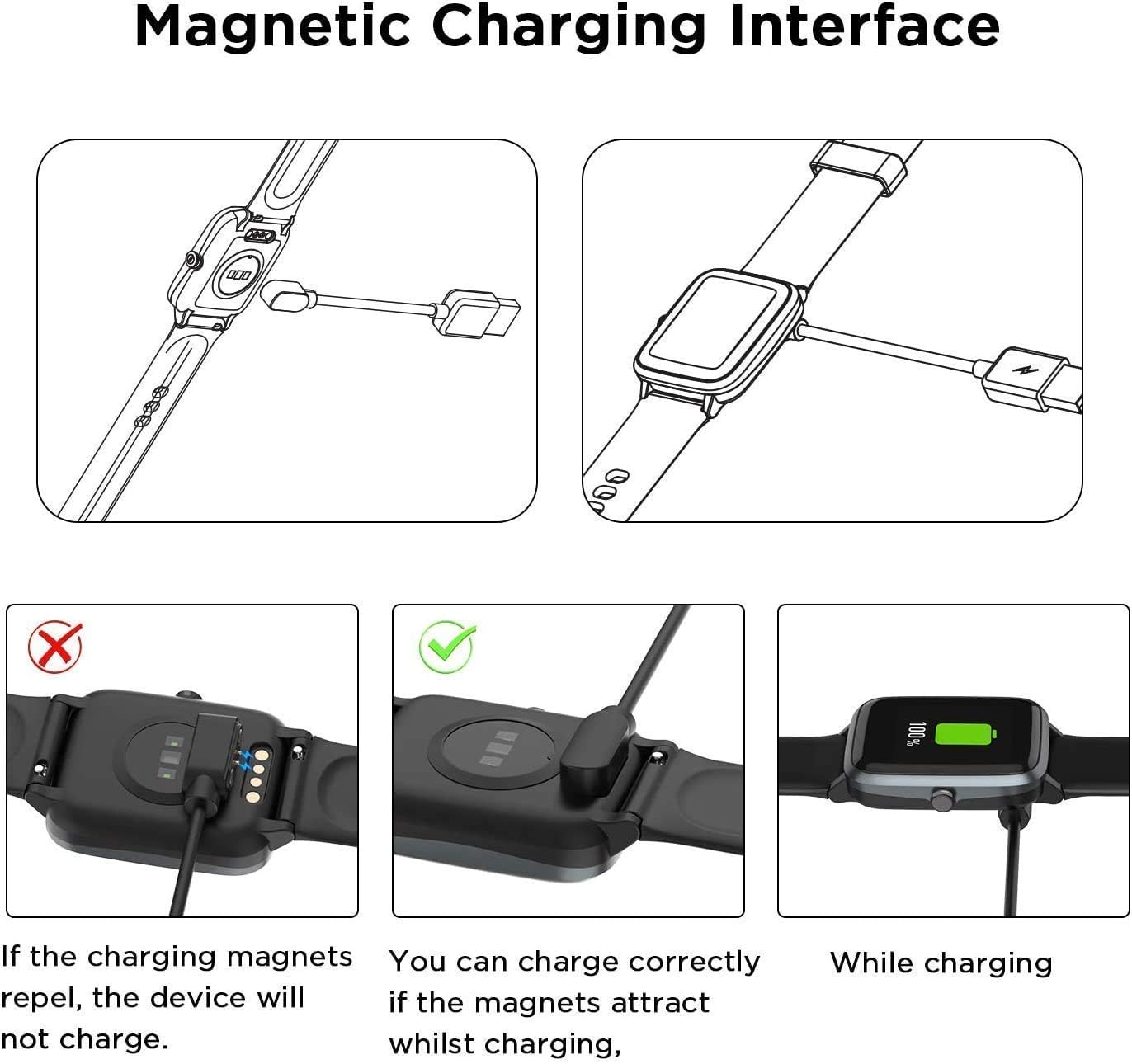
Image: Visual guide demonstrating the correct magnetic alignment for charging and showing what happens if the magnets repel.
Operating Instructions
Once the charger is connected to a power source and securely attached to your smartwatch, the charging process will begin automatically. The smartwatch display should indicate that it is charging.

Image: The smartwatch screen displaying a charging indicator, suggesting a full charge can be achieved in approximately 2.5 hours with a 1A output current.
A full charge typically takes approximately 2.5 hours when using a 1A output current power source. The charger is designed for convenience, allowing you to charge your smartwatch wherever a USB power source is available.
Maintenance and Care
- Cleaning: Gently wipe the charger cable and magnetic contacts with a soft, dry cloth. Avoid using liquid cleaners or abrasive materials.
- Storage: When not in use, store the charger in a cool, dry place. The flexible PVC cable is designed for easy coiling and storage.
- Handling: Do not bend the cable excessively or apply undue force to the connectors.
- Environmental Conditions: Avoid exposing the charger to extreme temperatures, direct sunlight, or high humidity.

Image: Breakdown of the charger's construction, highlighting durable materials and cable flexibility for storage.
Troubleshooting
- Smartwatch not charging:
- Ensure the USB-A connector is fully inserted into the power source.
- Verify the power source is active (e.g., wall outlet is working, computer is on).
- Check the magnetic connection to the smartwatch. Ensure the magnets attract and the charging pins are making proper contact. If the magnets repel, flip the charging dock 180 degrees.
- Clean the charging contacts on both the charger and the smartwatch to remove any dust or debris.
- Try a different USB power source.
- Slow charging:
- Ensure your power source provides sufficient output current (ideally 1A or more for optimal charging speed).
- Avoid charging through unpowered USB hubs.
Specifications
| Feature | Detail |
|---|---|
| Product Name | Lamshaw Magnetic Replacement Charger |
| Compatibility | Joautrial G8 Smart Watch (1.39 Inches) |
| Interface | Micro USB (input), Magnetic (output to watch) |
| Cable Length | Approx. 3.3 feet (1 meter) |
| Protection Features | Built-in Short-circuit Protection IC, Overvoltage Protection, Overcurrent Protection |
| Item Weight | 1.76 ounces |
| Package Dimensions | 3.94 x 1.97 x 0.39 inches |
Warranty and Support
For any issues or inquiries regarding your Lamshaw Magnetic Replacement Charger, please contact the seller directly through the platform where the purchase was made. Refer to your purchase documentation for specific warranty terms and conditions, as these may vary.
The manufacturer stands behind the quality of its products and aims to provide reliable charging solutions.
Ask a question about this manual
Ask about setup, troubleshooting, compatibility, parts, safety, or missing instructions. Manuals+ will review the question and use this page’s manual context to help answer it.