
1. Introduction
This manual provides detailed instructions for setting up, operating, maintaining, and troubleshooting your GMKtec M6 Mini PC. The M6 Mini PC is a compact yet powerful desktop solution designed for a wide range of applications, including productivity, office work, gaming, and multimedia consumption. It features an AMD Ryzen 5 6600H processor, high-speed DDR5 RAM, and a fast PCIe SSD, offering robust performance in a small form factor.
Please read this manual thoroughly before using your device to ensure proper operation and to maximize its lifespan.
2. What's in the Box
Upon unboxing your GMKtec M6 Mini PC, please verify that all the following items are included:
- GMKtec Nucbox M6 AMD Ryzen 5 6600H Mini PC Computer
- Power Supply & Cable
- HDMI Cable
- VESA Mount and Screws
- User Manual
- Warranty Card

Image: Contents of the GMKtec M6 Mini PC retail packaging, including the mini PC, power supply, HDMI cable, VESA mount, user manual, and warranty card.
3. Product Overview
3.1. Physical Features and Ports
The GMKtec M6 Mini PC is designed with a compact form factor and a comprehensive set of ports for versatile connectivity. Familiarize yourself with the various ports and indicators on the device.

Image: Detailed view of the GMKtec M6 Mini PC's front and rear panels, highlighting the various input/output ports such as USB, HDMI, DisplayPort, LAN, and audio jack.
- Front Panel: Power Button, 3.5mm Audio Jack (HP&MIC), USB 3.2 (Gen2) ports (x2), USB 4.0 Type-C port (PD/DP/DATA).
- Rear Panel: DC Power Port, RJ45 Dual LAN (2.5G), HDMI 2.0 port (4K@60Hz), DisplayPort (DP), USB 2.0 port (x1), Kensington Lock slot.
3.2. Key Components
The M6 Mini PC is equipped with high-performance components to ensure smooth operation for demanding tasks.
- Processor: AMD Ryzen 5 6600H (6 Cores/12 Threads, up to 4.50GHz). This processor is based on the ZEN 3+ architecture, offering significant performance improvements over previous generations.
- Graphics: Integrated AMD Radeon 660M GPU (6 Cores, 1900 MHz). This iGPU provides powerful graphics processing for 4K video, design software, and mid-range gaming.
- Memory: 32GB DDR5 RAM Dual Channel (2x16GB), expandable up to 64GB.
- Storage: 1TB M.2 2280 PCIe 3.0 SSD, with dual slot expansion support for PCIe 4.0 SSDs up to 4TB.

Image: Visual representation of the AMD Ryzen 5 6600H processor, detailing its Zen 3+ architecture, core/thread count, frequency, and L3 cache, along with Cinebench R23 performance comparisons.

Image: A bar chart illustrating the performance improvement of the AMD Radeon 660M GPU compared to previous AMD RX Vega 8, Intel Iris Xe, and NVIDIA GTX 1050, indicating its powerful gaming capabilities.
3.3. Connectivity and Display Support
The M6 Mini PC offers advanced connectivity options for a seamless user experience.
- Network: Dual NIC LAN 2.5G RJ45 ports for high-speed wired connections, and WiFi 6E (RZ616) for fast, low-latency wireless connectivity across 2.4G, 5G, and 6G bands.
- Bluetooth: Bluetooth 5.2 for quick and stable connections to wireless peripherals like headsets, mice, and keyboards.
- Display: Supports 4K Triple Screen Display simultaneously via HDMI 2.0, DisplayPort, and USB 4.0 Type-C, all at 4K@60Hz.
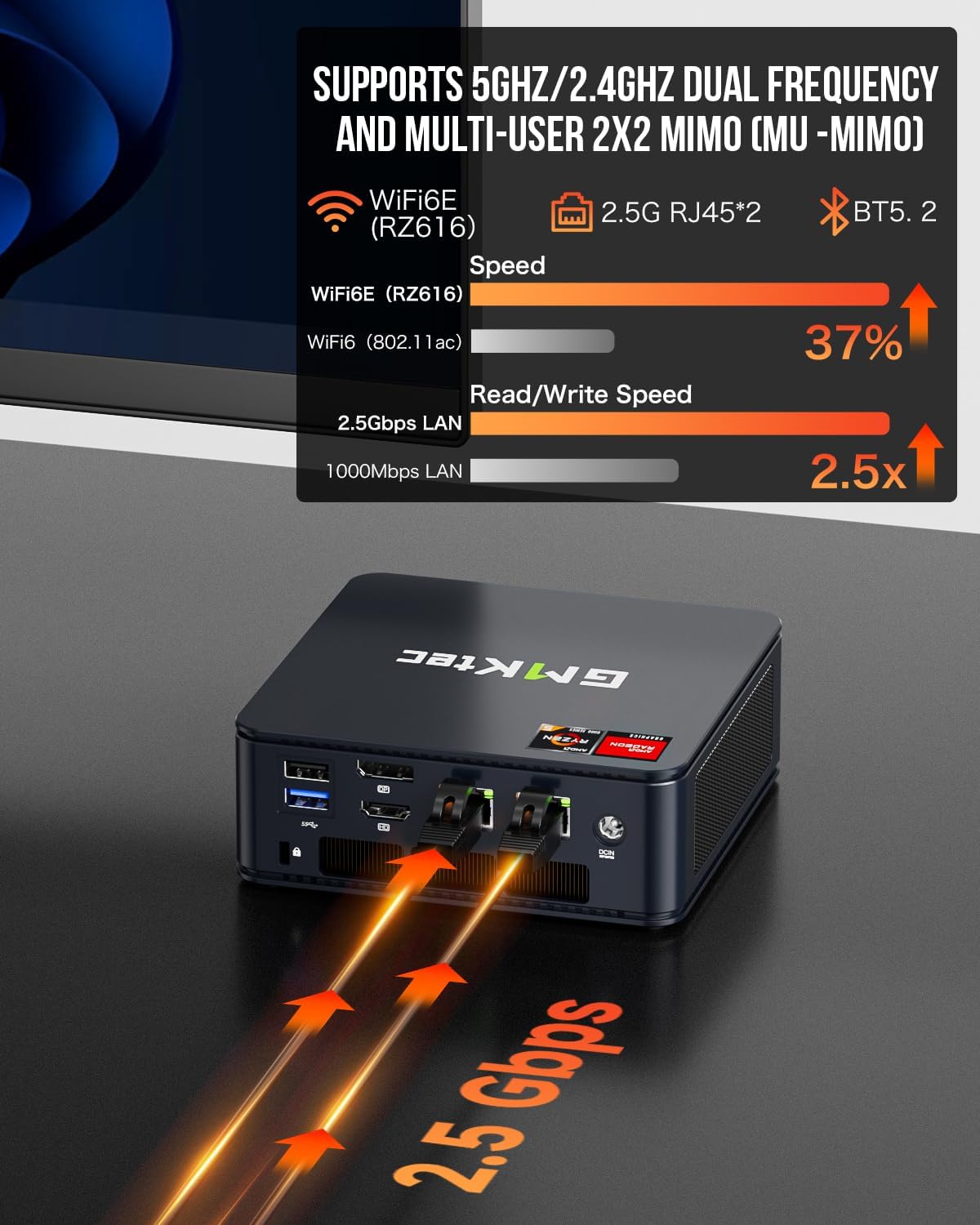
Image: An illustration demonstrating the speed advantages of WiFi 6E and 2.5G LAN over previous standards, highlighting faster read/write speeds and improved dual-frequency support.

Image: A visual example of the GMKtec M6 Mini PC connected to three external monitors, demonstrating its triple screen display capability for enhanced multitasking and immersive experiences.
4. Setup Guide
Follow these steps to set up your GMKtec M6 Mini PC for the first time:
- Connect Peripherals: Plug in your monitor(s) using the HDMI, DisplayPort, or USB-C (USB 4.0) connections. Connect your keyboard and mouse to the available USB ports.
- Connect to Power: Plug the power adapter into the DC Power Port on the rear of the Mini PC, then plug the adapter into a power outlet.
- Power On: Press the power button on the front of the Mini PC. The power indicator light will illuminate.
- Initial Windows Setup: The system will boot into the Windows 11 setup process. Follow the on-screen prompts to configure your language, region, network connection (Wi-Fi or Ethernet), and user account. It is recommended to connect to the internet during this phase to allow for initial driver and system updates.
- System Updates: After the initial setup, the system may require significant Windows updates. This process can take some time (10-15 minutes or more) and may involve multiple restarts. Allow the system to complete all updates before regular use to ensure optimal performance and security.
- Optional VESA Mount Installation: The Mini PC comes with a VESA mount. You can attach the mount to the back of a compatible monitor or to a wall, then secure the Mini PC to the mount using the provided screws. This allows for a clean, space-saving setup.

Image: Demonstrates flexible placement options for the GMKtec M6 Mini PC, including standard desktop placement and space-saving VESA installation behind a monitor.
5. Operating Instructions
5.1. General Usage
The GMKtec M6 Mini PC is designed for general purpose computing, including web browsing, word processing, and light home server use. Its powerful components ensure a snappy and responsive experience for everyday tasks and demanding applications like video editing and graphic design.

Image: Illustrates the GMKtec M6 Mini PC's capability for graphic design tasks, showing various professional software interfaces like DaVinci Resolve, Keyshot, Cinema 4D, and Adobe Creative Suite applications.
5.2. Gaming Performance
While primarily a mini PC, the integrated AMD Radeon 660M GPU allows for enjoyable gaming experiences, especially with older titles or lighter indie games. For more demanding games, performance may vary. You can optimize gaming performance by adjusting the VRAM allocation in the BIOS. By default, it may be set to 3GB; increasing it to 8GB can provide more resources for the integrated graphics without significantly impacting overall system RAM for typical use cases.

Image: Displays estimated FPS ranges for popular games like CS:GO, League of Legends, PUBG, DOTA 2, and Destiny 2, showcasing the gaming capabilities of the AMD Radeon 660M GPU.
5.3. Thermal Management and Noise
The M6 Mini PC incorporates a dual cooling fan system with copper cooling fans and multiple air vents to manage heat effectively. Under light to moderate workloads, the system operates quietly. Fan noise may become noticeable under full load, such as during intensive gaming or demanding applications, but it is generally not intrusive for normal work or gaming sessions.

Image: An exploded view diagram illustrating the internal cooling system of the GMKtec M6 Mini PC, highlighting the dual M.2 2280 PCIe slot, detachable cover lid, dual channel DDR5, mini fan for DDR/SSD, and large cooling heatsink with air vents.
6. Maintenance
Regular maintenance helps ensure the longevity and optimal performance of your Mini PC.
- Cleaning: Periodically clean the exterior of the Mini PC with a soft, dry cloth. Use compressed air to gently clear dust from the air vents to maintain proper airflow and cooling efficiency. Do not use liquid cleaners directly on the device.
- Storage Upgrade: The M6 Mini PC supports dual M.2 2280 slots for PCIe 3.0/4.0 SSDs, allowing for easy storage expansion up to 4TB. To upgrade, carefully remove the detachable cover lid and install the new SSD into an available slot. Refer to the detailed instructions in the full user manual for specific steps.
- Software Updates: Regularly check for and install operating system updates (e.g., Windows updates) and driver updates from the GMKtec website or AMD to ensure system stability, security, and performance.

Image: An internal view of the GMKtec M6 Mini PC, showcasing the pre-installed 32GB DDR5 RAM and 1TB PCIe 3.0 SSD, along with indicators for easy upgradeability to 64GB RAM and PCIe 4.0 SSDs up to 4TB.
7. Troubleshooting
Here are some common issues and their potential solutions:
| Problem | Possible Cause | Solution |
|---|---|---|
| No power/Does not turn on | Power cable not connected; Faulty power adapter; Power button issue. | Ensure power cable is securely connected to both the PC and the outlet. Test with another outlet. Contact support if issue persists. |
| No display on monitor | Monitor cable loose; Incorrect input source on monitor; Driver issue. | Check HDMI/DP/USB-C cable connections. Ensure monitor is set to correct input. Try a different monitor or cable. |
| Slow performance | Too many background applications; Insufficient VRAM for graphics; Overheating. | Close unnecessary programs. Adjust VRAM in BIOS (see Section 5.2). Ensure proper ventilation and clean vents. |
| Wi-Fi/Bluetooth connectivity issues | Driver issues; Interference; Router problems. | Update Wi-Fi/Bluetooth drivers. Restart router and Mini PC. Move closer to router or reduce interference. |
| System freezes or crashes | Software conflict; Overheating; Hardware fault. | Ensure all drivers and OS are updated. Monitor temperatures. Run system diagnostics. If persistent, consider reinstalling OS or contacting support. |
If you encounter issues not listed here or if the suggested solutions do not resolve the problem, please refer to the Warranty and Support section for further assistance.
8. Specifications
Detailed technical specifications for the GMKtec M6 Mini PC:
| Feature | Specification |
|---|---|
| Brand | GMKtec |
| Model Series | M6 |
| Processor | AMD Ryzen 5 6600H (6 Cores, 12 Threads, up to 4.5 GHz) |
| Graphics Coprocessor | AMD Radeon 660M (1900MHz) |
| RAM | 32 GB DDR5 (2x16GB, Dual Channel), expandable to 64GB |
| Memory Speed | 4.5 GHz (effective) |
| Hard Drive | 1 TB PCIe 3.0/4.0 M.2 2280 SSD (Dual Slot, Max. 4TB) |
| Operating System | OS Pro |
| Wireless Type | WiFi 6E (802.11ax, 2.4/5/6 GHz), Bluetooth 5.2 |
| LAN | Dual 2.5G RJ45 |
| USB Ports | 2x USB 3.2 (Gen2), 1x USB 2.0, 1x USB 4.0 (Type-C, PD/DP/DATA) |
| Video Output | 1x HDMI 2.0 (4K@60Hz), 1x DisplayPort (4K@60Hz), 1x USB 4.0 Type-C (4K@60Hz) |
| Audio Output | 3.5mm Audio Jack (HP&MIC) |
| Dimensions (LxWxH) | 5 x 2 x 5 inches |
| Item Weight | 3.63 pounds |
| Color | Space Black |
9. Warranty and Support
GMKtec is committed to providing excellent customer service and support for your Mini PC.
- Warranty: GMKtec offers a 1-year limited warranty for each Mini PC, effective from the date of purchase. This warranty covers defects due to design and workmanship. Please retain your proof of purchase for warranty claims.
- Technical Support: For any technical assistance or inquiries, you can reach out to the GMKtec support team.
Image: GMKtec Warranty & Support information, detailing how to contact Amazon Support and After-Sales Support via email at support@gmktec.com for 24/7 customer support.
For Amazon-related inquiries, you can contact Amazon Support by logging into your Amazon account, navigating to 'Your Orders', and selecting 'Ask Product Question'. For direct after-sales support, please send an email to support@gmktec.com. The professional after-sales team is ready to assist you.


