
1. Product Overview
This Fablestoryem Wind and Solar Hybrid Controller is designed for optimizing wind and solar complementary public lighting systems. It can also be adapted for home systems with appropriate settings. The controller efficiently manages power from both wind turbines and solar panels to charge batteries and supply power to loads.

Figure 1: Front and side views of the Fablestoryem Wind and Solar Hybrid Controller. The front panel features an LCD display, control buttons (OK, Esc, Up, Down), and connection terminals for wind, solar, battery, and load. The side views show the heat sink design and terminal blocks.
2. Key Features
- MPPT Boost Charging: Utilizes MPPT (Maximum Power Point Tracking) technology for wind turbine charging, ensuring efficient power conversion even at low wind speeds.
- Wide Screen Display: Provides real-time parameter information including wind turbine status, photovoltaic input, battery voltage, load status, and cumulative power generation.
- Dual Power Supply: Supports power supply from both photovoltaic panels and batteries, with intelligent selection to ensure continuous operation.
- External Unloading Resistor: Features a stepless unloading function with an external unloading load resistor to protect the battery and wind turbine from overcharging or overload.
- PWM Discharge Function: Incorporates PWM (Pulse Width Modulation) discharge for efficient energy management.
- PWM Overcurrent Limit: Includes a PWM overcurrent limit function for enhanced safety.
- Multiple Load Modes: Offers various load output modes suitable for street lighting (pure light control, light control + time control) and monitoring systems (24-hour operation).
- Comprehensive Safety Protection: Includes solar anti-reverse charging, battery reverse connection protection, open circuit protection, over-voltage, over-current, and load overload protection.
- Dust-proof and Anti-static Design: Internal circuit board is designed for durability in various environments.
- TVS Lightning Protection: Equipped with TVS lightning protection diodes to safeguard internal components.

Figure 2: Illustration of the controller's dual power supply capability. It shows how both a solar panel and a battery can supply power to the controller, highlighting its intelligent selection feature for continuous operation.

Figure 3: Detailed view of the controller's internal circuit board with conformal paint for dust-proof and moisture-proof protection, and TVS lightning protection diodes. Also shown are the multi-angle heat sink design and same-side terminals for easy wiring.
3. Product Specifications
| Parameter | Value |
|---|---|
| System Rated Voltage | 12V/24V/48V (Automatic Identification) |
| No-load Current | <0.05A |
| Power Consumption Source | Batteries or Photovoltaic Panels |
| Control Mode | Fan MPPT Boost Charging, PWM Discharge, PWM Overcurrent Limit |
| Display Mode | LCD |
| Heat Dissipation Method | Aluminum Profile Heat Dissipation and Self-cooling |
| Operating Temperature & Humidity | -20 ~ +55°C / 35 ~ 85% RH (non-condensing) |
| Net Weight | 2.35 kg (5.18 lbs) |
| Gross Weight | 2.85 kg (6.28 lbs) |
| Product Dimensions (L x W x H) | 167mm x 145.5mm x 61.8mm (6.6 x 5.7 x 2.5 inches) |
| Maximum Fan Input Voltage | 80V |
| Material | Aluminum Profile |

Figure 4: Dimensional drawing of the controller, showing its length (167mm / 6.6 inches), width (145.5mm / 5.7 inches), and height (61.8mm / 2.5 inches).
4. Package Contents
Upon opening the package, please verify that all the following items are included:
- 1x Fablestoryem Wind and Solar Hybrid Controller
- 1x Discharge Resistor
- 1x Instruction Manual (this document)
- 1x Unloading Line
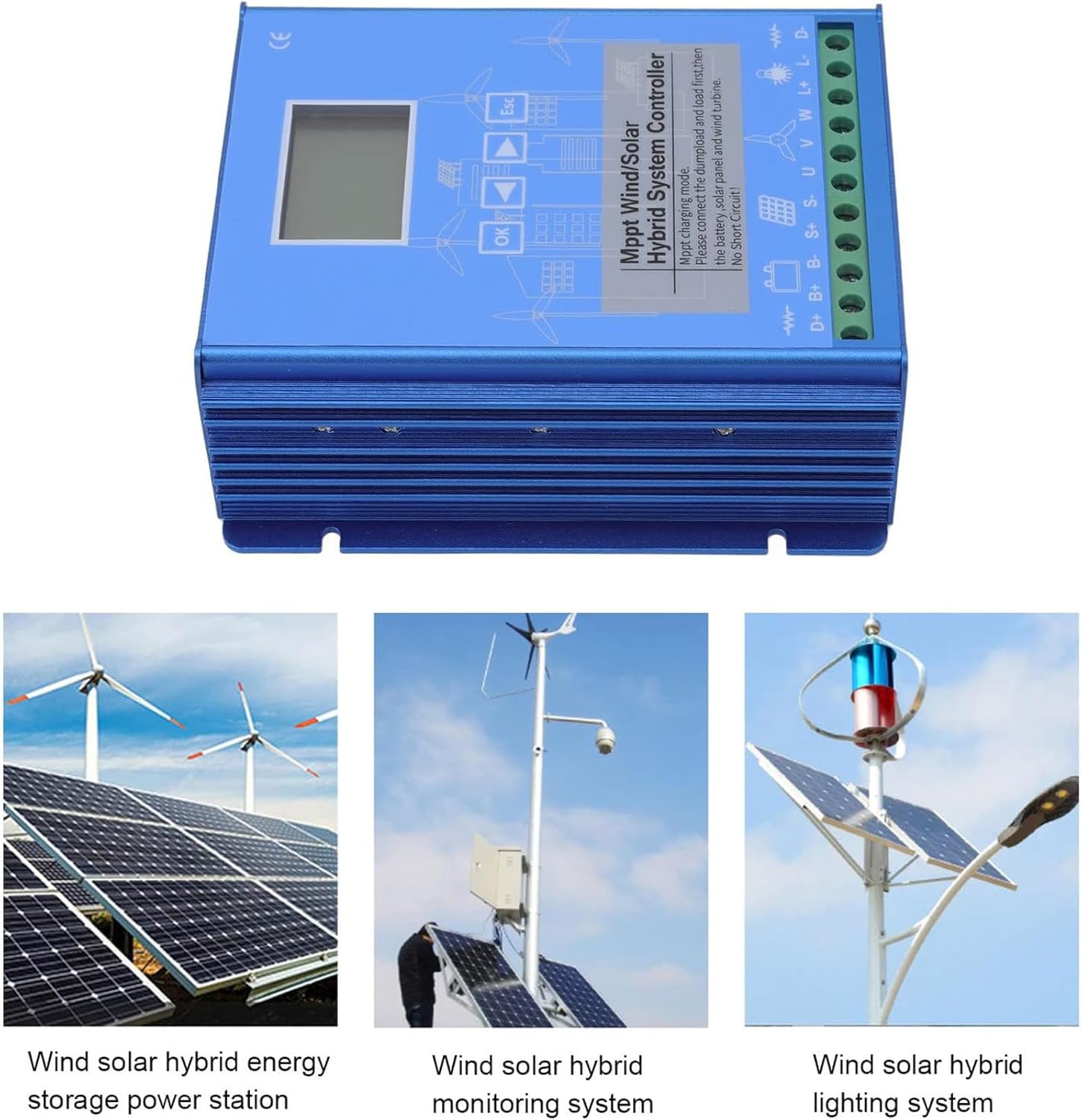
Figure 5: The image displays the controller and the discharge resistor within its packaging, confirming the included items. It also shows examples of typical applications: a wind solar hybrid energy storage power station, a wind solar hybrid monitoring system, and a wind solar hybrid lighting system.
5. Setup and Installation
Proper installation is crucial for the safe and efficient operation of your hybrid controller. Please follow these steps carefully. It is recommended that installation be performed by a qualified professional.
5.1 Wiring Diagram Overview
Refer to the wiring diagram below for connecting the wind turbine, solar panels, battery bank, and AC load through an inverter. Ensure all connections are secure and correctly polarized.

Figure 6: Comprehensive wiring diagram illustrating the connections for the wind turbine, solar panels, battery bank, inverter, AC load, and the external dump load resistor to the hybrid system controller. This diagram is essential for correct system setup.
5.2 Connection Sequence
- Connect the Dump Load: First, connect the external dump load resistor to the designated terminals on the controller. This is critical for safety and preventing overcharge.
- Connect the Battery: Connect the battery bank to the controller's battery terminals (D+ and B-). Ensure correct polarity. The controller will automatically identify the system voltage (12V/24V/48V).
- Connect Solar Panels: Connect the solar panels to the photovoltaic input terminals (S+ and S-).
- Connect Wind Turbine: Connect the wind turbine to the wind input terminals (U, V, W).
- Connect DC Load (Optional): If using a direct DC load, connect it to the load output terminals (L+ and L-).
- Power On: Once all connections are verified, the system can be powered on.
Important: Always ensure that the dump load and battery are connected first before connecting solar panels or the wind turbine. Never operate the controller without a connected battery.
6. Operating Instructions
The controller features an LCD display and control buttons for monitoring and adjusting system parameters.
6.1 LCD Display and Navigation
The widescreen LCD provides real-time data. Use the OK, Esc, and arrow buttons to navigate through menus and adjust settings.

Figure 7: The widescreen LCD display showing various system parameters such as wind turbine power (Pw), solar power (Ps), battery voltage (BAT), load status (LOAD), and temperature (TEMP). It also indicates cumulative power generation (V kwh) and other operational data.
6.2 System Voltage and Battery Type Setting
The controller automatically identifies 12V, 24V, or 48V systems. You can set the battery type (lithium, lead-acid, gel) through the menu to ensure optimal charging.

Figure 8: The LCD display showing settings for battery type (e.g., 12V, 24V, 12V24V auto-identification for lithium, lead-acid, gel batteries) and load modes. This interface allows users to configure the controller according to their specific system requirements.
6.3 Load Modes
The controller supports different load operating modes, primarily for street lighting and monitoring applications:
- Mode 1: Pure Light Control - The load operates based on ambient light levels (e.g., turns on at dusk, off at dawn).
- Mode 2: 24-Hour Operation - The load remains continuously active, suitable for monitoring systems.
- Mode 3: Light Control + Time Control - The load operates based on ambient light, but also incorporates a timer for specific durations (e.g., turns on at dusk for a set number of hours).
Select the appropriate mode via the controller's display menu.
7. Safety Protection
The Fablestoryem Hybrid Controller is equipped with multiple safety features to protect your system and ensure reliable operation:
- Solar Anti-Reverse Charging: Prevents current from flowing back into the solar panels from the battery.
- Battery Reverse Connection Protection: Protects the controller and battery from damage if the battery is connected with incorrect polarity.
- Open Circuit Protection: Safeguards the system against damage from open circuits.
- Over-Voltage Protection: Prevents damage due to excessive voltage levels.
- Over-Current Load Overload Protection: Protects connected loads from drawing too much current.
- External Unloading Resistor: When the battery is full or the wind turbine is generating excess power, the controller diverts excess energy to the external unloading resistor, preventing overcharge and braking the wind turbine.
- TVS Lightning Protection: Integrated Transient Voltage Suppression diodes protect internal components from lightning strikes and power surges.
Warning: Despite these protections, always adhere to proper installation procedures and safety guidelines.
8. Maintenance
To ensure the longevity and optimal performance of your Fablestoryem Wind and Solar Hybrid Controller, periodic maintenance is recommended:
- Visual Inspection: Regularly inspect the controller and all connections for any signs of damage, corrosion, or loose wiring.
- Cleanliness: Keep the controller clean and free from dust and debris. Ensure the heat dissipation fins are not obstructed to allow for proper cooling. Use a dry, soft cloth for cleaning.
- Terminal Check: Periodically check all terminal connections to ensure they are tight and secure.
- Battery Health: Monitor your battery bank's health according to the battery manufacturer's recommendations.
- Environmental Conditions: Ensure the controller is installed in a location that adheres to the specified operating temperature and humidity ranges.
Caution: Before performing any maintenance, disconnect all power sources (solar panels, wind turbine, and battery) to prevent electric shock.
9. Troubleshooting
This section provides guidance for common issues you might encounter. For more complex problems, please contact customer support.
| Problem | Possible Cause | Solution |
|---|---|---|
| Controller display is off | No power from battery or solar panels; loose connections. | Check battery connections and voltage. Verify solar panel input. Ensure all wiring is secure. |
| Battery not charging | Incorrect wiring; low wind speed/solar irradiance; faulty battery; controller settings. | Verify wiring according to Figure 6. Check wind turbine rotation and solar panel exposure. Test battery voltage. Review controller settings for battery type and charging parameters. |
| Load not receiving power | Load output disabled; insufficient battery charge; overload protection activated; incorrect load mode. | Check load output settings on the controller. Ensure battery has sufficient charge. Reduce load if overload protection is active. Verify selected load mode. |
| Wind turbine braking frequently | Battery fully charged; excessive wind speed; dump load not connected or faulty. | This is normal if the battery is full. Ensure the dump load resistor is correctly connected and functioning to dissipate excess energy. |
10. Warranty and Customer Support
For any questions, technical assistance, or warranty inquiries regarding your Fablestoryem Wind and Solar Hybrid Controller, please contact our customer support team.
You can reach us via email, and we aim to respond within 24 hours.
Please refer to your purchase documentation for specific warranty terms and conditions.