
Important Safety Instructions
When using electrical appliances, basic safety precautions should always be followed to reduce the risk of fire, electric shock, and injury to persons, including the following:
- Read all instructions thoroughly before operating the appliance.
- Do not touch hot surfaces. Use handles or knobs.
- To protect against electrical shock, do not immerse cord, plugs, or the main unit in water or other liquid.
- Close supervision is necessary when any appliance is used by or near children.
- Unplug from outlet when not in use and before cleaning. Allow to cool before putting on or taking off parts.
- Do not operate any appliance with a damaged cord or plug, or after the appliance malfunctions or has been damaged in any manner.
- The use of accessory attachments not recommended by the appliance manufacturer may cause injuries.
- Do not use outdoors.
- Do not let cord hang over edge of table or counter, or touch hot surfaces.
- Do not place on or near a hot gas or electric burner, or in a heated oven.
- Extreme caution must be used when moving an appliance containing hot oil or other hot liquids.
- Always attach plug to appliance first, then plug cord into the wall outlet. To disconnect, turn any control to "off", then remove plug from wall outlet.
- Do not use appliance for other than intended use.
- This pressure cooker cooks under pressure. Improper use may result in scalding injury. Make certain unit is properly closed before operating.
- Never force open the pressure cooker. Ensure internal pressure is completely released before opening.
- Do not fill the unit over 2/3 full. When cooking foods that expand during cooking, such as rice or dried vegetables, do not fill the unit over 1/2 full.
- This appliance has 9 built-in safety features designed for your protection.
Product Overview
The Sona SPC 2506 is a 6-liter electric pressure cooker designed for versatile cooking. It features a digital control system with 12 pre-programmed functions and 9 built-in safety features for convenient and safe operation.
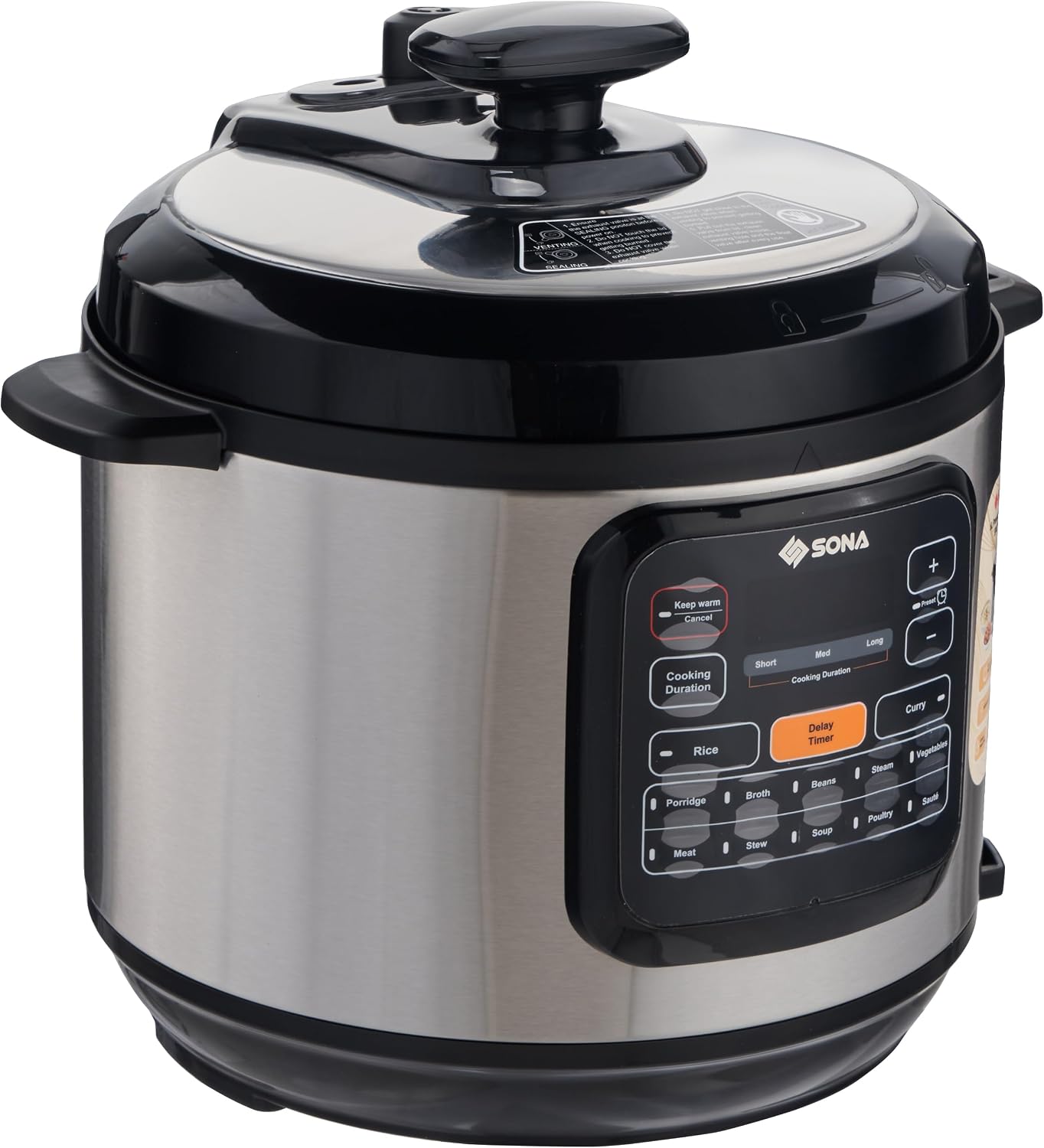
Figure 1: Sona SPC 2506 Electric Pressure Cooker, front view with control panel and lid.
Main Components:
- Main Unit: Stainless steel outer housing with integrated control panel.
- Inner Pot: Non-stick cooking pot.
- Lid: Outer lid with locking mechanism and pressure release valve.
- Control Panel: Digital display and touch controls for various functions.
- Power Cord: Detachable for easy storage.
Setup and First Use
- Unpacking: Carefully remove all packaging materials and accessories. Retain packaging for future storage or transport.
- Initial Cleaning:
- Wash the inner pot, sealing ring, and lid components with warm, soapy water. Rinse thoroughly and dry completely.
- Wipe the exterior of the main unit with a damp cloth. Do not immerse the main unit in water.
- Inner Pot Placement: Place the non-stick inner pot into the main unit. Ensure it sits correctly and is level.
- Lid Assembly: Ensure the sealing ring is properly seated in the lid. Place the lid on the cooker and rotate it clockwise until it locks into place.
- Power Connection: Connect the detachable power cord to the cooker and then plug it into a grounded electrical outlet.

Figure 2: Inner pot correctly placed inside the Sona SPC 2506 Pressure Cooker.
Operating Instructions
Control Panel Overview:
The Sona SPC 2506 features a digital control system with touch buttons for easy operation.
- Digital Display: Shows cooking time, status, and selected functions.
- Pre-programmed Functions: Dedicated buttons for 12 common cooking tasks.
- Manual Setting: Allows for custom time and pressure adjustments.
- Keep Warm Function: Automatically activates after cooking or can be selected manually.
- Preset Timer: Allows delaying the start of cooking for up to 15 hours.
- +/- Buttons: Adjust cooking time or delay timer.
Cooking with Pre-programmed Functions:
- Prepare Ingredients: Place your ingredients and required liquid into the inner pot. Do not exceed the MAX fill line (2/3 full for most foods, 1/2 full for expanding foods like rice).
- Close Lid: Place the lid on the cooker and rotate it clockwise until it locks. Ensure the pressure release valve is in the "Sealing" position.
- Select Program: Press the desired pre-programmed function button (e.g., Rice, Porridge, Steam, Beans, Vegetables, Sauté, Poultry, Meat, Broth, Curry, Stew, Soup). The display will show the default cooking time.
- Adjust Time (Optional): If needed, use the "+" or "-" buttons to adjust the cooking time.
- Start Cooking: The cooker will automatically begin the preheating process, then start cooking.
- Keep Warm: Once cooking is complete, the cooker will automatically switch to the "Keep Warm" function.
- Release Pressure:
- Natural Release: Allow the pressure to release naturally. This is recommended for foamy foods or large cuts of meat.
- Quick Release: Carefully turn the pressure release valve to the "Venting" position. Caution: Steam will be released rapidly. Keep hands and face clear.
- Open Lid: Once all pressure is released (the float valve drops), rotate the lid counter-clockwise and lift it off.
Using the Manual Setting:
For recipes requiring specific pressure cooking times not covered by pre-programmed functions:
- Follow steps 1 and 2 from "Cooking with Pre-programmed Functions".
- Press the "Manual" button (if available, or a general "Pressure Cook" button).
- Use the "+" or "-" buttons to set your desired cooking time.
- The cooker will start automatically after a few seconds.
Using the Delay Timer:
To delay the start of cooking for up to 15 hours:
- Prepare ingredients and close the lid as described above.
- Select your desired cooking program or manual setting.
- Press the "Delay Timer" button.
- Use the "+" or "-" buttons to set the desired delay time.
- The cooker will start counting down the delay time and then automatically begin cooking.
Maintenance and Cleaning
Regular cleaning ensures optimal performance and extends the life of your pressure cooker.
- Always Unplug: Before cleaning, always unplug the pressure cooker from the power outlet and allow it to cool completely.
- Inner Pot: The non-stick inner pot is dishwasher-safe. Alternatively, wash it with warm, soapy water and a non-abrasive sponge. Rinse thoroughly and dry.
- Lid: Remove the sealing ring and float valve components from the lid. Wash all lid parts with warm, soapy water. Ensure the steam release valve is clear of any food debris. Rinse and dry thoroughly. Reassemble carefully.
- Main Unit: Wipe the exterior of the stainless steel housing with a damp cloth. For stubborn stains, use a mild non-abrasive cleaner. Never immerse the main unit in water or any other liquid.
- Sealing Ring: Inspect the sealing ring regularly for cracks or damage. Replace if necessary to ensure proper pressure sealing.
- Storage: Store the pressure cooker in a dry place. You may place the lid upside down on the inner pot to prevent odors and allow air circulation.
Troubleshooting
If you encounter issues with your Sona SPC 2506 pressure cooker, refer to the following common problems and solutions:
| Problem | Possible Cause | Solution |
|---|---|---|
| Cooker not building pressure. | Lid not properly closed or sealed. Pressure release valve in "Venting" position. Sealing ring damaged or improperly seated. Insufficient liquid. | Ensure lid is fully locked. Turn pressure release valve to "Sealing". Check and adjust sealing ring. Add more liquid if necessary. |
| Steam leaking from lid. | Sealing ring dirty, damaged, or improperly installed. Food debris on rim. | Clean and properly seat the sealing ring. Clean the lid and inner pot rim. Replace sealing ring if damaged. |
| Food undercooked or overcooked. | Incorrect cooking time selected. Insufficient liquid. | Adjust cooking time for future use. Ensure adequate liquid is added for pressure cooking. |
| Display shows an error code. | Specific error condition (e.g., overheating, sensor issue). | Unplug the cooker, wait a few minutes, then plug it back in. If the error persists, contact customer support. |
If the problem persists after attempting these solutions, please contact Sona customer support for assistance.
Specifications
Detailed specifications for the Sona SPC 2506 Electric Pressure Cooker:
| Feature | Detail |
|---|---|
| Brand | Sona |
| Model Number | SPC 2506 |
| Capacity | 6.0 Liters |
| Material | Stainless steel outer housing, Non-stick inner pot |
| Color | Silver/Black |
| Product Dimensions (D x W x H) | 27D x 30W x 25H centimetres |
| Control Method | Touch, Digital Control System |
| Operation Mode | Automatic |
| Pre-programmed Functions | 12 (Rice, Porridge, Steam, Beans, Vegetables, Sauté, Poultry, Meat, Broth, Curry, Stew, Soup) |
| Special Features | Keep Warm Setting, Locking Lid, 15 Hours Preset Timer, 9 Built-in Safety Features, Manual Setting |
| Dishwasher Safe | Inner pot is dishwasher-safe |
| Manufacturer | SONA |

Figure 3: Dimensions of the Sona SPC 2506 Electric Pressure Cooker.