
bemi R8
bemi Revo Smart Ring User Manual - Fitness and Health Tracker (Model R8)
Model: R8 | Brand: bemi
1. Introduction
The bemi Revo Smart Ring is a wearable health and fitness tracker designed to monitor various physiological data points. This manual provides essential information for setting up, operating, and maintaining your device to ensure optimal performance and longevity.
Key features include:
- Highly accurate sleep monitoring (deep sleep, light sleep, awake time).
- Activity and fitness tracking.
- Automatic heart rate and heart rate variability monitoring.
- Manual oximetry and stress test measurements via the app.
- Durable microcrystalline zirconium nano-ceramic construction.
- IP68 waterproof rating for use in various environments.
- No subscription fees for app data access.

Image 1.1: The bemi Revo Smart Ring, showcasing its design.

Image 1.2: Exploded view of the bemi Revo Smart Ring components.
2. Package Contents
Verify that all items are present in your package:
- Smart Ring (x1)
- Charging Case (x1)
- Charging Cable (x1)
- Lanyard (x1)
- User Manual (x1)

Image 2.1: Charging case and lanyard for the bemi Revo Smart Ring.
3. Sizing Information
It is crucial to select the correct ring size for accurate data collection. bemi Revo sizes may differ from standard ring sizes. Please refer to the sizing chart and measurement guide below before wearing your ring.

Image 3.1: bemi Revo Smart Ring sizing guide.
If you experience sizing issues, contact customer support for assistance.
4. Setup Guide
4.1 Charging the Smart Ring
- Place the bemi Revo Smart Ring into its charging case. Ensure the ring is seated correctly.
- Connect the charging cable to the charging case and a compatible USB power source.
- The indicator lights on the charging case will illuminate to show charging status.
- Allow the ring to fully charge before first use.

Image 4.1: bemi Revo Smart Ring in its charging case.
4.2 App Installation and Pairing
- Download the "Smart Health" app from the App Store (iOS) or Google Play Store (Android). The app supports Android 6.0 and iOS 11.0 and above.
- Open the "Smart Health" app and follow the on-screen instructions to create an account or log in.
- Ensure your phone's Bluetooth is enabled.
- Within the app, navigate to the device pairing section and select your bemi Revo Smart Ring from the list of available devices.
- Confirm the pairing request on both your phone and, if prompted, the ring (though the ring has no screen, confirmation is typically app-based).
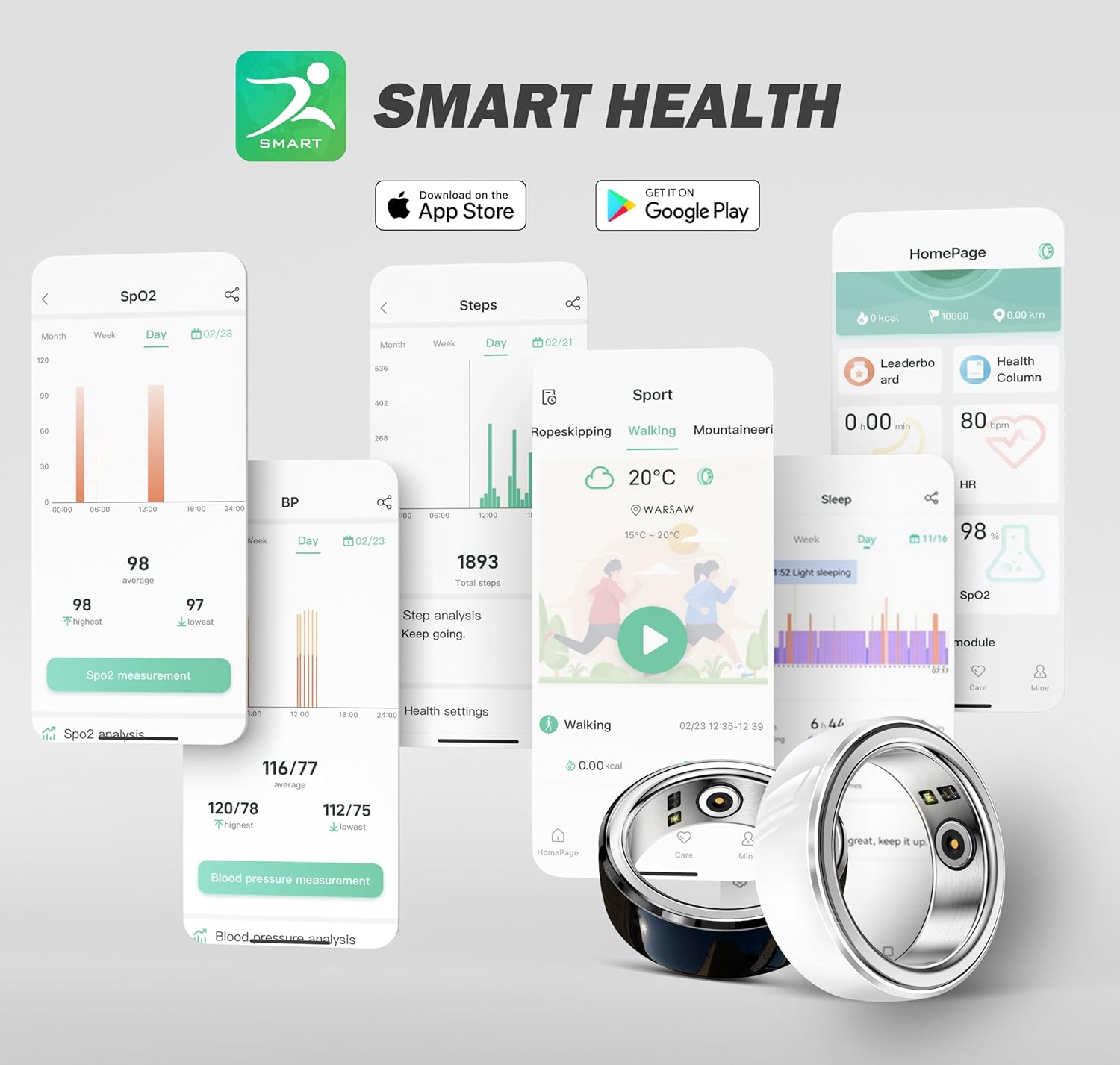
Image 4.2: The "Smart Health" application interface.
5. Operating Instructions
5.1 Wearing the Ring
Wear the bemi Revo Smart Ring on any finger where it fits comfortably and securely. For optimal sensor contact and accurate readings, ensure the sensors on the inner surface of the ring are in contact with your skin.

Image 5.1: Examples of wearing the bemi Revo Smart Ring.

Image 5.2: Close-up of the ring's internal sensors.
5.2 Activity Tracking
The ring automatically records your daily exercise data, including steps and activity levels. View detailed statistics in the "Smart Health" app.

Image 5.3: Activity tracking data displayed in the app.
5.3 Heart Rate Monitoring
The bemi Revo Smart Ring automatically monitors your heart rate and heart rate variability throughout the day. For real-time or manual measurements, open the "Smart Health" app and navigate to the heart rate section.
5.4 Sleep Monitoring
Wear the ring while sleeping for comprehensive sleep analysis. The ring tracks sleep duration, deep sleep, light sleep, and periods of wakefulness. Access your sleep data in the "Smart Health" app.
5.5 Oximetry and Stress Tests
Oximetry (blood oxygen saturation) and stress tests can be performed manually through the "Smart Health" app. Follow the app's instructions for accurate readings.
6. Maintenance and Care
6.1 Cleaning
Wipe the ring and charging case with a soft, dry, or slightly damp cloth. Avoid using abrasive cleaners or solvents that could damage the ceramic or electronic components.
6.2 Water Resistance
The bemi Revo Smart Ring is IP68 waterproof, allowing it to be worn during showers, workouts in the rain, and swimming up to 164 feet (50 meters). Ensure the ring is dry before placing it back into the charging case to prevent damage to the charging contacts.

Image 6.1: IP68 waterproof feature of the bemi Revo Smart Ring.
6.3 Storage
Store the ring and charging case in a cool, dry place away from direct sunlight and extreme temperatures when not in use for extended periods.
7. Troubleshooting
- Ring not connecting to app:
- Ensure Bluetooth is enabled on your smartphone.
- Verify the ring is charged.
- Restart the "Smart Health" app.
- Try restarting your smartphone.
- If issues persist, attempt to unpair and re-pair the device in the app's settings.
- Inaccurate readings (sleep, heart rate):
- Ensure the ring is worn snugly but comfortably, with sensors making good contact with your skin.
- Check for any debris or moisture on the sensors.
- Verify the app is up to date.
- Ring not charging:
- Ensure the charging cable is securely connected to both the case and the power source.
- Check if the charging contacts on both the ring and the case are clean and free of obstruction.
- Try a different USB power adapter or port.
For further assistance, refer to the Warranty and Support section.
8. Specifications
| Feature | Detail |
|---|---|
| Model Name | BEMI Revo (R8) |
| Brand | bemi |
| Material | Microcrystalline Zirconium Nano-Ceramics, Stainless Steel |
| Water Resistance | IP68 (up to 164 feet / 50 meters) |
| Battery Type | Lithium Polymer |
| Battery Capacity | 23 Milliamp Hours (Ring) |
| Connectivity | Bluetooth |
| App Compatibility | Android 6.0+ / iOS 11.0+ |
| Item Weight | 5 Grams (0.176 ounces) |
| Special Features | Activity Tracker, Custom Activity Tracking, Cycle Tracking, Lightweight, Multisport Tracker |
9. Warranty and Support
bemi offers a lifetime warranty for the Revo Smart Ring. If you encounter any issues or are not satisfied with the product quality, please contact our customer support team.
Our support team aims to reply within 24 hours to assist with replacements, refunds, or troubleshooting.
For support, please visit the bemi Store on Amazon or use the contact information provided with your purchase documentation.
Related documentsR8

Ask a question about this manual
Ask about setup, troubleshooting, compatibility, parts, safety, or missing instructions. Manuals+ will review the question and use this page’s manual context to help answer it.