
1. Introduction
The BAOFENG UV-5RM is a high-power, multi-band handheld ham radio designed for reliable long-range communication. This manual provides comprehensive instructions for the setup, operation, maintenance, and troubleshooting of your UV-5RM radio.
Key features include 10W power output, a 1.8-inch color display, 999 storage channels, Type-C charging, and support for multiple bands including UHF, VHF, GMRS, FM, AM, and NOAA weather alerts.
2. Package Contents
Upon unboxing your BAOFENG UV-5RM radio set, please verify that all components listed below are present and in good condition:
- 2 × BAOFENG UV-5RM Radios
- 2 × 2500mAh Lithium-ion Batteries
- 2 × Original Headphones
- 2 × Hand Microphones
- 2 × BF-771 High Gain Antennas
- 2 × Original Antennas
- 2 × Power Adapters
- 2 × Belt Clips
- 2 × Hand Straps
- 1 × Programming Cable
- 1 × User Manual

Figure 1: Complete package contents of the BAOFENG UV-5RM radio set.
Video 1: An overview of the BAOFENG UV-5RM radio and its included accessories, demonstrating the items found within the product packaging.
3. Setup
3.1. Battery Installation and Charging
- Ensure the radio is powered off.
- Align the battery pack with the grooves on the back of the radio.
- Slide the battery pack upwards until it clicks securely into place.
- To charge, connect the power adapter to the charging base.
- Place the radio (with battery installed) into the charging base. The indicator light on the base will show charging status.
- Alternatively, use the Type-C charging port directly on the battery for convenient charging via USB wall adapter, power bank, or vehicle USB port.

Figure 2: The 2500mAh Type-C charging battery and its estimated usage times.

Figure 3: Multiple convenient charging solutions for the UV-5RM radio.
3.2. Antenna Attachment
Screw the desired antenna (standard or high-gain BF-771) clockwise onto the antenna connector at the top of the radio until it is finger-tight. Do not overtighten.

Figure 4: The 771 long antenna enhances long-distance communication.
3.3. Attaching Accessories (Optional)
- Hand Microphone: Plug the hand microphone into the side port of the radio. The microphone features a 360° rotating clip and a 3.5mm headphone jack.
- Headphones: Connect the original headphones to the side port for private listening and communication.
- Belt Clip: Attach the belt clip to the back of the radio using the provided screws for easy carrying.
- Hand Strap: Secure the hand strap to the designated loop on the radio to prevent accidental drops.
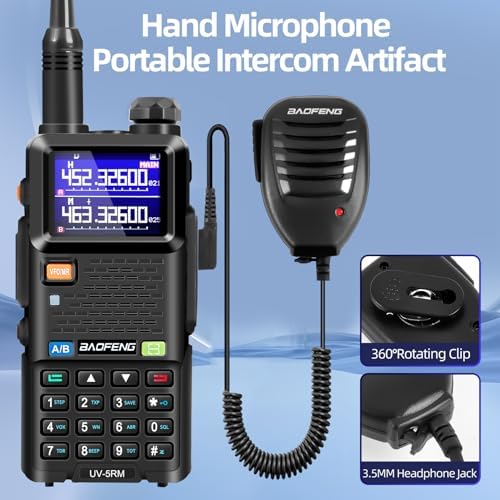
Figure 5: The hand microphone provides convenient portable intercom functionality.
4. Operating Instructions
4.1. Power On/Off and Volume Control
To power on the radio, rotate the top knob clockwise. To power off, rotate it counter-clockwise until it clicks. Adjust the volume by rotating the same knob.
4.2. Frequency and Channel Selection
- VFO Mode (Frequency Mode): Allows direct frequency input. Use the keypad to enter frequencies.
- MR Mode (Memory Channel Mode): Allows selection of pre-programmed channels. Use the up/down arrow keys to navigate through channels.
- Press the VFO/MR button to switch between VFO and MR modes.
- The UV-5RM supports multi-band operation including UHF, VHF, GMRS, FM, AM, and NOAA.
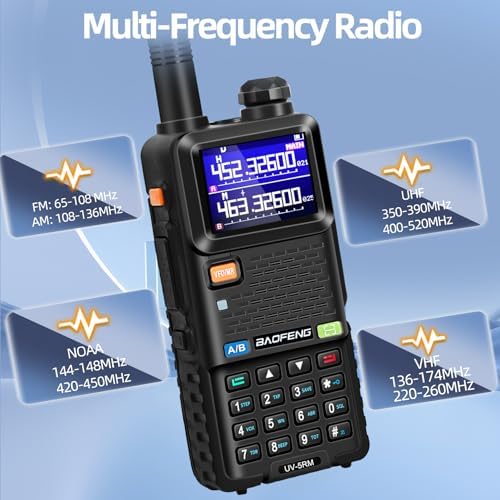
Figure 6: The UV-5RM supports a wide range of frequencies across multiple bands.
4.3. Transmitting and Receiving
- To transmit, press and hold the PTT (Push-To-Talk) button on the side of the radio. Speak clearly into the microphone.
- Release the PTT button to stop transmitting and return to receive mode.
- Ensure your selected frequency or channel is clear before transmitting.
4.4. One-Click Frequency Copy
The UV-5RM features a convenient one-click frequency matching function to quickly copy frequencies from other radios:
- Place the UV-5RM radio near the radio from which you want to copy the frequency.
- Press and hold the green key (often labeled F or SCAN) to initiate frequency search.
- Once the frequency is detected, press another key (e.g., MENU or SAVE) to save the copied frequency to a channel. Refer to the specific manual for exact key assignments.

Figure 7: One-click frequency copy simplifies channel programming.
Video 2: Demonstration of the UV-5RM Ham Radio's features, including its 10W power output and ease of use.
4.5. Advanced Functions
- VOX (Voice Operated Transmission): Enables hands-free transmission when voice is detected. Activate and adjust VOX sensitivity in the menu.
- Squelch: Adjusts the receiver's sensitivity to block out weak signals and background noise. Higher squelch levels require stronger signals.
- Flashlight: The radio includes a built-in flashlight. Refer to the user manual for specific button presses to activate and cycle through modes (e.g., steady, SOS).
- DTMF (Dual-Tone Multi-Frequency): Used for various control functions, such as remote control of repeaters.
- BCL (Busy Channel Lockout): Prevents transmission on a busy channel.
- TOT (Time-Out Timer): Limits the maximum transmission time to prevent accidental continuous transmission.
- Power-on Password Management: Set a password to prevent unauthorized use of the radio.
- Stopwatch: The radio includes a stopwatch function for timing activities.

Figure 8: The stopwatch timing function on the UV-5RM display.

Figure 9: The high brightness flashlight integrated into the radio.

Figure 10: Intelligent noise reduction for clearer communication.
5. Maintenance
- Cleaning: Use a soft, damp cloth to clean the radio's exterior. Avoid harsh chemicals or abrasive cleaners.
- Battery Care: To prolong battery life, avoid overcharging or completely draining the battery. Store the radio and batteries in a cool, dry place when not in use for extended periods.
- Antenna Care: Handle antennas carefully to prevent bending or breaking. Do not use the radio without an antenna attached, as this can damage the transmitter.
- Storage: Store the radio in a dry, dust-free environment away from direct sunlight and extreme temperatures.
6. Troubleshooting
| Problem | Possible Cause | Solution |
|---|---|---|
| Radio does not power on. | Low or dead battery. Battery not properly installed. | Charge the battery. Reinstall the battery correctly. |
| Cannot transmit or receive. | Incorrect frequency/channel. Antenna not attached. Battery low. | Verify frequency/channel. Attach antenna. Charge battery. |
| Poor audio quality. | Weak signal. Squelch level too high. Obstructions. | Move closer to other radio. Adjust squelch. Move to open area. |
| Radio not charging. | Charger/cable faulty. Battery not making contact. | Check charger/cable. Ensure battery is seated correctly. |
7. Specifications
- Model: UV-5RM
- FCC ID: 2AJGM-5RM
- Power Output: 10W
- Storage Channels: 999
- Display: 1.8-inch Color Display
- Battery Capacity: 2500mAh Lithium-ion
- Charging: Type-C Port, Charging Base
- Frequency Range:
- UHF: 350-390MHz (RX) / 400-520MHz (TX&RX)
- VHF: 136-174MHz (TX&RX) / 220-260MHz (RX)
- NOAA: 144-148MHz / 420-450MHz
- FM: 65-108 MHz (RX)
- AM: 108-136MHz (RX)
- Antenna: 15-inch 771 Long Antenna (High Gain)
- Special Features: Stopwatch, Power-on Password Management, DTMF, BCL, TOT, One-click Frequency Copy, Flashlight, VOX, Squelch.
- Water Resistance Level: Water Repellent
- Item Weight: 10.6oz (radio only) / 3.08 pounds (package)
- Dimensions: 5.3in/135mm (height) x 2.36in/60mm (width) x 1.3in/33mm (depth) - radio only
- Country of Origin: China
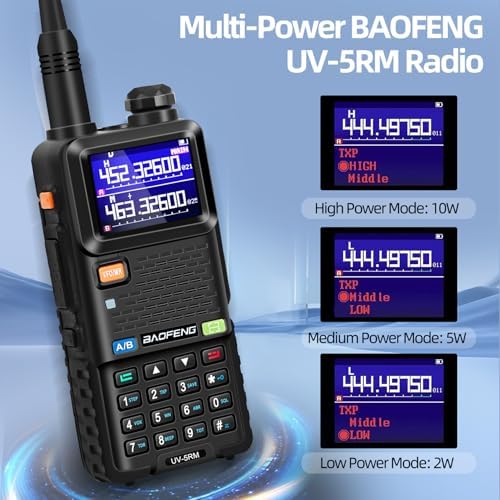
Figure 11: Model comparison highlighting UV-5RM's enhanced features.

Figure 12: Multi-power output modes of the UV-5RM radio.
8. Warranty and Support
The BAOFENG UV-5RM radio comes with a 1-year warranty from the date of purchase. For any product-related issues, technical assistance, or warranty claims, please contact our professional customer service team. We are committed to providing responses and solutions within 24 hours.
Contact information can typically be found on the product packaging or the official BAOFENG website.


