
Aoleaby BD6A20S10P
JK Smart BMS Active Balance User Manual
Model: BD6A20S10P
Brand: Aoleaby
1. Introduction
The Aoleaby JK Smart BMS (Battery Management System) is designed to provide comprehensive protection and intelligent management for various Lifepo4 battery configurations, including 12V, 24V, 4S, 8S, 16S, 17S, 20S, and 24S systems. This active balance BMS ensures optimal battery performance, extends battery lifespan, and enhances safety through its advanced features.
Key features include real-time monitoring via a dedicated mobile application, active cell balancing, and robust protection against common battery issues.
2. Safety Information
Always prioritize safety when working with batteries and electrical systems. Improper installation or handling can lead to serious injury or damage. Please read and understand all instructions before proceeding with installation or operation.
- Ensure all power sources are disconnected before installation or maintenance.
- Wear appropriate personal protective equipment (PPE), including safety glasses and insulated gloves.
- Verify correct polarity for all connections to prevent damage to the BMS or battery pack.
- Do not short-circuit battery terminals or BMS connections.
- Install the BMS in a well-ventilated area, away from flammable materials.
- If any unusual behavior (e.g., excessive heat, smoke, unusual odors) is observed, immediately disconnect power and consult a qualified technician.
3. Package Contents
Verify that all items listed below are present in your package:
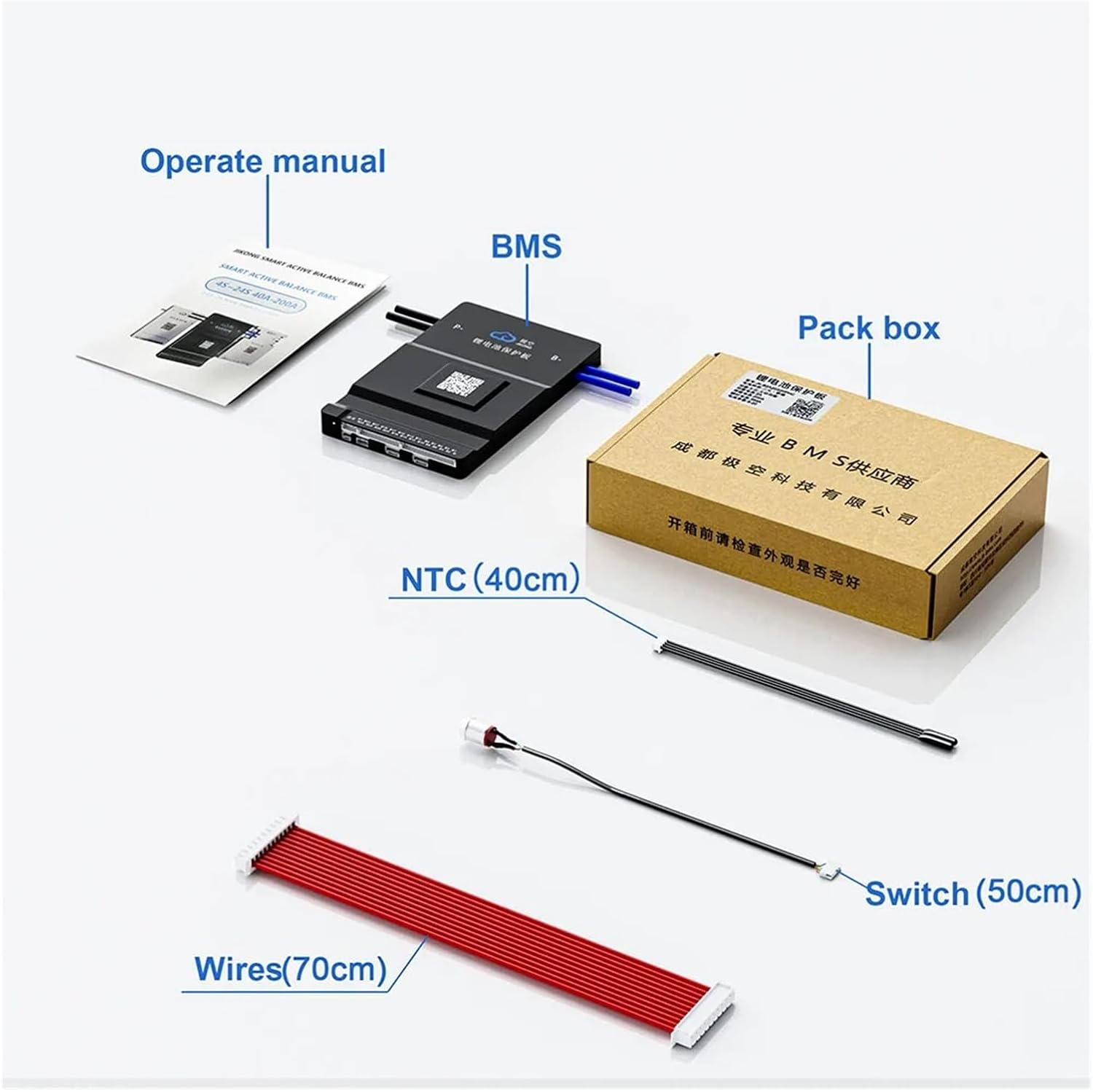
Figure 3.1: Included Components
- 1x JK Smart BMS Unit
- 1x Operate Manual (User Guide)
- 1x NTC (Negative Temperature Coefficient) Sensor (approx. 40cm)
- 1x Switch (approx. 50cm)
- 1x Set of Wires (approx. 70cm)
4. Setup and Installation
Carefully follow the wiring diagram to connect the BMS to your battery pack. Incorrect wiring can damage the BMS or battery.

Figure 4.1: BMS Wiring Diagram
4.1 Wiring Steps:
- Connect the main negative terminal of the battery pack to the B- terminal on the BMS.
- Connect the P- terminal on the BMS to the negative terminal of your load (motor, inverter, etc.) and charger.
- Connect the sampling cable (balance wires) to each cell of your battery pack, starting from B1 (positive of the first cell) up to the last cell's positive terminal (Bn). Ensure the correct order and polarity.
- Connect the total positive pole of the battery pack to your load and charger.
- Connect the NTC temperature sensor to the designated port on the BMS and place the sensor on a battery cell for accurate temperature monitoring.
- Connect the switch to its designated port on the BMS. This switch can be used to activate/deactivate the BMS.
For detailed app download and connection instructions, please refer to the official app link: http://qr17.cn/BApbC0
5. Operating Instructions
5.1 Mobile Application (APP)
The JK Smart BMS features a proprietary mobile application for real-time monitoring and configuration. The app supports both Android and iOS systems and connects via Bluetooth.

Figure 5.1: Smart BT APP Interface
- Monitor Real-time Data: View battery voltage, current, temperature, cell voltages, state of charge (SOC), and cycle count.
- Modify Parameters: Adjust various BMS settings such as over-charge voltage, over-discharge voltage, over-current limits, and temperature protection thresholds.
- Control Balance Switch: Manually enable or disable the active balancing function.
Download the app using the QR code provided in the product packaging or via this link: http://qr17.cn/BApbC0
5.2 Active Balance Function
The JK Smart BMS actively balances the voltage differences between individual battery cells. This process ensures that all cells are maintained at similar voltage levels, which significantly improves the overall efficiency of the battery pack (up to 99%) and extends its operational lifespan. The balance current for this model is 0.6A.
5.3 Protection Functions
The BMS provides comprehensive protection for your battery system:
- Over-charge Protection: Prevents cells from being charged beyond their safe voltage limit.
- Over-discharge Protection: Prevents cells from being discharged below their safe voltage limit.
- Over-current Protection: Shuts off power if the current draw exceeds safe limits during charge or discharge.
- Short Circuit Protection: Immediately disconnects the battery in case of a short circuit.
- Low Temperature Charging Cutoff: Prevents charging at temperatures that could damage the battery cells.
6. Specifications
The following table outlines the technical specifications for the JK Smart BMS (Model: BD6A20S10P):

Figure 6.1: Key Product Specifications
| Feature | Specification |
|---|---|
| Model | BD6A20S10P |
| Battery Type Supported | Li-ion / Lifepo4 / LTO |
| Battery Strings Supported | 8S - 20S (also supports 4S, 16S, 17S, 24S variants) |
| Active Balance Current | 0.6A |
| Continuous Charge/Discharge Current | 100A (up to 350A max current for other variants) |
| Communication | Bluetooth (BT), RS485 |
| Dimensions (L x W x H) | 162 x 102 x 20 mm (approx. 6.38 x 4.02 x 0.79 inches) |
| Item Weight | Approx. 1000 Grams (2.2 pounds) |
7. Troubleshooting
If you encounter issues with your JK Smart BMS, refer to the following common problems and solutions:
- BMS Not Powering On:
- Check all wiring connections, especially B- and P-, for secure contact and correct polarity.
- Ensure the battery pack voltage is within the operating range of the BMS.
- Verify the switch is correctly connected and in the 'on' position.
- Bluetooth Connection Issues:
- Ensure Bluetooth is enabled on your mobile device.
- Make sure the BMS is powered on.
- Try restarting the app and your phone.
- Ensure you are within Bluetooth range of the BMS.
- Battery Cells Unbalanced:
- Confirm that the balance wires are correctly connected to each cell and are not loose.
- Check the app to ensure the active balance function is enabled.
- Allow sufficient time for the active balance to work, especially if cell voltage differences are significant.
- BMS Shutting Off Unexpectedly:
- Check the app for any active protection warnings (e.g., over-current, over-voltage, under-voltage, over-temperature).
- Reduce the load if an over-current protection is triggered.
- Verify battery voltage is not too low (under-voltage protection) or too high (over-voltage protection).
- Ensure proper ventilation to prevent over-temperature shutdowns.
If the problem persists, contact customer support for further assistance.
8. Maintenance
The JK Smart BMS is designed for low maintenance. However, periodic checks can help ensure its longevity and optimal performance:
- Visual Inspection: Periodically inspect the BMS and all wiring for any signs of damage, corrosion, or loose connections.
- Cleanliness: Keep the BMS free from dust, dirt, and moisture. Use a dry, soft cloth for cleaning. Do not use liquid cleaners.
- Firmware Updates: Check the official app or manufacturer's website for any available firmware updates for the BMS. Follow instructions carefully if updating.
- Temperature Monitoring: Regularly monitor the battery and BMS temperature via the app to ensure they operate within safe limits.
9. Warranty and Support
For warranty information and technical support, please refer to the documentation included with your purchase or contact the manufacturer directly. Keep your proof of purchase for warranty claims.
Manufacturer: Aoleaby
For app-related inquiries or further technical details, visit: http://qr17.cn/BApbC0
Related documentsBD6A20S10P


Ask a question about this manual
Ask about setup, troubleshooting, compatibility, parts, safety, or missing instructions. Manuals+ will review the question and use this page’s manual context to help answer it.