
1. Product Overview
This document provides instructions for the Goodsby Replacement Motor Unit, designed for specific LG CordZero A9 Series cordless stick vacuum cleaners. This motor unit is a critical component responsible for generating the suction power of your vacuum.
Important Compatibility Information:
- Compatible with: LG CordZero A9, A900, A902, A905, A906, A907, A908 Series.
- NOT Compatible with: LG CordZero A912, A913, A916, A925, A926, A927, A929, A931, A937, A938, A939, A949 Series.
Please verify your vacuum cleaner's model number to ensure proper fit and function before installation.
2. Package Contents
The package contains the following item:
- 1x Goodsby Replacement Motor Unit (Part # EAU63543703)
3. Installation Instructions
Replacing the motor unit requires careful handling and basic disassembly of your vacuum cleaner. If you are unsure about any step, it is recommended to seek assistance from a qualified technician.
- Safety First: Before beginning any installation, ensure the vacuum cleaner is completely powered off and disconnected from its charging base or any power source. Remove the battery pack.
- Access the Motor Unit: Refer to your original LG CordZero A9 series vacuum cleaner manual for specific instructions on how to access and remove the existing motor unit. This typically involves disassembling the main body of the vacuum.
- Remove Old Motor Unit: Carefully disconnect any wiring or fasteners securing the old motor unit. Note the orientation and connection points for reassembly.
- Install New Motor Unit: Position the Goodsby Replacement Motor Unit into the vacuum cleaner's housing. Ensure all connections align correctly.
- Secure Connections: Reconnect any wiring and secure the new motor unit with the fasteners previously removed. Ensure all connections are firm and correctly seated.
- Reassemble Vacuum: Carefully reassemble the vacuum cleaner's body, ensuring all components are properly aligned and secured.
- Test Functionality: Reinsert the battery pack and attempt to power on the vacuum cleaner. Listen for normal operation and check for proper suction.
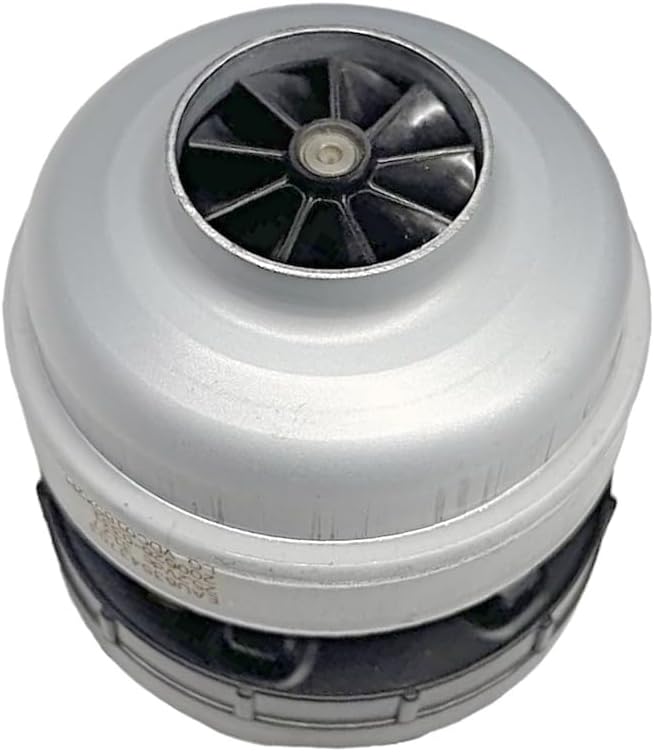
Image 1: Top view of the Goodsby Replacement Motor Unit, showing the fan intake and silver casing. This view is typical when the unit is installed within the vacuum's main body.

Image 2: Bottom view of the Goodsby Replacement Motor Unit, revealing the green circuit board with various electronic components, capacitors, and connection points. This side connects to the vacuum's internal wiring.
4. Operation
As a replacement component, the Goodsby Motor Unit operates in conjunction with your LG CordZero A9 series vacuum cleaner's existing controls and power system. There are no separate operational controls for the motor unit itself. Once installed correctly, the motor unit will function as part of the vacuum cleaner's normal operation, providing suction power when the vacuum is turned on.
5. Maintenance
To ensure the longevity and optimal performance of your replacement motor unit, consider the following maintenance guidelines:
- Keep Air Vents Clear: Regularly check and clean the air intake and exhaust vents of your vacuum cleaner to prevent blockages that can strain the motor.
- Avoid Overheating: Do not operate the vacuum cleaner for extended periods if it feels excessively hot. Allow it to cool down.
- Prevent Obstructions: Ensure that the vacuum's filters are clean and that there are no large obstructions in the nozzle or hose that could impede airflow and overwork the motor.
- Professional Inspection: If you notice any unusual noises or a significant decrease in performance, consult a qualified technician.
6. Troubleshooting
If you encounter issues after installing the replacement motor unit, consider the following:
- Motor Not Starting:
- Ensure the battery is fully charged and properly inserted.
- Verify all internal wiring connections to the motor unit are secure.
- Check if the vacuum's power switch is functioning correctly.
- Reduced Suction:
- Inspect all filters (pre-filter, fine dust filter) for clogs and clean or replace them as needed.
- Check the vacuum's nozzle, wand, and hose for any blockages.
- Ensure all vacuum components are correctly assembled and sealed.
- Unusual Noises:
- Turn off the vacuum immediately.
- Check for any foreign objects that may have entered the motor housing or fan assembly during installation.
- Ensure the motor unit is securely mounted and not vibrating against other components.
If troubleshooting steps do not resolve the issue, contact customer support for further assistance.
7. Specifications
| Brand | Goodsby |
| Model Name | GFL - A906 - MOTOR UNIT |
| Part Number | EAU63543703 |
| Compatible LG CordZero A9 Series | A900, A902, A905, A906, A907, A908 |
| Item Weight | 0.75 Pounds (12 ounces) |
| Product Dimensions | 15 x 4 x 7 inches |
| Color | Gray |
| Special Features | Bagless (refers to the vacuum system, not the motor unit itself) |
| Included Components | Motor Unit |
| Batteries Required | No (motor unit itself does not require batteries) |
| UPC | 659459023377 |
8. Warranty and Support
Goodsby is committed to providing quality products and ensuring customer satisfaction. If you have any questions, concerns, or require assistance with your replacement motor unit, please do not hesitate to contact us. We are dedicated to providing you with the best possible support.
For support, please refer to the contact information provided with your purchase or visit the Goodsby official website.