
Introduction
Thank you for choosing the Desky Dual Mini Electric Standing Desk Frame. This compact, height-adjustable sit-stand base is designed to enhance your workspace with ergonomic flexibility. Featuring dual motors for smooth and stable adjustments, a robust steel frame, and convenient memory settings, this manual provides essential information for assembly, operation, maintenance, and troubleshooting to ensure optimal performance and longevity of your desk frame.
Setup and Assembly
The Desky Dual Mini Electric Standing Desk Frame is designed for straightforward assembly. Please follow these steps carefully to ensure proper setup.
Included Components:
- Desk Frame (Legs and Crossbar)
- Desk Hand Controller
- Power Box
- Connecting Cords
- GPO Wall Plug
- Hardware (Screws)
- Sticky Cable Ties
Assembly Steps:
- Unpack Components: Carefully remove all components from the packaging and verify against the included parts list.
- Assemble the Frame: Connect the motorized desk legs to the crossbar according to the diagrams in your separate assembly guide. Ensure all connections are secure.
- Attach Your Desktop: Position your chosen desktop (compatible with 31.5" to 43.3" length and up to 25.6" width) onto the assembled frame. Use the provided self-tapping screws to secure the desktop to the frame.
- Connect Electronics: Connect the motorized legs to the power box, and then connect the hand controller to the power box. Finally, plug the GPO wall plug into the power box and then into a wall outlet.
- Cable Management: Use the sticky cable ties to organize and secure all cables, ensuring they do not interfere with the desk's movement.
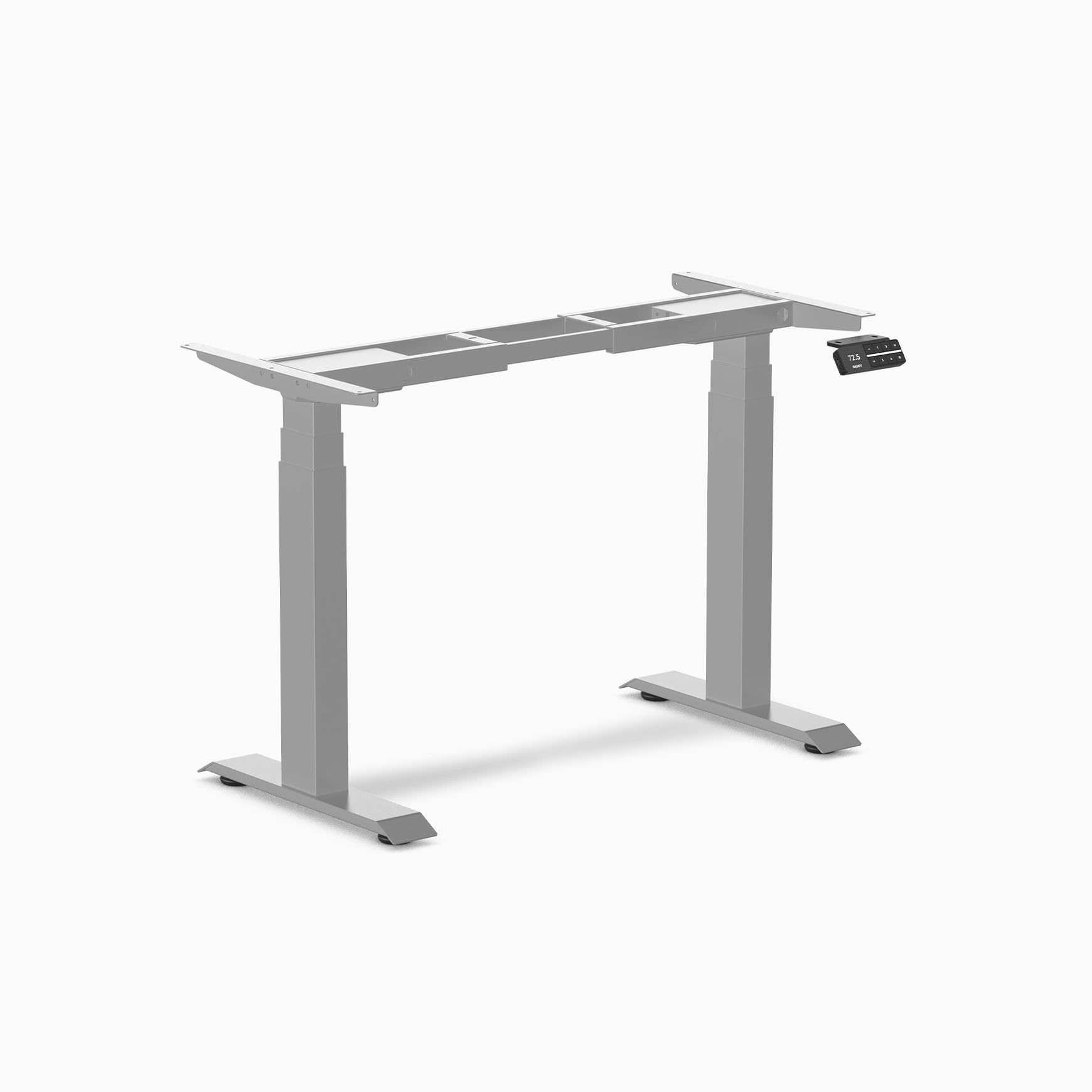
Ensure all connections are firm before proceeding to operation. The frame is designed for tool-free installation for most parts, simplifying the setup process.
Operating Instructions
The Desky Dual Mini Electric Standing Desk Frame offers intuitive controls for height adjustment and memory presets.
Basic Height Adjustment:
- Use the Up and Down arrows on the hand controller to raise or lower the desk to your desired height.
- The desk will move at approximately 1.4 inches per second.
Setting Memory Presets:
The hand controller features 4 memory presets to store your preferred sitting and standing heights.
- Adjust the desk to your desired height using the Up/Down arrows.
- Press the M button. The display will show 'S-'.
- Within 3 seconds, press one of the numbered preset buttons (1, 2, 3, or 4). The current height will be saved to that preset.
- To recall a saved height, simply press the corresponding numbered preset button. The desk will automatically move to the stored position.
Programming Upper and Lower Limits:
You can program custom upper and lower height limits for the desk.
- Adjust the desk to the desired lower limit.
- Press and hold the M button until 'S-' appears, then press the Down arrow. The lower limit is now set.
- Adjust the desk to the desired upper limit.
- Press and hold the M button until 'S-' appears, then press the Up arrow. The upper limit is now set.
- To clear limits, press and hold the M button and the Up arrow simultaneously for 5 seconds until the display shows 'RST'.
Anti-Collision System:
The desk frame is equipped with an anti-collision safety technology. If the desk encounters resistance during movement, it will automatically stop and reverse slightly to prevent damage to objects or injury to users.

Maintenance
Regular maintenance ensures the longevity and smooth operation of your Desky Dual Mini Electric Standing Desk Frame.
- Cleaning: Wipe down the frame with a soft, damp cloth. Avoid abrasive cleaners or solvents that could damage the powder-coated finish.
- Cable Management: Periodically check that all cables are securely fastened and not interfering with the desk's movement. Re-secure with sticky cable ties if necessary.
- Connection Check: Ensure all electrical connections (power box, motors, controller) remain firm and undamaged.
- Weight Distribution: Avoid placing excessive weight on one side of the desk. Distribute items evenly to maintain balance and prevent strain on the motors. The maximum weight capacity is 308.6 lbs.
Troubleshooting
If you encounter issues with your Desky Dual Mini Electric Standing Desk Frame, refer to the following common solutions.
Desk Not Moving / Error Code Displayed:
- Check Power: Ensure the power cord is securely plugged into both the wall outlet and the power box.
- Check Connections: Verify that all cables connecting the motors, controller, and power box are firmly seated.
- Overload Protection: If the desk is overloaded (exceeding 308.6 lbs), the overload protection may activate. Remove some weight and try again.
- Reset Procedure: If an error code persists or the desk is unresponsive, perform a reset: Press and hold the Down arrow until the desk reaches its lowest point and then slightly rises. Release the button. If this does not work, unplug the desk from the wall for 10 minutes, then plug it back in and try the reset procedure again.
Uneven Movement:
- Weight Distribution: Ensure the weight on the desktop is evenly distributed.
- Reset Procedure: An uneven movement can sometimes be resolved by performing the reset procedure described above.
If these steps do not resolve the issue, please contact Desky customer support.
Specifications
| Height Range (without desktop) | 23.6" - 49.2" |
| Gross Weight | 79.4 lbs |
| Travel Speed | 1.4" per second (loaded) |
| Noise Level | 40db in motion |
| Base Width (Suits Desktops) | 31.5" - 43.3" (length), up to 25.6" (width) |
| Weight Capacity | 308.6 lbs (140 kg) |
| Input Power | 120V |
| Transformer Power | 200W (0.1W on standby) |
| Hand Controller | 4 memory presets |
| Upper & Lower Limits | Programmable by user |
| Overload Protection | Yes |
| Frame Material | Alloy Steel, Powder Coated Steel |
| Model Number | 7964329279810, mini-frame-grey-USA |
| UPC | 749565946834 |
Warranty Information
The Desky Dual Mini Electric Standing Desk Frame is covered by a 10-year supplier warranty. This warranty covers defects in materials and workmanship under normal use. Please retain your proof of purchase for warranty claims.
Customer Support
For any questions, technical assistance, or warranty claims regarding your Desky Dual Mini Electric Standing Desk Frame, please contact Desky USA customer support. Desky USA offers 30-day easy returns and dedicated customer service.
Please visit the official Desky website or refer to your purchase documentation for contact details.


