
1. Introduction
The EaseZen KTR-4015 Foot Circulation Stimulator utilizes TENS (Transcutaneous Electrical Nerve Stimulation) and EMS (Electrical Muscle Stimulation) dual technology to provide relief for various foot and leg conditions. This device is designed to alleviate foot neuropathy, arthritic pain, muscle spasms, swelling, Restless Leg Syndrome (RLS), and plantar fasciitis. It also promotes blood circulation and enhances muscle performance. This manual provides essential information for the safe and effective use of your device.
The device features 10 modes and 20 intensity levels, a user-friendly remote control, an LCD display, and a 30-minute auto-off function. It is battery-powered for cordless convenience.

Image: The EaseZen KTR-4015 Foot Circulation Stimulator unit and its remote control.
2. Safety Information
Please read all safety warnings and instructions carefully before using this device. Failure to follow these instructions may result in electric shock, fire, or serious injury.
Important Safeguards:
- Always use the device with both bare feet placed on the stimulator simultaneously. The device will not function if only one foot is placed on it.
- Keep the device away from water and do not use it while sleeping or bathing.
- Always follow the instructions provided in this user manual for safe and effective use.
- If you have any medical conditions, consult with a healthcare professional before using the device.
- Do not use the device on open wounds or inflamed areas.
Do Not Use If You Have Any of the Following Conditions:

Image: Important contraindications for using the foot stimulator.
- Pregnant women.
- Heart patients or individuals with cardiac conditions.
- People with metal implants (e.g., pacemakers).
- Cerebral hemorrhage patients.
- Deep venous thrombosis patients.
- Individuals with abnormal blood pressure.
- Patients with acute cardiovascular and cerebrovascular conditions.
- On wounds or inflammation.
3. Package Contents
Please check the package contents upon unboxing:
- EaseZen KTR-4015 Foot Circulation Stimulator Unit
- Remote Control
- 3 x AA Batteries (for the main unit)
- 2 x AAA Batteries (for the remote control)
- User Manual
4. Setup
4.1 Battery Installation
- For the Main Unit: Locate the battery compartment on the underside of the foot stimulator. Insert 3 AA batteries, ensuring correct polarity (+/-).
- For the Remote Control: Locate the battery compartment on the back of the remote control. Insert 2 AAA batteries, ensuring correct polarity (+/-).

Image: Battery installation for the main unit and remote control.
4.2 Device Placement
Place the foot stimulator on a flat, stable surface where you can comfortably sit and place both feet on the device. Ensure there is enough space around the device for safe operation.
5. Operating Instructions
5.1 Powering On/Off
- To power on the device, press the power button (U) on the main unit or the remote control. The LCD display will illuminate.
- To power off, press and hold the power button for a few seconds, or the device will automatically turn off after 30 minutes of continuous use.
5.2 Placing Your Feet
Sit comfortably and place both bare feet on the designated footpads of the stimulator. Ensure full contact with both feet for the device to operate correctly. The device will not activate if only one foot is placed on it.
5.3 Adjusting Modes and Intensities
The EaseZen KTR-4015 offers 10 modes and 20 intensity levels, allowing for a personalized stimulation experience. You can adjust these settings using either the buttons on the main unit or the remote control.

Image: Remote control and main unit display for easy operation.
- Changing Modes: Press the 'M' button on the main unit or the power button (U) on the remote control to cycle through the 10 available modes. Each press will advance to the next mode.
- Adjusting Intensity: Use the '+' button to increase the intensity level and the '-' button to decrease it. Start with a low intensity and gradually increase until you feel a comfortable, yet effective, stimulation. The intensity ranges from 1 (mild) to 20 (strong).
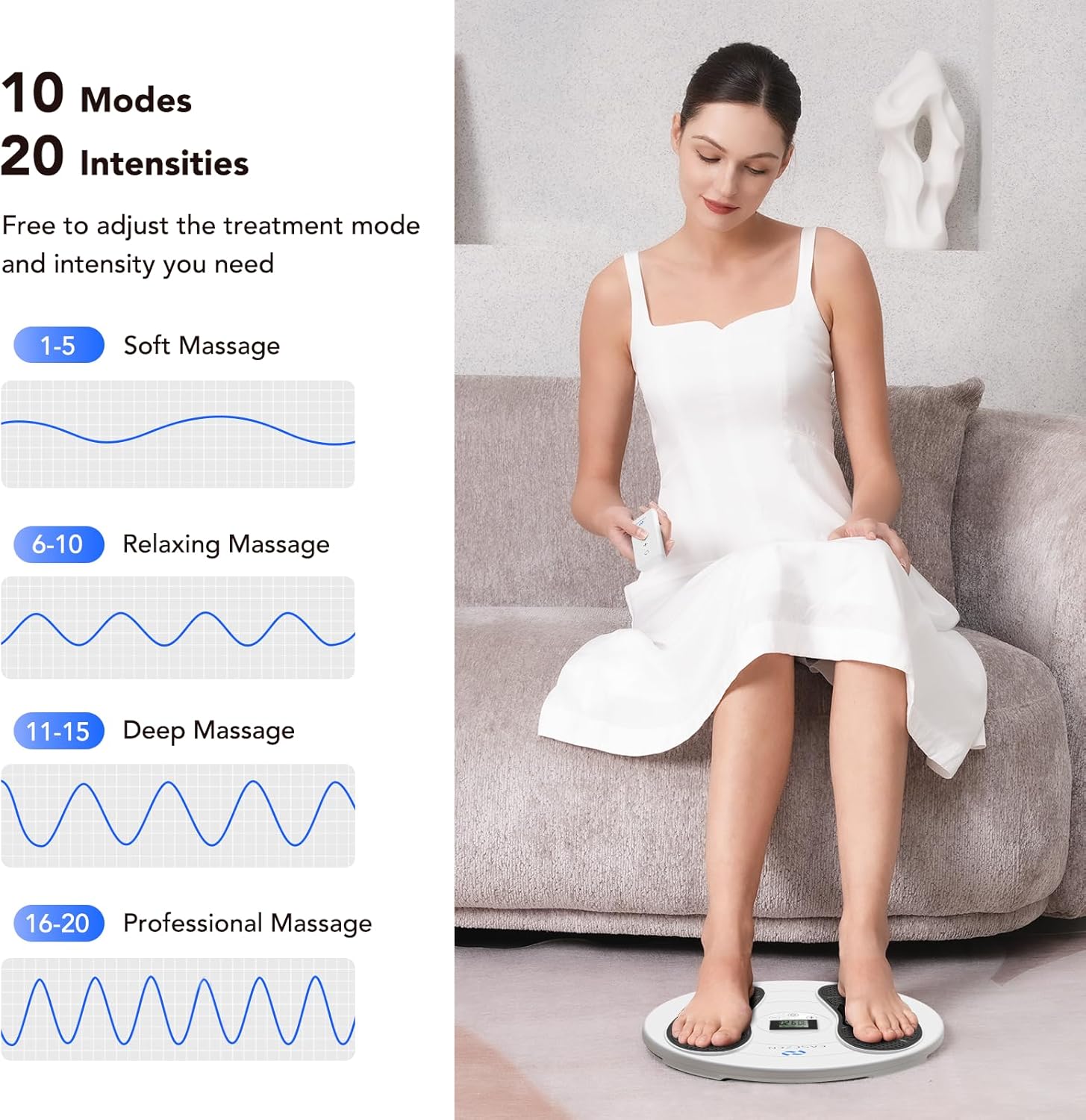
Image: Visual representation of the 10 modes and 20 intensity levels.
5.4 Auto-Off Function
The device is equipped with a 30-minute auto-off function to prevent overuse. After 30 minutes of continuous operation, the stimulator will automatically power down. You can restart a session if desired.

Image: The 30-minute auto-off timer feature.
5.5 Recommended Usage
For optimal results, it is recommended to use the device daily for approximately 30 minutes per session. Consistent use over 2-3 months is typically needed to observe visible benefits.
6. Maintenance
6.1 Cleaning
- Ensure the device is powered off and batteries are removed before cleaning.
- Wipe the surface of the foot stimulator and remote control with a soft, damp cloth.
- Do not use abrasive cleaners, solvents, or immerse the device in water.
- Allow the device to air dry completely before reinserting batteries or storing.
6.2 Storage
Store the device in a cool, dry place away from direct sunlight and extreme temperatures. If the device will not be used for an extended period, remove the batteries to prevent leakage.
7. Troubleshooting
If you encounter any issues with your EaseZen KTR-4015, please refer to the following troubleshooting guide:
| Problem | Possible Cause | Solution |
|---|---|---|
| Device does not power on. | Batteries are dead or incorrectly inserted. | Check battery polarity and replace with new AA batteries for the main unit and AAA for the remote. |
| No stimulation felt. | Only one foot on the device; intensity too low; poor foot contact. | Ensure both bare feet are firmly placed on the footpads. Increase intensity gradually. Ensure feet are clean and dry. |
| Remote control not working. | Remote batteries are dead or incorrectly inserted; remote out of range. | Check remote battery polarity and replace with new AAA batteries. Ensure remote is pointed towards the main unit within a reasonable distance. |
| Device turns off unexpectedly. | 30-minute auto-off function activated; low batteries. | This is normal operation after 30 minutes. If it turns off sooner, replace batteries. |
If the problem persists after trying these solutions, please contact customer support.
8. Specifications
| Feature | Detail |
|---|---|
| Model Number | KTR-4015 |
| Product Dimensions | 13.78 x 2.7 x 13.78 inches |
| Item Weight | 3.04 Pounds (1.38 Kilograms) |
| Power Source | Battery Powered (3 AA for unit, 2 AAA for remote) |
| Technology | TENS & EMS Dual Technology |
| Modes | 10 |
| Intensity Levels | 20 |
| Auto-Off Timer | 30 minutes |
| Material | Plastic |
| Manufacturer | Shenzhen Kentro Medical Electronics Co,. Ltd |
9. Warranty and Support
9.1 Warranty Information
Specific warranty details for the EaseZen KTR-4015 are not provided in this manual. Please refer to the product packaging or contact the manufacturer directly for warranty terms and conditions.
9.2 Customer Support
For further assistance, technical support, or inquiries, please contact EaseZen customer service through their official channels. You may also visit the EaseZen Store on Amazon for more information.