
Introduction
This manual provides essential information for the proper setup, operation, and maintenance of your AVUMDA Smartwatch. Please read it thoroughly before using the device to ensure optimal performance and longevity.
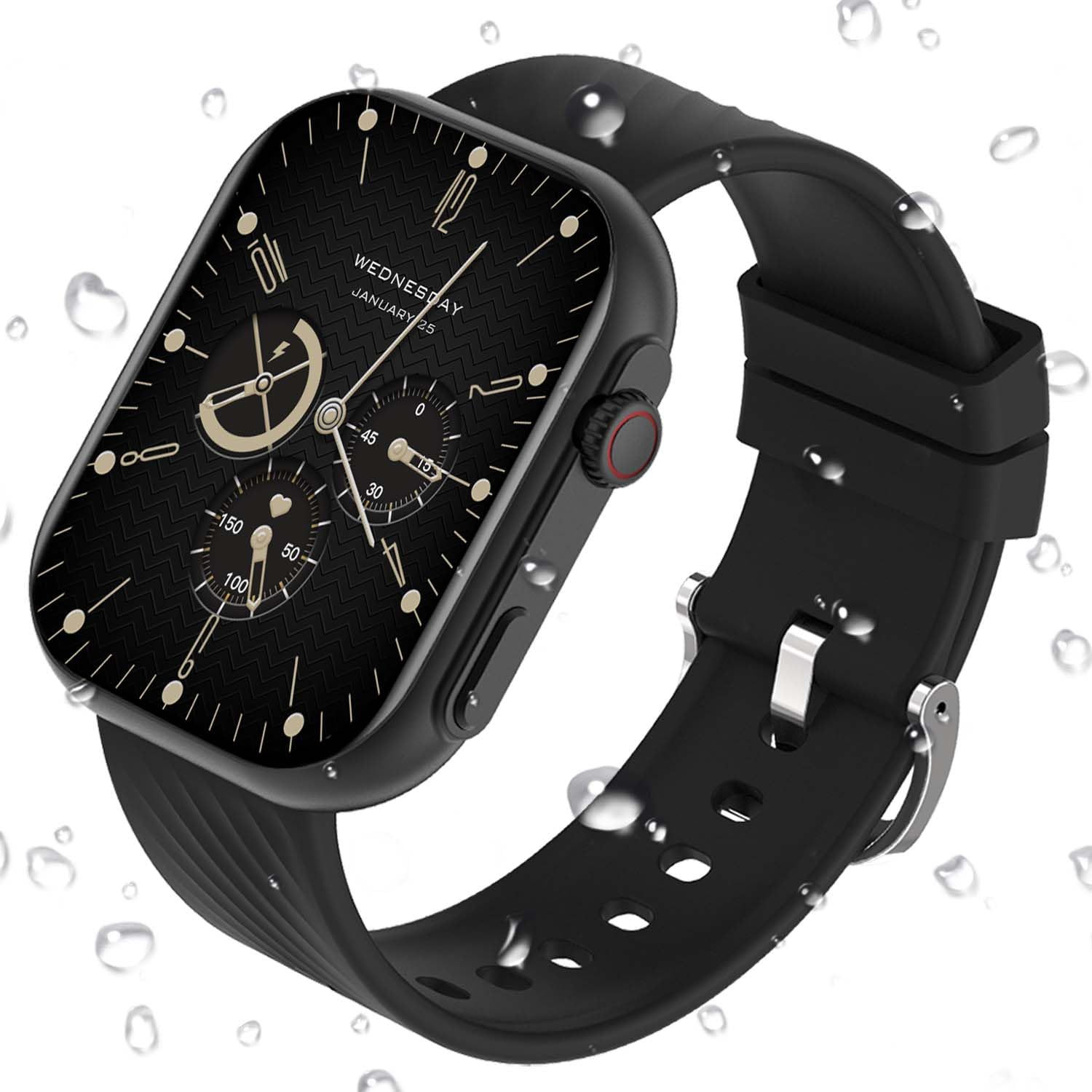
Figure 1: AVUMDA Smartwatch featuring a 2.01-inch HD touch screen, showcasing multiple customizable watch faces and the functional rotary encoder.
Setup
1. Charging the Device
Before first use, fully charge your smartwatch. Connect the magnetic charging cable to the charging contacts on the back of the watch and plug the USB end into a power adapter (not included). A full charge typically takes approximately 2 hours.
2. Pairing with Your Smartphone
- Download the companion application from your smartphone's app store (compatible with iOS and Android devices).
- Ensure Bluetooth is enabled on your smartphone.
- Open the application and follow the on-screen instructions to search for and connect to your AVUMDA Smartwatch.
- Confirm the pairing request on both your phone and the smartwatch.
3. Initial Configuration
Once paired, use the app to set your personal profile, preferred units (e.g., metric/imperial), and notification preferences. You can also select from over 200 watch faces to customize your display.
Operating Instructions
1. Basic Navigation
- Touch Screen: Swipe left, right, up, or down to navigate through menus and features. Tap to select.
- Rotary Encoder: Rotate the side button to scroll through lists or change watch faces. Press the button to return to the home screen or confirm selections.
2. Bluetooth Calling and Voice Assistant

Figure 2: The smartwatch displaying an incoming call, voice assistant activation, and various app notification icons.
- Making/Receiving Calls: Once paired via Bluetooth, you can make and receive calls directly from your watch using the built-in speaker and microphone.
- Voice Assistant: Activate the voice assistant feature (e.g., Siri, Google Assistant) by tapping the designated icon or using a specific gesture/button press (refer to app settings for configuration).
- Notifications: The watch displays real-time notifications for SMS, WhatsApp, Facebook, and other applications configured in the companion app.
3. Health Monitoring

Figure 3: Screens showing 24/7 heart rate, blood oxygen saturation (SpO2), and sleep duration tracking on the smartwatch.
- Heart Rate: The watch continuously monitors your heart rate. View real-time data on the watch or detailed historical data in the app.
- Blood Oxygen (SpO2): Measure your blood oxygen levels on demand or set for periodic monitoring.
- Blood Pressure: The watch provides blood pressure readings. Note: This feature is for reference only and should not be used for medical diagnosis.
- Sleep Tracking: Wear the watch to bed to monitor your sleep patterns, including deep sleep, light sleep, and awake times.
- Sedentary Reminder: Set reminders to encourage movement after periods of inactivity.
4. Sport Modes and Activity Tracking

Figure 4: A visual representation of the 123+ integrated sport modes available on the smartwatch, covering various activities like walking, running, cycling, and more.
- The smartwatch supports 123 sport modes, including running, cycling, football, and more.
- Select your desired sport mode before starting an activity to track steps, calories burned, distance, and real-time heart rate.
- Review daily, weekly, and monthly activity data in the companion app.
- Breathing Training: Utilize the breathing training function after exercise to aid recovery.
5. Other Practical Functions
- Timer & Stopwatch: Access these tools for various timing needs.
- Calculator: Perform basic calculations directly on your wrist.
- Weather Forecasts: Get current weather information and forecasts.
- Camera Control: Remotely control your smartphone's camera.
- Menstrual Cycle Tracking: For female users, track and predict menstrual cycles.
- Games: Enjoy simple games available on the device.
Maintenance
1. Cleaning
- Wipe the watch and strap regularly with a soft, damp cloth.
- Avoid using harsh chemicals or abrasive materials, as these can damage the device.
- Ensure the charging contacts are clean and dry before charging.
2. Water Resistance (IP68)

Figure 5: The smartwatch shown with water droplets, illustrating its IP68 water resistance, suitable for daily use and shallow water activities.
- The smartwatch has an IP68 rating, meaning it is resistant to dust and can withstand immersion in water up to 1.5 meters for 30 minutes.
- It is suitable for daily use, hand washing, and light rain.
- Avoid hot water, saunas, or diving, as extreme temperatures and high-pressure water jets can compromise the seal.
- If the watch gets wet, dry it thoroughly before charging or using the physical buttons.
3. Battery Care
- To prolong battery life, avoid fully discharging the battery frequently.
- Store the device in a cool, dry place when not in use for extended periods.
Troubleshooting
- Device not turning on: Ensure the watch is fully charged. Connect it to the charger for at least 10 minutes.
- Cannot pair with smartphone:
- Ensure Bluetooth is enabled on your phone and the watch is discoverable.
- Restart both your phone and the smartwatch.
- Clear the app's cache or reinstall the app.
- Check if the watch is already paired with another device.
- Inaccurate health data:
- Ensure the watch is worn snugly on your wrist, not too tight or too loose.
- Clean the sensor on the back of the watch.
- Avoid excessive movement during measurements.
- Notifications not appearing:
- Check notification settings in the companion app and your phone's system settings.
- Ensure the watch is connected to your phone via Bluetooth.
- Disable any power-saving modes on your phone that might restrict app background activity.
- Short battery life:
- Reduce screen brightness and screen-on time.
- Limit continuous heart rate monitoring or other intensive features.
- Ensure no background apps on the watch are consuming excessive power.
Specifications
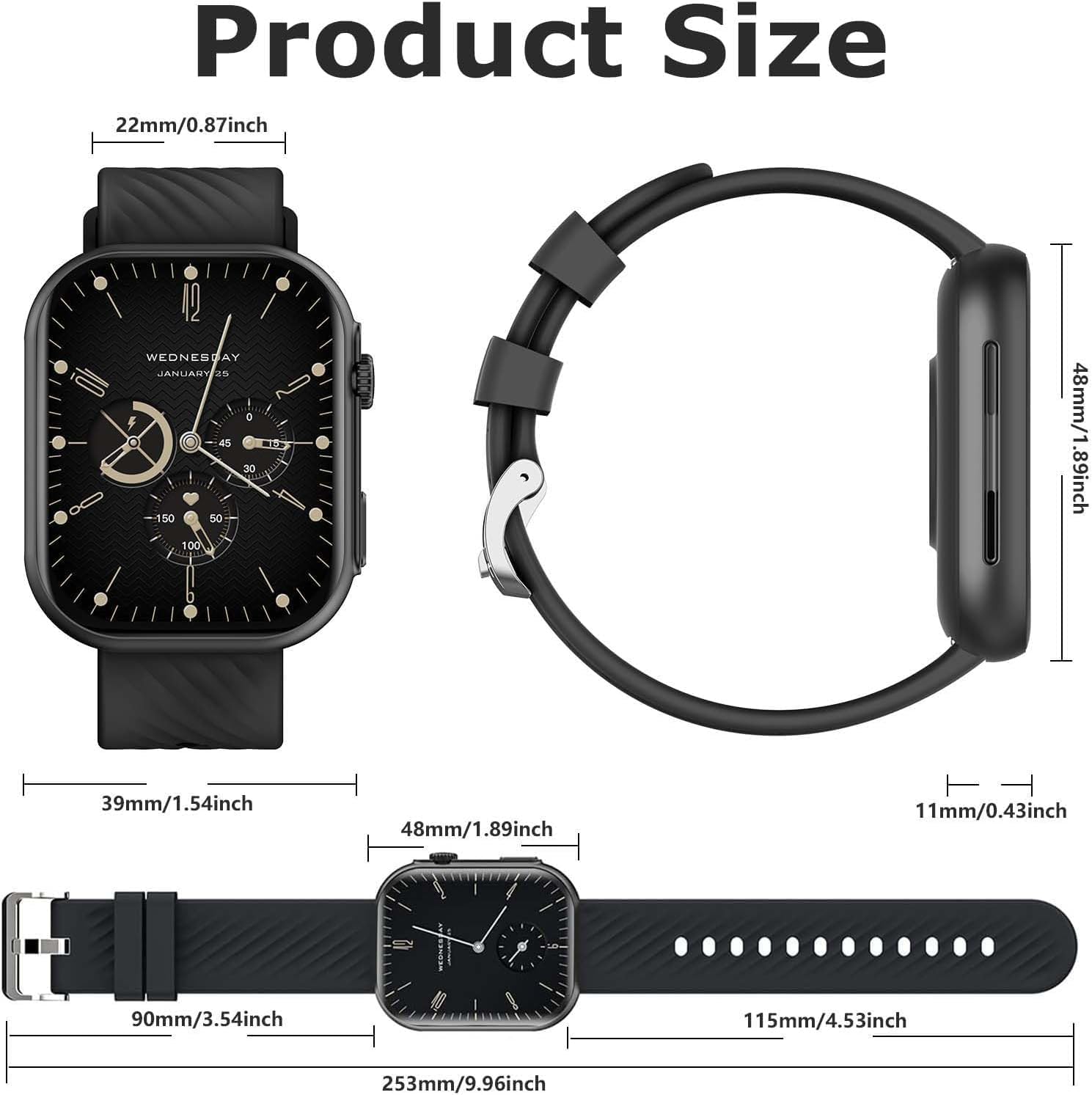
Figure 6: Detailed product dimensions of the smartwatch, including watch face width (39mm), height (48mm), thickness (11mm), and strap width (22mm).
| Model Number | 663810306757 |
| Brand | AVUMDA |
| Screen Size | 2.01 Inches |
| Display Type | LCD |
| Resolution | 240 x 201 |
| Operating System | AsteroidOS |
| Connectivity | Bluetooth |
| RAM | 128 MB |
| Battery Type | Lithium-polymer |
| Charging Time | 2 hours |
| Average Battery Life | 5-7 days (working), 15 days (standby) |
| Water Resistance | IP68 (up to 1.5 meters) |
| Weight | 45 Grams |
| Strap Material | Silicone |
| Compatible Devices | iOS and Android Smartphones |
Warranty and Support
Warranty Information
Your AVUMDA Smartwatch is covered by a standard manufacturer's warranty against defects in materials and workmanship. Please refer to the warranty card included in your product packaging for specific terms and conditions, including the warranty period and coverage details. Keep your proof of purchase for warranty claims.
Customer Support
For technical assistance, troubleshooting, or warranty inquiries, please contact AVUMDA customer support through the following channels:
- Online Support: Visit the official AVUMDA website for FAQs and support resources.
- Email Support: Refer to your product packaging or the companion app for the customer service email address.
- Retailer Support: If purchased from a retailer, you may also contact them for assistance.
When contacting support, please have your product model number (663810306757) and proof of purchase readily available.