
1. Safety Information
Please read all instructions carefully before using the Zstar 24-inch Built-in Electric Wall Oven. Retain this manual for future reference. Failure to follow these instructions could result in electric shock, fire, or personal injury.
1.1 Electrical Safety
- Ensure the oven is properly grounded according to local codes and ordinances.
- Do not operate the oven with a damaged power cord or plug.
- Disconnect power before servicing or cleaning the oven.
- This appliance must be installed by a qualified electrician.
- The oven operates on 240V and requires a dedicated circuit.
1.2 General Safety Precautions
- Do not touch hot surfaces. Always use oven mitts or pot holders.
- Never use the oven for storage of flammable materials.
- Keep children away from the oven during operation. The oven features a safety lock function to prevent accidental changes to settings.
- Ensure proper ventilation around the oven.
- Do not use abrasive cleaners or sharp metal scrapers to clean the oven door glass, as they can scratch the surface and lead to shattering.
- The oven door features 3-layer visible glass for effective heat insulation and to prevent scalding.
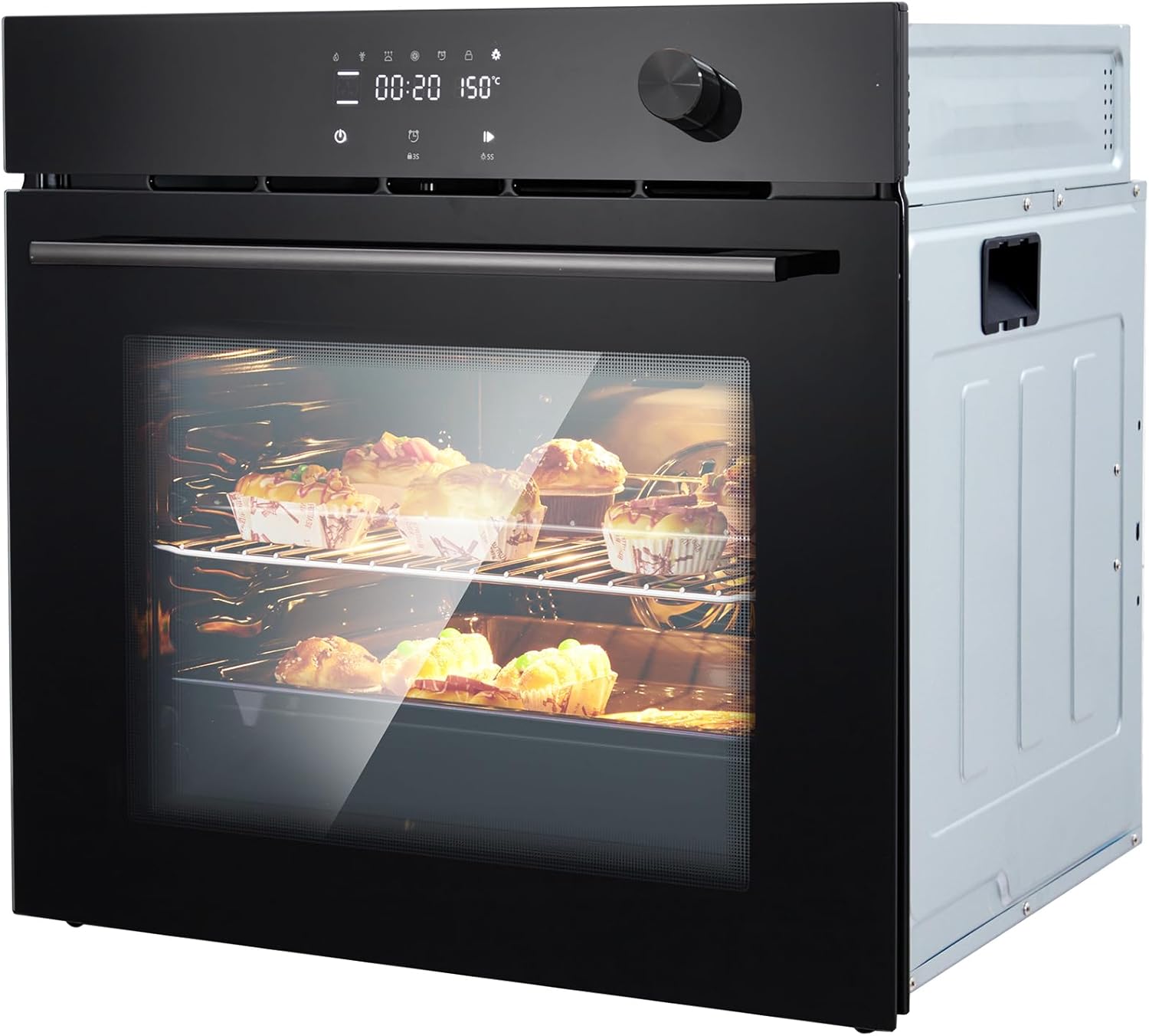
Image 1: Front view of the Zstar 24-inch Built-in Electric Wall Oven.
2. Product Overview
The Zstar 24-inch Built-in Electric Wall Oven is designed for efficient and versatile cooking. It features a 2.5 cubic feet capacity, convection cooking, touch controls, and a variety of cooking functions and automatic recipes.
2.1 Key Features
- Capacity: 2.5 Cu.ft (70L) interior, suitable for various dishes including whole chickens.
- Power: 3000W, 240V for rapid heating and efficient cooking.
- Cooking Functions: 8 distinct cooking functions including Roast, Bake, and Broil.
- Automatic Recipes: 108 pre-programmed automatic recipes for convenient meal preparation.
- Control: Intuitive touch control panel for easy mode selection and setting adjustments.
- Safety: Child safety lock and 3-layer visible glass door for heat insulation.
- Interior: Food-grade enamel cavity for durability and easy cleaning.
- Rack Positions: 5 side rack positions for flexible cooking options.

Image 2: Illustration of the oven's 2.5 cubic feet (70L) capacity, demonstrating space for a whole chicken.
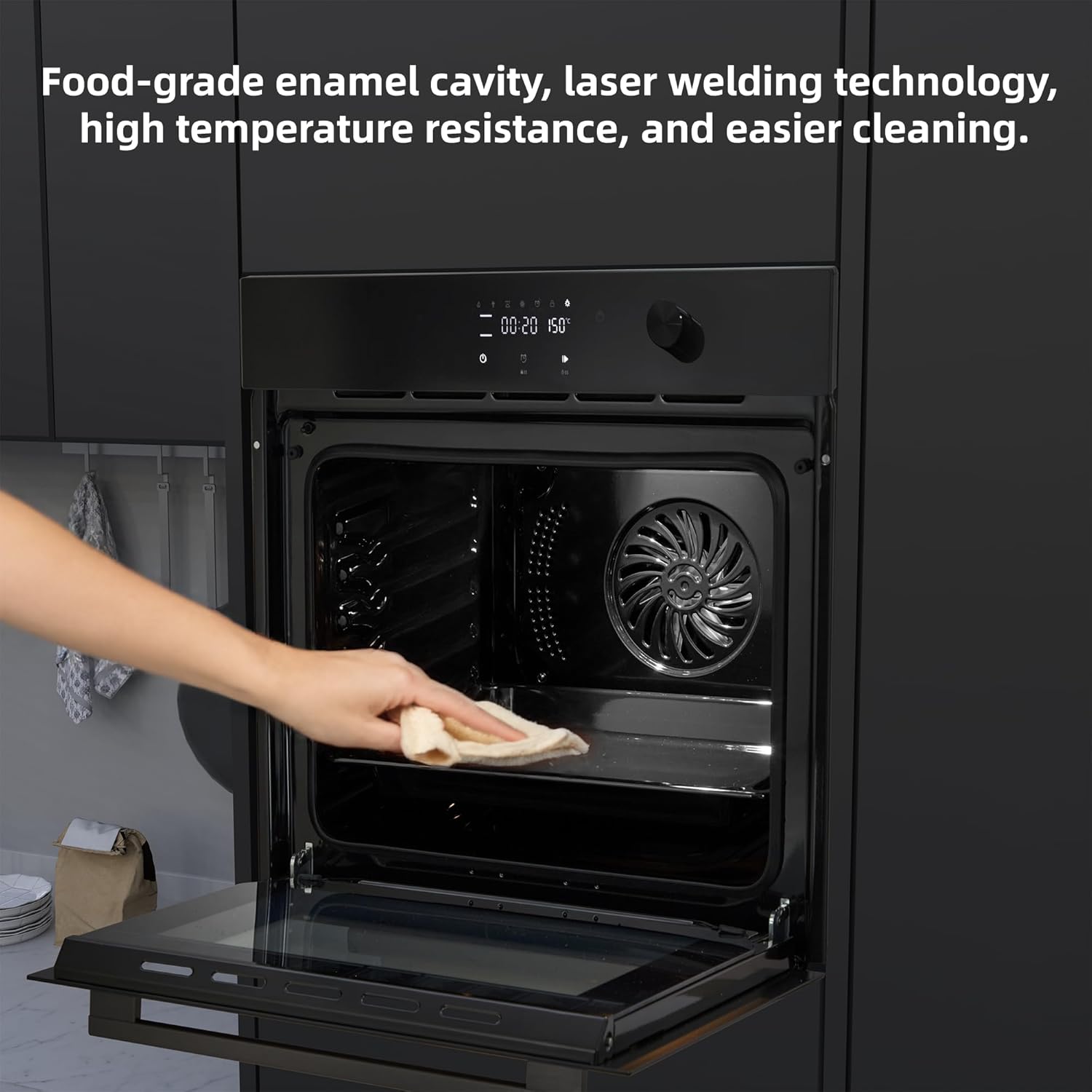
Image 3: The oven's touch control panel and a visual representation of the 108 automatic menus available.
3. Installation
The Zstar 24-inch Built-in Electric Wall Oven is designed for wall-mount installation. Proper installation is crucial for safe and efficient operation. It is highly recommended that installation be performed by a qualified professional.
3.1 Pre-Installation Checklist
- Verify that the electrical supply meets the oven's requirements (240V, 3000W).
- Ensure the cabinet opening dimensions match the oven's specifications.
- Confirm all packaging materials have been removed from the oven.
3.2 Dimensions
Refer to the diagram below for detailed product dimensions to ensure proper fit within your cabinetry.
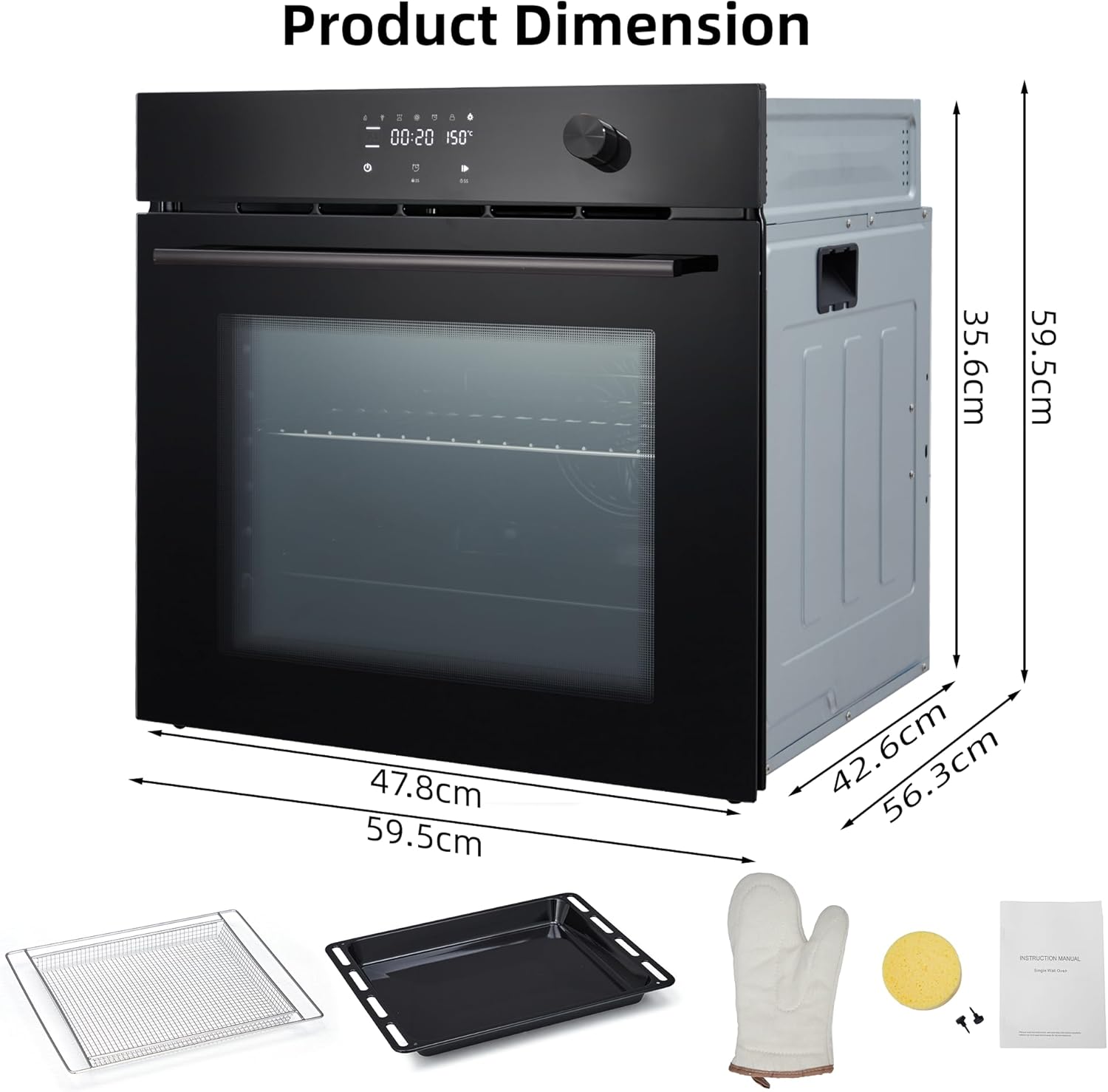
Image 4: Diagram showing the external dimensions of the Zstar 24-inch Built-in Electric Wall Oven (59.5cm width, 59.5cm height, 56.3cm depth).
3.3 Electrical Connection
The oven requires a direct electrical connection to a dedicated 240V circuit. Consult a licensed electrician for proper wiring and connection to prevent electrical hazards.
4. Operating Instructions
The Zstar oven features an intuitive touch control panel for easy operation. Familiarize yourself with the controls before first use.
4.1 Control Panel Overview
The control panel consists of a digital display and touch-sensitive buttons for various functions, along with a rotary knob for temperature and time adjustments.
Image 5: Close-up of the oven's touch control panel and display.
4.2 Basic Operation
- Power On: Touch the power icon to turn on the oven.
- Select Function: Browse through the 8 cooking functions or 108 automatic recipes using the touch controls.
- Set Temperature/Time: Use the rotary knob to adjust the desired temperature and cooking time. The display will show the current settings.
- Start Cooking: Press the start button to begin the cooking cycle.
- Preheating: The oven will preheat to the set temperature. An indicator will show when preheating is complete.
4.3 Cooking Functions
The oven offers various heating elements and modes for optimal cooking results:
- Convection Bake: Utilizes a fan to circulate hot air for even cooking, ideal for roasting and baking multiple items.
- Traditional Bake: Uses upper and lower heating elements for standard baking.
- Broil: High heat from the upper element for grilling and browning.
- Defrost: Gentle circulation of air to thaw frozen foods.
- Fermentation: Maintains a low, consistent temperature for dough proofing.
- Sterilization: High-temperature cycle for sanitizing dishes.
- Other Functions: Refer to the full list in the oven's digital interface for specific details on all 8 functions.

Image 6: Diagram illustrating the oven's heating elements: 2900W Upper Heating, 1200W Lower Heating, and 2100W Circle Heating for precise temperature control.

Image 7: The oven interior showcasing the 5 available rack positions for flexible cooking arrangements.
4.4 Automatic Recipes
The oven includes 108 pre-programmed automatic recipes. To use them:
- Access the automatic recipe menu on the touch control panel.
- Select the desired recipe. The oven will automatically set the appropriate temperature and cooking time.
- Follow any on-screen prompts for food preparation or placement.
- Press start to begin.
4.5 Safety Lock Feature
To activate the child safety lock, press and hold the designated lock icon on the control panel for a few seconds. This prevents accidental operation or changes to settings. Repeat the action to deactivate.

Image 8: Illustration of the safety lock feature, designed to prevent children from interacting with the oven controls.
5. Maintenance and Cleaning
Regular cleaning and maintenance will ensure the longevity and optimal performance of your Zstar oven.
5.1 Interior Cleaning
- Allow the oven to cool completely before cleaning.
- The oven features a food-grade enamel cavity, which is designed for easier cleaning. Wipe spills and food residue with a damp cloth and mild detergent.
- For stubborn stains, use an oven cleaner specifically designed for enamel surfaces, following the product instructions carefully.
- Remove oven racks and clean them separately with warm, soapy water.
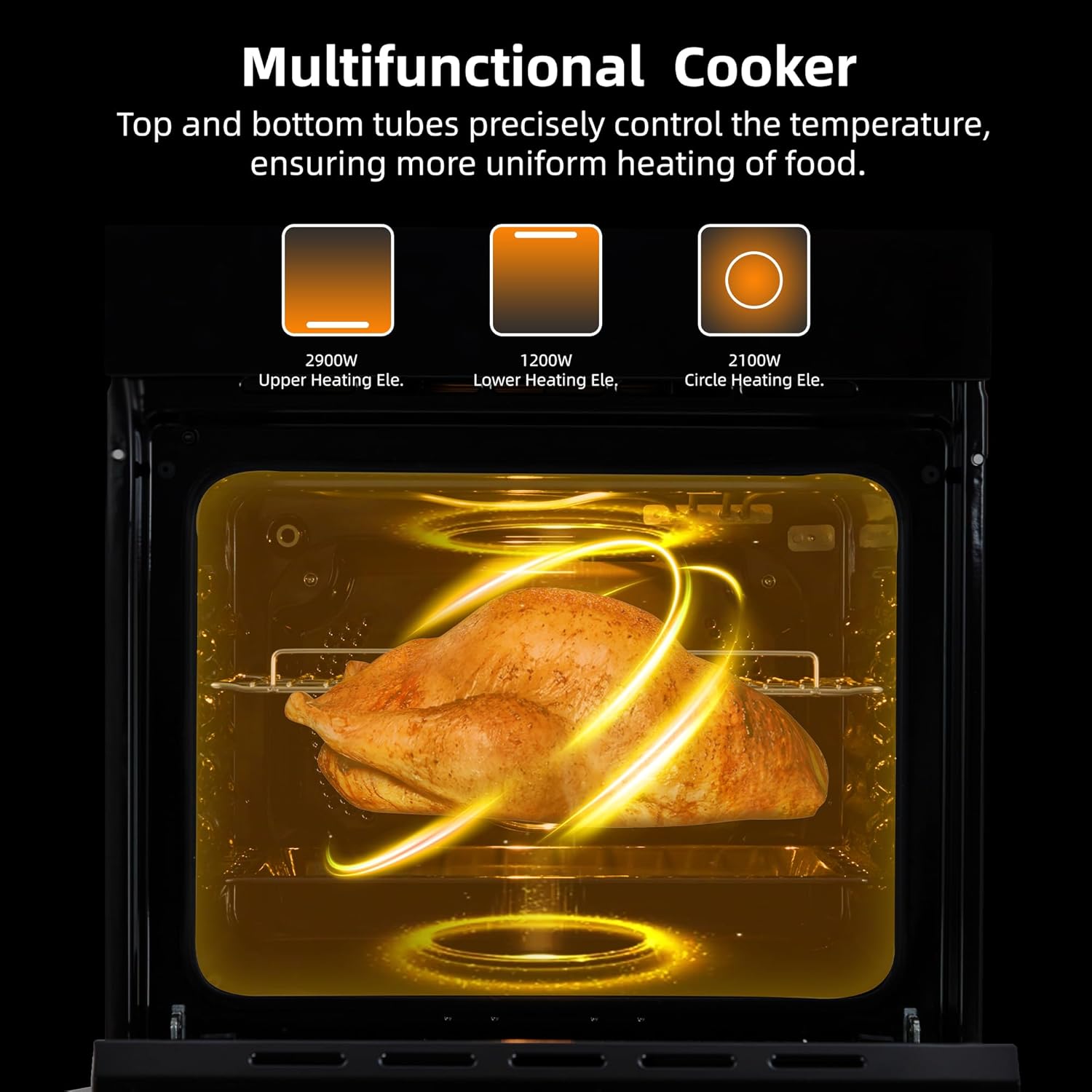
Image 9: A hand wiping the interior of the oven, demonstrating the ease of cleaning the food-grade enamel cavity.
5.2 Exterior Cleaning
- Wipe the exterior surfaces with a soft, damp cloth and mild soap.
- For the glass door, use a glass cleaner or a mixture of vinegar and water. Avoid abrasive cleaners.
- Do not spray cleaners directly onto the control panel. Apply cleaner to a cloth first.
6. Troubleshooting
Before contacting customer support, review the following common issues and solutions.
| Problem | Possible Cause | Solution |
|---|---|---|
| Oven does not turn on. | No power supply; circuit breaker tripped. | Check power connection; reset circuit breaker. |
| Oven not heating properly. | Incorrect temperature setting; door not closed completely. | Verify temperature setting; ensure door is fully closed. |
| Control panel unresponsive. | Safety lock activated; temporary electronic glitch. | Deactivate safety lock; power cycle the oven (turn off and on). |
| Food cooking unevenly. | Improper rack position; overloaded oven. | Adjust rack position; avoid overcrowding the oven. Utilize convection mode for better heat distribution. |
7. Specifications
| Feature | Detail |
|---|---|
| Brand | Zstar |
| Model Number | PHO_11V07MJT |
| Capacity | 2.5 Cubic Feet (70L) |
| Voltage | 240V |
| Wattage | 3000W |
| Installation Type | Wall Mount |
| Oven Cooking Mode | Convection |
| Fuel Type | Electric |
| Color | Black |
| Item Weight | 80 pounds |
| Package Dimensions | 26.77 x 25.98 x 25.79 inches |
| Defrost Feature | Auto Defrost |
| Door Hinges | Front |
8. Warranty and Support
For warranty information and customer support, please refer to the documentation included with your purchase or visit the official Zstar website. Protection plans may also be available for extended coverage.
For assistance, please contact Zstar customer service through their official channels.