
VEAGASO VG370
VEAGASO VG370 Dehumidifier
Instruction Manual
1. Introduction
Thank you for choosing the VEAGASO VG370 Dehumidifier. This intelligent humidity control unit is designed to efficiently remove excess moisture from large rooms, bathrooms, basements, and other living spaces, creating a healthier and more comfortable environment. Please read this manual thoroughly before operation to ensure proper use, maintenance, and safety.

Front view of the VEAGASO VG370 Dehumidifier, showing the control panel and water tank.
2. Safety Information
- Always plug the dehumidifier into a grounded electrical outlet.
- Do not operate the unit with a damaged power cord or plug.
- Keep the dehumidifier away from water and other liquids.
- Ensure proper ventilation around the unit; do not block air inlets or outlets.
- Do not insert objects into the air vents.
- Unplug the unit before cleaning or performing any maintenance.
- This appliance is not intended for use by persons (including children) with reduced physical, sensory or mental capabilities, or lack of experience and knowledge, unless they have been given supervision or instruction concerning use of the appliance by a person responsible for their safety.
3. Product Overview
The VEAGASO VG370 Dehumidifier features a compact design with intelligent controls and efficient moisture removal capabilities.
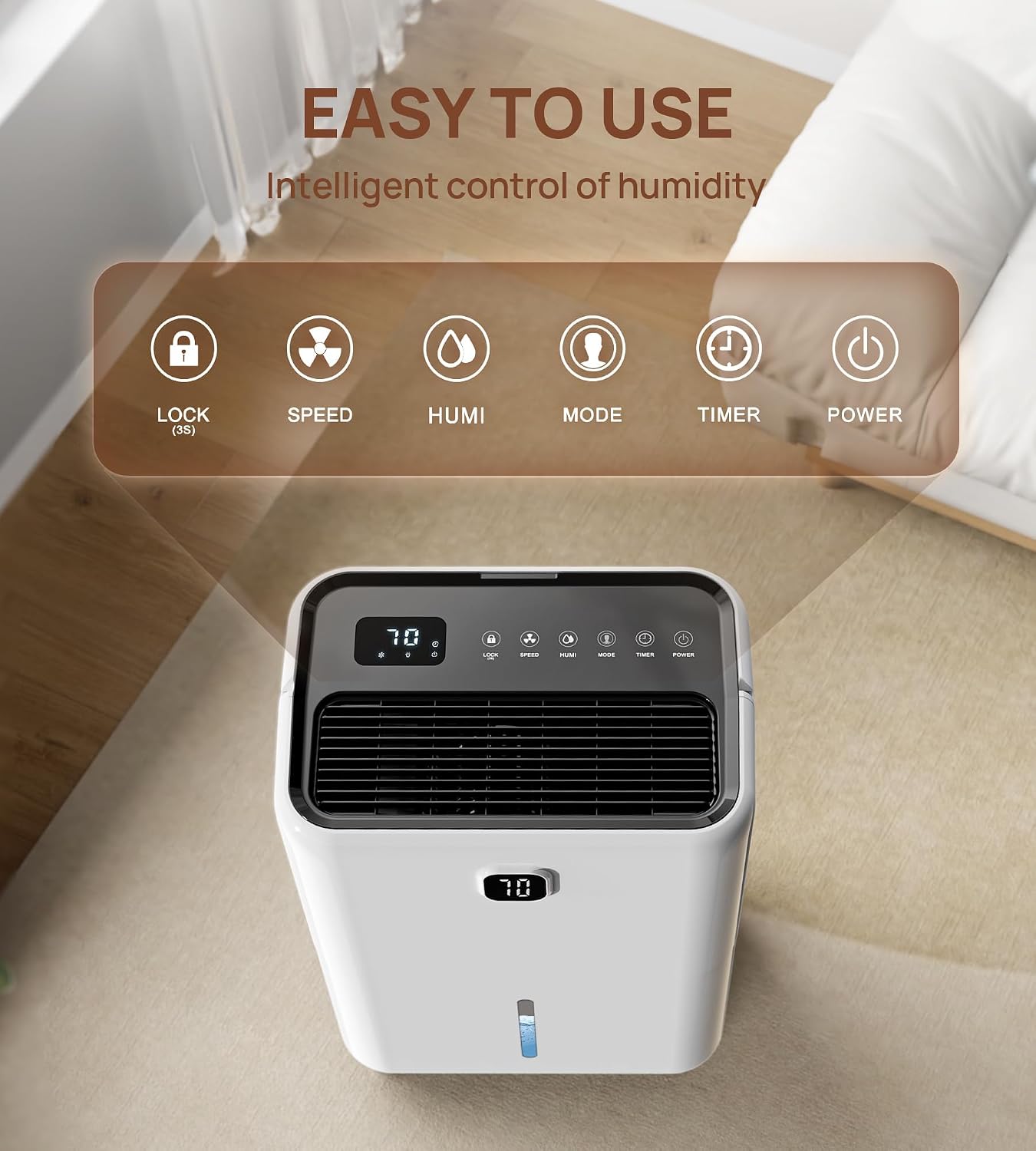
Top view of the dehumidifier showing the control panel with buttons for Lock, Speed, Humidity, Mode, Timer, and Power.
Key Components:
- Control Panel: Digital display and touch buttons for various settings.
- Air Inlet/Outlet: For drawing in and expelling air.
- Water Tank: Removable tank for collecting condensed water (1.37 Gallon capacity).
- Drainage Port: For continuous drainage option.
- Washable Filter: Located at the back for air purification.
- Rotating Wheels: For easy mobility.
- Ergonomic Handle: For convenient carrying.
4. Setup
Before first use, ensure the dehumidifier is placed on a flat, stable surface. Allow at least 8 inches of space around the unit for proper airflow.
Drainage Options:
The VG370 offers two methods for water drainage:
- Manual Drainage (Water Tank): The dehumidifier will collect water in its internal 1.37-gallon tank. When the tank is full, the unit will automatically shut off and an indicator light will illuminate. Carefully remove the tank, empty the water, and reinsert it to resume operation.
- Continuous Drainage: For extended operation without needing to empty the tank, connect the included 6.56ft drain hose to the continuous drainage port on the back of the unit. Route the hose to a suitable drain (e.g., floor drain, sink) ensuring it is sloped downwards for gravity drainage.

Illustration of the two water drainage methods: manual tank emptying and continuous hose drainage.
5. Operating Instructions
Plug the dehumidifier into a suitable power outlet. The unit will enter standby mode.
Control Panel Functions:
- Power Button: Press to turn the unit ON or OFF.
- Mode Button: Cycle through different operating modes:
- DEHU Mode: Dehumidification mode. Allows you to set a target humidity level. The unit will operate until the desired humidity is reached, then cycle on/off to maintain it.
- DRY Mode: Continuous drying mode. The unit will run continuously at high fan speed to dry clothes or rapidly reduce humidity.
- CONT Mode: Continuous dehumidification. The unit will run continuously regardless of humidity level, ideal for very damp spaces.
- Humidity Button: In DEHU mode, press to adjust the target humidity level (e.g., 40% to 80% RH).
- Speed Button: Adjust fan speed (High/Low).
- Timer Button: Set a timer for automatic ON/OFF (1-24 hours). Press repeatedly to select the desired duration.
- Lock Button (Child Lock): Press and hold for 3 seconds to activate or deactivate the child lock. This prevents accidental changes to settings.

Visual representation of DEHU, DRY, and CONT operating modes.

The child lock feature ensures safety by preventing unintentional modifications to settings.
6. Maintenance
Regular maintenance ensures optimal performance and longevity of your dehumidifier.
Cleaning the Air Filter:
The washable air filter should be cleaned every two weeks or more frequently depending on usage and air quality. A dirty filter can reduce efficiency and airflow.
- Unplug the dehumidifier from the power outlet.
- Remove the filter from the back of the unit.
- Wash the filter with warm, soapy water. Rinse thoroughly.
- Allow the filter to air dry completely before reinserting it into the unit. Do not use a dryer or direct heat.

The washable filter is easy to remove and clean for consistent performance.
Cleaning the Water Tank:
Periodically clean the water tank to prevent mold and mildew growth. Use a mild detergent and warm water, then rinse thoroughly.
Storage:
If storing the unit for an extended period, ensure the water tank is empty and clean, and the filter is clean and dry. Store in a cool, dry place.
7. Troubleshooting
| Problem | Possible Cause | Solution |
|---|---|---|
| Dehumidifier does not turn on. | No power; Water tank full or not properly inserted; Child lock activated. | Check power connection; Empty and reinsert water tank; Deactivate child lock (hold LOCK for 3s). |
| No water collected. | Humidity level too low; Room temperature too low; Air filter clogged. | Adjust target humidity lower; Ensure room temp is above 41°F (5°C); Clean air filter. |
| Unit is noisy. | Unit not on a level surface; Air filter clogged. | Place on a flat, stable surface; Clean air filter. |
| Water leaks from unit. | Water tank not properly seated; Continuous drain hose kinked or blocked. | Reinsert water tank correctly; Check and clear drain hose. |
8. Specifications
| Feature | Detail |
|---|---|
| Model Number | VG370 |
| Brand | VEAGASO |
| Product Dimensions | 11.89 x 15.35 x 21.06 inches (approx.) |
| Water Tank Capacity | 1.37 Gallons |
| Drainage Options | Manual (tank) / Continuous (hose) |
| Operation Mode | Continuous, DEHU, DRY |
| UPC | 763977363737 |

Approximate dimensions of the dehumidifier: 21.06 inches height, 11.89 inches width, 15.35 inches depth.
9. Warranty and Support
VEAGASO stands behind the quality of its products. For warranty information, technical support, or any questions regarding your VG370 Dehumidifier, please refer to the contact information provided with your purchase or visit the official VEAGASO website. Please retain your proof of purchase for warranty claims.
Related documentsVG370


Ask a question about this manual
Ask about setup, troubleshooting, compatibility, parts, safety, or missing instructions. Manuals+ will review the question and use this page’s manual context to help answer it.