
GVDA GD188
GVDA GD188 3-in-1 Digital Oscilloscope Multimeter Signal Generator User Manual
Model: GD188 | Brand: GVDA
Introduction
The GVDA GD188 is a versatile 3-in-1 device combining a digital oscilloscope, a digital multimeter, and a signal generator. Designed for precision and ease of use, it features a high-speed sampling chip and a clear color display, making it suitable for various electrical testing and measurement applications.
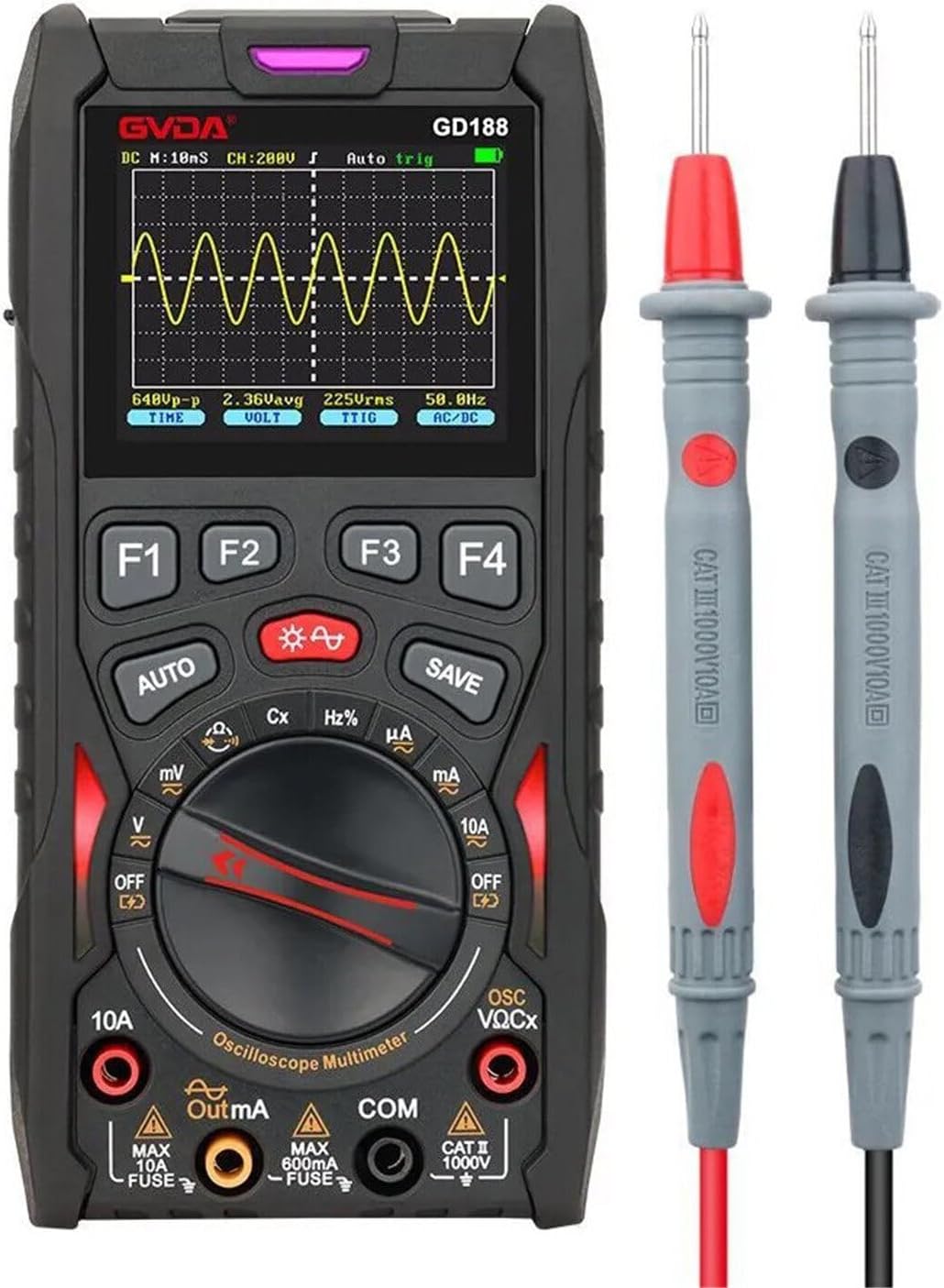
Figure 1: The GVDA GD188 device with its included test leads.

Figure 2: Labeled diagram of the GD188 showing key components like the charging interface, multi-function buttons, display, and input terminals.
Product Features

Figure 3: Key features of the GD188 represented by icons.
- 50Msps high-speed sampling chip and 12 analog bandwidth.
- 6000-count digital multimeter for precise measurements.
- One-key waveform confirmation for voltage gear.
- Three waveform scan modes: Auto, Normal, and Single.
- Signal source output for sine, triangle, and square waves.
- Adjustable signal source parameters: output range, frequency, and duty cycle.
- Fixed decimal point for stable readings.
- Powered by a replaceable 18650 lithium battery for environmental friendliness.
- Data storage function for up to 100 records of DMM data and 10 records of OSC waveforms.
- Overload protection and buzzer warning for safety.
- Color screen for clear display.
- Auto sleep function to conserve battery.
Setup
Initial Charging
Before first use, fully charge the device using the provided charging cable. The charging indicator light will show the charging status.
Battery Installation/Replacement
The GD188 uses a replaceable 18650 lithium battery. To install or replace the battery, open the battery compartment cover on the back of the device. Ensure correct polarity.

Figure 4: Included accessories: charging cable, original test leads, gift box, carrying bag, and user manual.
Operating Instructions
Power On/Off
To power on the device, press and hold the power button. To power off, press and hold the power button again. The device also features an auto-sleep function to save power.
Multimeter Functions
Rotate the functional range knob to select the desired measurement mode (e.g., Voltage (V), Current (A), Resistance (Ω), Capacitance (Cx), Frequency (Hz%)).
- Voltage Measurement: Connect the test leads to the appropriate input ports (VΩCx and COM) and the circuit. Select AC or DC voltage mode.
- Current Measurement: Connect the test leads to the 10A or mA input ports and COM, then connect in series with the circuit. Select AC or DC current mode.
- Resistance/Capacitance/Frequency Measurement: Connect the test leads to the VΩCx and COM ports.
Oscilloscope Functions
The GD188 integrates an oscilloscope for waveform analysis.

Figure 5: Oscilloscope trigger modes: Auto, Normal, and Single.
- One-Click Oscillogram: Press the dedicated button (often labeled "OSC" or similar) to quickly view the voltage waveform.
- Waveform Scan Modes:
- Auto Mode: Automatically acquires waveform data without a specific trigger.
- Normal Mode: Acquires waveform data when a trigger signal is detected.
- Single Mode: Acquires a single waveform when a trigger signal is detected.
- Data Storage: The device can store up to 100 records of DMM data and 10 records of oscilloscope waveforms. Use the "SAVE" button to store data.

Figure 6: The device's storage capability for DMM data and OSC waveforms.
Signal Generator Functions
The GD188 can output various waveforms for testing circuits.

Figure 7: Examples of sine, square, and triangle wave outputs from the signal generator.
- Waveform Types: Sine wave, Triangle wave, Square wave.
- Adjustable Parameters: Frequency, amplitude, and duty cycle can be adjusted for the generated signals.
Maintenance
Cleaning
Clean the device with a soft, dry cloth. Do not use abrasive cleaners or solvents.
Storage
When not in use for extended periods, store the device in a cool, dry place. Remove the battery if storing for a very long time to prevent leakage.
Battery Care
Recharge the battery regularly, even if the device is not in use, to maintain battery health.
Troubleshooting
Device does not power on
- Check if the battery is properly installed and charged.
- Ensure the power button is pressed and held sufficiently.
Inaccurate readings
- Verify test lead connections are secure and correct for the selected mode.
- Check if the battery is low, which can affect measurement accuracy.
- Ensure the correct measurement range is selected (if not in auto-ranging mode).
Oscilloscope not displaying waveform
- Check input signal connection.
- Adjust trigger settings (Auto, Normal, Single modes).
- Verify voltage and time base settings.
Specifications
| Parameter | Value |
|---|---|
| Sampling Rate | 50Msps |
| Analog Bandwidth | 12MHz |
| Display Count | 6000 Counts |
| Power Source | 18650 Lithium Battery (Rechargeable) |
| Product Dimensions (L x W x H) | 20 x 14.5 x 6 cm |
| Color | Black |
| ASIN | B0D2QCR8TS |

Figure 8: Dimensions of the GD188 device (153mm height, 75mm width, 30mm thickness).

Figure 9: Common applications for the GD188, including car overhaul, product line testing, electrical engineering, and power system maintenance.
Warranty and Support
For warranty information and technical support, please refer to the documentation included with your purchase or contact the manufacturer directly. Keep your purchase receipt as proof of purchase.
Related documentsGD188


Ask a question about this manual
Ask about setup, troubleshooting, compatibility, parts, safety, or missing instructions. Manuals+ will review the question and use this page’s manual context to help answer it.