
1. Introduction
Thank you for choosing the ALFORDSON Ergonomic Mesh Office Chair. This manual provides detailed instructions for the assembly, operation, and maintenance of your new chair. Designed for optimal comfort and support, this chair features a breathable mesh backrest, 3D adjustable armrests, an adjustable headrest, and a retractable footrest to enhance your sitting experience. Please read this manual thoroughly before assembly and use to ensure proper function and safety.
2. Safety Instructions
To prevent injury or damage, please observe the following safety guidelines:
- Maximum Load Capacity: Do not exceed the maximum weight capacity of 180 kg (396 lbs).
- Assembly: Ensure all screws and bolts are securely tightened before using the chair. Periodically check and re-tighten fasteners.
- Usage: Do not stand on the chair. Use the chair only for its intended purpose of sitting.
- Children: Keep children away from the chair during assembly. Small parts may pose a choking hazard.
- Movement: Avoid sudden movements or leaning excessively to prevent tipping.
- Placement: Use the chair on a flat, stable surface.
3. Package Contents
Please verify that all components are present before beginning assembly. If any parts are missing or damaged, contact customer service.
- 1 x ALFORDSON Office Chair (Backrest, Seat, Armrests, Headrest, Footrest)
- 1 x Gas Lift Cylinder
- 1 x Star Base
- 5 x Caster Wheels
- 1 x Seat Mechanism
- 1 x Hardware Pack (screws, washers, Allen key)
- 1 x Assembly Manual
4. Setup and Assembly
Follow these steps to assemble your ALFORDSON Ergonomic Mesh Office Chair. It is recommended to assemble the chair on a soft, clean surface to prevent scratches.
- Attach Caster Wheels to Base: Insert each of the 5 caster wheels into the holes at the end of each leg of the star base. Push firmly until they click into place.
- Insert Gas Lift: Place the gas lift cylinder into the center hole of the assembled star base.
- Attach Seat Mechanism to Seat: Align the seat mechanism with the pre-drilled holes on the underside of the seat cushion. Secure it with the provided screws and Allen key. Ensure the front of the mechanism faces the front of the seat.
- Attach Backrest to Seat: Connect the backrest to the seat mechanism using the designated screws. Ensure a secure fit.
- Attach Armrests: Secure the armrests to the sides of the seat using the provided screws. Pay attention to the left and right armrest orientation.
- Attach Headrest: Slide the headrest into the slots at the top of the backrest. Adjust its height and angle as desired.
- Connect Seat Assembly to Gas Lift: Carefully place the assembled seat, backrest, and armrests onto the gas lift cylinder, ensuring the center hole of the seat mechanism aligns with the top of the gas lift.
- Attach Footrest: If not pre-attached, slide the retractable footrest into its designated slots under the seat.


5. Operating Instructions
Your ALFORDSON office chair offers multiple adjustment features to customize your seating experience.
- Chair Height Adjustment: Locate the lever under the right side of the seat. To raise the chair, lift the lever while taking your weight off the seat. To lower the chair, lift the lever while seated. Release the lever to lock the height.
- Backrest Recline (90° to 150°): Use the recline lever, typically located on the left side under the seat. Pull the lever to unlock the recline function, lean back to your desired angle (up to 150 degrees), and push the lever back in to lock the position.
- Recline Tension Adjustment: A knob located under the front of the seat allows you to adjust the tension of the recline mechanism. Turn clockwise to increase tension (requiring more force to recline) and counter-clockwise to decrease tension.
- 3D Armrest Adjustment: The armrests can be adjusted in three dimensions:
- Height: Press the button on the side of the armrest and slide it up or down (7 cm adjustment in 6 positions).
- Rotation: Rotate the armrest pad 60 degrees left or right.
- Forward/Backward: Slide the armrest pad forward or backward (6 cm adjustment).
- Adjustable Headrest: The headrest can be adjusted for both height and angle. Gently push or pull the headrest to find your preferred position.
- Self-Adaptive Lumbar Support: The chair features a self-adaptive lumbar support system that adjusts to the curvature of your spine. Some models may also offer manual adjustment for depth and height.
- Retractable Footrest: Pull the footrest out from under the seat when desired, and push it back in when not in use.
- 360-Degree Swivel: The chair seat can rotate freely 360 degrees.


6. Maintenance
Regular maintenance will prolong the life and performance of your office chair.
- Cleaning:
- For mesh and plastic parts, wipe with a soft, damp cloth and mild soap. Avoid abrasive cleaners.
- For metal parts, wipe with a dry cloth.
- Do not saturate the chair with water.
- Fasteners: Periodically check all screws and bolts to ensure they are tight. Re-tighten as necessary.
- Moving Parts: If any moving parts (e.g., wheels, gas lift) become stiff or noisy, apply a small amount of silicone-based lubricant.
- Wheels: Keep the caster wheels clean from hair, dust, and debris to ensure smooth movement.
7. Troubleshooting
Refer to this section for solutions to common issues.
| Problem | Possible Cause | Solution |
|---|---|---|
| Chair does not adjust height. | Gas lift not properly installed or damaged. | Ensure the gas lift is fully inserted into the base and seat mechanism. If still not working, the gas lift may need replacement. |
| Chair squeaks during use. | Loose fasteners or friction between parts. | Check and tighten all screws and bolts. Apply silicone lubricant to moving joints and the gas lift. |
| Caster wheels do not roll smoothly. | Debris caught in wheels or wheels are loose. | Remove any hair, dust, or debris from the wheels. Ensure wheels are securely inserted into the base. |
| Backrest does not recline or lock. | Recline mechanism is stuck or damaged. | Check if the recline lever is fully engaged or disengaged. Adjust the recline tension knob. If the issue persists, contact customer service. |
8. Specifications
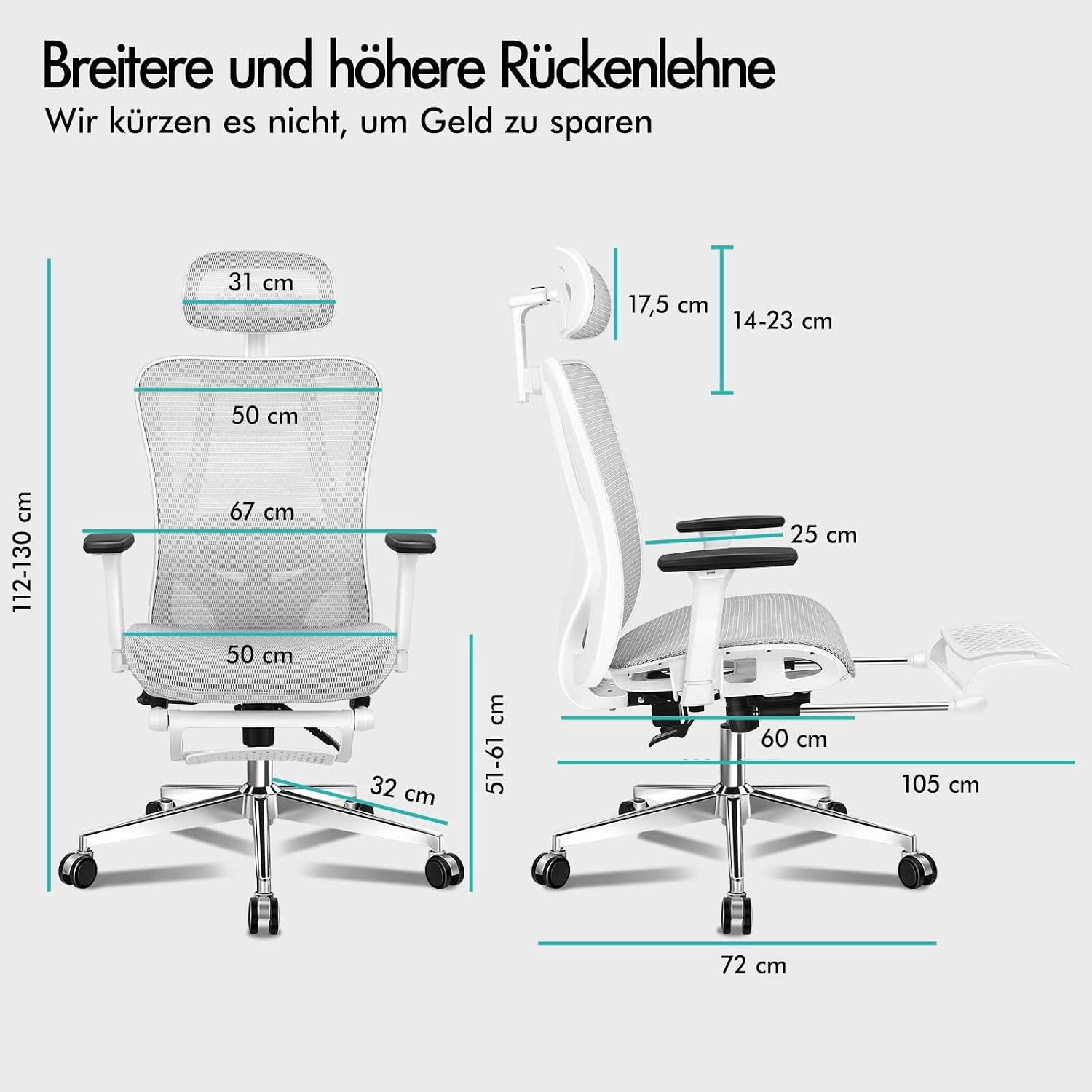
Key technical specifications for the ALFORDSON Ergonomic Mesh Office Chair.
- Model Number: 0fe5d4e5-0573-4b7e-bcbc-bbe9926cd754
- Dimensions (L x W x H): 60 x 50 x 130 cm (Product); 108P x 67l x 134H cm (Overall)
- Weight: 20 kg
- Maximum Load Capacity: 180 kg (396 lbs)
- Materials: Mesh, Foam, Plastic, Polyurethane, Stainless Steel, Polypropylene
- Frame Material: Stainless Steel, Polypropylene
- Seat Material: Mesh and Foam
- Special Features: 3D Adjustable Armrests, Adjustable Headrest, Ergonomic Design, Adjustable Height, Reclinable (up to 150°), Adjustable Lumbar Support, Retractable Footrest, Swivel Function
- Gas Lift: SGS Certified
- Base: Stainless Chrome
- Wheels: Quality Universal Casters

9. Warranty
The ALFORDSON Ergonomic Mesh Office Chair comes with a 2-year warranty from the date of purchase. This warranty covers manufacturing defects in materials and workmanship under normal use. It does not cover damage resulting from misuse, accidents, unauthorized modifications, or normal wear and tear. Please retain your proof of purchase for warranty claims.
10. Customer Support
If you have any questions, require assistance with assembly, or encounter any issues not covered in this manual, please contact ALFORDSON customer service.
- Website: Refer to the official ALFORDSON website for support contact details.
- Email: [Insert Customer Service Email Here, if available]
- Phone: [Insert Customer Service Phone Number Here, if available]
When contacting support, please have your model number (0fe5d4e5-0573-4b7e-bcbc-bbe9926cd754) and proof of purchase ready.


