
Jugeman Y66
Jugeman Y66 Smartwatch User Manual
Model: Y66
Introduction
Welcome to the Jugeman Y66 Smartwatch user manual. This guide provides detailed instructions on how to set up, operate, and maintain your new smartwatch. The Jugeman Y66 is designed to enhance your daily life with features such as Bluetooth calling, comprehensive health monitoring, and a wide array of sports modes. Please read this manual carefully to ensure optimal performance and longevity of your device.

The Jugeman Y66 Smartwatch, featuring a large 1.96-inch HD display and a sleek design.
Setup Guide
1. Charging the Smartwatch
Before first use, fully charge your smartwatch. Connect the magnetic charging cable to the charging contacts on the back of the watch and plug the USB end into a power adapter (not included) or a computer USB port. A full charge typically takes about 2.5 hours.
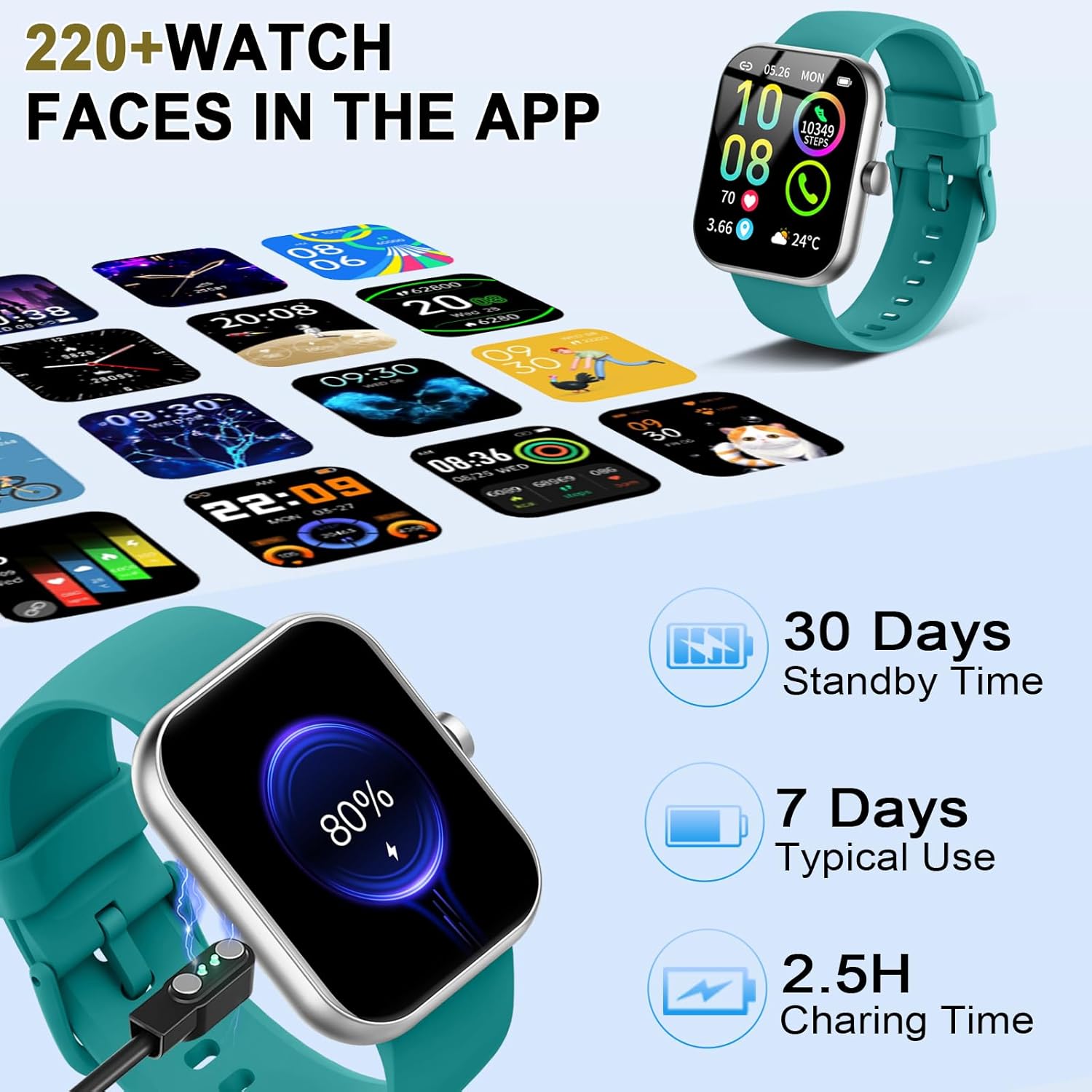
The smartwatch charging process and typical battery life: 7 days of typical use, 30 days standby, with a 2.5-hour charging time.
2. App Installation and Pairing
To unlock the full potential of your smartwatch, download and install the GloryFit application on your smartphone. The app is compatible with iOS 9.0/Android 5.0 or above, and Bluetooth 4.0 or above.
- Scan the QR code in the manual or search for "GloryFit" in your phone's app store (App Store for iOS, Google Play Store for Android).
- Install the app and open it.
- Enable Bluetooth on your smartphone.
- In the GloryFit app, navigate to the device section and select "Add Device".
- Select "Y66" from the list of available devices to pair.
- Follow the on-screen prompts to complete the pairing process. Ensure the watch is close to your phone during pairing.
3. Customizing Watch Faces
Your smartwatch offers over 200 unique online watch faces. You can also upload any image from your phone as a custom background to personalize your device.
- Open the GloryFit app.
- Go to the "Dial Settings" or "Watch Face" section.
- Browse the available watch faces or select an image from your phone's gallery to set as your custom watch face.

Customize your smartwatch with over 220 watch faces available in the app, or use your own photos.
Operating Instructions
1. Basic Navigation
The smartwatch features a 1.96-inch HD TFT color display with a resolution of 320x380 pixels. Navigate through menus by swiping left, right, up, or down, and tap to select options. The side button typically serves as a power/back button.

The ultra-large 1.96-inch HD display offers clear visuals with a 320x385 resolution.
2. Bluetooth Calling and Notifications
With its built-in microphone and speaker, and Bluetooth 5.3 connectivity, the smartwatch allows you to make and receive calls directly from your wrist. It also displays notifications from various apps.
- Making Calls: Once connected via Bluetooth, use the dial pad on the watch or access your contacts to initiate a call.
- Receiving Calls: Answer or reject incoming calls directly from the watch screen.
- Notifications: Receive alerts for calls, messages (SMS), and social media apps (e.g., WhatsApp, Twitter, Facebook, Instagram) directly on your watch.

The smartwatch supports Bluetooth calls, allowing you to make and receive calls, view call logs, and receive message alerts from various applications.
3. Sports Modes and Activity Tracking
The smartwatch features over 110 sports modes, including walking, running, cycling, hiking, football, yoga, and more. It accurately records daily activities such as steps, distance, calories burned, and active minutes.
- Select your desired sport mode from the watch menu to begin tracking.
- View real-time data during your workout.
- Synchronize data with the GloryFit app for detailed analysis and historical records.

Track your workouts with over 113 built-in sports modes, recording steps, distance, and calories.
4. Health Monitoring
The Jugeman Y66 provides continuous health monitoring features to help you maintain a healthier lifestyle.
- Heart Rate Monitoring: Automatically monitors your heart rate every 5 minutes in real-time.
- SpO2 Monitoring: Manually detect your blood oxygen saturation (SpO2) levels.
- Sleep Monitoring: Automatically tracks your sleep quality (deep sleep, light sleep, REM, and awake time) and provides analysis in the app.

Monitor your heart rate, blood oxygen, and sleep patterns for comprehensive health insights.
5. Multifunctional Features
Beyond core functions, the smartwatch includes several practical tools for daily use:
- Music Control
- Remote Camera Control
- Weather Forecasts
- Sedentary Reminders
- Calculator
- Alarm Clock
- Stopwatch and Timer
- Flashlight
- Breathing Training
- Find Phone function

Access a wide range of multifunctional features directly from your wrist, including music control, remote camera, weather, and more.
Maintenance
1. Water Resistance (IP68)
The smartwatch is IP68 waterproof and dustproof, meaning it can be safely worn when washing hands or during rain. Please note: It is not resistant to hot water (e.g., hot showers, saunas) or seawater, as these can damage the device.

The IP68 waterproof rating ensures the watch can be used during hand washing and in the rain.
2. Cleaning
Regularly clean your smartwatch and strap to prevent skin irritation and maintain device hygiene. Use a soft, dry cloth to wipe the screen and body. For the strap, a slightly damp cloth can be used, then dry thoroughly.
3. Battery Care
To prolong battery life, avoid extreme temperatures and do not leave the watch fully discharged for extended periods. Charge the device regularly, even if not in frequent use.
Troubleshooting
| Problem | Possible Cause | Solution |
|---|---|---|
| Watch not turning on | Low battery | Charge the watch for at least 30 minutes. |
| Cannot pair with phone | Bluetooth off, app issue, or watch too far | Ensure Bluetooth is on, restart phone and watch, reinstall GloryFit app, keep devices close. |
| Inaccurate health data | Improper fit, sensor obstruction | Ensure watch is snug on wrist, clean sensors, avoid excessive movement during measurement. |
| Notifications not received | App permissions, Bluetooth disconnection | Check app notification permissions, ensure stable Bluetooth connection, verify app is running in background. |
| Speaker crackling / poor call quality | Water damage, software glitch | Ensure watch is dry. If issue persists, try restarting the watch. If recently exposed to water, allow to dry completely. |
| Bluetooth range is poor | Environmental interference, device limitations | Minimize obstacles between watch and phone. Note that Bluetooth range can be affected by walls and other electronic devices. |
Specifications
| Feature | Detail |
|---|---|
| Model Number | Y66 |
| Brand | Jugeman |
| Display | 1.96-inch TFT Color Screen |
| Resolution | 320 x 380 pixels |
| Bluetooth Version | 5.3 |
| Compatibility | iOS 9.0+ / Android 5.0+ |
| Water Resistance | IP68 |
| Battery Life (Typical Use) | 5-7 days |
| Battery Life (Standby) | Up to 30 days |
| Charging Time | Approx. 2.5 hours |
| Sports Modes | 113+ |
| Health Monitoring | Heart Rate, SpO2, Sleep |
| Color | Dark Green |

Dimensions of the smartwatch and typical package contents, including the watch, strap, charging cable, and user manual.
Warranty and Support
Warranty Information
Your Jugeman Y66 Smartwatch comes with a standard manufacturer's warranty. Please refer to the warranty card included in your product packaging for specific terms and conditions, including coverage period and limitations. Keep your proof of purchase for warranty claims.
Customer Support
If you encounter any issues or have questions not covered in this manual, please contact Jugeman customer support. Contact information can typically be found on the product packaging, the official Jugeman website, or through your retailer.
Ask a question about this manual
Ask about setup, troubleshooting, compatibility, parts, safety, or missing instructions. Manuals+ will review the question and use this page’s manual context to help answer it.