
Introduction
This Epronic 2.4GHz Wireless RCA Transmitter and Receiver Kit is designed to convert a wired car reversing camera system into a wireless one. It simplifies installation by eliminating the need for complex wiring between your camera and monitor, providing a stable 2.4GHz wireless signal for clear video transmission.
The kit is compatible with any DC 12V vehicle and supports standard RCA composite video connections, making it suitable for various car, truck, van, and RV applications.
Product Components
The Epronic Wireless RCA Transmitter and Receiver Kit includes the following items:
- 1 x Wireless Transmitter
- 1 x Wireless Receiver

Image: The Epronic 2.4GHz Wireless RCA Transmitter and Receiver Kit, showing both the transmitter and receiver units with their respective RCA and power cables.
Both units feature RCA video connectors and power input wires for easy integration into your vehicle's existing camera and monitor setup.
Setup and Installation
The Epronic wireless kit offers a plug-and-play solution for converting your wired reversing camera to a wireless system. Follow these steps for proper installation:
Step 1: Connect the Transmitter
- Locate your wired reversing camera.
- Connect the camera's video output (typically a yellow RCA connector) to the transmitter's video input (also a yellow RCA connector).
- Connect the camera's 12V DC power supply wires to the transmitter's power input wires. The red wire is for positive (+), and the black wire is for negative (-). Ensure correct polarity.

Image: An installation diagram illustrating the connection of a reversing camera to the wireless transmitter. The camera's video output connects to the transmitter's yellow RCA input, and the camera's 12V power connects to the transmitter's power wires.
Step 2: Connect the Receiver
- Locate your car monitor or display unit.
- Connect the receiver's video output (yellow RCA connector) to your car monitor's video input (also a yellow RCA connector).
- Connect the receiver's 12V DC power supply wires to your vehicle's 12V power source. For automatic activation when reversing, connect the receiver's power to the reverse light circuit. Ensure correct polarity (red to positive, black to negative).
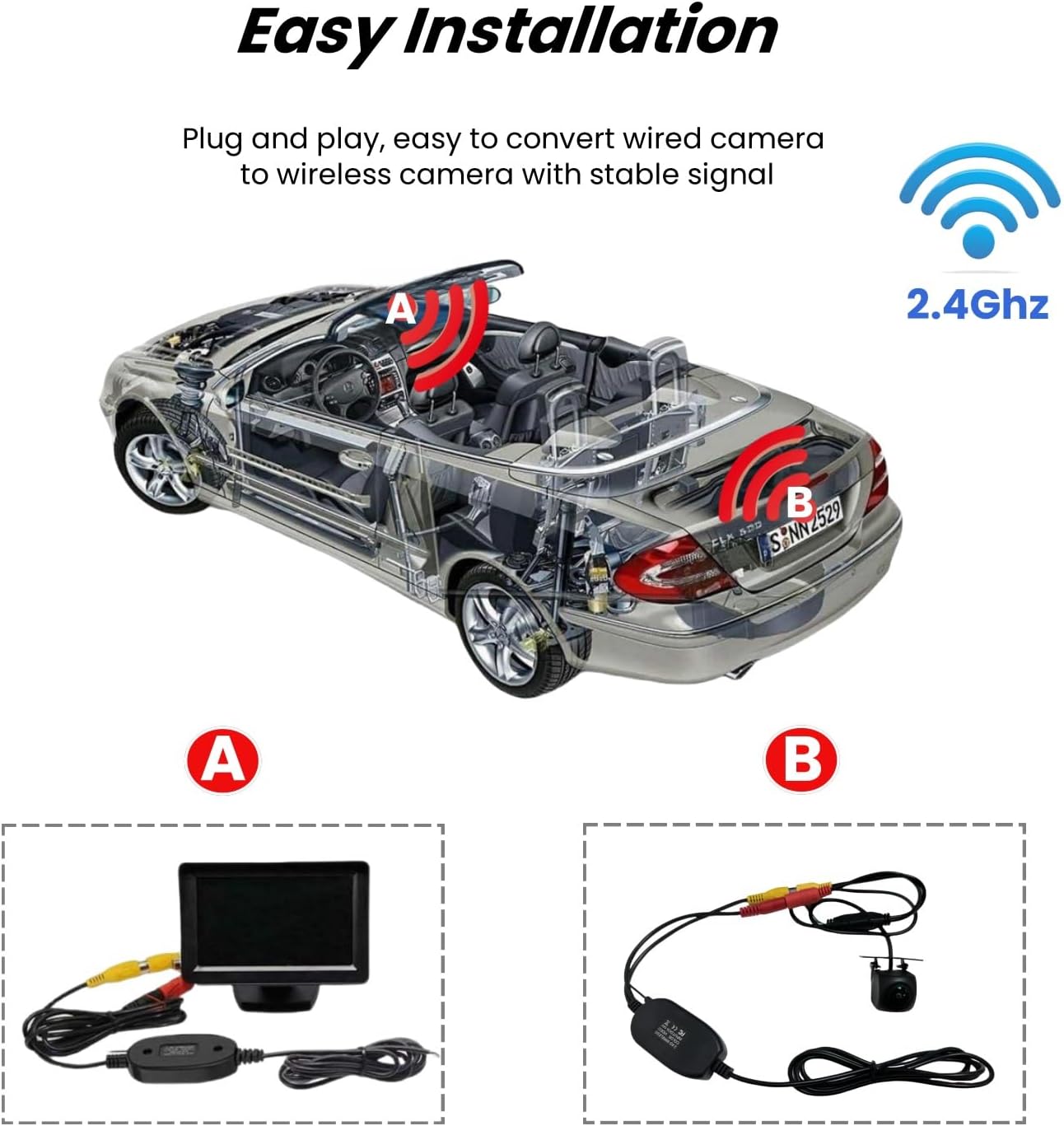
Image: An installation diagram showing the wireless receiver connected to a car monitor. The receiver's yellow RCA output plugs into the monitor's video input, and the receiver is powered by a 12V DC source, often from the vehicle's reverse light circuit.
Step 3: Power On and Test
- Ensure all connections are secure and properly insulated.
- Turn on your vehicle's ignition and engage reverse gear (if connected to the reverse light circuit).
- The wireless system should automatically establish a connection, and the camera's feed should appear on your connected monitor.
Operating Instructions
Once properly installed and powered, the Epronic wireless system operates automatically. When the reversing camera is activated (e.g., by engaging reverse gear), the transmitter sends the video signal wirelessly to the receiver. The receiver then relays this signal to your connected monitor, displaying the camera's view in real-time.
No manual pairing or configuration is typically required after the initial setup, as the units are designed for automatic connection.
Maintenance
To ensure the longevity and optimal performance of your Epronic Wireless RCA Transmitter and Receiver Kit, follow these simple maintenance guidelines:
- Keep Clean and Dry: Avoid exposing the transmitter and receiver units to excessive moisture, dust, or extreme temperatures. Wipe them with a soft, dry cloth if they become dirty.
- Check Connections: Periodically inspect all cable connections (RCA and power) to ensure they remain secure and free from corrosion.
- Avoid Obstructions: Ensure the units are not obstructed by large metal objects, which can interfere with the wireless signal.
Troubleshooting
If you encounter issues with your Epronic Wireless RCA Transmitter and Receiver Kit, refer to the following troubleshooting tips:
No Signal or Black Screen on Monitor:
- Power Check: Verify that the camera, transmitter, receiver, and monitor are all receiving stable 12V DC power. Check fuses and wiring.
- Connection Check: Ensure all RCA video cables are securely plugged into their respective ports on the camera, transmitter, receiver, and monitor.
- Camera Functionality: If possible, test your reversing camera with a direct wired connection to confirm it is functioning correctly.
- Interference: Check for potential interference from other 2.4GHz wireless devices in the vicinity. Try temporarily disabling other wireless devices or repositioning the transmitter/receiver slightly.
Poor Image Quality or Flickering:
- Signal Obstruction: Ensure there are no significant metal objects or thick barriers directly between the transmitter and receiver that could impede the wireless signal.
- Power Stability: Unstable or insufficient power supply to any component can affect signal quality. Re-check all power connections.
- Cable Integrity: Inspect all RCA cables for damage or loose connections.
Specifications
| Feature | Specification |
|---|---|
| Brand | Epronic |
| Model Number | BCWTR-EU0425 |
| Wireless Frequency | 2.4 GHz |
| Input Voltage | DC 12V |
| Compatible Devices | Reversing Camera, Car Monitor |
| Product Dimensions (Approximate) | 136L x 2W x 1H centimeters (This refers to the approximate length of the main cable segment, not the unit dimensions.) |
| ASIN | B0D2NQ78BC |
Note: Specifications such as 'Field of View' (70 Degrees) and 'Real View Angle' (70 Degrees) mentioned in some product listings typically refer to the specifications of a compatible reversing camera, not the wireless transmitter/receiver kit itself.
Warranty and Support
For detailed warranty information, technical assistance, or customer support regarding your Epronic 2.4GHz Wireless RCA Transmitter and Receiver Kit, please refer to the product packaging or contact Epronic customer service directly. It is recommended to retain your purchase receipt for any warranty claims.