
GRECELL T1 PRO
GRECELL Portable Power Station 2200W User Manual
Model: T1 PRO
Introduction
The GRECELL Portable Power Station 2200W is a high-capacity, high-power solar generator designed to provide reliable electricity for various applications, including home backup, outdoor camping, and emergency situations. With a substantial 1126Wh capacity and a rated output of 2200W (4800W peak), it can power a wide range of devices, from mobile phones and laptops to refrigerators and other household appliances. Its advanced LiFePO4 battery technology ensures durability and safety, while multiple charging options offer flexibility for continuous power supply.

Image: Front view of the GRECELL Portable Power Station 2200W, showcasing its display and various output ports.
Safety Information
Please read all safety instructions carefully before operating the power station. Failure to follow these instructions may result in electric shock, fire, or serious injury.
- Do not disassemble, repair, or modify the unit. Incorrect reassembly may cause fire or electric shock.
- Do not place the unit near fire or expose it to excessive heat. Keep out of direct sunlight.
- Do not charge, use, or store the unit in a bathroom or in an area exposed to water or moisture.
- Use only the original or certified charging cables and adapters.
- Keep the unit away from children and pets.
- Ensure proper ventilation during use and charging to prevent overheating.
- Do not insert foreign objects into the ports or openings.
- In case of fire, use a dry powder fire extinguisher. Water may cause electric shock.
Package Contents
Verify that all items are included in your package:
- 1x GRECELL Portable Power Station 2200W
- 1x AC Charger
- 1x Car Charger
- 1x Anderson to MC4 Cable (for solar panel connection)
- 1x Cable Storage Bag
- 1x User Manual
Product Overview
Familiarize yourself with the various components and ports of your power station.

Image: Detailed view of the GRECELL Power Station's front panel, highlighting the various input and output ports including AC, USB-C, USB-A, DC, and Cigar Lighter ports.
Ports and Features:
- AC Output (x4): 2200W rated power, 4800W peak. For powering household appliances.
- USB-C PD100W (x2): For fast charging compatible laptops, tablets, and smartphones.
- USB-C QC3.0 18W (x2): For quick charging various USB-C devices.
- USB-A QC3.0 18W (x2): For quick charging various USB-A devices.
- DC Output (x2): Standard DC ports for compatible devices.
- Cigar Lighter Output (x1): 13.3V/10A, for car appliances.
- AC Input: For fast charging the power station via wall outlet.
- DC Input: For charging via solar panel or car charger.
- LCD Display: Shows battery level, input/output wattage, and remaining runtime.
Setup
Initial Charging:
Before first use, fully charge the power station. This ensures optimal battery performance and calibration.
- Connect the provided AC charger to the AC input port on the power station.
- Plug the AC charger into a standard wall outlet (110V).
- The LCD display will show the charging status. The unit can be fully charged in approximately 1.25 hours using the 1200W AC input.
- Once fully charged, disconnect the charger.

Image: The GRECELL Power Station being charged via an AC wall outlet, illustrating its fast charging capability.
Operating Instructions
Turning On/Off:
- To turn on the power station, press and hold the main power button for a few seconds until the LCD display illuminates.
- To turn off the power station, press and hold the main power button again until the display turns off.
Using AC Outputs:
- Ensure the power station is turned on.
- Press the AC power button to activate the AC outlets. The AC indicator on the display will light up.
- Plug your AC devices into the available AC outlets. Ensure the total wattage of your devices does not exceed 2200W (or 4800W peak for short durations).
- When finished, press the AC power button again to turn off the AC outlets and conserve power.
Using USB and DC Outputs:
- Ensure the power station is turned on.
- For USB ports, simply plug in your USB devices. The USB ports are typically always active when the unit is on.
- For DC outputs (including the cigar lighter), press the DC power button to activate them. The DC indicator on the display will light up.
- Plug your DC devices into the appropriate ports.
- When finished, press the DC power button again to turn off the DC outputs.

Image: Two individuals using the GRECELL Power Station to power a laptop, mini-fridge, and other devices in an outdoor camping setting.
Emergency Power Supply (EPS) Function:
The EPS function allows the power station to act as an uninterruptible power supply for connected devices. When the power station is connected to an AC wall outlet and devices are plugged into its AC outputs, it will pass through power directly from the wall. In the event of a power outage, the power station will automatically switch to battery power within 20 milliseconds, ensuring continuous operation for your critical devices.
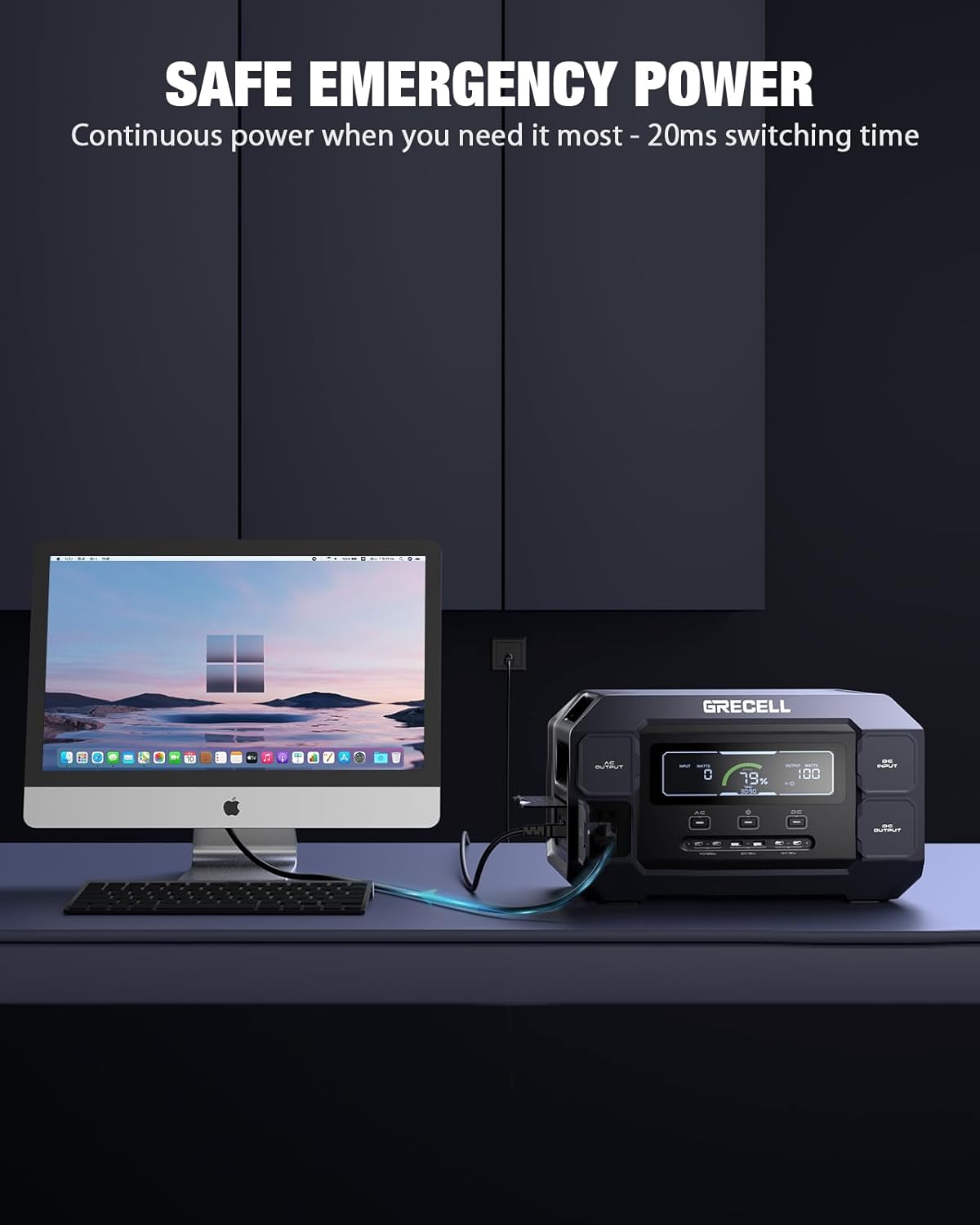
Image: The GRECELL Power Station connected to a desktop computer setup, demonstrating its role as a safe emergency power source with rapid switching time.
Charging Methods
The GRECELL Portable Power Station offers multiple ways to recharge, providing flexibility for various scenarios.

Image: A collage showing four different charging methods for the GRECELL Power Station: AC wall charging, solar charging with panels, car charging, and simultaneous AC + solar charging.
1. AC Wall Charging:
- Connect the provided AC charging cable to the AC input port and a standard wall outlet.
- The power station supports up to 1200W AC input, allowing for a full charge in approximately 1.25 hours.
2. Solar Charging:
- Connect compatible solar panels (up to 600W max input) to the DC input port using the Anderson to MC4 cable.
- Position the solar panels in direct sunlight for optimal charging efficiency.
- The built-in MPPT controller ensures efficient solar charging.

Image: The GRECELL Power Station being charged by two solar panels in an outdoor setting near a body of water, emphasizing its green power source capability.
3. Car Charging:
- Connect the provided car charger to the DC input port and your vehicle's 12V/24V cigarette lighter socket.
- This method is ideal for charging while on the go.
4. AC + Solar Charging:
- For the fastest possible recharge, combine AC wall charging with solar panel charging simultaneously.
- This method can significantly reduce charging time.
Maintenance
Proper maintenance ensures the longevity and optimal performance of your power station.
- Cleaning: Use a dry, soft cloth to wipe the surface of the unit. Do not use abrasive cleaners or solvents.
- Storage: Store the power station in a cool, dry place, away from direct sunlight and extreme temperatures. For long-term storage, charge the unit to 50-80% every 3-6 months to maintain battery health.
- Battery Health: The LiFePO4 battery is designed for over 3500 charge cycles. Avoid fully discharging the battery frequently to maximize its lifespan.
- Ventilation: Ensure the ventilation openings are not blocked during use to prevent overheating.

Image: An exploded view of the GRECELL Power Station, illustrating its internal components and the LiFePO4 battery pack, highlighting the Battery Management System (BMS).
Troubleshooting
If you encounter issues with your power station, refer to the following common problems and solutions:
| Problem | Possible Cause | Solution |
|---|---|---|
| Unit does not turn on. | Battery is completely discharged; Power button not pressed long enough. | Charge the unit using the AC charger. Press and hold the power button for 3-5 seconds. |
| AC output not working. | AC output not activated; Overload protection triggered; Device wattage too high. | Press the AC power button. Reduce the total wattage of connected devices. Disconnect and reconnect devices. |
| Unit not charging. | Charger not properly connected; Faulty charger/cable; Extreme temperature. | Ensure all connections are secure. Try a different outlet or charging method. Charge within recommended temperature range (0-40°C). |
| Display shows an error code. | Internal fault; Over-temperature; Under-voltage. | Refer to the specific error code in the full user manual (if available) or contact customer support. |
Specifications
| Feature | Detail |
|---|---|
| Model | T1 PRO |
| Capacity | 1126Wh |
| AC Output Power | 2200W (Rated), 4800W (Peak) |
| Battery Type | LiFePO4 |
| Cycle Life | 3500+ cycles to 80% capacity |
| AC Input Charging | Max 1200W (Full charge in approx. 1.25 hours) |
| Solar Input Charging | Max 600W (MPPT supported) |
| USB-C Output | 2x PD 100W, 2x QC3.0 18W |
| USB-A Output | 2x QC3.0 18W |
| DC Output | 2x DC Output, 1x Cigar Lighter (13.3V/10A) |
| Dimensions (L x W x H) | 15.6" x 6.13" x 9.19" |
| Operating Temperature | -10°C to 40°C (14°F to 104°F) |

Image: The GRECELL Power Station with its dimensions (length, width, height) clearly marked.
Warranty and Support
The GRECELL Portable Power Station 2200W comes with a 2-year warranty from the date of purchase. This warranty covers manufacturing defects and workmanship under normal use.
For technical support, warranty claims, or any questions regarding your product, please contact GRECELL customer service. Refer to the contact information provided in the included user manual or visit the official GRECELL website.
Online Resources: For additional information, FAQs, and product updates, please visit the GRECELL Store on Amazon.
Related documentsT1 PRO

Ask a question about this manual
Ask about setup, troubleshooting, compatibility, parts, safety, or missing instructions. Manuals+ will review the question and use this page’s manual context to help answer it.