
1. Introduction
Thank you for purchasing the THRIVE MD-460 Grasping Kneading Massager. This device is designed to provide a professional-grade massage experience for various parts of your body, including the neck, shoulders, waist, and legs. It incorporates advanced kneading technology with adjustable settings to suit individual preferences. Please read this manual thoroughly before use to ensure safe and optimal operation.
2. Safety Information
This product is classified as a managed medical device. Always adhere to the following safety guidelines:
- Do not use if you have a pacemaker, heart condition, or any other serious medical condition without consulting a physician.
- Avoid using on injured skin, swollen areas, or areas with rashes.
- Do not use for more than the recommended duration (approximately 10 minutes per session).
- Keep out of reach of children.
- Ensure the power cord is not damaged and is properly connected to a suitable power outlet (AC100V 50/60Hz).
- Do not attempt to disassemble or repair the device yourself. Contact customer support for service.
- This device is not waterproof. Avoid contact with water or excessive moisture.
3. Product Overview and Features
The THRIVE MD-460 massager is designed for targeted relief with its unique grasping kneading mechanism.
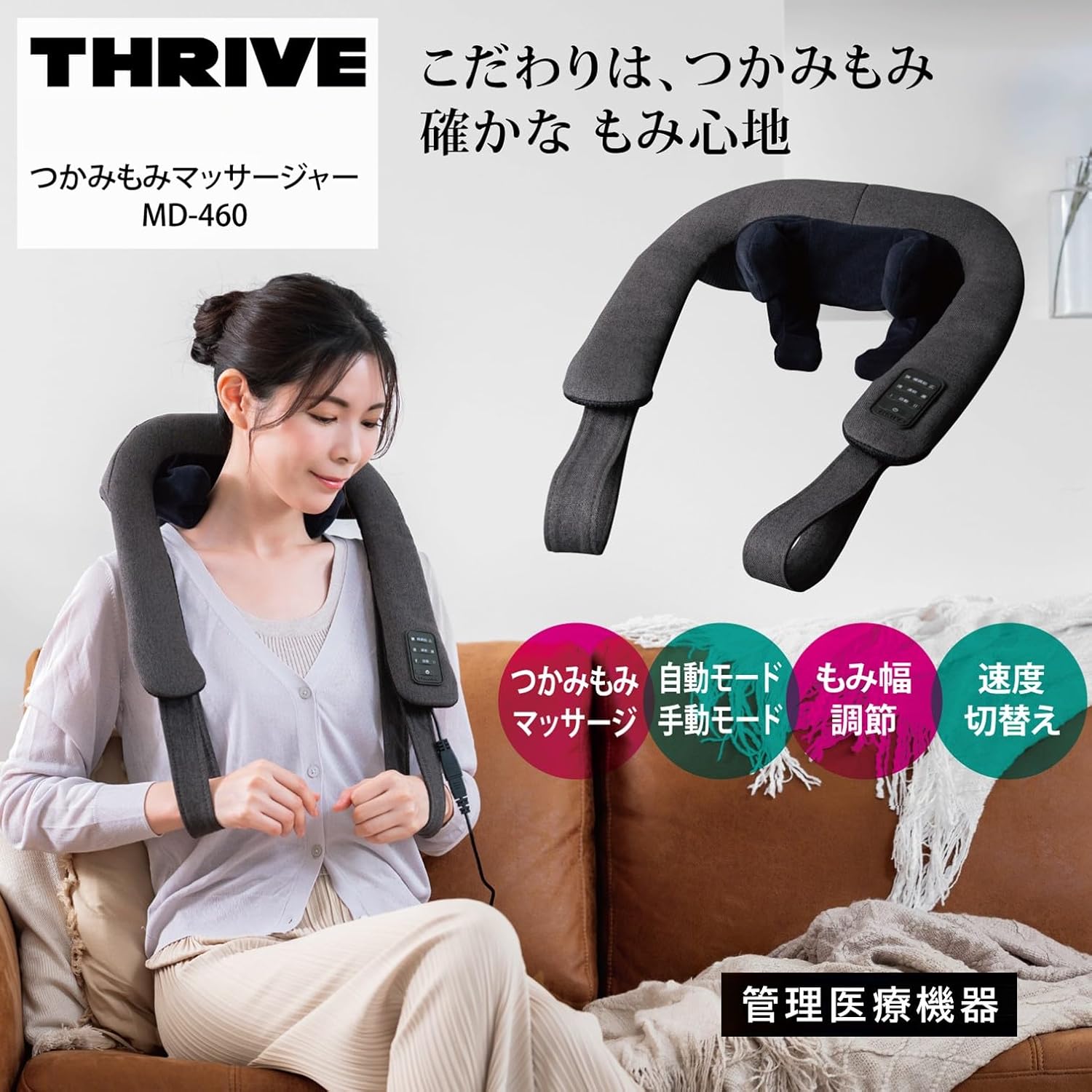
The THRIVE MD-460 massager being used on the neck, highlighting its ergonomic design and key features.

Internal mechanism illustrating the Grasping Motion Technology (GMT) with kneading balls and arms for effective massage.

Adjustable kneading width feature, allowing customization for different body types and massage preferences (Narrow and Wide settings).

User interacting with the control panel, which features illuminated silicone switches for easy operation. The soft textile material ensures comfort.
Key Features:
- Grasping Kneading Massage: Utilizes a unique mechanism to mimic professional hand massage techniques.
- Adjustable Kneading Width: Customize the massage width to perfectly fit your body contours for optimal comfort and effectiveness.
- Speed Switching Function: Choose between 'Fast' (approx. 14 times/min) and 'Slow' (approx. 10 times/min) kneading speeds.
- Auto and Manual Modes: Select between continuous mode for consistent speed or two rhythmic patterns in auto mode.
- Auto-Timer: Equipped with an automatic shut-off function after approximately 10 minutes to prevent overuse.
- Versatile Application: Suitable for massaging the neck, shoulders, waist, and legs.
- Lightweight Design: Weighing approximately 1.45 kg, it is easy to handle and position.
4. Setup
- Unpack the Device: Carefully remove the massager and all accessories from the packaging.
- Inspect for Damage: Check the device and power cord for any visible damage. Do not use if damaged.
- Connect Power: Insert the power cord into the massager's power input, then plug the other end into a standard AC100V 50/60Hz electrical outlet. Ensure the connection is secure.
- Positioning: Place the massager around the desired body part (neck, shoulders, waist, or legs). Use the integrated handles to adjust and hold the massager in place for optimal contact.
5. Operating Instructions
The control panel is located on one of the massager's handles for easy access.
The control panel with illuminated silicone switches for easy mode and speed selection.
- Power On/Off: Press the power button (usually indicated by an 'I/O' symbol) to turn the massager on. Press it again to turn off.
- Select Mode:
- Continuous Mode: Provides a steady kneading motion.
- Auto Mode: Offers two different rhythmic massage patterns. Press the mode button to cycle through the available auto patterns.
- Adjust Kneading Width: Use the width adjustment buttons (often labeled with arrows or 'Narrow'/'Wide' indicators) to change the distance between the kneading nodes. Adjust until it feels comfortable and targets the desired area effectively.
- Adjust Speed: Use the speed control buttons (often labeled 'Fast'/'Slow' or with '+'/'–' symbols) to switch between the two available kneading speeds: Fast (approx. 14 times/min) or Slow (approx. 10 times/min).
- Session Duration: The massager is equipped with an auto-timer and will automatically shut off after approximately 10 minutes. If you wish to continue, you may restart the device after a short break.
- Finishing: When finished, press the power button to turn off the device and unplug it from the power outlet.
6. Maintenance
Proper maintenance ensures the longevity and hygiene of your massager.
- Cleaning: Always unplug the device before cleaning. Wipe the exterior with a soft, dry cloth. For stubborn dirt, a slightly damp cloth with mild detergent can be used, followed by a dry cloth.
- Storage: Store the massager in a cool, dry place, away from direct sunlight and high temperatures. Avoid placing heavy objects on top of it.
- Do Not Wash: The cover is not designed for user removal or washing. Do not attempt to remove the cover or immerse the device in water.
- Cord Care: Do not wrap the power cord tightly around the device. Avoid bending or twisting the cord excessively.
7. Troubleshooting
| Problem | Possible Cause | Solution |
|---|---|---|
| Device does not turn on. | Power cord not properly connected or no power from outlet. | Ensure the power cord is securely plugged into both the massager and a working electrical outlet. Check if the outlet has power. |
| Massage feels too strong or too weak. | Kneading width or speed settings are not optimal for your preference. | Adjust the kneading width and speed settings using the control panel until a comfortable intensity is achieved. |
| Device stops unexpectedly. | Auto-timer has activated. | The device has an auto-timer that stops operation after approximately 10 minutes. This is normal. You can restart the device if desired. |
| Unusual noise during operation. | Possible internal issue. | Turn off the device and unplug it. If the noise persists upon restart, discontinue use and contact customer support. |
If the problem persists after attempting these solutions, please contact the customer service center.
8. Specifications
| Specification | Detail |
|---|---|
| Model Number | MD-460 |
| Rated Voltage | AC100V |
| Frequency | 50/60Hz |
| Power Consumption | 20W |
| Dimensions (W x D x H) | Approx. 37 cm x 39.5 cm x 12.5 cm |
| Weight | Approx. 1.45 kg |
| Power Cord Length | Approx. 1.8 m |
| Kneading Speed (Fast) | Approx. 14 times/minute |
| Kneading Speed (Slow) | Approx. 10 times/minute |
| Auto-Timer | Approx. 10 minutes |
| Material | Polyester |
| Color | GY Gray |
| Water Resistance | Not waterproof |
9. Warranty and Support
THRIVE products are manufactured with high quality standards. We offer the following for your peace of mind:
- 1-Year Warranty: Your THRIVE MD-460 massager comes with a 1-year manufacturer's warranty from the date of purchase. Please retain your proof of purchase for warranty claims.
- Repair Services: In case of malfunction, repair services are available. Do not attempt to repair the device yourself.
- Customer Support: For any inquiries, technical assistance, or warranty claims, please contact our customer service center.
Customer Service Center:
Hours: Monday - Friday, 9:00 AM - 5:00 PM (excluding national holidays)
Phone: 0570-064-762
Please note that standard call charges may apply.

THRIVE's commitment to customer satisfaction, including a 1-year warranty, repair services, and dedicated customer support.