
1. Introduction
This user manual provides detailed instructions for the ELP 4K HDMI USB Camera, Model 2.8-12mm 4X Manual Zoom Lens. This camera is designed for various applications, offering high-resolution video capture and flexible connectivity options. Please read this manual thoroughly before using the product to ensure proper operation and to maximize its performance.

Figure 1: ELP 4K HDMI USB Camera with 2.8-12mm 4X Manual Zoom Lens and connection cables.
2. Product Overview
Key Features
- Simultaneous HDMI + USB3.0 Output: Supports maximum resolution of 3840x2160 with up to 5GBPS high-speed USB 3.0 interface.
- Three Operation Modes: USB Mode, HDMI Mode, and USB+HDMI Simultaneous Output Mode.
- 4K 60fps 2.8-12mm 4X Manual Optical Zoom Lens: Equipped with a 1/2.8-inch CMOS IMX415 color image sensor for clear images and accurate color reproduction.
- High-Speed 4K Camera: Achieves 3840x2160 MJPEG 60fps / H.264 60fps via USB 3.0 and 4K 60fps via HDMI output for smooth streaming.
- UVC Compliant Plug & Play: No additional drivers required. Connects directly to PC, laptop, Android devices, or Raspberry Pi via USB, or to a monitor via HDMI.
- Versatile Compatibility: Compatible with Windows, macOS, and Android operating systems.
- Multiple Applications: Suitable for research, technical projects, bird watching, industrial applications, live streaming, education, and meetings.
Components
The package typically includes the ELP 4K HDMI USB Camera body with a 2.8-12mm manual zoom lens, a USB 3.0 cable, and an HDMI cable.
3. Setup
Connecting the Camera
- USB Connection: Connect the USB 3.0 cable from the camera to an available USB 3.0 port on your computer (PC, laptop, Raspberry Pi, or Android device). The camera is UVC compliant, so no additional drivers are typically needed.
- HDMI Connection: Connect the HDMI cable from the camera to an HDMI input port on your monitor, TV, or projector.
- Power: The camera is powered via the USB connection. Ensure your device provides sufficient power.
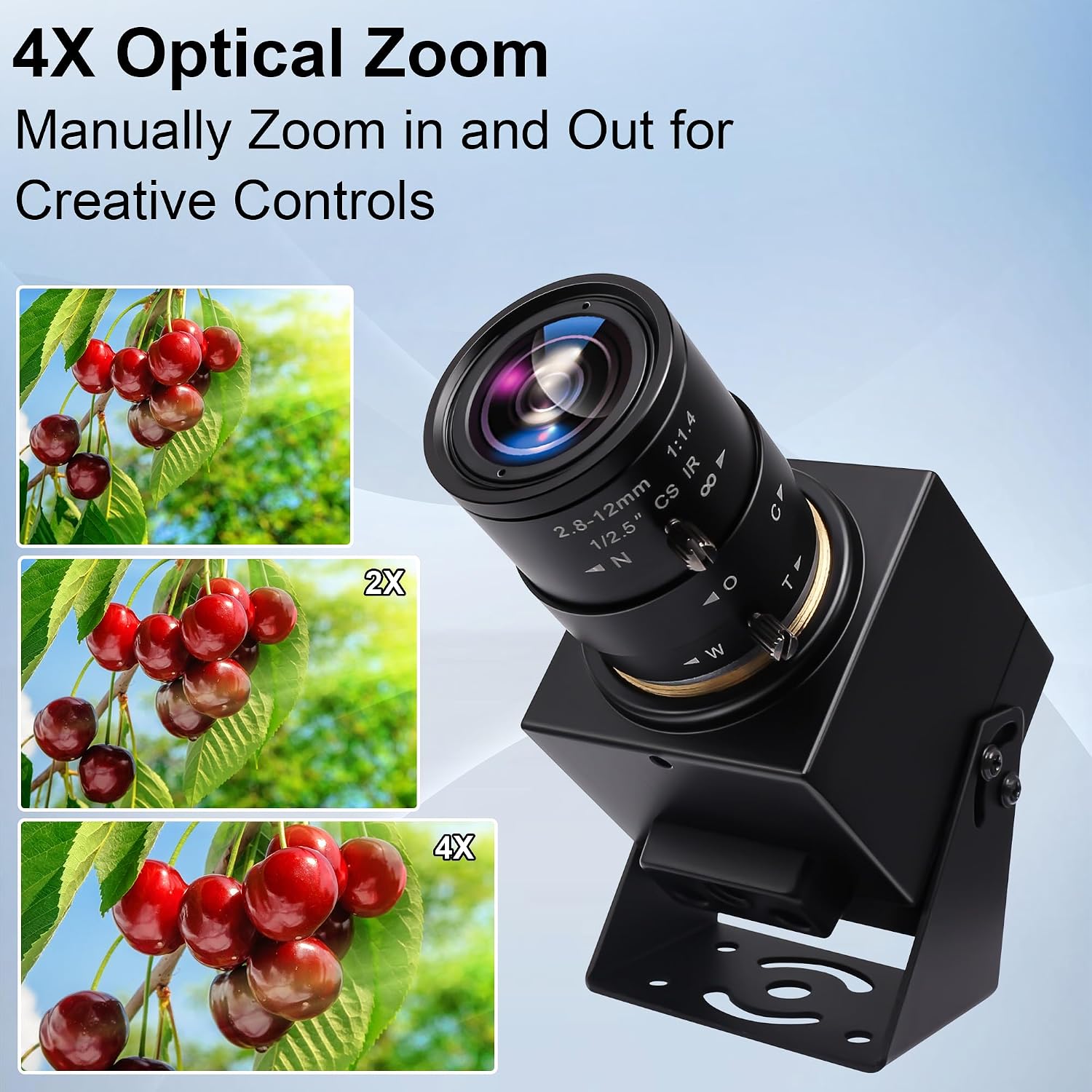
Figure 2: USB 3.0 Plug and Play connection to a laptop.

Figure 3: Simultaneous HDMI and USB output setup.
4. Operating Instructions
Adjusting Zoom and Focus
The camera features a 2.8-12mm 4X manual optical zoom lens. To adjust the zoom and focus:
- Zoom: Rotate the zoom ring on the lens to adjust the magnification (from 2.8mm wide-angle to 12mm telephoto).
- Focus: Rotate the focus ring on the lens until the image appears sharp and clear. This is a manual focus lens, requiring physical adjustment.

Figure 4: Manual 4X optical zoom adjustment.
Selecting Output Modes
The camera supports three distinct output modes:
- USB Mode: Video output is sent only through the USB 3.0 connection to a connected computer or compatible device.
- HDMI Mode: Video output is sent only through the HDMI connection to a monitor, TV, or projector.
- USB+HDMI Simultaneous Output Mode: Video is output concurrently through both USB 3.0 and HDMI connections.
The specific method for switching between these modes may depend on the connected software or device. Refer to your software's documentation for mode selection options.

Figure 5: Visual comparison of 4K@15FPS vs 4K@60FPS output.

Figure 6: H.264 and MJPEG compression format comparison.
Software Compatibility
The camera is compatible with standard UVC (USB Video Class) software on various operating systems, including:
- Windows
- macOS
- Android
- Raspberry Pi
For optimal performance, ensure your software is updated and configured to support 4K resolution and 60fps frame rates. Common applications include OBS Studio, VLC Media Player, and various video conferencing platforms.

Figure 7: Multiple application scenarios for the camera.
5. Maintenance
Cleaning
- Lens: Use a soft, lint-free cloth specifically designed for optical lenses to gently wipe the lens surface. Avoid using abrasive materials or harsh chemicals.
- Camera Body: Wipe the camera body with a dry, soft cloth. Do not use liquid cleaners directly on the camera.
Storage
When not in use, store the camera in a cool, dry place away from direct sunlight and extreme temperatures. Protect the lens from dust and scratches by using a lens cap if available.
6. Troubleshooting
If you encounter issues with your ELP 4K HDMI USB Camera, refer to the following common problems and solutions:
| Problem | Possible Cause | Solution |
|---|---|---|
| No image/video output | Loose cable connection, incorrect input selection on monitor, software not detecting camera. | Check USB and HDMI cable connections. Ensure the monitor input is set correctly. Verify camera detection in your software/OS settings. Try a different USB port or cable. |
| Poor image quality/Blurry image | Incorrect focus, insufficient lighting, software settings, lens smudges. | Adjust the manual focus ring on the lens. Ensure adequate lighting. Check resolution and frame rate settings in your software. Clean the lens. |
| Image distortion at wide angle | Characteristic of wide-angle lenses. | This is a common optical effect for wide-angle lenses. Adjust zoom to a narrower field of view if distortion is problematic. |
| No audio recording | The camera does not have a built-in microphone. | This camera is designed for video capture only. Use an external microphone for audio recording. |
| Low frame rate at 4K resolution | System limitations, software settings, USB bandwidth. | Ensure your computer meets the minimum requirements for 4K 60fps video processing. Check software settings for frame rate. Use a high-quality USB 3.0 port and cable. |
7. Specifications
| Feature | Detail |
|---|---|
| Brand | ELPCAM |
| Photo Sensor Technology | CMOS (IMX415) |
| Video Capture Resolution | 4K (3840x2160) |
| Max Focal Length | 12 millimeters |
| Min Focal Length | 2.8 millimeters |
| Max Aperture | f/2.8 |
| Connectivity Technology | HDMI, USB 3.0 |
| Optical Zoom | 4X |
| Image Sensor Size | 1/2.8 inches |
| Image Capture Speed | 60 fps (at 4K) |
| Video Capture Formats | MJPEG, YUY2, H.264 |
| Focus Type | Manual Focus |
| Supported Operating Systems | Windows, macOS, Android |
| Form Factor | Compact |
| Image Stabilization | No |
| UPC | 757350434299 |
| ASIN | B0D2N92P1W |
8. Warranty and Support
For warranty information or technical support, please contact the manufacturer or the seller directly. Keep your purchase receipt as proof of purchase.