
MEIHUA FLB060
MEIHUA 60W LED Security Motion Sensor Outdoor Light (Model: FLB060) User Manual
1. Introduction
Thank you for purchasing the MEIHUA 60W LED Security Motion Sensor Outdoor Light. This manual provides detailed instructions for installation, operation, and maintenance to ensure optimal performance and safety. Please read this manual thoroughly before use and retain it for future reference.
2. Important Safety Instructions
- Always disconnect power before installation or servicing.
- Installation should be performed by a qualified electrician or in accordance with local electrical codes.
- Ensure the mounting surface can support the weight of the fixture.
- Do not look directly into the LED light source when it is illuminated, as this may cause eye damage.
- Do not modify the product in any way. Unauthorized modifications may void the warranty and create safety hazards.
- Keep the product away from flammable materials.
3. Package Contents
Verify that all components are present:
- MEIHUA 60W LED Security Motion Sensor Outdoor Light
- Remote Control
- Mounting Screws and Wall Anchors (4 sets)
- User Manual (this document)

Figure 3.1: Contents of the package including the floodlight, remote control, and mounting accessories.
4. Product Overview
The MEIHUA 60W LED Security Motion Sensor Outdoor Light features 84 high-quality SMD LEDs, providing 5200 lumens of 6500K daylight white illumination. It includes a motion sensor and can be controlled via a remote or integrated buttons. The unit is IP66 waterproof for the light and IP65 for the sensor, ensuring durability in various weather conditions.

Figure 4.1: Overview of the MEIHUA 60W LED Security Light's main features.

Figure 4.2: Product dimensions, adjustable bracket, and various installation methods.
5. Installation
5.1 Mounting Location
Choose a suitable location for installation. The recommended installation height is between 5-7 meters (16.4-23 feet) for optimal coverage. The motion sensor has a 180° detection range and the light has a 120° lighting range.

Figure 5.1: Recommended installation height and coverage area.
5.2 Installation Steps
- Prepare the Mounting Surface: Ensure the surface is clean, dry, and capable of supporting the fixture.
- Mark Drilling Points: Use the bracket as a template to mark the positions for drilling holes.
- Drill Holes: Drill holes at the marked positions. Insert wall anchors if installing on masonry or drywall.
- Mount the Bracket: Secure the bracket to the wall using the provided screws.
- Attach the Light Fixture: Attach the LED floodlight to the mounted bracket. The bracket allows for 180° adjustment of the light angle.
- Adjust Sensor Angle: The motion sensor can be adjusted 360° horizontally and 180° vertically to optimize detection.
- Connect Power: Connect the power cord to a suitable power outlet. Ensure the power is off during connection.
Figure 5.2: Visual guide for adjusting the bracket and sensor, and different installation types.
6. Operation
6.1 Control Methods
The MEIHUA security light can be operated using two methods:
- Remote Control: Provides full functionality for adjusting modes, brightness, sensing distance, and timing.
- Buttons on Sensor: Basic controls are available directly on the back of the motion sensor unit.
6.2 Remote Control Functions
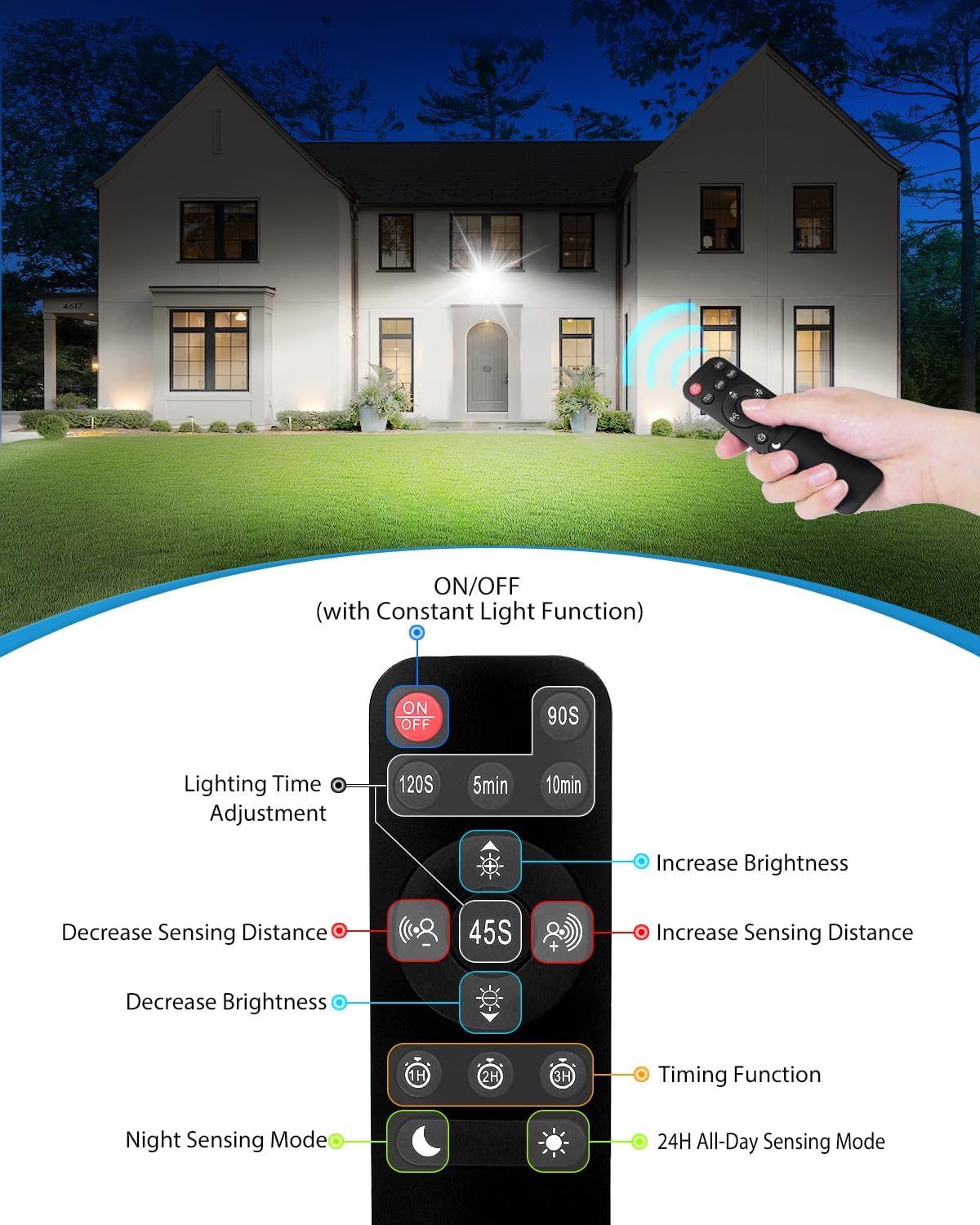
Figure 6.1: Remote control layout and button functions.
- ON/OFF: Toggles the light on or off. In Constant Light Mode, this button maintains the light until turned off.
- Lighting Time Adjustment: Sets how long the light stays on after motion detection (90s, 120s, 5min, 10min).
- Brightness Adjustment: Increases or decreases the light brightness (10% to 100%).
- Sensing Distance Adjustment: Adjusts the motion detection range (6m/19.7ft, 9m/29.5ft, 12m/39.4ft).
- Timing Function (1H/2H/3H): Sets the light to stay on for a fixed duration (1, 2, or 3 hours) in Constant Light Mode. After the timer expires, it reverts to Night Sensing Mode.
- Night Sensing Mode: Light activates only when motion is detected at night.
- 24H All-Day Sensing Mode: Light activates when motion is detected, regardless of ambient light conditions.
6.3 Lighting Modes
The light offers three distinct operating modes:
- Mode 1: 24H All-Day Sensing Mode
The light will automatically turn on when motion is detected, whether it is day or night. - Mode 2: Night Sensing Mode
The light will automatically turn on only when motion is detected at night. - Mode 3: Constant Light Mode
The light will stay on continuously until manually turned off. This mode can be combined with the Timing Function.

Figure 6.2: Visual representation of the three lighting modes.
6.4 Brightness and Sensing Distance Adjustment
The brightness can be adjusted from 10% to 100% (520LM to 5200LM). The sensing distance can be set to approximately 6m (19.7ft), 9m (29.5ft), or 12m (39.4ft).

Figure 6.3: Brightness levels and sensing distance/time adjustments.
6.5 Memory Function
The security light retains the last selected mode and settings. If power is interrupted, the light will resume its previous configuration once power is restored.

Figure 6.4: The light's memory function in action.
7. Maintenance
- Cleaning: Periodically clean the light fixture and motion sensor lens with a soft, damp cloth. Do not use abrasive cleaners or solvents.
- Inspection: Regularly inspect the power cord and mounting hardware for any signs of wear or damage.
- LED Replacement: The LED light source is designed for long-term use and is not user-replaceable.
8. Troubleshooting
| Problem | Possible Cause | Solution |
|---|---|---|
| Light does not turn on. | No power; Sensor blocked; Incorrect mode setting. | Check power connection; Clear sensor path; Verify mode (e.g., 24H All-Day Sensing Mode). |
| Light stays on continuously. | Constant Light Mode activated; Sensor continuously detecting motion. | Switch to a sensing mode; Adjust sensor angle or sensitivity to avoid constant detection. |
| Motion sensor not detecting. | Sensor angle incorrect; Sensing distance too low; Obstruction. | Adjust sensor angle and increase sensing distance via remote; Remove obstructions. |
| Remote control not working. | Battery depleted; Obstruction between remote and sensor; Remote too far. | Replace remote battery; Ensure clear line of sight; Operate within effective range (approx. 10-15 ft). |
9. Specifications
| Feature | Detail |
|---|---|
| Model Number | FLB060 |
| Power Consumption | 60W |
| Luminous Flux | 5200 Lumens (adjustable 10%-100%) |
| Color Temperature | 6500K Daylight White |
| LED Type | 84 SMD LEDs |
| Motion Sensor Detection Angle | 180° |
| Motion Sensor Detection Distance | 6m (19.7ft) - 12m (39.4ft) adjustable |
| Lighting Angle | 120° |
| Waterproof Rating | Light: IP66, Sensor: IP65 |
| Material | Aluminum, Glass |
| Product Dimensions | 4 x 16 x 16 cm (1.57 x 6.3 x 6.3 inches) |
| Weight | 860 g (1.9 lbs) |
| Power Source | Corded Electric |
10. Warranty and Support
MEIHUA products are designed for reliability and performance. For warranty information or technical support, please contact MEIHUA customer service through your purchase platform or the official MEIHUA website. Please have your model number (FLB060) and purchase date available when contacting support.
Related documentsFLB060

Ask a question about this manual
Ask about setup, troubleshooting, compatibility, parts, safety, or missing instructions. Manuals+ will review the question and use this page’s manual context to help answer it.