
1. Introduction
This manual provides essential information for the safe and efficient operation, installation, and maintenance of your HOBART LXNC-3 Commercial Undercounter Dishwasher. Please read all instructions carefully before using the appliance to ensure proper function and to prevent injury or damage. Keep this manual for future reference.
Safety Information
Always follow basic safety precautions when using electrical appliances. This unit is designed for commercial use by trained personnel. Ensure all electrical and plumbing connections are performed by qualified professionals in accordance with local codes and regulations. Disconnect power before performing any service or maintenance.
2. Setup and Installation
The HOBART LXNC-3 dishwasher is designed for undercounter installation. Proper installation is crucial for optimal performance and safety. It is recommended that installation be performed by a certified technician.
Unpacking
Carefully remove the dishwasher from its packaging. Inspect the unit for any shipping damage. Report any damage to the carrier immediately. The package includes the dishwasher unit itself.
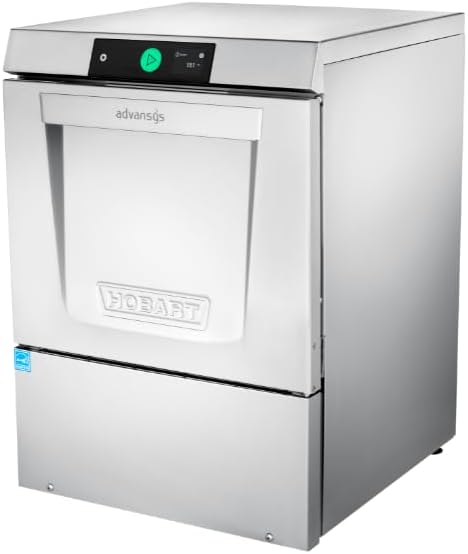
Figure 2.1: HOBART LXNC-3 Commercial Undercounter Dishwasher. This image shows the overall exterior of the dishwasher, highlighting its compact design suitable for undercounter placement.
Placement and Connections
- Dimensions: Ensure adequate space for the unit, which measures approximately 25.56"D x 23.94"W x 32.5"H.
- Electrical: The unit requires a 120 Volt electrical supply. Connect to a dedicated circuit as specified in the electrical requirements section of the full installation guide.
- Plumbing: Connect to appropriate hot water supply and drain lines. This model uses chemical sanitizing and requires connections for chemical pumps.
- Leveling: Adjust the leveling feet to ensure the dishwasher is stable and level on the floor.
3. Operating Instructions
The HOBART LXNC-3 features intuitive controls designed for ease of use in a commercial environment.
Smart Touchscreen Controls
The dishwasher is equipped with smart touchscreen controls for selecting wash cycles, monitoring status, and accessing settings. The display provides real-time information, including temperature readings.

Figure 3.1: Smart Touchscreen Controls. This image displays the digital touchscreen interface, showing temperature and operational status, along with a play button to start cycles.
Loading the Dishwasher
The 17-inch door opening height allows for easy loading and unloading of various dishware sizes. The unit accommodates optional two-level racking accessories to maximize capacity and throughput.

Figure 3.2: Two-Level Racking System. This image illustrates the interior of the dishwasher with dishes loaded on two levels, demonstrating the capacity and flexible racking options.
Wash Cycle Selection
Select the appropriate wash cycle using the touchscreen interface. Available cycle options include:
- Normal: For standard soiled dishes.
- Intensive: For heavily soiled items requiring a more thorough wash.
- Rinse Only: For pre-rinsing or quick rinsing of dishes.
- Quick Wash: For lightly soiled items or when speed is critical.
The dishwasher is capable of processing up to 34 racks per hour, or 48 racks per hour when utilizing the optional second-level rack. Each rack uses approximately 0.62 gallons of water.
SmartConnect App
The SmartConnect app allows for remote monitoring and control of the dishwasher, providing enhanced convenience and operational insights. Refer to the app's dedicated instructions for pairing and usage.
4. Maintenance
Regular maintenance ensures the longevity and optimal performance of your HOBART LXNC-3 dishwasher. Always disconnect power before performing any maintenance.
Cleaning and Deliming
- Self-Cleaning Filter: The unit features a self-cleaning filter, reducing the frequency of manual filter cleaning. Periodically check the filter for any debris accumulation.
- Delime Notification: The dishwasher will provide a delime notification when descaling is required. Follow the instructions on the touchscreen or in the full service manual for the deliming procedure.
- Chemical Pumps with Auto Prime: The chemical pumps are equipped with an auto-prime feature to ensure proper chemical delivery. Regularly check chemical levels and refill as needed.
- General Cleaning: Wipe down the exterior with a damp cloth. Clean the interior spray arms and nozzles regularly to prevent blockages.

Figure 4.1: Dishwasher Interior View. This image shows the internal components of the dishwasher, including the wash arms and filter area, relevant for cleaning and maintenance.
5. Troubleshooting
This section provides guidance for common issues you might encounter. For more complex problems, refer to the full service manual or contact HOBART customer support.
Common Issues and Solutions
- Dishwasher Not Starting: Check power supply, ensure door is fully closed, and verify water supply is connected and turned on.
- Poor Wash Results: Ensure dishes are loaded correctly, spray arms are not blocked, and detergent levels are adequate. Check for delime notification.
- Leaks: Inspect door gasket for damage or debris. Ensure drain hose is properly connected.
- Error Codes: The smart touchscreen controls provide service diagnostics. Refer to the display for specific error codes and consult the full service manual for detailed explanations and solutions.
If issues persist after basic troubleshooting, utilize the built-in service diagnostics feature or contact a qualified service technician.
6. Specifications
| Feature | Detail |
|---|---|
| Model Name | LXNC-3 |
| Brand | HOBART |
| Style | LXNC Low Temp |
| Voltage | 120 Volts |
| Cycle Options | Normal, Intensive, Rinse Only, Quick Wash |
| Water Consumption | 0.62 Gallons per rack |
| Racks per Hour | 34 (48 with second level rack) |
| Product Dimensions (D x W x H) | 25.56" x 23.94" x 32.5" |
| Material | Stainless Steel |
| Special Feature | Self-Cleaning Filter |
| Installation Type | Under Counter |
| Included Components | Dishwasher |
7. Warranty and Support
For detailed warranty information, please refer to the documentation provided with your purchase or visit the official HOBART website. HOBART provides customer support for technical assistance, parts, and service inquiries.
Contact HOBART Support:
- Visit the official HOBART website for contact details and service locator.
- Have your model number (LXNC-3) and serial number ready when contacting support.


