
1. Introduction
This manual provides essential instructions for the safe and efficient use of your ONEVAN 20V Lithium-Ion Battery and Charger. Please read this manual thoroughly before first use and keep it for future reference. This product is designed to power ONEVAN cordless tools.
2. Safety Information
WARNING: Read all safety warnings and instructions. Failure to follow the warnings and instructions may result in electric shock, fire, and/or serious injury.
- Always use the battery with compatible ONEVAN tools and chargers.
- Do not immerse the battery in water or other liquids.
- Do not store or use the battery in temperatures exceeding 50°C (122°F) or below -10°C (14°F).
- Do not short-circuit the battery terminals.
- Do not open, disassemble, or attempt to repair the battery pack.
- Keep the battery away from heat sources, direct sunlight, and flammable materials.
- If the battery is damaged, leaking, or excessively hot, discontinue use immediately and dispose of it properly.
- Charge the battery only with the specified ONEVAN charger.
- Dispose of batteries responsibly according to local regulations.
3. Product Overview
The ONEVAN 20V Li-Ion Battery and Charger system provides portable power for your cordless tools. The battery features an LED indicator for charge status and built-in protection mechanisms.

Figure 1: ONEVAN 20V Li-Ion Battery (x2) and Charger. Each battery features a green LED charge indicator on the side.
3.1 Battery Features
- Voltage: 20V
- Capacity: 3.0 Ah (3000 mAh)
- Battery Composition: Lithium-ion
- LED Indicator: Displays current charge level.
- Protection System: Built-in smart core protection against overcharge, over-discharge, overheating, short circuit, overcurrent, overvoltage, and over-power.

Figure 2: Detailed view of the battery showing the charging port, LED charge status display, and the button to activate the display.

Figure 3: The battery incorporates multiple protection features including short circuit, overcharge, recovery, overvoltage, overpower, over-discharge, overheating, and overcurrent protection.
3.2 Charger Features
- Designed for ONEVAN 20V Li-Ion batteries.
- Fast charging capability.
4. Setup
4.1 Unpacking
- Carefully remove all components from the packaging.
- Inspect the battery and charger for any signs of damage. Do not use if damaged.
- Retain packaging for storage or future transport.
4.2 Initial Charging
It is recommended to fully charge the battery before its first use to ensure optimal performance and battery life.
- Connect the charger to a standard power outlet.
- Insert the battery into the charger, ensuring it clicks securely into place.
- The charger will indicate the charging status (refer to charger's specific LED indicators if available, otherwise assume a general charging light).
- Once fully charged, remove the battery from the charger.
5. Operating Instructions
5.1 Checking Battery Charge Status
Press the display switch button on the battery to activate the LED indicator. The number of illuminated green LEDs indicates the approximate charge level:
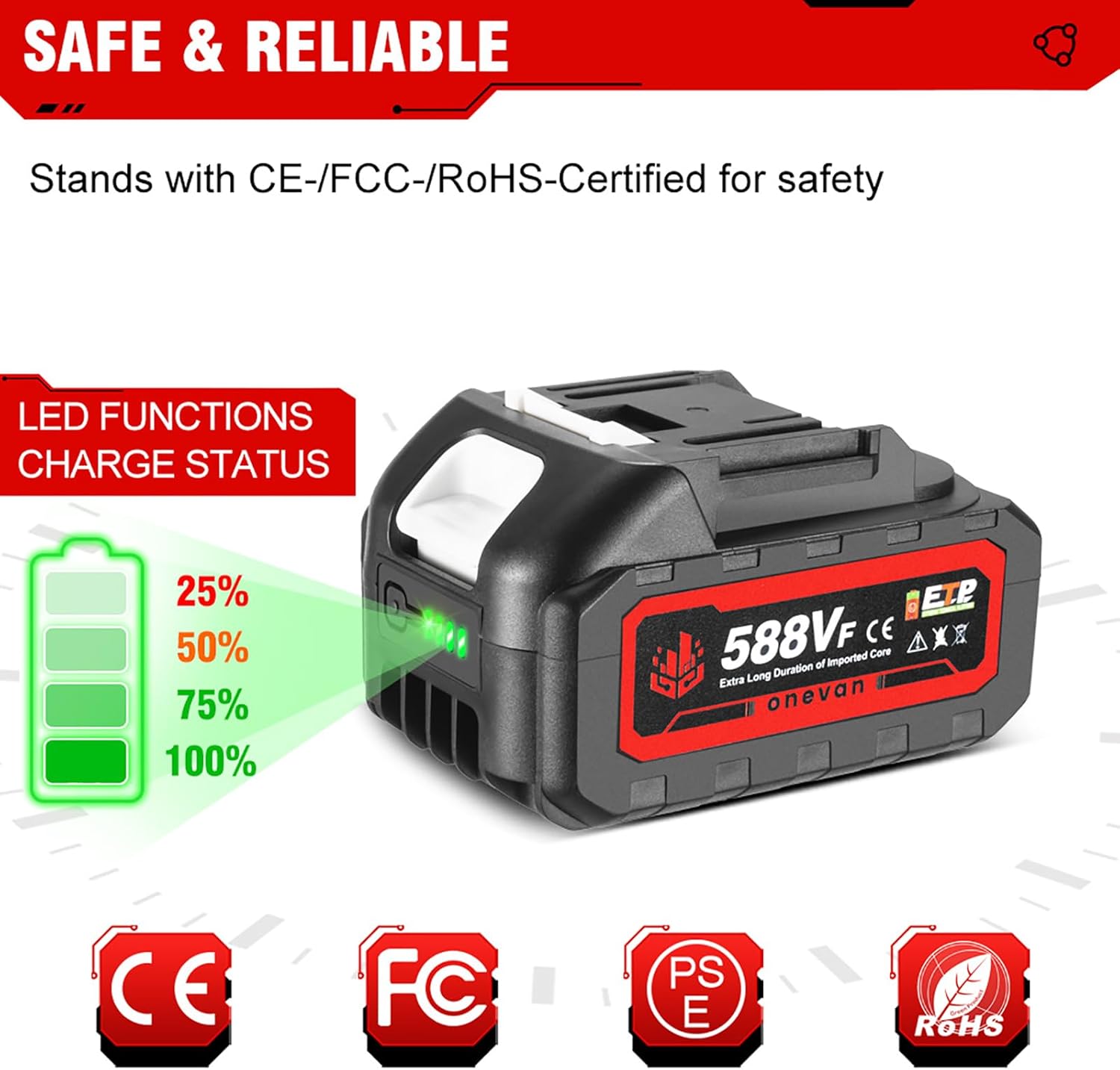
Figure 4: The LED indicator shows charge levels: 1 LED (25%), 2 LEDs (50%), 3 LEDs (75%), 4 LEDs (100%).
- 4 LEDs: 75-100% charged
- 3 LEDs: 50-75% charged
- 2 LEDs: 25-50% charged
- 1 LED: 0-25% charged (recharge soon)
5.2 Installing and Removing the Battery
- To Install: Align the battery with the battery port on your ONEVAN tool. Slide the battery into place until it clicks securely.
- To Remove: Press the battery release button (if present on your tool) and slide the battery out of the tool.

Figure 5: Ensure the battery's pin style and dimensions (e.g., 55mm x 40mm, 53mm x 40mm x 32mm) are compatible with your specific ONEVAN tool. The image indicates compatibility with certain 18V/20V tool interfaces.
5.3 Charging the Battery
Follow these steps to charge your ONEVAN 20V Li-Ion battery:
- Ensure the charger is connected to a functional power outlet.
- Insert the battery into the charger. The charger's indicator light will show that charging has begun.
- Allow the battery to charge fully. The charger's indicator will change (e.g., from red to green, or solid to blinking) when charging is complete.
- Once fully charged, remove the battery from the charger to prevent overcharging, although the battery has built-in protection.
6. Maintenance
6.1 Cleaning
- Keep the battery and charger clean and free of dust and debris.
- Use a dry, soft cloth to wipe surfaces. Do not use solvents or abrasive cleaners.
- Ensure charging terminals are clean and free of obstruction.
6.2 Storage
- Store batteries in a cool, dry place, away from direct sunlight and moisture.
- For long-term storage, charge the battery to approximately 50-75% capacity. Do not store fully charged or fully discharged.
- Keep batteries away from metal objects that could short-circuit the terminals.
6.3 Battery Care Tips
- Avoid completely draining the battery before recharging.
- Do not expose batteries to extreme temperatures.
- If a battery becomes excessively hot during use or charging, allow it to cool down before further use or charging.
7. Troubleshooting
7.1 Battery Not Charging
- Check Power Connection: Ensure the charger is securely plugged into a working power outlet.
- Check Battery Connection: Make sure the battery is fully seated in the charger.
- Temperature: The battery may be too hot or too cold. Allow it to reach room temperature before charging.
- Damage: Inspect the battery and charger for any visible damage. Do not use if damaged.
7.2 Tool Not Operating
- Battery Charge: Check the battery charge level using the LED indicator. Recharge if necessary.
- Battery Connection: Ensure the battery is properly installed and locked into the tool.
- Tool Issue: If the battery is charged and properly installed, the issue might be with the tool itself. Refer to your tool's instruction manual.
8. Specifications
| Feature | Specification |
|---|---|
| Brand | ONEVAN |
| Model Number | sku005201 |
| Battery Voltage | 20V |
| Battery Capacity | 3.0 Ah (3000 mAh) |
| Battery Type | Lithium-ion |
| Certifications | CE |
| Rechargeable | Yes |
Note: The image showing "30000 mAh" is likely a graphical error or refers to a different product variant. The product description specifies 3.0 Ah (3000 mAh).
9. Warranty and Support
For warranty information, technical support, or service inquiries, please contact your retailer or the ONEVAN manufacturer directly. Keep your purchase receipt as proof of purchase.
Information regarding spare parts availability and software updates is not provided in the product specifications. Please consult the manufacturer for details.
10. Product Applications
The ONEVAN 20V Li-Ion battery is designed to power a wide range of compatible ONEVAN cordless tools, enhancing versatility and convenience for various tasks.

Figure 6: Examples of ONEVAN cordless tools compatible with the 20V battery system.

