
1. Introduction
The LAUNCH X431 IMMO Plus is an advanced all-in-one OBD2 car diagnostic device designed for professional automotive technicians and locksmiths. This tool integrates comprehensive diagnostic functions, advanced key programming, ECU coding, and over 39 special reset services. It is equipped with a 10.1-inch touchscreen, 4G connectivity, and a powerful 47800 mAh battery, ensuring efficient and reliable operation.
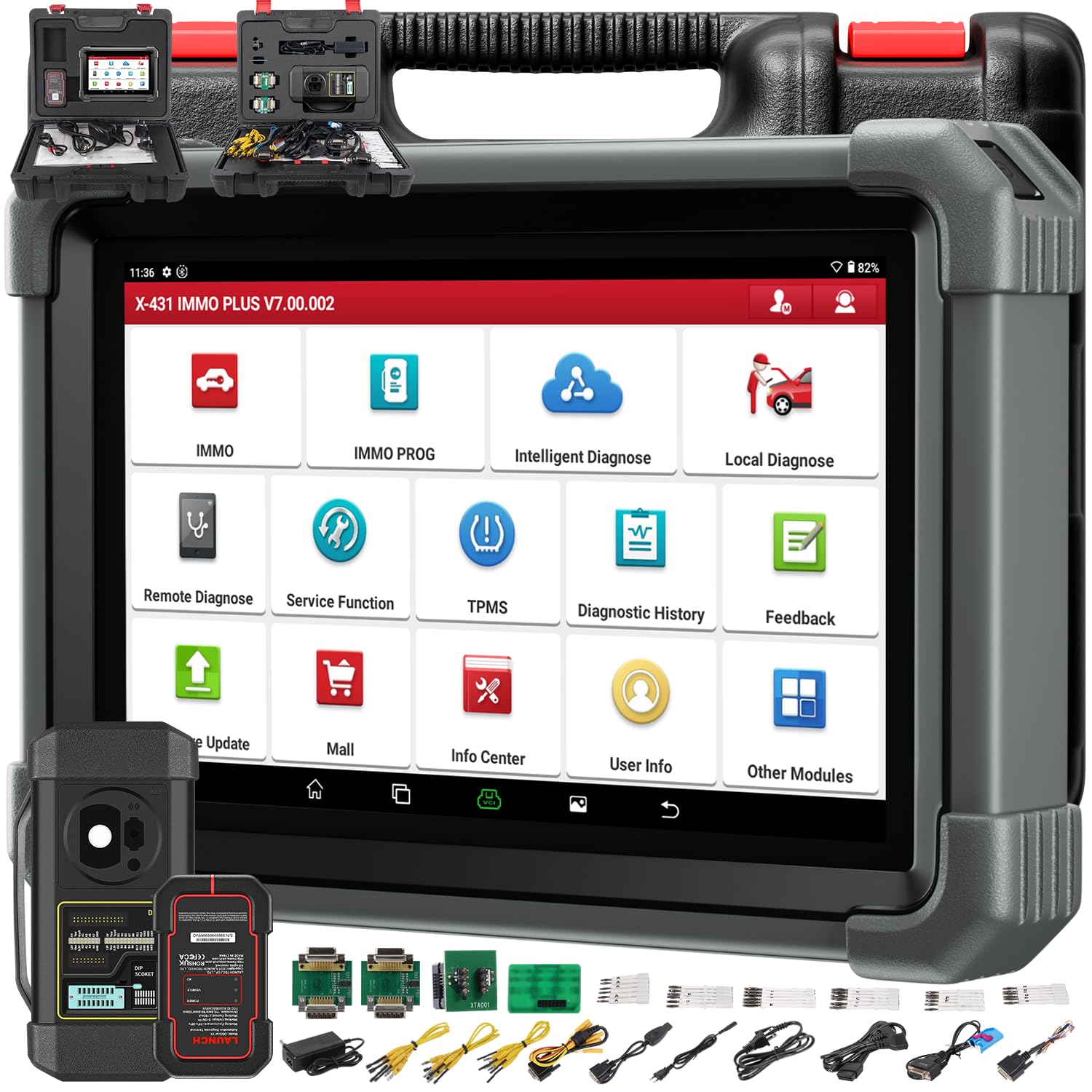
Image 1.1: The LAUNCH X431 IMMO Plus diagnostic device shown with the X-PROG3 key programmer.
2. What's in the Box
Verify that all components are present upon unboxing:
- LAUNCH X431 IMMO Plus Diagnostic Tablet
- LAUNCH X431 ProGIII Key Programmer
- Necessary cables and adapters (not explicitly listed in source, but implied for operation)
3. Setup
3.1 Initial Device Activation
Upon first use, the device requires activation. Follow the on-screen prompts to register your device using the provided serial number and activation code. Ensure a stable internet connection (Wi-Fi or 4G) during this process.
3.2 Connecting to a Vehicle
- Locate the vehicle's OBD-II port, typically under the dashboard on the driver's side.
- Connect the diagnostic cable to the OBD-II port.
- Connect the other end of the cable to the LAUNCH X431 IMMO Plus device.
- Turn the vehicle's ignition to the 'ON' position (engine off).
- Power on the LAUNCH X431 IMMO Plus device.
4. Operating Instructions
4.1 Full System Diagnostics
The device supports comprehensive diagnostics for all vehicle systems, including Engine (ENG), Transmission Control Module (TCM), Body Control Module (BCM), Tire Pressure Monitoring System (TPMS), Supplemental Restraint System (SRS), and Anti-lock Braking System (ABS).
- Read/Clear DTCs: Retrieve and erase diagnostic trouble codes.
- Live Data Stream: View real-time data parameters from various sensors.
- Vehicle Information: Access vehicle identification details.
- Active Tests: Perform bidirectional control tests (see section 4.4).

Image 4.1: The diagnostic tablet interface showing vehicle diagnostic options and broad compatibility.
4.2 Advanced Key Programming (IMMO)
Utilizing the included X-PROG3 key programmer, the X431 IMMO Plus offers extensive immobilizer functions:
- Read PIN/CS codes.
- Add/Delete keys.
- Perform 'All Keys Lost' procedures.
- ECU reset, adaptation, refresh, and coding.
- Read and write EEPROM/MCU chips.
- Engine/Gearbox ECU replacement and cloning.
- MC9S12 encryption chip read/write.
- Remote learning.

Image 4.2: The X-PROG3 key programmer, an essential component for advanced immobilizer functions.
4.3 Advanced ECU Coding
ECU coding allows for advanced vehicle customization and module management:
- Restore ECU code data for replaced modules.
- Activate, tune, or convert ECU modules.
- Optimize vehicle performance and fuel efficiency.
- Unlock hidden features and disable unwanted functions.
- Perform Programmable Module Installation (PMI) for Ford, Lincoln, and Mazda vehicles.

Image 4.3: The advanced ECU coding interface on the diagnostic tablet, showing options for vehicle customization and parameter modification.
4.4 Bidirectional Control / Active Tests
This function allows the diagnostic tool to send commands to vehicle ECUs to test specific components or subsystems, helping to quickly identify malfunctions.
- Activate radiator fans.
- Modulate the throttle.
- Operate mirrors.
- Turn lights on/off.
- Test door lock actuators.
- Activate transmission oil pump.
- Perform injector buzz tests.

Image 4.4: A tablet screen displaying system controls for various vehicle functions, demonstrating bidirectional control capabilities.
4.5 39+ Special Reset Services
The X431 IMMO Plus provides a wide range of special functions for maintenance and service tasks:
- Oil Reset
- Steering Angle Sensor (SAS) Reset
- Electronic Parking Brake (EPB) Reset
- ABS Bleeding
- Battery Matching
- Diesel Particulate Filter (DPF) Regeneration
- Throttle Adaptation
- Tire Pressure Monitoring System (TPMS) Reset
- Injector Coding
- Transmission Learning
Note: The availability of specific functions may vary depending on the vehicle model and year.

Image 4.5: The tablet interface showcasing the extensive list of over 39 special service functions available.
4.6 CAN FD & DOIP Protocols
The device supports advanced communication protocols for newer vehicles:
- CAN FD: Supported for GM vehicles from 2020 onwards.
- DOIP: Supported for Volvo (2018+), Land Rover (2017+), and Jaguar (2017+) vehicles. An additional transparent adapter may be required for DOIP.
- AutoAuth for FCA SGW: Provides secure gateway access for 2018 and newer FCA vehicles (Chrysler, Dodge, Jeep).
5. Maintenance
5.1 Software Updates
The LAUNCH X431 IMMO Plus includes 2 years of free software updates. Regularly update the device software to ensure access to the latest vehicle models, diagnostic functions, and bug fixes. Connect the device to Wi-Fi and navigate to the 'Software Update' section in the main menu.
5.2 Cleaning and Storage
- Clean the device screen and body with a soft, damp cloth. Avoid abrasive cleaners or solvents.
- Store the device in its original case in a dry, cool environment when not in use.
- Avoid exposing the device to extreme temperatures, direct sunlight, or excessive moisture.
6. Troubleshooting
6.1 Device Not Powering On
- Ensure the battery is sufficiently charged. Connect the device to its charger.
- Check the power button for proper function.
6.2 Communication Errors with Vehicle
- Verify that the diagnostic cable is securely connected to both the device and the vehicle's OBD-II port.
- Ensure the vehicle's ignition is in the 'ON' position (engine off).
- Check for any blown fuses in the vehicle's OBD-II circuit.
- Confirm that the vehicle model and year are correctly selected in the diagnostic software.
6.3 Software Update Issues
- Ensure a stable and strong internet connection.
- Check available storage space on the device.
- Restart the device and attempt the update again.
7. Specifications

Image 7.1: The LAUNCH X431 IMMO Plus Scanner, highlighting its technical specifications and features.
| Feature | Description |
|---|---|
| Brand | LAUNCH |
| Model Name | X431 IMMO Plus |
| Manufacturer Part Number | YZH03-A |
| UPC | 884508000348 |
| Power Source | Battery Powered |
| Screen Size | 10.1 Inches (estimated from image description) |
| Connectivity | 4G, Wi-Fi (2.4GHz/5GHz) |
| Battery Capacity | 47800 mAh |
| Operating System | Android 10.0 |
| Storage | 64GB |
| Included Components | LAUNCH X431 IMMO Plus, LAUNCH X431 ProGIII |
8. Warranty and Support
8.1 Manufacturer's Warranty
The LAUNCH X431 IMMO Plus comes with a 2-year manufacturer's warranty. Please retain your proof of purchase for warranty claims. The warranty covers defects in materials and workmanship under normal use.
8.2 Technical Support
For technical assistance, software updates, or troubleshooting beyond this manual, please contact LAUNCH customer support. Refer to the official LAUNCH website or product packaging for the most current contact information.


