1. Introduction
Thank you for choosing the Reboot RBC6000L 60A Non-Touch Pilot Arc Plasma Cutter. This manual provides essential information for the safe and efficient operation, setup, and maintenance of your plasma cutting machine. Please read this manual thoroughly before operating the equipment to ensure proper use and to prevent injury or damage.
The RBC6000L is designed for cutting various metals, including stainless steel, alloy steel, mild steel, copper, and aluminum. Its non-touch pilot arc technology allows for cutting through rough, painted, and rusty surfaces with minimal slag, extending consumable lifespan and improving cut quality.
2. Safety Information
WARNING: Plasma cutting can be dangerous. Always follow safety precautions to prevent serious injury or death.
- Electric Shock: Can kill. Ensure proper grounding. Do not touch live electrical parts. Wear dry insulating gloves and protective clothing.
- Fumes and Gases: Can be hazardous to your health. Keep your head out of the fumes. Use ventilation or exhaust to remove fumes from the breathing zone.
- Arc Rays: Can burn eyes and skin. Wear a welding helmet with a proper shade number to protect your face and eyes. Wear appropriate protective clothing.
- Fire and Explosion: Hot metal and sparks can cause fires. Keep flammable materials away from the work area. Have a fire extinguisher readily available.
- Compressed Air: Use only clean, dry, oil-free compressed air. Ensure air pressure is within specified limits.
- Moving Parts: Keep hands, hair, and loose clothing away from moving parts.
3. Product Overview and Components
The Reboot RBC6000L plasma cutter is a compact and powerful unit. Familiarize yourself with its main components and included accessories.

Figure 3.1: Reboot RBC6000L Plasma Cutter and Accessories
This image displays the main unit along with the plasma torch, ground clamp, air filter regulator, air hose, and various consumables (nozzles, electrodes, ceramic cups).

Figure 3.2: RBC6000L Component Diagram
Key components are labeled as follows:
- Pressure Adjust Knob
- Turn On/Off Switch
- Power Cable
- Hose Interface
- Air Filter Regulator (Install by removing red cap)
- Air Regulator
- High Speed Fan
Front Panel Indicators:
- A: Current Adjust Knob
- B: Digital Display (shows air pressure, voltage, current)
- C: 2T/4T / Air Testing Mode Selection
- D: Post Air / Pilot Arc Time Adjustment
- E: Cutting Torch Interface
- F: Torch Switch Socket
- G: "+" Output Terminal
4. Setup Instructions
Follow these steps to set up your plasma cutter for operation:
- Unpacking: Carefully remove the plasma cutter and all accessories from the packaging. Inspect for any shipping damage.
- Air Filter Regulator Installation: Locate the air filter regulator. Remove the red protective cap from the hose interface (4) on the back of the unit. Connect the air filter regulator to this interface. Ensure it is securely tightened to prevent air leaks.
- Air Supply Connection: Connect your compressed air supply hose to the inlet of the air filter regulator. Ensure your air compressor provides clean, dry, oil-free air.
- Ground Clamp Connection: Connect the ground clamp cable to the "-" terminal on the front panel. Securely attach the ground clamp to the workpiece or work table, ensuring good electrical contact.
- Plasma Torch Connection: Connect the plasma torch cable to the cutting torch interface (E) and the torch switch plug to the torch switch socket (F) on the front panel.
- Power Connection: Ensure the unit's power switch (2) is in the OFF position. Connect the power cable (3) to a suitable 240V power outlet. The unit comes with a 240V EU standard plug.

Figure 4.1: Included Accessories
The package includes the plasma cutter, plasma torch, ground clamp, air filter regulator, air hose, and various consumables for immediate use.
5. Operating Instructions
Before operating, ensure all safety precautions are understood and followed.
5.1 Power On and Initial Settings
- Turn the power switch (2) to the ON position. The digital display (B) will illuminate.
- Adjust the air pressure using the pressure adjust knob (1) and monitor the reading on the digital display. Ensure the air pressure is within the appropriate range for your cutting task.
- Use the current adjust knob (A) to set the desired cutting amperage. Refer to the cutting chart (if provided separately) for recommended settings based on material type and thickness.
- Select 2T (Two-Touch) or 4T (Four-Touch) mode using the mode selection button (C). 2T requires holding the torch trigger, while 4T allows for continuous cutting after a single trigger press.
- Adjust Post Air and Pilot Arc time using the adjustment buttons (D) if necessary.

Figure 5.1: Large Digital Display
The large digital screen centrally displays parameters such as air pressure (Psi), voltage, and current (A), making it easier to monitor and adjust operations.
5.2 Cutting Operation
- Wear all necessary Personal Protective Equipment (PPE), including a welding helmet, gloves, and protective clothing.
- Position the workpiece on a non-flammable surface, ensuring good ground clamp contact.
- Hold the plasma torch firmly. For non-touch pilot arc, position the torch nozzle slightly above the workpiece (typically 1/16" to 1/8" gap).
- Press the torch trigger. The pilot arc will initiate.
- Slowly move the torch across the cutting line at a consistent speed. Observe the molten metal and sparks to ensure a clean cut.
- Release the trigger to stop cutting. The post-air flow will continue for a set time to cool the torch.
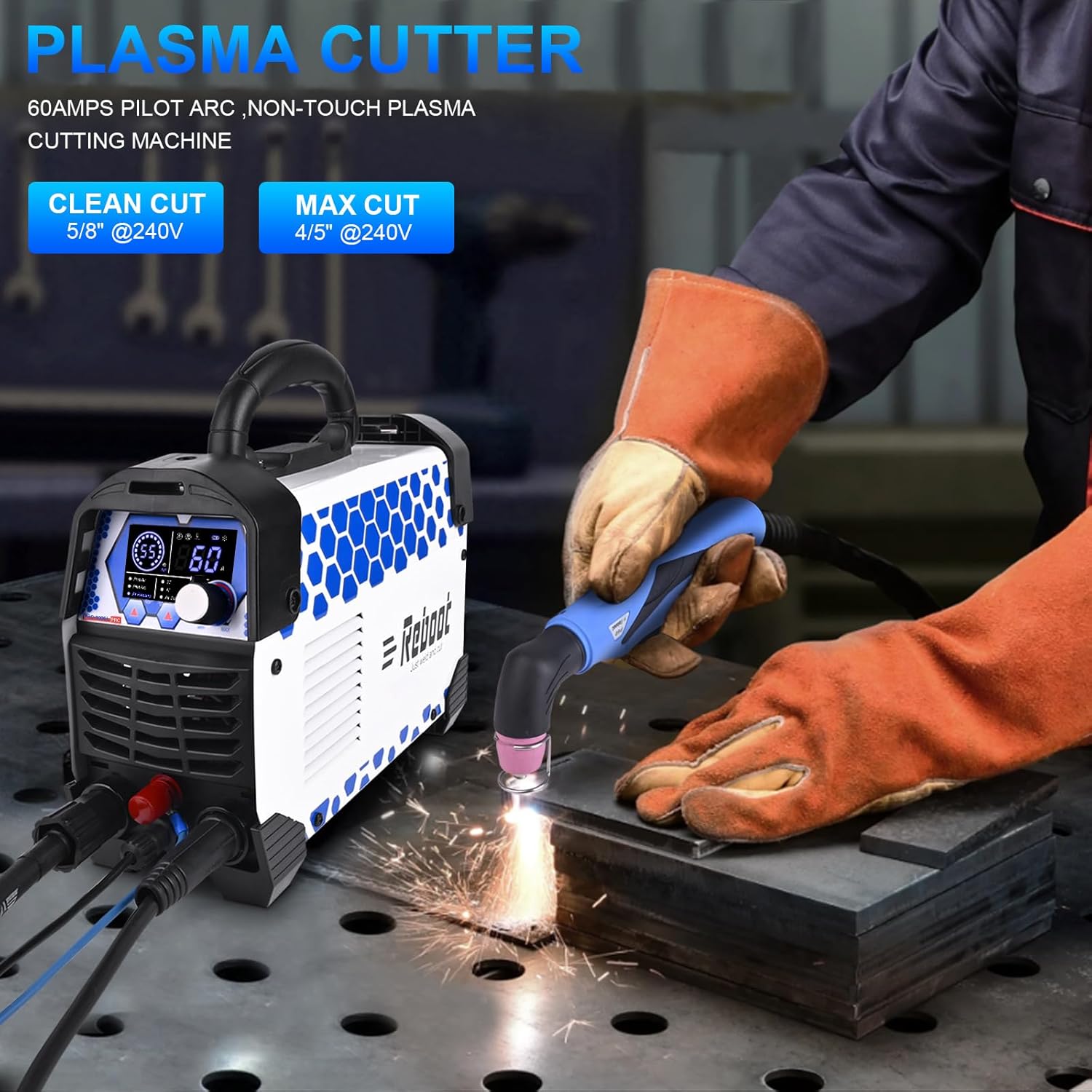
Figure 5.2: Plasma Cutter in Action
This image illustrates the plasma cutter in operation, demonstrating the non-touch pilot arc cutting through a metal plate.
6. Maintenance
Regular maintenance ensures optimal performance and extends the lifespan of your plasma cutter.
- Consumables Inspection: Regularly inspect the plasma torch consumables (nozzle, electrode, swirl ring, shield cup) for wear. Replace them when they show signs of degradation to maintain cut quality.
- Air Filter Regulator: Periodically drain any accumulated moisture from the air filter regulator bowl. Clean or replace the filter element as needed to ensure a clean air supply.
- Cleaning: Keep the machine clean and free from dust and metal particles. Use compressed air to blow out internal components if necessary, ensuring the unit is unplugged.
- Cable Inspection: Check all cables (power, torch, ground) for damage, cuts, or frayed insulation. Replace damaged cables immediately.
- Fan Vents: Ensure the cooling fan vents are clear of obstructions to allow for proper airflow and prevent overheating.
7. Troubleshooting
The RBC6000L features an upgraded digital display that can show error codes to assist in troubleshooting.

Figure 7.1: Air Pressure Display and Error Codes
This image shows various air pressure states and an error code E06, indicating a problem.
- No Arc / Arc Stops:
- Check ground clamp connection.
- Inspect torch consumables for wear; replace if necessary.
- Verify air pressure is within the correct range (see digital display).
- Ensure power supply is stable and sufficient.
- Error Code E06: Indicates no air connected or insufficient air pressure. Check air supply, hose connections, and air filter regulator.
- Poor Cut Quality:
- Consumables may be worn; replace them.
- Cutting speed too fast or too slow. Adjust speed.
- Incorrect amperage setting for material thickness. Adjust current.
- Air pressure too low or too high. Adjust air regulator.
- Overheating: The machine has thermal overload protection. If it stops, allow it to cool down. Ensure fan vents are clear. Reduce duty cycle.
If problems persist after following these steps, contact customer support.
8. Specifications
| Specification | Value |
|---|---|
| Manufacturer | Reboot |
| Model Number | RBC-6000LPRO-42EU |
| Dimensions (Package) | 39.29 x 27.6 x 20.8 cm |
| Weight (Package) | 6.88 kilograms |
| Power Type | AC/DC |
| Voltage | 240 Volts |
| Output Current (240V) | 10-60A DC |
| Ideal Clean Cut (240V) | 5/8" (approx. 15.8mm) |
| Maximum Severance Cut (240V) | 4/5" (approx. 20mm) |
| Technology | IGBT Inverter, Non-Touch Pilot Arc |
| Included Components | Plasma cutting kit / consumables |
9. Warranty and Support
Reboot Brand is dedicated to providing reliable products and services. For any questions, technical assistance, or support regarding your RBC6000L plasma cutter, please contact Reboot customer service. Refer to your purchase documentation for specific warranty terms and contact information.
Reboot has over 12 years of experience in manufacturing welding and cutting equipment, ensuring professional support for our customers.


