
1. Introduction
This manual provides detailed instructions for the installation, operation, and maintenance of your Septekon 2K Outdoor Security Camera 3MP. Please read this manual thoroughly before using the product to ensure proper functionality and safety. Keep this manual for future reference.

Image: Septekon 2K Outdoor Security Camera 3MP. This image shows the main camera unit with its two Wi-Fi antennas, designed for outdoor use.
2. Package Contents
Verify that all items are present in your package:
- Septekon 2K Outdoor Security Camera (Model 764)
- Power Adapter (Corded Electric)
- Mounting Screws and Wall Plugs
- User Manual
3. Product Diagram
Familiarize yourself with the components of your security camera:
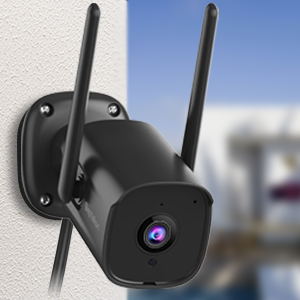
Image: Close-up of the camera showing the lens, infrared LEDs, and microphone. The camera features a robust black casing.
- Camera Lens: 3MP, 2K resolution for clear video.
- Infrared LEDs: For enhanced night vision up to 65 feet.
- Microphone: For audio input during two-way communication.
- Speaker: For audio output during two-way communication and siren.
- Dual Wi-Fi Antennas: For stable 2.4GHz Wi-Fi connectivity.
- Mounting Base: For secure wall installation.
- Power Port: For connecting the corded electric power adapter.
- Micro SD Card Slot: Supports up to 128GB for local storage (card not included).
4. Setup
4.1 Pre-installation Checks
- Ensure your Wi-Fi network is 2.4GHz. This camera does not support 5GHz Wi-Fi.
- Verify a stable Wi-Fi signal strength at the intended installation location.
- Confirm access to a power outlet for continuous power supply.
4.2 App Download and Account Creation
Download the official Septekon security camera application from your smartphone's app store (iOS or Android). Follow the on-screen instructions to create an account and log in.
4.3 Camera Pairing/Connection
- Power on the camera by connecting it to a power outlet.
- Open the Septekon app and select "Add Device" or the "+" icon.
- Follow the in-app prompts to connect the camera to your 2.4GHz Wi-Fi network. This typically involves scanning a QR code displayed on your phone with the camera lens.
- Once connected, you can name your camera and begin live viewing.
4.4 Mounting Instructions
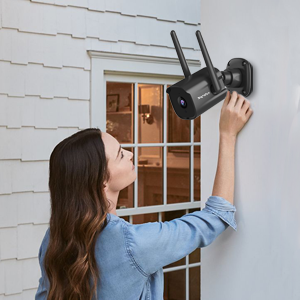
Image: A woman installing the Septekon outdoor security camera on an exterior wall of a house, demonstrating the wall-mount installation process.
- Choose a suitable outdoor location with a clear view and within Wi-Fi range.
- Use the provided mounting screws and wall plugs to securely attach the camera's base to a wall or other stable surface.
- Adjust the camera angle to cover the desired monitoring area.
- Ensure the power connection is protected from weather elements, as the power cube and connection are not fully weatherproof.
5. Operating the Camera
5.1 Live View

Image: A smartphone screen showing a live 2K video feed from the Septekon camera, capturing a wide outdoor scene.
Open the Septekon app and select your camera to view the live 2K video feed. You can access this remotely from anywhere with an internet connection.
5.2 Two-Way Audio

Image: A delivery driver at a door, with a speech bubble saying "Hello, your package!". Below, a person views the scene on a smartphone, with a speech bubble saying "Put it by the door, please. Thank you!", illustrating the two-way audio feature.
The camera features a built-in microphone and speaker. In the live view, tap the microphone icon to speak through the camera and the speaker icon to listen to audio from the camera's location. This allows for interactive communication with visitors or to deter unwanted individuals.
5.3 Motion Detection & Alerts

Image: An outdoor scene at night with a person in a mask detected by the camera, which emits a red light and siren icon. Below, a smartphone displays a "Motion Alarm" notification, demonstrating real-time alerts.
The camera utilizes AI human motion tracking to detect activity. When motion is detected, you will receive real-time alerts on your smartphone. You can adjust motion detection sensitivity and set detection zones within the app settings.
An audible siren can be activated manually or set to trigger automatically upon motion detection to deter intruders.
5.4 Night Vision

Image: A smartphone displaying a clear black and white night vision view of a house, captured by the Septekon camera's infrared LEDs.
Equipped with 8 infrared LEDs, the camera provides clear night vision up to 65 feet, ensuring continuous monitoring even in complete darkness.
5.5 Storage Options

Image: Icons for "Encrypted Cloud" and "SD Card Storage" with various video playback thumbnails, indicating flexible recording storage solutions.
- Micro SD Card: Insert a Micro SD card (up to 128GB, not included) into the camera's slot for local video storage. Recordings can be accessed and managed via the app.
- Cloud Storage: The camera supports encrypted cloud storage for secure video backup. Refer to the app for subscription details and access to cloud-stored data.
5.6 Sharing Access

Image: A map with pin icons showing multiple people viewing the camera feed on various devices (phone, tablet, PC), illustrating multi-user sharing.
You can share access to your camera's live feed and recordings with up to 8 family members through the Septekon app, enabling collaborative home protection.
5.7 Alexa Integration
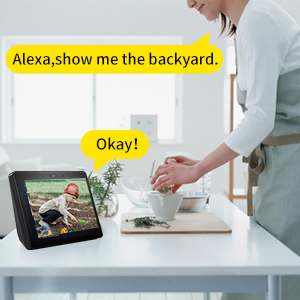
Image: A woman in a kitchen, with an Echo Show device displaying a camera feed of a child in a garden, demonstrating Alexa integration with the command "Alexa, show me the backyard."
The Septekon camera is compatible with Amazon Alexa. Link your camera to your Alexa account to view live feeds on compatible Alexa-enabled devices (e.g., Echo Show) using voice commands.
6. Maintenance
- Cleaning: Periodically clean the camera lens with a soft, dry cloth to ensure optimal image clarity. Do not use harsh chemicals.
- Firmware Updates: Check the Septekon app regularly for available firmware updates. Keeping your camera's firmware updated ensures the latest features, security patches, and performance improvements.
- Power Connection: Regularly inspect the power cable and adapter for any signs of wear or damage. Ensure the power connection is adequately protected from environmental elements.
7. Troubleshooting
7.1 Camera Not Connecting to Wi-Fi
- Ensure your Wi-Fi network is 2.4GHz. The camera does not support 5GHz.
- Check that the camera is within range of your Wi-Fi router.
- Verify your Wi-Fi password is entered correctly in the app.
- Restart your router and the camera, then attempt to reconnect.
7.2 Poor Image Quality
- Clean the camera lens to remove any dust or smudges.
- Ensure there are no obstructions blocking the camera's view.
- Check your internet connection speed. A slow connection can affect streaming quality.
7.3 Motion Detection Not Working or Too Sensitive
- Verify motion detection is enabled in the app settings.
- Adjust the motion detection sensitivity levels within the app.
- Define specific motion detection zones to reduce false alerts from irrelevant areas.
7.4 Two-Way Audio Issues
- Ensure your smartphone's microphone and speaker are enabled and not muted.
- Check the camera's microphone and speaker settings in the app.
- Verify a stable internet connection for clear audio transmission.
8. Specifications
| Feature | Detail |
|---|---|
| Model Name | 764 |
| Video Capture Resolution | 2K (2304x1296), 3 MP |
| Connectivity Technology | Wi-Fi (2.4GHz only) |
| Power Source | Corded Electric |
| Night Vision Range | Up to 65 feet |
| International Protection Rating | IP66 (Waterproof) |
| Viewing Angle | 105 Degrees |
| Storage Options | Micro SD Card (up to 128GB), Cloud Storage |
| Control Method | App, Amazon Alexa |
| Material | Plastic |
| Item Weight | 11.7 ounces |
| Package Dimensions | 5.79 x 5.24 x 2.91 inches |
9. Warranty and Support
Septekon products are designed for reliability and performance. For warranty information, technical support, or customer service inquiries, please refer to the contact information provided on the Septekon official website or within the mobile application. Please retain your proof of purchase for warranty claims.
For further assistance, visit the Septekon Store on Amazon.
