
DOUGH ES07E2D
DOUGH Spectrum Black 27-inch QHD OLED Gaming Monitor User Manual
Model: ES07E2D
Introduction
This manual provides detailed instructions for the setup, operation, and maintenance of your DOUGH Spectrum Black 27-inch QHD OLED Gaming Monitor. Please read this manual thoroughly before using the product to ensure proper functionality and to maximize your user experience. Keep this manual for future reference.
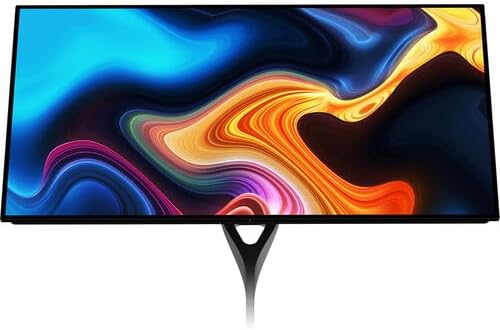
Figure 1: Front view of the DOUGH Spectrum Black 27-inch QHD OLED Gaming Monitor.
1. Setup
1.1 Unboxing and Package Contents
Carefully remove all components from the packaging. Ensure all items listed below are present. If any items are missing or damaged, contact customer support.
- DOUGH Spectrum Black 27-inch QHD OLED Gaming Monitor
- Power Cable and Adapter
- Documentation (Quick Start Guide, Warranty Information)
- (Optional: Monitor Stand, if purchased separately)
1.2 Monitor Assembly (Stand Attachment)
If your monitor stand was purchased separately, follow the instructions provided with the stand for assembly. Typically, the stand base attaches to the stand arm, which then connects to the VESA mounting points on the rear of the monitor. Ensure all screws are securely fastened.

Figure 2: Rear view of the monitor with stand attached.
1.3 Connecting to Your Devices
The DOUGH Spectrum Black monitor offers a variety of input and output ports for versatile connectivity. Refer to the image below for port locations.

Figure 3: Overview of monitor ports.
- Power: Connect the power adapter to the monitor's power input and then to a wall outlet.
- Video Inputs:
- HDMI 2.1a (x2): For high-bandwidth connections to gaming consoles, PCs, and other HDMI-enabled devices.
- DisplayPort 1.4 (x1): For high-resolution and high-refresh-rate connections to PCs.
- USB-C 3.2 Gen 2 (x1, 100W PD): Connect compatible laptops for video, data, and up to 100W power delivery over a single cable.
- USB-C 3.2 Gen 2 (x1, Upstream/KVM): Connect to your desktop for KVM functionality, allowing the monitor's USB peripherals to be shared between two connected computers.
- USB Hub:
- USB-A (x2, side-facing): For connecting peripherals like keyboards, mice, or external drives.
- USB-C (x1, side-facing): For connecting USB-C peripherals.
- Audio Output:
- 3.5mm Audio Jack (x1): Connect headphones or external speakers for audio output.
1.4 Initial Power On
After connecting all necessary cables, press the power button on the monitor. The monitor will power on and display the DOUGH logo, followed by the input source. If no signal is detected, ensure your source device is powered on and the correct input is selected on the monitor.
2. Operating Instructions
2.1 On-Screen Display (OSD) Navigation
The monitor's settings are controlled via the On-Screen Display (OSD) menu. Use the joystick or buttons (location varies by model, typically on the rear or bottom-right) to navigate the menu. Common OSD options include:
- Picture Settings: Brightness, Contrast, Color Temperature, Gamma.
- Input Select: Manually switch between HDMI 1, HDMI 2, DisplayPort, and USB-C inputs.
- Gaming Features: Access specific gaming enhancements.
- System Settings: Language, OSD Timeout, Reset to Factory Defaults.
2.2 Display Features and Enhancements
- Immersive Visuals: The 27-inch OLED panel is factory calibrated for Delta E <1 accuracy, covering 98.5% DCI-P3 and 100% sRGB color gamuts. HDR10 support provides a 1.5 million:1 contrast ratio and 1000 nits peak brightness for enhanced visuals.
- Adaptive Sync Technology: Supports AMD FreeSync Premium Pro, NVIDIA G-Sync, and VESA Adaptive-Sync. This technology dynamically adjusts the monitor's refresh rate to match the graphics card's frame rate, reducing screen tearing and stuttering.
- Gaming Features:
- Black Equalizer: Adjusts darkened areas to improve visibility in shadows.
- Crosshair Overlay: Provides an on-screen crosshair for aiming assistance.
- Frame Rate Counter: Displays the current frame rate on screen.
- Pixel-Perfect Upscaling: Uses integer-ratio pixel duplication for low-resolution input signals, maintaining the clarity of pixel art and retro games.
- Multi-Source Display: The monitor can display video from two separate sources simultaneously using Picture-by-Picture (PbP) or Picture-in-Picture (PiP) modes.
- USB-C Functionality: The USB-C 3.2 Gen 2 port on the rear panel supports video, data, and up to 100W power delivery for compatible laptops. A second USB-C 3.2 Gen 2 port enables KVM functionality, allowing you to control multiple computers with a single keyboard and mouse connected to the monitor's USB hub.
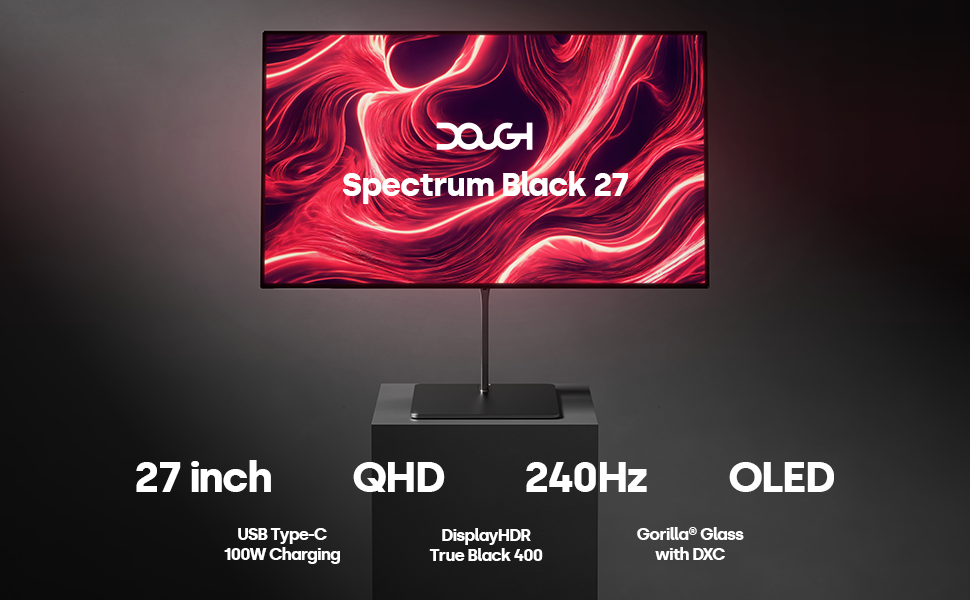
Figure 4: Key features of the DOUGH Spectrum Black monitor.
3. Maintenance
3.1 Cleaning the Monitor
To clean the monitor screen and casing:
- Always power off the monitor and unplug the power cable before cleaning.
- Use a soft, lint-free cloth slightly dampened with water or a non-abrasive screen cleaner.
- Wipe the screen gently. Avoid applying excessive pressure.
- Do not use alcohol, ammonia, or abrasive cleaners, as these can damage the Gorilla Glass surface.
- For the casing, use a dry, soft cloth.

Figure 5: Gorilla Glass with DXC technology reduces reflections.
3.2 OLED Pixel Care
OLED technology offers superior image quality but can be susceptible to image retention or burn-in if static images are displayed for extended periods. To minimize this risk:
- Enable screen saver or power-saving features when the monitor is idle.
- Avoid displaying static images or UI elements for very long durations.
- Utilize the monitor's built-in pixel refresh or pixel shift features, if available in the OSD.
4. Troubleshooting
If you encounter issues with your monitor, refer to the following common solutions. If the problem persists, contact DOUGH customer support.
4.1 No Power / No Display
- Ensure the power cable is securely connected to both the monitor and a working power outlet.
- Verify the power adapter is functioning correctly.
- Press the monitor's power button to ensure it is turned on.
4.2 No Signal
- Check that the video cable (HDMI, DisplayPort, or USB-C) is securely connected to both the monitor and your source device (PC, console).
- Ensure the source device is powered on and outputting a signal.
- Use the OSD menu to manually select the correct input source.
- Try a different video cable or port on both the monitor and the source device.
4.3 Image Flickering or Distortion
- Ensure your graphics card drivers are up to date.
- Check the display resolution and refresh rate settings on your computer. Ensure they are within the monitor's supported specifications.
- Disable Adaptive Sync (FreeSync/G-Sync) temporarily to see if it resolves the issue.
- Try a different video cable.
4.4 USB Ports Not Functioning
- Ensure the USB upstream cable (for KVM functionality) or the USB-C data cable is connected from the monitor to your computer.
- Verify that the connected USB devices are functioning correctly.
5. Specifications
| Feature | Specification |
|---|---|
| Model Number | ES07E2D |
| Screen Size | 27 Inches |
| Panel Type | OLED |
| Resolution | 2560 x 1440 (QHD) |
| Refresh Rate | 240 Hz |
| Aspect Ratio | 16:9 |
| Peak Brightness | 1000 nits (HDR Mode) |
| Contrast Ratio | 1.5 million:1 |
| Color Gamut | 98.5% DCI-P3, 100% sRGB |
| Screen Surface | Gorilla Glass with DXC |
| Video Inputs | 2x HDMI 2.1a, 1x DisplayPort 1.4, 2x USB-C 3.2 Gen 2 (1x with 100W PD) |
| USB Ports | 2x USB-A 3.2 Gen 2, 1x USB-C 3.2 Gen 2 (side-facing) |
| Audio Output | 1x 3.5mm Audio Jack |
| Dimensions (Product) | 6 x 26.5 x 17.5 inches |
| Item Weight | 22 pounds |
| Voltage | 100 Volts |
6. Warranty and Support
6.1 Product Warranty
Your DOUGH Spectrum Black monitor is covered by a limited warranty. For specific terms and conditions, please refer to the warranty card included with your product or visit the official DOUGH website. Keep your proof of purchase for warranty claims.
6.2 Customer Support
If you require technical assistance, have questions about your product, or need to report a defect, please contact DOUGH customer support. Before contacting support, please have your monitor's model number (ES07E2D) and serial number ready.
For the most up-to-date support information and contact methods, please visit the official DOUGH website.
Related documentsES07E2D


Ask a question about this manual
Ask about setup, troubleshooting, compatibility, parts, safety, or missing instructions. Manuals+ will review the question and use this page’s manual context to help answer it.