
Introduction
The AC Infinity VPD Thermometer AC-TRV3 is a digital thermal device designed for precise environmental monitoring. It measures plant leaf Vapor Pressure Deficit (VPD), ambient temperature, leaf temperature, and relative humidity. This tool assists in optimizing grow environments by providing critical data for calibrating smart controllers and tracking climate conditions.

Figure 1: The AC Infinity VPD Thermometer AC-TRV3, a handheld device with a digital display and ergonomic grip.
Package Contents
- AC Infinity VPD Thermometer (AC-TRV3)
- 2 x AAA Batteries
- Instruction Manual (this document)
Setup
1. Battery Installation
- Locate the battery compartment cover on the handle of the device.
- Slide or unclip the cover to open the compartment.
- Insert two AAA batteries, ensuring correct polarity (+/-) as indicated inside the compartment.
- Close the battery compartment cover securely.

Figure 2: Diagram showing the dimensions of the AC-TRV3 and the included AAA batteries for installation.
2. Initial Power-On
After battery installation, press the trigger to power on the device. The display will illuminate, showing current environmental readings.
Operating Instructions
1. Taking Measurements
To take a measurement, point the infrared sensor towards the target surface (e.g., a plant leaf) and press the trigger. The device utilizes 12-point laser positioning to indicate the measurement area. Hold the trigger until the reading stabilizes on the display.

Figure 3: The VPD Thermometer in use, aiming its laser at a plant leaf within a grow tent to measure leaf VPD.

Figure 4: An illustration demonstrating the 12-point laser system used by the thermometer to define the exact measurement spot on a plant leaf.
2. Understanding the Display
The digital display provides multiple environmental readings simultaneously:
- Ambient Temp: The surrounding air temperature.
- Leaf Temp: The temperature of the target leaf surface.
- Ambient Humidity: The relative humidity of the surrounding air.
- Air VPD: Vapor Pressure Deficit of the air.
- Leaf VPD: Vapor Pressure Deficit calculated for the plant leaf.
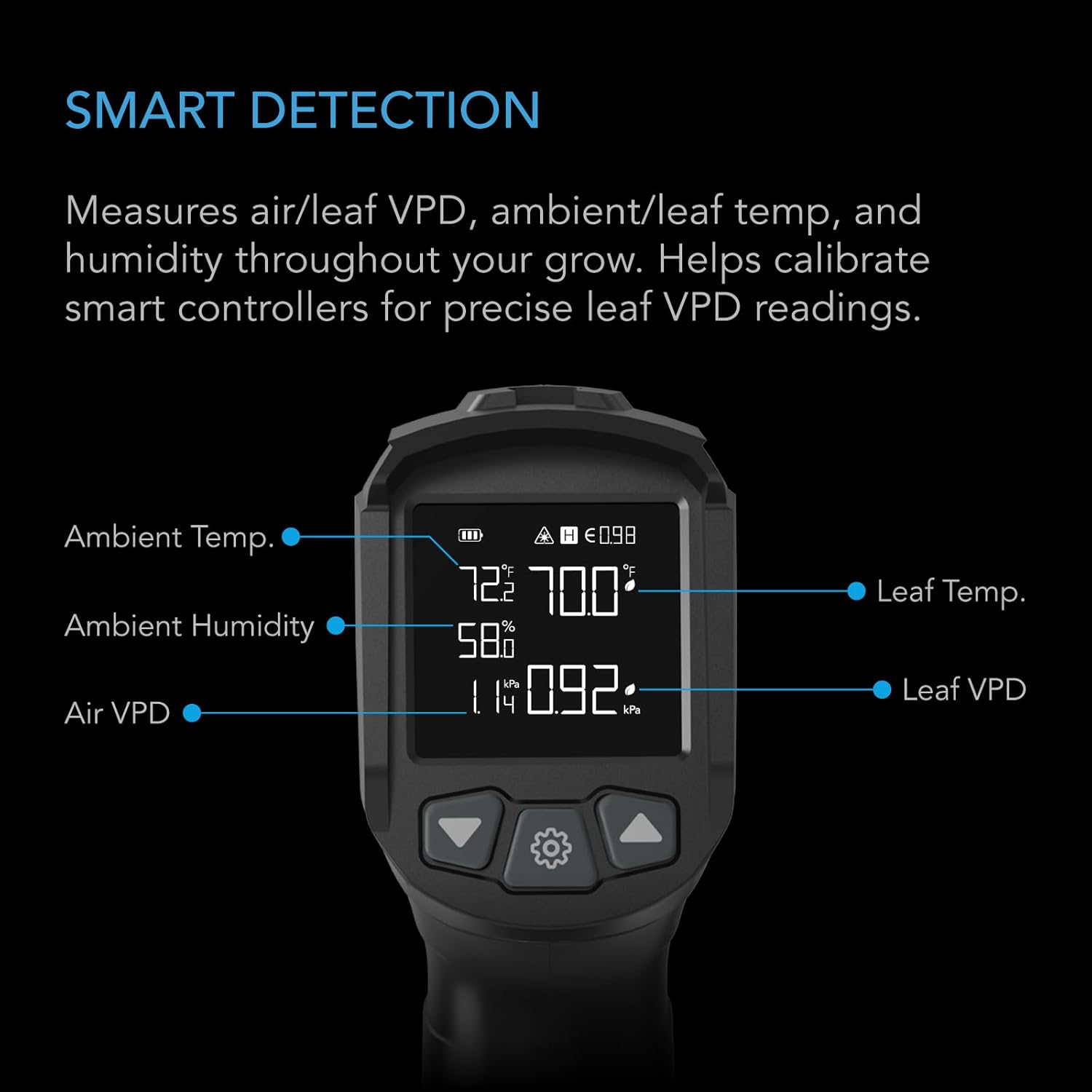
Figure 5: A close-up of the thermometer's display, clearly labeling each measured parameter: Ambient Temperature, Leaf Temperature, Ambient Humidity, Air VPD, and Leaf VPD.
3. Adjusting Emissivity
For accurate temperature readings, especially on different surfaces, the emissivity setting may need adjustment. The device allows for intuitive programming to adjust emissivity levels (0.1-1.00) based on the intended surface. For leafy plants, a typical emissivity value is 0.98.

Figure 6: A table displaying recommended emissivity values for different surfaces such as steel, water, leafy plants, wood, and soil, aiding in accurate measurements.
4. Historical Data Logging
The AC-TRV3 automatically saves the last 5 readings. This feature allows users to track climate conditions over time and identify potential shifts in their environment, aiding in better calibration of grow devices.

Figure 7: Three devices shown side-by-side, illustrating the historical data logging capability, with each display showing different past readings.
Maintenance
1. Cleaning
To clean the device, wipe it with a soft, dry cloth. Avoid using abrasive cleaners or solvents that could damage the casing or display. Ensure the infrared sensor and laser apertures are kept clean for optimal performance.
2. Battery Replacement
When the battery indicator on the display shows low power, replace the AAA batteries following the installation steps outlined in the Setup section. Always use fresh batteries for consistent performance.
3. Storage
Store the thermometer in a cool, dry place away from direct sunlight and extreme temperatures. If storing for extended periods, it is recommended to remove the batteries to prevent leakage.
Troubleshooting
- Device does not power on:
- Check if batteries are installed correctly with proper polarity.
- Replace batteries with new ones.
- Inaccurate readings:
- Ensure the sensor and laser apertures are clean and free from obstructions.
- Verify the emissivity setting is appropriate for the surface being measured.
- Allow the device to acclimate to the environment for 15-20 minutes before taking critical readings, especially for humidity.
- Ensure the measurement distance is within the optimal range for the 12:1 distance-spot ratio.
- Laser dots are difficult to see:
- In brightly lit environments, especially under grow lights, the laser dots may be less visible. Try to shade the measurement area if possible or rely on the general aiming of the device.
- Humidity readings seem off or slow to adjust:
- Humidity sensors require time to stabilize when moved between different environments. Allow sufficient time (e.g., 30 minutes to an hour) for the device to acclimate to the new humidity level.
- Ensure the device is not exposed to direct moisture or extreme condensation, which can affect sensor performance.
Specifications
| Model | AC-TRV3 |
| Distance-Spot Ratio | 12:1 |
| Temperature Range | -5.8 to 1022°F (-21 to 550°C) |
| Emissivity | 0.1-1.00 (Adjustable) |
| Response Time | <500ms |
| Power Source | 2 x AAA Batteries |
| Package Dimensions | 7.52 x 5.43 x 2.24 inches |
| Item Weight | 10.86 ounces |
| Manufacturer | AC Infinity |
| Special Feature | High Accuracy |
| Display Type | Digital |
| Outer Material | Plastic |
Warranty and Support
Warranty Information
AC Infinity products are designed for quality and durability. For specific warranty terms and conditions applicable to your AC-TRV3 VPD Thermometer, please refer to the warranty card included with your purchase or visit the official AC Infinity website. Keep your proof of purchase for warranty claims.
Customer Support
If you encounter any issues or have questions regarding your AC Infinity VPD Thermometer, please contact AC Infinity customer support. You can typically find contact information, FAQs, and additional resources on the official AC Infinity website:


