
1. Introduction
Thank you for choosing the ELECTROPRIME BAIJIALI KK-218 Portable Multiband Radio. This compact and easy-to-use analog radio is designed to provide clear audio reception across multiple frequency bands. Please read this manual carefully before operating the device to ensure proper use and to maximize its lifespan.
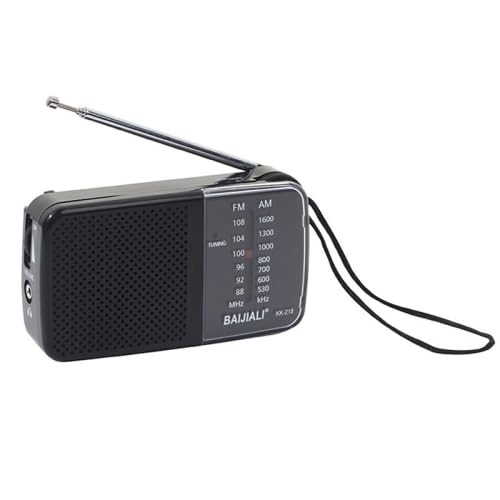
Image 1: The ELECTROPRIME BAIJIALI KK-218 Portable Multiband Radio, showcasing its compact design and telescopic antenna.
2. Safety Information
- Do not expose the radio to rain, moisture, or extreme temperatures.
- Avoid dropping the device or subjecting it to strong impacts.
- Use only the specified battery type (2 x AA batteries). Ensure correct polarity when inserting batteries.
- Remove batteries if the radio will not be used for an extended period to prevent leakage.
- Do not attempt to disassemble or modify the radio. Refer all servicing to qualified personnel.
- Keep out of reach of children.
3. Package Contents
Please check the package for the following items:
- 1 x ELECTROPRIME BAIJIALI KK-218 Portable Multiband Radio
- 1 x User Manual (this document)
Note: AA batteries are not included and must be purchased separately.
4. Product Features
- Clear Sound Quality: Equipped with a permanent magnet horn for loud and clear audio.
- Multiband Reception: Full frequency radio with FM and AM bands.
- Easy Operation: Simple controls for tuning and volume, suitable for all users.
- Portable Design: Compact and lightweight with a portable handle for easy carrying.
- Stable Reception: Features a DSP IC chip and a long telescopic antenna for enhanced signal stability.
- Clear Frequency Display: Analog pointer-type frequency indication window for easy station identification.
- Built-in Speaker: Enjoy audio directly from the device.
- Strong Battery Life: Optimized for extended use with 2 AA batteries.
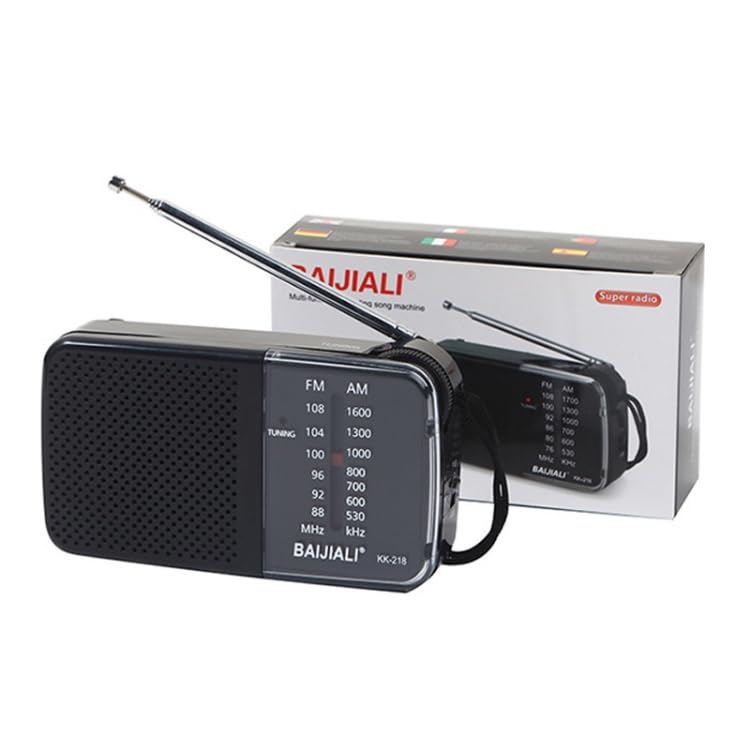
Image 2: Illustration highlighting the DSP IC chip and telescopic antenna, crucial for stable radio reception.
5. Controls and Components
Familiarize yourself with the main parts of your radio:
- Telescopic Antenna: Extends for improved signal reception.
- Tuning Knob: Used to select radio stations.
- Volume Knob: Adjusts the audio output level.
- Frequency Display Window: Shows the current frequency band and station.
- Band Selector Switch: (If present, typically FM/AM) Selects between frequency bands.
- Battery Compartment: Located on the back, holds 2 AA batteries.
- Built-in Speaker: For audio output.
6. Setup
6.1. Battery Installation
- Locate the battery compartment cover on the back of the radio.
- Slide or open the cover to access the compartment.
- Insert two (2) AA batteries, ensuring the correct positive (+) and negative (-) polarity as indicated inside the compartment.
- Close the battery compartment cover securely.
6.2. Antenna Extension
For optimal reception, fully extend the telescopic antenna. Adjust its direction for the best signal clarity.
7. Operating Instructions
7.1. Powering On/Off
The volume knob often doubles as the power switch. Rotate the volume knob clockwise until you hear a click to turn the radio on. Rotate it counter-clockwise until it clicks to turn the radio off.
7.2. Selecting a Band
If your radio has a band selector switch (e.g., FM/AM), slide it to your desired frequency band.
7.3. Tuning to a Station
- Turn the radio on.
- Slowly rotate the Tuning Knob to scan through the frequencies.
- Observe the Frequency Display Window to identify the station frequency.
- Stop tuning when you find a clear broadcast.
- Adjust the telescopic antenna for optimal reception.
7.4. Adjusting Volume
Rotate the Volume Knob clockwise to increase the volume and counter-clockwise to decrease it.
8. Maintenance
- Cleaning: Wipe the radio with a soft, dry cloth. Do not use liquid cleaners or abrasive materials.
- Battery Replacement: Replace batteries when the sound becomes weak or distorted, or if the radio stops functioning. Always replace both batteries at the same time.
- Storage: When not in use for extended periods, store the radio in a cool, dry place and remove the batteries.
9. Troubleshooting
| Problem | Possible Cause | Solution |
|---|---|---|
| No power / Radio does not turn on | Batteries are dead or incorrectly inserted. | Replace batteries with new ones, ensuring correct polarity. |
| Poor reception / Static sound | Antenna not extended or improperly positioned. Weak signal in the area. | Fully extend and adjust the telescopic antenna. Try moving the radio to a different location. |
| No sound | Volume is too low. Radio is not tuned to a station. | Increase the volume. Tune to an active radio station. |
10. Specifications
| Brand | ELECTROPRIME |
| Model | BAIJIALI KK-218 |
| Power Source | 2 x AA Batteries (not included) |
| Rated Power | 5W |
| Rated Voltage | 3V |
| Signal-to-Noise Ratio | 60dB |
| Tuner Technology | FM, AM |
| FM Frequency Range | 88 - 108 MHz |
| AM Frequency Range | 530 - 1700 KHz |
| Channel Selection Method | Manual (Pointer Type) |
| Material | Plastic |
| Dimensions (L x W x H) | 11.5 x 2.8 x 6.2 cm (approximately) |
| Weight | 0.16 kg (approximately) |
| Special Feature | Portable, Built-in Speaker |
11. Warranty and Support
For warranty information or technical support, please refer to the retailer or manufacturer's official website. Keep your purchase receipt as proof of purchase.
Manufacturer: ELECTROPRIME