
1. Product Overview
The ELECTROPRIME BENETECH GT8220 is a versatile multi-gas detector designed for monitoring flammable gas, oxygen, hydrogen sulfide, and carbon monoxide. It features a 2.3-inch high-definition color screen, multiple alarm modes, and a robust design suitable for various applications requiring gas detection.
Key Features:
- Multiple alarm modes: Sound, light, and vibration.
- Real-time feedback of gas concentrations.
- 2.3-inch high-definition color screen for clear data display.
- Built-in smart menu for convenient operation.
- Fast warm-up time.
- Support for Chinese and English menu switching.
- Highly sensitive probe for accurate detection.
- Rugged aluminum portable tool case for durability.
- Sturdy alligator clip on the back for easy attachment.
- USB charging with a protective cover.
2. Safety Information
Please read all safety warnings and instructions carefully before operating the device. Failure to follow these instructions may result in injury, damage to the device, or inaccurate readings.
- Do not attempt to repair or modify the device. Refer all servicing to qualified personnel.
- Ensure the device is calibrated regularly according to local regulations and manufacturer recommendations to maintain accuracy.
- Operate the device within its specified temperature and humidity ranges.
- Keep the sensor area clean and free from obstructions.
- Always use the device in well-ventilated areas when testing for gas leaks to avoid personal exposure.
- The device is designed to detect specific gases. It may not detect other hazardous substances.
- In case of an alarm, follow your facility's safety protocols immediately.
3. Product Components
Familiarize yourself with the different parts of your GT8220 multi-gas detector.
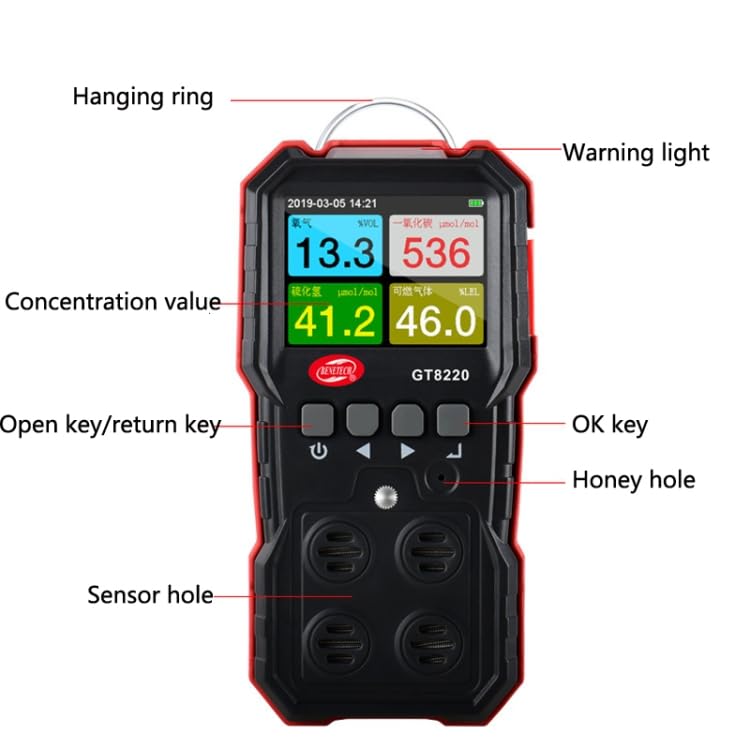
Image 1: Labeled components of the GT8220 detector. Key parts include the Hanging ring, Warning light, Concentration value display, Open key/return key, OK key, Honey hole (speaker), and Sensor hole.
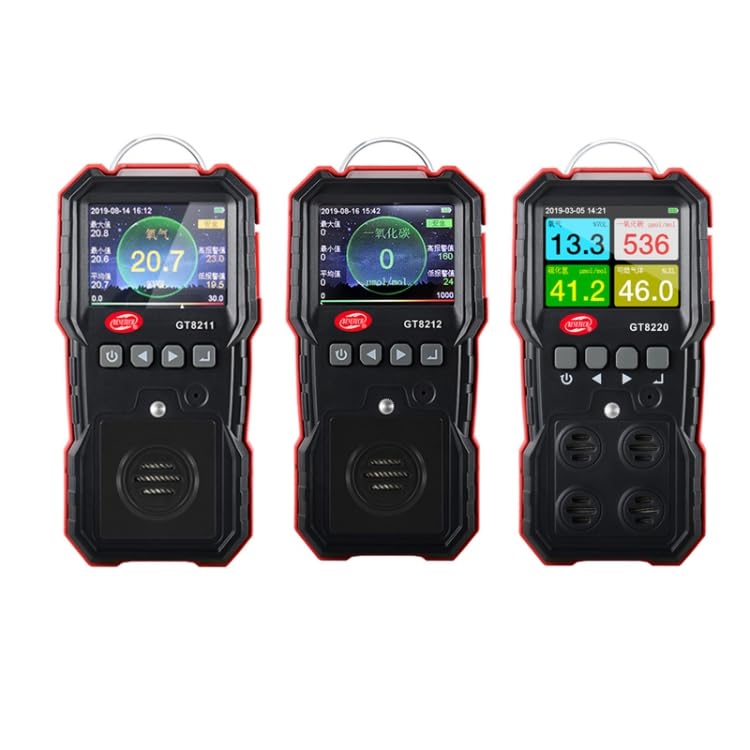
Image 2: Comparison view of GT8211 (Oxygen), GT8212 (Carbon Monoxide), and GT8220 (Multi-Gas) detectors, showing their respective display interfaces and gas readings.
Component Descriptions:
- Hanging Ring: For attaching the device to a lanyard or clip.
- Warning Light: Illuminates during alarm conditions.
- Concentration Value Display: Shows real-time gas concentration readings.
- Open Key/Return Key: Used to power on/off the device and navigate back in menus.
- OK Key: Used to confirm selections and enter menus.
- Honey Hole: Integrated speaker for audible alarms.
- Sensor Hole: Area where gas sensors are located for detection. Keep clear of obstructions.
4. Setup
4.1 Initial Charging
Before first use, fully charge the device. The GT8220 is equipped with an 1800mAh / 3.7V battery.
- Locate the USB charging port, typically protected by a rubber cover.
- Open the protective cover and connect the provided USB charging cable to the device.
- Connect the other end of the USB cable to a compatible USB power adapter (not included) or a computer USB port.
- The charging indicator on the device will show the charging status. Allow the device to charge until the indicator shows a full charge.
- Once charging is complete, disconnect the USB cable and ensure the protective cover is securely closed to prevent dust and moisture ingress.
4.2 Powering On/Off
- To Power On: Press and hold the 'Open key/return key' (power button) for a few seconds until the screen illuminates and the device starts its warm-up sequence.
- Warm-up: The device will undergo a fast warm-up period. During this time, it performs self-checks and sensor stabilization. Do not use for gas detection until the warm-up is complete and stable readings are displayed.
- To Power Off: Press and hold the 'Open key/return key' again until the device prompts you to confirm shutdown or powers off directly.
5. Operating Instructions
5.1 Menu Navigation
The GT8220 features a smart menu system for easy configuration.
- Use the navigation buttons (up/down arrows) to scroll through menu options.
- Press the 'OK key' to select an option or enter a sub-menu.
- Press the 'Open key/return key' to go back to the previous menu or exit the menu system.
- The device supports Chinese and English language switching within the menu settings.
5.2 Gas Detection
Once powered on and warmed up, the device will display real-time gas concentrations.
- Ensure the sensor hole is unobstructed and exposed to the environment to be monitored.
- The 2.3-inch color screen will display the current concentration values for flammable gas, oxygen, hydrogen sulfide, and carbon monoxide.
- Monitor the readings for any fluctuations or alarms.
5.3 Alarm Modes
The GT8220 provides multiple alarm indications when gas concentrations exceed preset thresholds.
- Audible Alarm: A loud sound will be emitted from the 'Honey hole' (speaker).
- Visual Alarm: The 'Warning light' will flash, and the screen display may change color or show alarm indicators.
- Vibration Alarm: The device will vibrate to alert the user.
- In case of an alarm, immediately evacuate the area if safe to do so, and follow established safety procedures.
6. Maintenance
6.1 Cleaning
- Wipe the exterior of the device with a soft, damp cloth.
- Do not use abrasive cleaners, solvents, or harsh chemicals, as these can damage the casing or sensors.
- Ensure the sensor hole is kept clean and free of dust or debris. Use a soft brush if necessary, but avoid inserting objects into the sensor opening.
6.2 Battery Care
- Recharge the battery when the low battery indicator appears on the screen.
- Avoid completely draining the battery frequently to prolong its lifespan.
- If storing the device for an extended period, charge it to approximately 50% and recharge every few months.
6.3 Calibration
Regular calibration is essential for maintaining the accuracy and reliability of the gas detector. Refer to the device's internal menu for calibration options or consult a qualified service technician.
- Calibration frequency may vary depending on usage, environmental conditions, and local regulations.
- Always use certified calibration gases for accurate results.
7. Troubleshooting
| Problem | Possible Cause | Solution |
|---|---|---|
| Device does not power on. | Low or depleted battery. | Charge the device fully using the USB cable. |
| Inaccurate gas readings. | Sensor obstruction, dirty sensor, or calibration required. | Clean the sensor area. Perform a calibration. Ensure proper ventilation around the sensor. |
| No alarm when gas is detected. | Alarm settings configured incorrectly, or speaker/vibrator malfunction. | Check alarm threshold settings in the menu. Ensure volume is not muted. If issue persists, contact support. |
| Screen is blank or frozen. | Software glitch or battery issue. | Attempt to restart the device by holding the power button. If unresponsive, allow battery to drain completely then recharge. |
8. Specifications
- Model: GT8220
- Detected Gases: Flammable Gas, Oxygen, Hydrogen Sulfide, Carbon Monoxide
- Display: 2.3-inch High-Definition Color Screen
- Alarm Method: Sound, Light, Vibration
- Battery Capacity: 1800mAh / 3.7V
- Power Supply Mode: USB Charging
- Operating Language: Chinese, English
- Dimensions (Package): 18.5cm * 28cm * 8cm / 7.28inch * 11.02inch * 3.15inch
- Weight (Package): 0.90kgs / 1.99lb
9. Warranty and Support
For warranty information or technical support, please contact ELECTROPRIME customer service. Keep your purchase receipt as proof of purchase.
Manufacturer: ELECTROPRIME
Contact Information: Refer to your product packaging or the official ELECTROPRIME website for the most current support details.