
ELECTROPRIME SW6310B
ELECTROPRIME SW6310B Coating Thickness Gauge User Manual
High-Precision Car Paint Finish Measuring Instrument
1. Introduction
This user manual provides detailed instructions for the operation, maintenance, and troubleshooting of the ELECTROPRIME SW6310B High-Precision Car Paint Finish Coating Thickness Gauge. Please read this manual thoroughly before using the instrument to ensure proper and safe operation.
Product Overview
The ELECTROPRIME SW6310B is a high-precision instrument designed for measuring the thickness of paint and other coatings on various surfaces. It features a large digital display, simple operation, and reliable calibration capabilities, making it an essential tool for automotive and industrial applications.
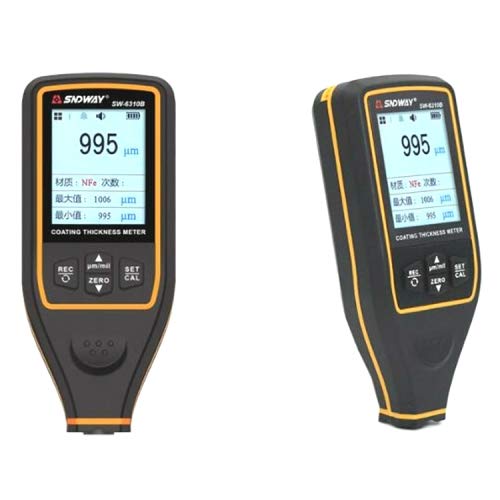
Figure 1: Front view of the ELECTROPRIME SW6310B Coating Thickness Gauge, showing the digital display and control buttons.
2. Safety Information
- Do not attempt to disassemble or modify the instrument.
- Keep the device away from water and excessive humidity.
- Avoid dropping the instrument or subjecting it to strong impacts.
- Use only the specified battery type and ensure correct polarity.
- Store the instrument in a dry, cool place when not in use.
3. Setup
3.1. Battery Installation
- Locate the battery compartment on the back of the device.
- Slide the battery cover open.
- Insert the required batteries, ensuring correct polarity (+/-).
- Close the battery cover securely.
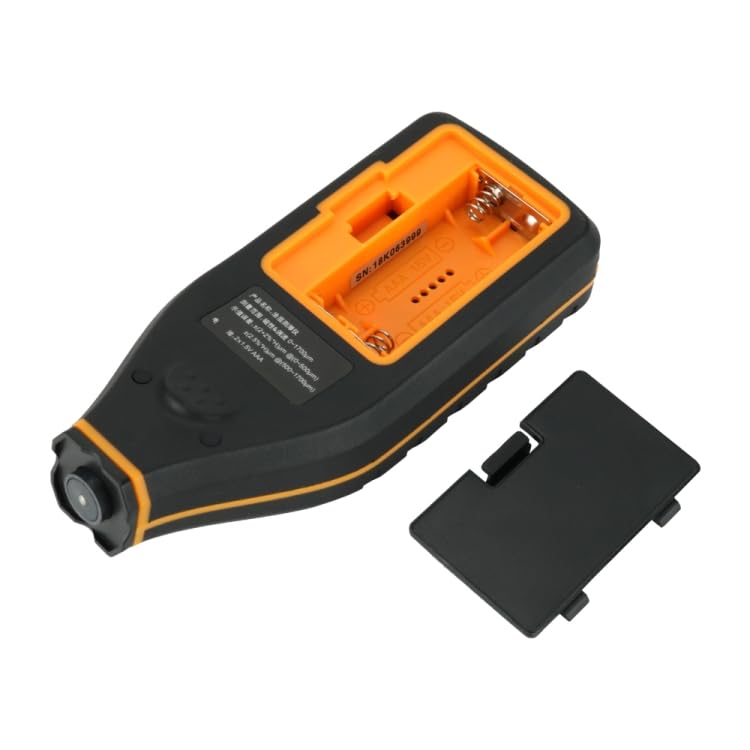
Figure 2: Back view of the ELECTROPRIME SW6310B with the battery compartment open, illustrating battery installation.
3.2. Initial Power On
Press and hold the power button (usually labeled 'REC' or 'ON/OFF') to turn on the device. The display will light up, indicating the device is ready for use.
4. Operating Instructions
4.1. Basic Measurement
- Ensure the device is powered on.
- Place the probe of the instrument firmly and perpendicularly onto the surface to be measured.
- The thickness reading will be displayed instantly on the screen.
- Lift the instrument from the surface to take another measurement.
4.2. Calibration
The SW6310B supports Zero and Multi-point calibration for accurate measurements.
Zero Calibration:
- Place the probe on a bare, uncoated metal substrate (e.g., steel or aluminum).
- Press the 'ZERO' button. The display should show '0' or a value very close to zero.
Multi-point Calibration:
- Use calibration foils of known thickness.
- Place a calibration foil on the bare metal substrate.
- Place the probe on the calibration foil.
- Press the 'CAL' button and follow the on-screen prompts to adjust the reading to match the known thickness of the foil.
- Repeat for multiple calibration points if necessary.
4.3. Display Features
- 2.0 inches large screen segment: Provides clear visibility of readings.
- Swivel display screen: Allows for different viewing angles during measurement.
- Data Storage: The device can store up to 30 sets of measured data. This data is retained even after power-off.
- Upper/Lower Limits Alarm: Configurable alarm function for out-of-range measurements.
- Low Power Indication: An icon or message will appear when battery power is low.
5. Maintenance
- Cleaning: Wipe the instrument with a soft, dry cloth. Do not use abrasive cleaners or solvents.
- Storage: When not in use for extended periods, remove the batteries to prevent leakage. Store the device in its original packaging or a protective case in a dry, cool environment.
- Probe Care: Keep the probe tip clean and free from debris to ensure accurate readings. Avoid scratching the probe surface.
6. Troubleshooting
| Problem | Possible Cause | Solution |
|---|---|---|
| Device does not power on. | Low or dead batteries; incorrect battery installation. | Replace batteries; ensure correct polarity. |
| Inaccurate readings. | Needs calibration; dirty probe; unstable placement. | Perform calibration (Zero/Multi-point); clean probe; ensure firm and perpendicular placement. |
| Display shows "Low Power". | Batteries are running low. | Replace batteries immediately. |
7. Specifications
| Parameter | Value |
|---|---|
| Measuring Range | 0-1700um |
| Display Mode | Digital display |
| Weight | 0.25 kg (0.55 lbs) |
| Display Screen Size | 2.0 inches |
| Data Storage | Up to 30 sets |
| Package Weight | 0.80 kgs (1.77 lbs) |
| Package Size | 23cm x 17cm x 5cm (9.06in x 6.69in x 1.97in) |
8. Warranty and Support
8.1. Warranty Information
Please refer to the product packaging or the official ELECTROPRIME website for detailed warranty terms and conditions. Typically, a limited warranty covers manufacturing defects for a specified period from the date of purchase.
8.2. Customer Support
For technical assistance, troubleshooting not covered in this manual, or warranty claims, please contact ELECTROPRIME customer support. Contact details can usually be found on the product packaging or the official brand website.
Note: Keep your purchase receipt as proof of purchase for warranty purposes.
Ask a question about this manual
Ask about setup, troubleshooting, compatibility, parts, safety, or missing instructions. Manuals+ will review the question and use this page’s manual context to help answer it.