
ELECTROPRIME YINDIAO A7
ELECTROPRIME Wireless Silent Gaming Mouse User Manual
Model: YINDIAO A7
Product Overview
The ELECTROPRIME YINDIAO A7 is a 2.4GHz wireless gaming mouse designed for precision and comfort. It features 7 programmable keys, adjustable DPI settings (800/1200/1600), silent click functionality, and customizable RGB lighting. The mouse is rechargeable and compatible with various operating systems, making it suitable for both gaming and general computer use.

Figure 1: The ELECTROPRIME YINDIAO A7 wireless gaming mouse shown with its USB receiver, positioned near a laptop. This image highlights the mouse's sleek design and wireless capability.
Setup Guide
- Charging the Mouse: Before first use, connect the mouse to a USB power source using the provided charging cable. The built-in battery requires approximately 2.5 hours for a full charge. An indicator light will typically show charging status.
- Connecting the USB Receiver: Locate the 2.4GHz USB receiver, usually stored in a compartment on the underside of the mouse. Insert the USB receiver into an available USB port on your computer (laptop or personal computer).
- Powering On: Turn on the mouse using the power switch, typically located on the underside. The mouse should automatically connect to the receiver. If connection is not established, try moving the mouse closer to the receiver or re-inserting the receiver.
- Driver Installation: The mouse is plug-and-play and generally does not require specific driver installation on supported operating systems (Windows XP, Windows 7, Linux).
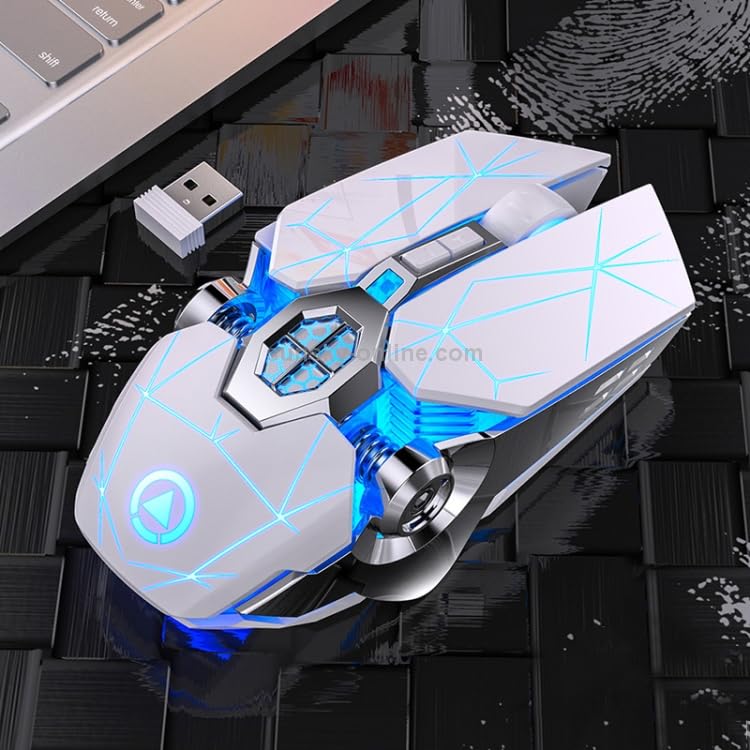
Figure 2: A top-down view of the ELECTROPRIME YINDIAO A7 wireless gaming mouse, clearly showing its ergonomic shape and the compact USB receiver. This perspective highlights the mouse's design and the small size of the receiver.
Operating Instructions
The ELECTROPRIME YINDIAO A7 mouse features multiple buttons and adjustable settings for an optimized user experience.
- DPI Adjustment: The mouse offers three adjustable DPI levels: 800, 1200, and 1600. Press the DPI button (usually located behind the scroll wheel) to cycle through these settings. Each press will change the cursor sensitivity, allowing you to adapt to different tasks or game requirements.
- 7-Key Functionality: In addition to the standard left, right, and scroll wheel buttons, the mouse includes additional keys for enhanced functionality. These typically include forward/back buttons on the side and potentially other programmable buttons. Refer to your operating system's mouse settings for customization options.
- RGB Lighting Control: The mouse features colorful glow effects. Depending on the model, there may be a dedicated button or a combination of buttons to cycle through lighting modes or to turn the lights off.
- Silent Clicks: The mouse is designed with silent micro-switches, providing a quiet clicking experience suitable for environments where noise reduction is desired.
- Use While Charging: The mouse can be used normally even while it is connected to a power source for charging.
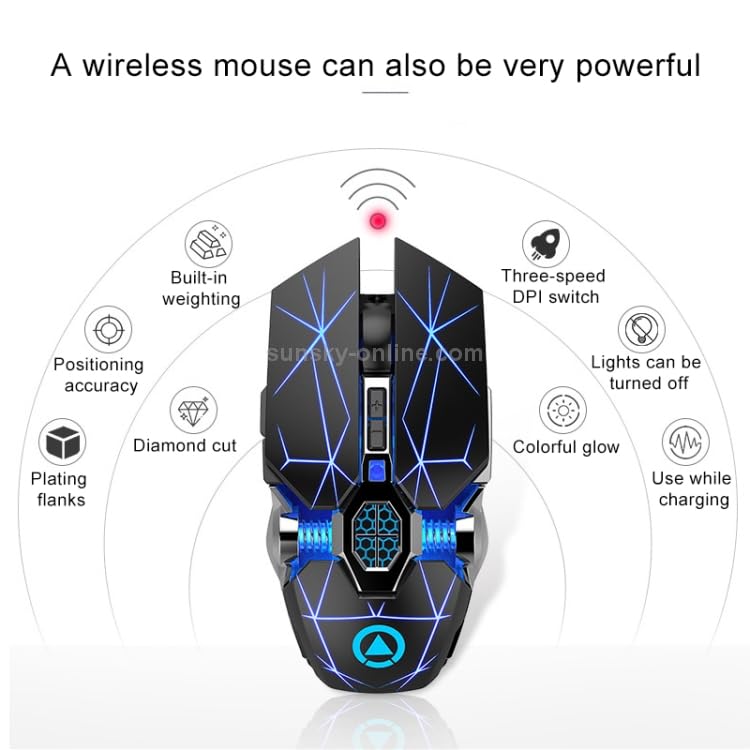
Figure 3: An illustrative diagram detailing the key features of the ELECTROPRIME YINDIAO A7 mouse, including built-in weighting, positioning accuracy, diamond cut design, plating flanks, three-speed DPI switch, the ability to turn lights off, colorful glow, and the option to use while charging. This visual aid helps in understanding the mouse's capabilities.
Maintenance
- Cleaning: Use a soft, dry cloth to wipe the surface of the mouse. For stubborn dirt, a slightly damp cloth can be used, ensuring no liquid enters the internal components. Avoid using harsh chemicals or abrasive cleaners.
- Battery Care: To prolong battery life, avoid fully discharging the mouse frequently. Recharge the mouse when the battery indicator suggests low power. Store the mouse in a cool, dry place when not in use for extended periods.
- Storage: When transporting or storing the mouse, ensure the USB receiver is securely placed in its dedicated compartment to prevent loss.
Troubleshooting
| Problem | Solution |
|---|---|
| Mouse not responding. |
|
| DPI setting not changing. |
|
| RGB lights not working. |
|
Specifications
| Feature | Detail |
|---|---|
| Model | YINDIAO A7 |
| Connectivity | 2.4GHz Wireless (USB Receiver) |
| DPI Levels | 800 / 1200 / 1600 DPI (Adjustable) |
| Number of Keys | 7 |
| Click Type | Silent Micro-switches |
| Battery Type | Built-in Rechargeable Battery |
| Charging Time | Approx. 2.5 hours |
| Dimensions (L x W x H) | 128mm x 75mm x 39mm |
| Weight | 97g |
| Operating System Compatibility | Linux, Windows XP, Windows 7 |
| Movement Detection Technology | Optical |
| Hand Orientation | Right |
Warranty and Support
For information regarding product warranty, please refer to the warranty card included with your purchase or visit the official ELECTROPRIME website. For technical support or further assistance, please contact ELECTROPRIME customer service through the contact details provided on their official website or product packaging.
Please retain your proof of purchase for warranty claims.
Ask a question about this manual
Ask about setup, troubleshooting, compatibility, parts, safety, or missing instructions. Manuals+ will review the question and use this page’s manual context to help answer it.