
Introduction
Welcome to the user manual for your ELECTROPRIME GH1717 storage case. This case is designed to provide secure and organized storage for your 2.5-inch mobile hard disks, data cables, USB drives, and other small electronic accessories. Its robust construction ensures protection against impacts and environmental factors, making it an ideal companion for your portable storage devices.
Product Features
- Decompression and Compression Resistance: Engineered to withstand external pressure and protect contents.
- Multiple Card Positions: Dedicated slots for organized storage of small items like USB drives or memory cards.
- Environmentally Friendly Materials: Constructed from durable and eco-conscious leather material.
- Waterproof and Wear-Resistant: Provides protection against moisture and daily wear and tear.
- Triple Shock-Absorbing Design: Enhanced internal padding for superior impact protection.
- Intimate Storage Mesh Bag: A high-elastic mesh pocket for securing cables and smaller accessories.
- Category Design: Thoughtful internal layout for efficient organization.
Setup and Usage
- Opening the Case: Unzip the case completely using the dual zippers.
- Placing the Hard Disk: Gently place your 2.5-inch mobile hard disk into the main compartment. Secure it using the elastic strap provided to prevent movement during transit.
- Organizing Cables and Accessories: Utilize the internal mesh pocket for data cables, USB drives, or other small accessories. The multiple card positions can hold smaller items securely.
- Closing the Case: Ensure all items are properly seated and then zip the case closed. The dual zippers provide secure closure.
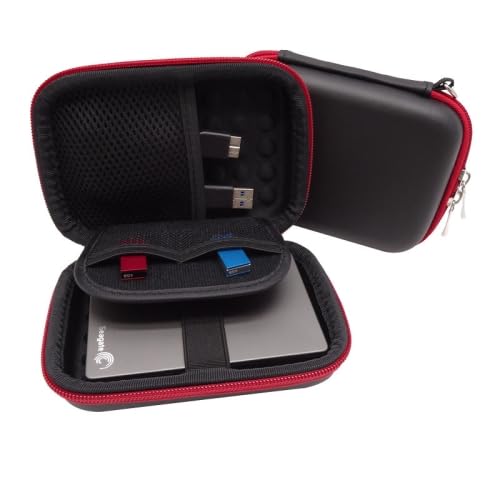
Image 1: The ELECTROPRIME GH1717 storage case shown open, revealing a 2.5-inch hard drive secured by an elastic band, two USB drives in dedicated slots, and data cables stored in the mesh pocket.
Maintenance
- Cleaning: Wipe the exterior with a soft, damp cloth. For stubborn stains, use a mild soap solution and then wipe clean with a dry cloth. Avoid harsh chemicals or abrasive cleaners.
- Storage: Store the case in a cool, dry place away from direct sunlight and extreme temperatures when not in use.
- Avoid Overfilling: Do not overfill the case, as this can stress the zippers and material, potentially causing damage.
Troubleshooting
As a protective storage case, the ELECTROPRIME GH1717 is designed for simplicity. If you encounter any issues, please consider the following:
- Zipper Stuck: Ensure no fabric or items are caught in the zipper teeth. Gently pull the zipper back and try again. Do not force it.
- Items Not Fitting: Verify that your hard disk is a 2.5-inch model. The case is designed for this specific size. Avoid forcing larger items into the compartments.
Specifications
| Feature | Detail |
|---|---|
| Model | GH1717 |
| Material | Leather |
| Internal Dimensions | 12.6 cm x 8.7 cm x 3 cm (Length x Width x Height) |
| External Dimensions | 15 cm x 10.5 cm x 4.7 cm (Length x Width x Height) |
| Compatibility | 2.5-inch mobile hard disks, U disk, data cables, small accessories |
| Process | Sewing |
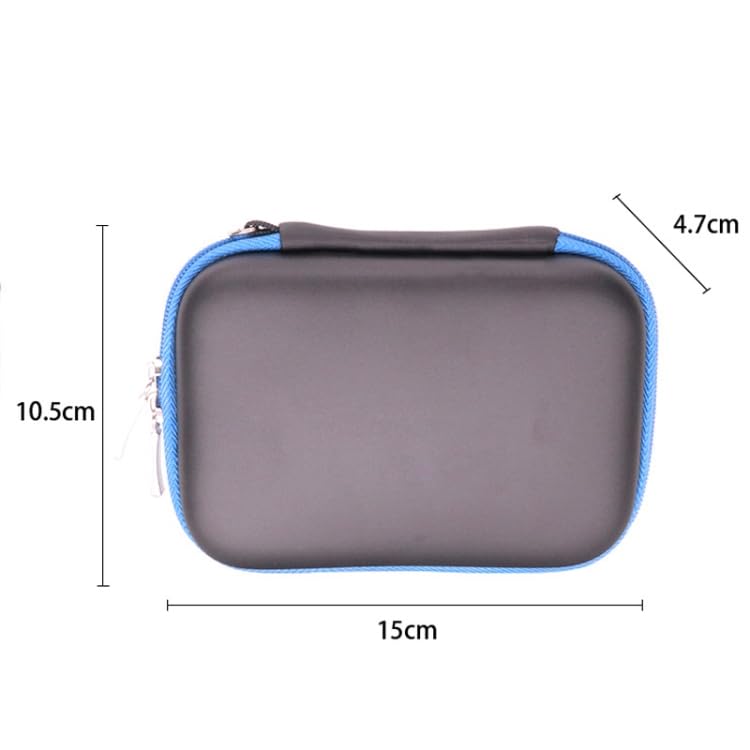
Image 2: A side view of the ELECTROPRIME GH1717 storage case illustrating its external dimensions: 15 cm length, 10.5 cm width, and 4.7 cm height.
Warranty and Support
For warranty information or customer support regarding your ELECTROPRIME GH1717 storage case, please refer to the retailer's return policy or contact ELECTROPRIME customer service directly through their official channels. Keep your purchase receipt as proof of purchase.