
1. Introduction
This manual provides detailed instructions for the WISCENT WTB-798 Compact CD Player Stereo System. Please read this manual thoroughly before using the product to ensure proper operation and to maximize its features. This all-in-one system integrates a CD player, Bluetooth stereo, digital clock, dual alarm, FM radio, USB port, and AUX input.
2. Safety Information
To ensure safe operation and prevent damage, please observe the following safety precautions:
- Do not expose the unit to rain or moisture.
- Do not block ventilation openings.
- Place the unit on a stable, flat surface.
- Use only the power adapter supplied with the unit.
- Do not open the casing; refer all servicing to qualified personnel.
- Avoid extreme temperatures and direct sunlight.
3. Package Contents
Verify that all items are present in the package:
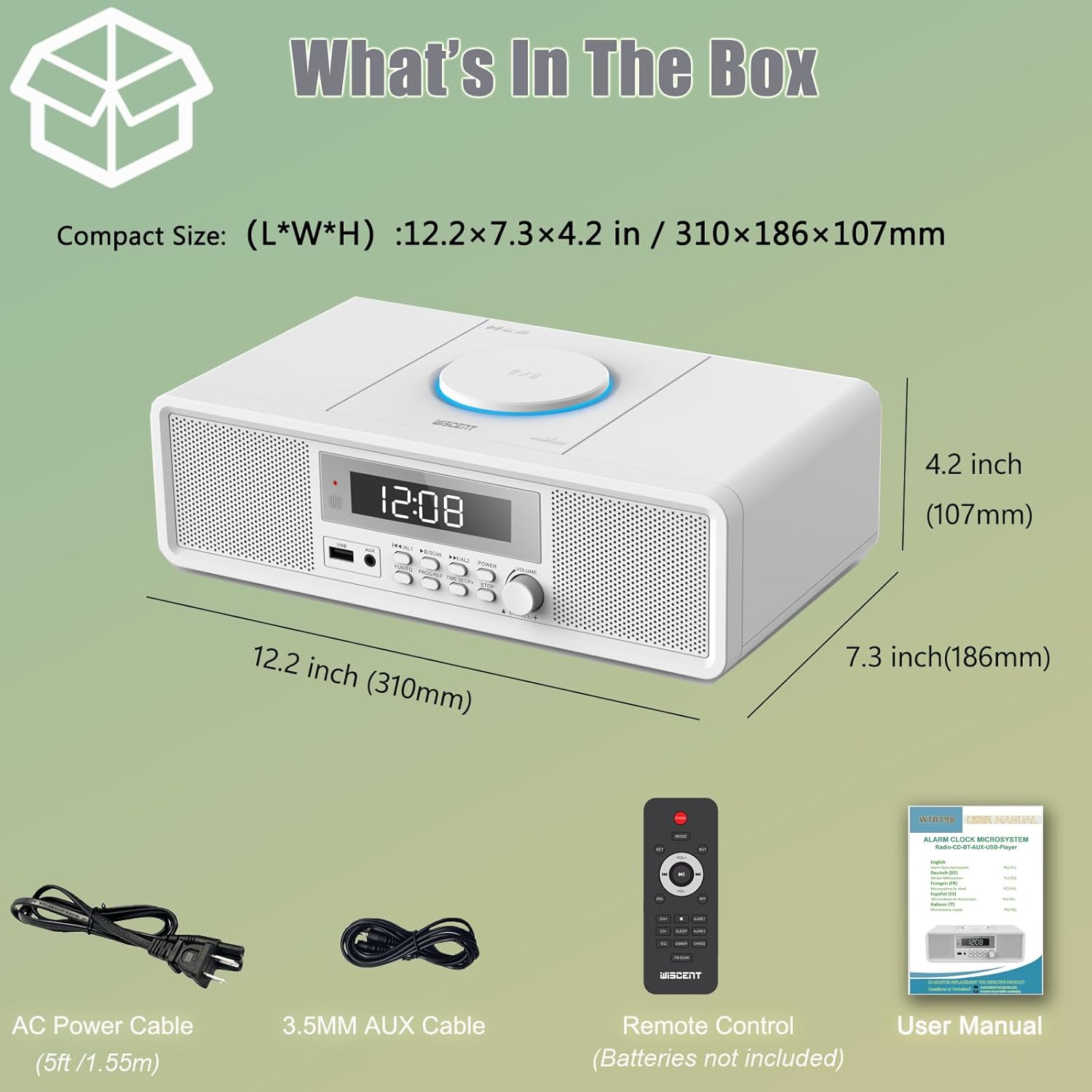
- 1 x WISCENT Home Stereo System with CD Player (2 x 10 W)
- 1 x Remote Control (batteries not included)
- 1 x User Manual
- 1 x AC Power Cable
- 1 x AUX Cable
4. Product Overview
The WISCENT WTB-798 is a compact stereo system designed for versatile audio playback. It features a top-loading CD player, Bluetooth connectivity, USB playback, AUX input, and an FM radio. The unit also includes a digital clock with dual alarm functions.

4.1 Front Panel Controls and Features
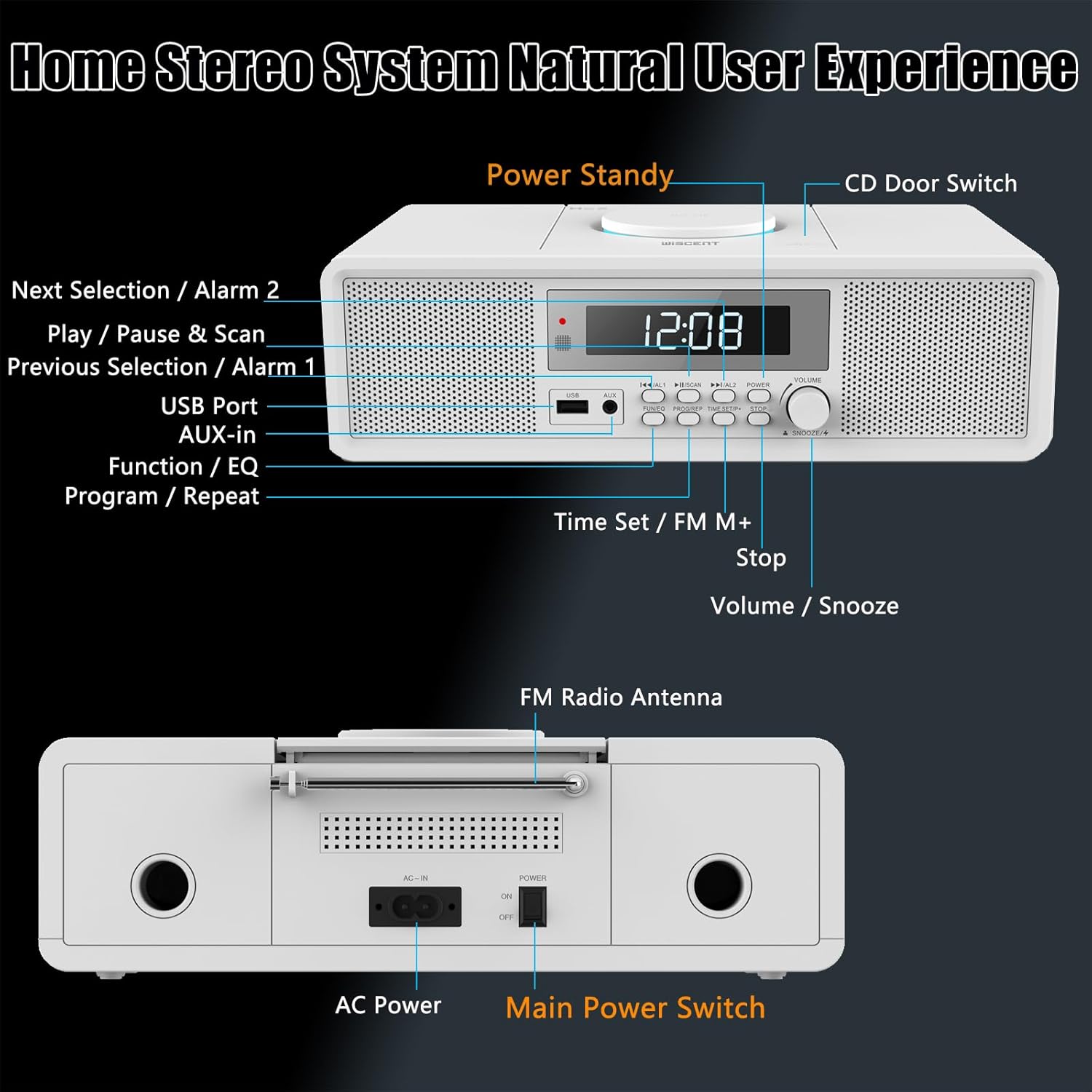
- Power Standby Button: Turns the unit on or off (standby mode).
- CD Door Switch: Opens the CD compartment.
- Next Selection / Alarm 2: Skips to the next track/station or sets Alarm 2.
- Play / Pause & Scan: Plays/pauses media or scans FM radio frequencies.
- Previous Selection / Alarm 1: Skips to the previous track/station or sets Alarm 1.
- USB Port: For USB drive playback.
- AUX-in: 3.5mm jack for external audio devices.
- Function / EQ: Switches between modes (CD, USB, AUX, Bluetooth, Radio) and adjusts equalizer settings.
- Program / Repeat: Programs CD tracks or sets repeat modes.
- Time Set / FM M+: Sets the time or saves FM radio presets.
- Stop: Stops playback.
- Volume / Snooze: Adjusts volume or activates snooze during an alarm.
4.2 Rear Panel Features
- FM Radio Antenna: Extendable antenna for FM reception.
- AC In: Power input for the AC power cable.
- Main Power Switch: Hard power on/off switch for the unit.
5. Setup
5.1 Power Connection
- Connect the AC power cable to the "AC In" port on the rear of the unit.
- Plug the other end of the power cable into a standard wall outlet.
- Ensure the "Main Power Switch" on the rear panel is in the "ON" position.
5.2 Antenna Setup
For optimal FM radio reception, fully extend the telescopic FM antenna located on the rear of the unit. Adjust its position for the best signal.
5.3 Initial Power On and Time Setting
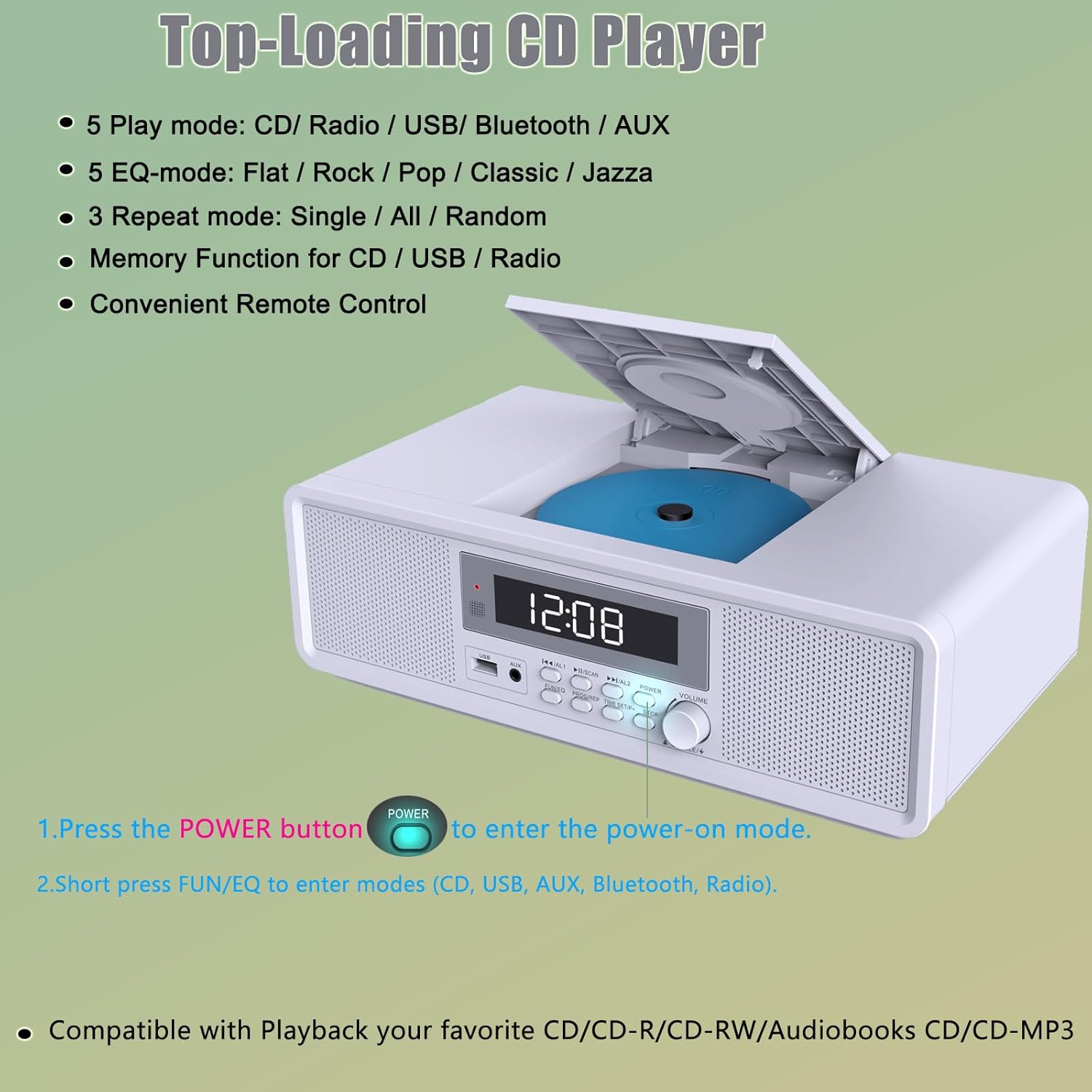
- Press the POWER button on the front panel or remote control to turn on the unit.
- To set the time, press and hold the TIME SET button.
- Use the PREVIOUS/NEXT buttons or the VOLUME knob to adjust the hour and minute.
- Press TIME SET again to confirm each setting.
6. Operating Instructions
6.1 General Operation
- Power On/Off: Press the POWER button.
- Volume Adjustment: Rotate the VOLUME knob or use the VOL+/- buttons on the remote.
- Mode Selection: Press the FUNCTION/EQ button repeatedly to cycle through CD, USB, AUX, Bluetooth, and FM Radio modes.
6.2 CD Player Operation
The unit supports CD, CD-R, CD-RW, MP3, and audiobook CDs.
- Press the CD Door Switch to open the CD compartment.
- Place a CD with the label side facing up.
- Close the CD compartment.
- Switch to CD mode using the FUNCTION/EQ button. The CD will begin playing automatically.
- Use PLAY/PAUSE, STOP, PREVIOUS, and NEXT buttons for playback control.
- Press PROGRAM/REPEAT repeatedly to select repeat modes: One (repeat current track), All (repeat all tracks), Random (shuffle playback).
6.3 Bluetooth Connection
- Switch to Bluetooth mode using the FUNCTION/EQ button. The display will show "BT" and flash, indicating pairing mode.
- On your mobile device, enable Bluetooth and search for available devices.
- Select "WISCENT WTB-798" (or similar) from the list to pair.
- Once connected, the "BT" indicator will stop flashing, and you can play audio from your device through the stereo system.

6.4 USB Playback
- Insert a USB flash drive into the USB Port on the front panel.
- Switch to USB mode using the FUNCTION/EQ button.
- The unit will automatically detect and play compatible audio files (e.g., MP3).
- Use PLAY/PAUSE, STOP, PREVIOUS, and NEXT buttons for playback control.
6.5 AUX Input
- Connect an external audio device (e.g., MP3 player, tablet) to the AUX-in port using the provided 3.5mm AUX cable.
- Switch to AUX mode using the FUNCTION/EQ button.
- Play audio from your connected device. Volume can be controlled via both the stereo system and the external device.
6.6 FM Radio Operation
The FM radio operates within the 87.5-108 MHz frequency range.
- Switch to FM Radio mode using the FUNCTION/EQ button.
- Automatic Scan: Press and hold the PLAY/PAUSE & SCAN button to automatically scan and save available FM stations. Up to 30 stations can be preset.
- Manual Tuning: Briefly press the PREVIOUS/NEXT buttons to fine-tune the frequency.
- Recalling Presets: Use the PREVIOUS/NEXT buttons to cycle through saved preset stations.

6.7 Alarm Clock Setup
The unit features a dual alarm clock with multiple wake-up sound options.
- Setting Alarm 1 or Alarm 2: In standby mode, long press AL1 or AL2 button.
- Use the VOLUME knob or PREVIOUS/NEXT buttons to set the alarm time (hour and minute). Press the respective alarm button to confirm each step.
- Select the alarm source (CD, Bluetooth, USB, FM, White Noise) using the FUNCTION/EQ button.
- Adjust the alarm volume.
- Press the alarm button again to save and activate the alarm. An alarm icon will appear on the display.
- Turning Alarms On/Off: In standby mode, short press AL1 or AL2 to toggle the alarm on or off.
- Snooze Function: When an alarm sounds, press the SNOOZE button (Volume knob) to temporarily silence it. The alarm will sound again after a set interval.

6.8 Remote Control Usage
The included remote control provides convenient access to all functions. Insert 2 x AAA batteries (not included) into the remote before use.
- MODE: Cycles through input sources.
- SET: Used for setting time and alarms.
- VOL+/-: Adjusts volume.
- PLAY/PAUSE, STOP, PREV, NEXT: Media playback controls.
- ALARM 1/2: Sets or activates/deactivates alarms.
- SLEEP: Sets sleep timer.
- SNOOZE: Activates snooze during an alarm.
- EQ: Cycles through equalizer presets (Flat, Rock, Pop, Classic, Jazz).
- PROG/REP: Programs CD tracks or sets repeat modes.
- FM SCAN: Scans and saves FM stations.
7. Maintenance
- Cleaning: Use a soft, dry cloth to clean the unit. Do not use abrasive cleaners or solvents.
- CD Care: Handle CDs by their edges. Clean dirty CDs with a soft, lint-free cloth, wiping from the center outwards.
- Storage: When not in use for extended periods, unplug the unit and store it in a cool, dry place.
8. Troubleshooting
| Problem | Possible Cause | Solution |
|---|---|---|
| No power | Power cable not connected; Main power switch off. | Ensure power cable is securely plugged in; Turn the Main Power Switch to ON. |
| No sound | Volume too low; Incorrect mode selected; AUX cable loose. | Increase volume; Select the correct input mode; Check AUX cable connection. |
| CD not playing | CD inserted incorrectly; CD is dirty or scratched; Incorrect mode. | Insert CD label side up; Clean or replace CD; Select CD mode. |
| Bluetooth not connecting | Unit not in pairing mode; Device too far; Already connected to another device. | Ensure unit is in Bluetooth pairing mode (BT flashing); Move device closer; Disconnect from other devices. |
| Poor FM reception | Antenna not extended or positioned correctly. | Fully extend and adjust the FM antenna. |
| Alarm not sounding | Alarm not activated; Volume too low; Incorrect time set. | Ensure alarm is ON (icon visible); Increase alarm volume; Verify alarm time. |
9. Specifications
| Feature | Detail |
|---|---|
| Brand | WISCENT |
| Model | WTB-798 |
| Dimensions (LxWxH) | 31 x 17 x 10 cm (12.2 x 7.3 x 4.2 inches) |
| Weight | 2 kg |
| Audio Output Mode | Stereo |
| Wattage | 20 Watts (2 x 10W RMS) |
| Supported Audio Formats | CD, CD-R, CD-RW, MP3, Audiobooks CD |
| Connectivity | Bluetooth, USB, AUX |
| Bluetooth Version | 5.1 |
| FM Radio Frequency | 87.5 - 108 MHz |
| Power Source | Corded Electric |
| Compatible Devices | Smartphone, MP3 Player, Tablet |
| Included Components | Stereo System, Remote Control, User Manual, AC Power Cable, AUX Cable |
10. Warranty and Support
For warranty information and customer support, please refer to the documentation provided with your purchase or contact WISCENT customer service through their official channels. Keep your proof of purchase for any warranty claims.


