
Introduction
This manual provides detailed instructions for the setup, operation, maintenance, and troubleshooting of your ELECTROPRIME Ajazz AC067 67-Key RGB Hot Plug Wired Mechanical Keyboard. Please read this manual thoroughly before using the product to ensure optimal performance and longevity.
Setup
Package Contents
- ELECTROPRIME Ajazz AC067 Mechanical Keyboard
- USB Cable (approx. 1.5 meters)
Connecting the Keyboard
The ELECTROPRIME Ajazz AC067 keyboard features a simple USB connection for plug-and-play functionality. No additional drivers are typically required for basic operation.
- Locate an available USB port on your computer.
- Connect the USB cable to the Type-C port on the keyboard.
- Connect the other end of the USB cable to your computer's USB port.
- The keyboard should be automatically recognized by your operating system.
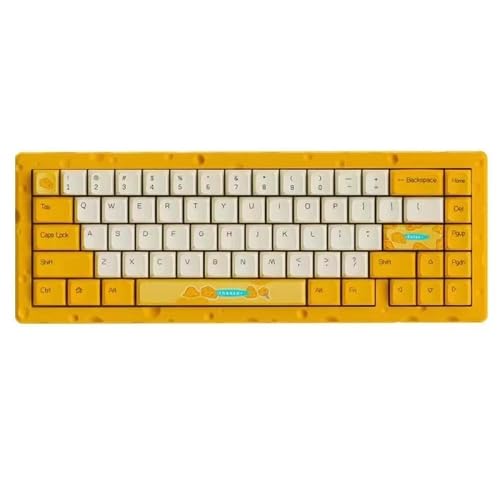
Figure 1: Top-down view of the ELECTROPRIME Ajazz AC067 Mechanical Keyboard, showcasing its 67-key layout and distinctive yellow and white color scheme.
Operating the Keyboard
Key Features
- 67-Key Layout: A compact layout designed for efficiency while retaining essential keys.
- RGB Dynamic Lighting: The keyboard features customizable RGB backlighting. Specific key combinations or software (if available, not mentioned in product data) can be used to cycle through lighting modes and colors.
- Hot-Swappable Shaft Seat: This feature allows users to easily change mechanical switches without soldering, offering flexibility for customization and repair.
- Gasket Structure: The innovative gasket spacer design, utilizing a Poron spacer between the top and bottom cases, suspends the PCB. This provides a more flexible and comfortable typing experience with improved acoustics.
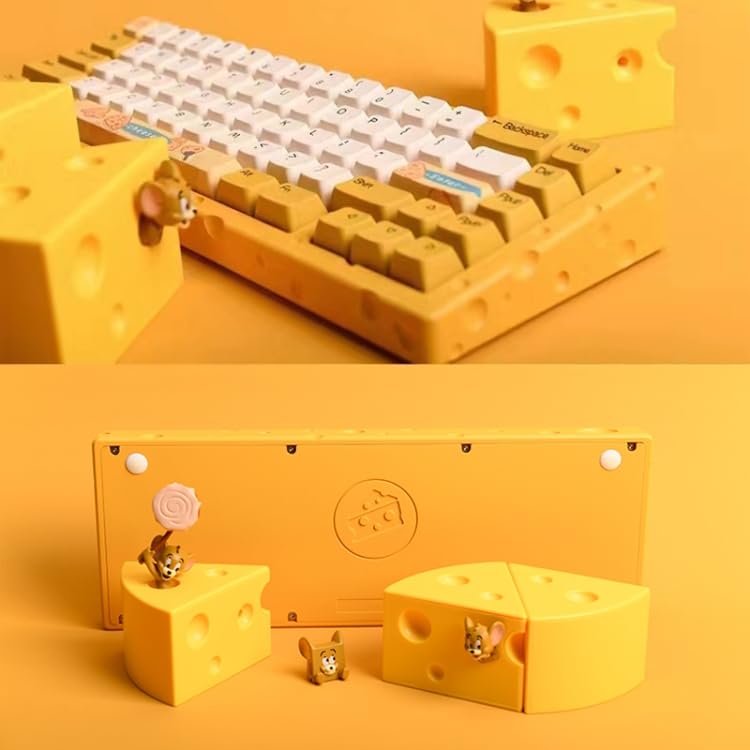
Figure 2: The ELECTROPRIME Ajazz AC067 Mechanical Keyboard, highlighting its unique "Cheese" aesthetic and compact design, surrounded by decorative cheese-themed elements.
Maintenance
Cleaning the Keyboard
Regular cleaning helps maintain the keyboard's appearance and functionality.
- General Cleaning: Use a soft, lint-free cloth slightly dampened with water or a mild cleaning solution to wipe down the keycaps and casing. Avoid excessive moisture.
- Dust Removal: Use compressed air to remove dust and debris from between the keycaps.
- Waterproof Feature: The keyboard is designed with a waterproof feature, offering protection against accidental spills. However, it is not recommended to submerge the keyboard in water. In case of a spill, disconnect the keyboard immediately and allow it to dry completely before reconnecting.
- Shell Material: The shell is made of CNC aluminum alloy, which is durable. Avoid using abrasive cleaners or solvents that could damage the finish.
Troubleshooting
If you encounter issues with your keyboard, please refer to the following common troubleshooting steps:
- Keyboard Not Responding:
- Ensure the USB cable is securely connected to both the keyboard and the computer.
- Try connecting the keyboard to a different USB port on your computer.
- Test the keyboard on another computer to determine if the issue is with the keyboard or the computer's setup.
- Keys Not Registering:
- Check for any debris or foreign objects under the affected keycap.
- If the keyboard is hot-swappable, carefully remove and re-insert the switch for the non-registering key.
- RGB Lighting Issues:
- Ensure the keyboard is properly powered.
- Refer to any specific key combinations for lighting control (not provided in product data, but common for RGB keyboards).
Specifications
| Brand | ELECTROPRIME |
| Model | Ajazz AC067 |
| Connectivity | Wired (USB) |
| Key Count | 67 Keys |
| Lighting | RGB Dynamic Lighting |
| Structure | Gasket Structure |
| Shell Material | CNC Aluminum Alloy |
| Cable Length | Approx. 1.5 meters |
| Dimensions (L x W x H) | 327mm x 118.2mm x 43.4mm |
| Weight | 1480.5g |
| Special Features | Hot-swappable shaft seat, Waterproof |
| Compatible Devices | Ajazz AC067 67 key |
| Mounting Hardware | USB Cable |
| Hand Orientation | Ambidextrous |
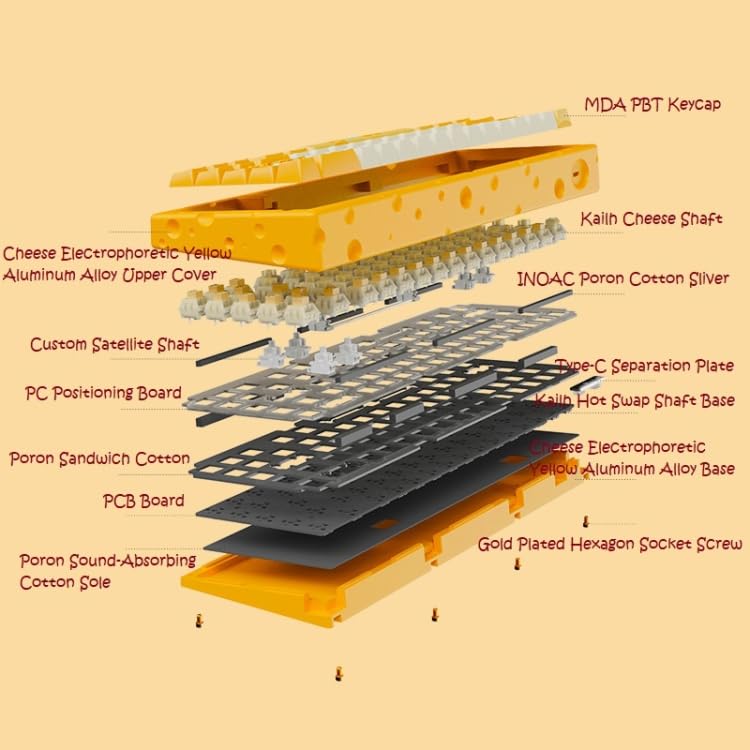
Figure 3: Exploded view illustrating the internal components of the ELECTROPRIME Ajazz AC067 Mechanical Keyboard, including the MDA PBT Keycap, Cheese Electrophoretic Yellow Aluminum Upper Cover, Kailh Cheese Shaft, INOAC Poron Cotton Sliver, Custom Satellite Shaft, Type-C Separation Plate, PC Positioning Board, Poron Sandwich Cotton, PCB Board, Poron Sound-Absorbing Cotton Sole, and Gold Plated Hexagon Socket Screw.
Warranty and Support
For warranty information and technical support, please refer to the documentation provided with your purchase or contact ELECTROPRIME customer service directly. Keep your proof of purchase for warranty claims.