
1. Introduction
The Irfora ATU-10-0A is a compact and efficient automatic antenna tuner designed for shortwave radio applications. It functions as both an automatic antenna tuner, a shortwave power meter, and a standing wave ratio (SWR) meter. This device is engineered to provide stable and reliable performance across a wide frequency band, making it suitable for various amateur radio operations.
This manual provides essential information for the safe and effective use of your ATU-10-0A, including setup, operation, maintenance, and troubleshooting.
2. Safety Information
- Always ensure proper grounding for your radio equipment.
- Do not exceed the maximum power rating of 20W for this device. Exceeding this limit can cause damage to the tuner and connected equipment.
- Avoid operating the tuner in wet or excessively humid environments.
- Do not open the device casing. Refer servicing to qualified personnel.
- Keep the device away from strong magnetic fields.
3. Package Contents
Please verify that all items are present in your package:
- 1 x Irfora ATU-10-0A Automatic Antenna Tuner
- 1 x USB Type-C Charging Cable
4. Product Overview
The ATU-10-0A features a durable aluminum alloy housing and a clear digital display. It integrates a 3.7V, 1200mAh lithium battery, rechargeable via a Type-C port. The tuner operates effectively in a wide frequency range from 1.8 to 30MHz, with an extended maximum of 54MHz. It supports various continuous modes including FT8, CW, Frequency Modulation, and AM.

Figure 4.1: Irfora ATU-10-0A Automatic Antenna Tuner, highlighting its features like the 1200mAh battery, digital display, and durable housing.
Front Panel Controls and Indicators

Figure 4.2: Front panel of the ATU-10-0A with labeled controls.
- Digital Display: Shows PWR (power), L (inductance), C (capacitance), and SWR (standing wave ratio) values.
- Power Switch: Red toggle switch to turn the device ON/OFF.
- TUNE Knob: Blue knob for manual tuning adjustments (though primarily automatic).
- Charge Indicator: LED light indicating charging status.
- 5V@1A Type-C Port: For charging the internal battery.
Rear Panel Connections
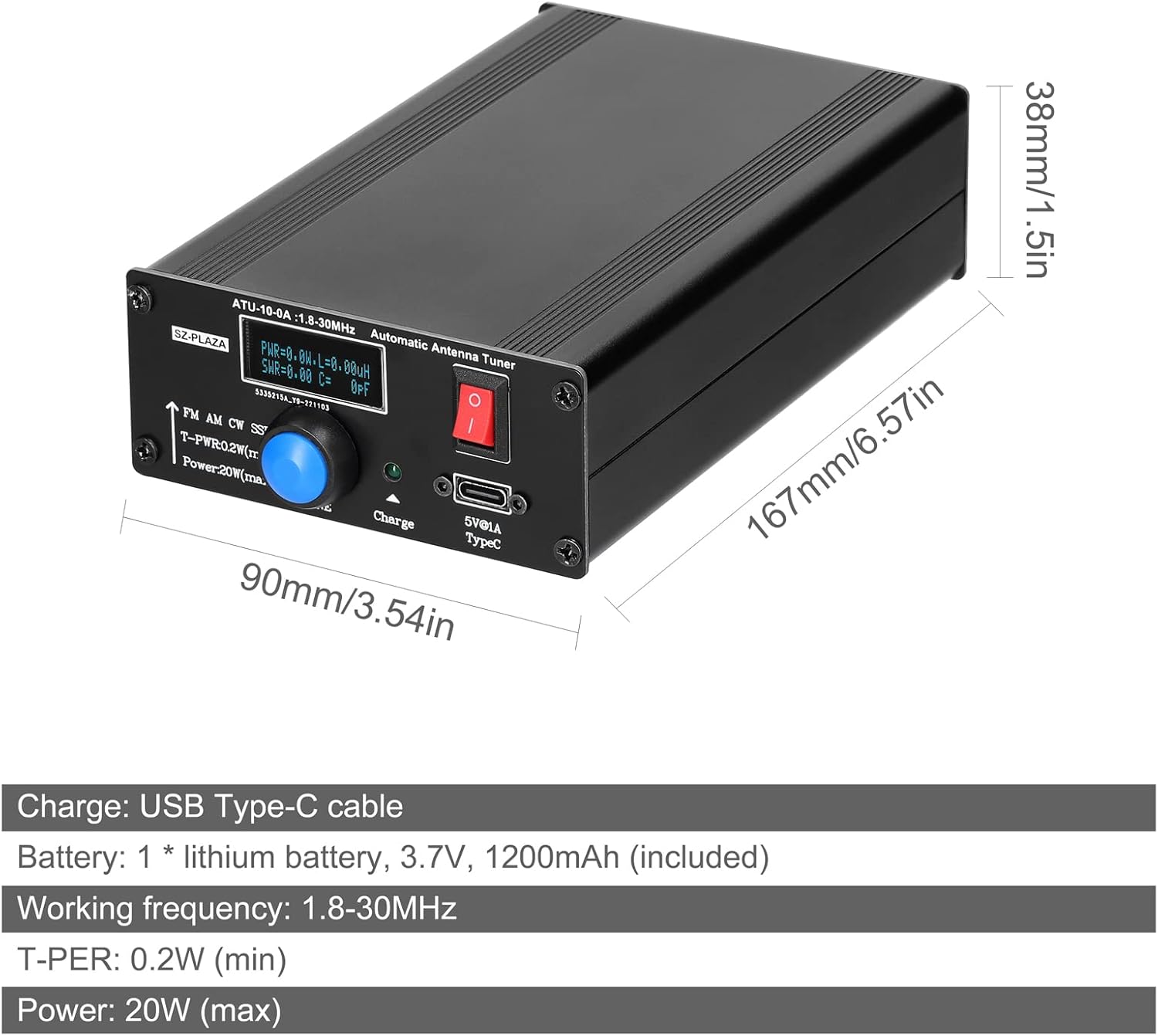
Figure 4.3: Rear panel connections for antenna and transceiver.
- ANT Connector: BNC connector for connecting your antenna.
- TRX Connector: BNC connector for connecting to your transceiver (radio).
5. Setup
- Charge the Device: Before first use, connect the supplied Type-C cable to the 5V@1A Type-C port on the front panel and to a suitable USB power source (e.g., computer USB port, wall adapter). The charge indicator LED will illuminate during charging.
- Connect Transceiver: Connect your shortwave radio (transceiver) to the TRX BNC connector on the rear panel of the ATU-10-0A using a suitable coaxial cable.
- Connect Antenna: Connect your antenna to the ANT BNC connector on the rear panel of the ATU-10-0A using a suitable coaxial cable.
- Power On: Flip the red power switch on the front panel to the ON position. The digital display will light up.
6. Operating Instructions
Automatic Tuning Process
The ATU-10-0A is designed for automatic tuning, simplifying antenna matching. Follow these steps:
- Ensure the tuner is powered on and correctly connected between your transceiver and antenna.
- Select your desired operating frequency on your transceiver.
- Transmit a low power signal (typically 1-5W) in a continuous mode such as AM, FM, or CW. The minimum starting tuning power is 0.2W.
- The ATU-10-0A will automatically detect the transmitted signal and begin the tuning process. The display will show the SWR value as it adjusts.
- Once tuning is complete, the SWR should be optimized (ideally below 1.5:1). You can then increase your transceiver's power up to the maximum supported by the tuner (20W).
The tuner utilizes a 7-group LC combination reaction to achieve optimal matching.
Power and SWR Measurement
The digital display provides real-time readings for:
- PWR: Transmitted power in Watts. The maximum measurable power is 20W.
- SWR: Standing Wave Ratio, indicating the match between your antenna and the transmission line. A lower SWR (closer to 1.0) indicates a better match.
7. Maintenance
- Cleaning: Use a soft, dry cloth to clean the exterior of the device. Do not use liquid cleaners or solvents.
- Storage: Store the tuner in a cool, dry place away from direct sunlight and extreme temperatures when not in use.
- Battery Care: To prolong battery life, avoid completely discharging the internal lithium battery. Recharge the device regularly, even if not in frequent use.
- Connections: Periodically check all coaxial cable connections for tightness and corrosion.
8. Troubleshooting
- Device not powering on:
- Ensure the battery is charged. Connect the Type-C cable and allow it to charge for a period.
- Verify the power switch is in the ON position.
- Tuner not tuning or high SWR after tuning:
- Confirm that your transceiver is transmitting a low power signal (1-5W) in a continuous mode (AM, FM, CW) during the tuning process.
- Check all coaxial cable connections between the radio, tuner, and antenna for proper seating and continuity.
- Ensure your antenna is suitable for the operating frequency range (1.8-30MHz).
- If the SWR remains high, there might be an issue with the antenna itself or the feedline.
- Device malfunction or unexpected behavior:
- If the device ceases to function correctly, discontinue use.
- Contact customer support or your retailer for assistance. Do not attempt to repair the device yourself.
9. Specifications

Figure 9.1: Physical dimensions of the ATU-10-0A.
| Feature | Specification |
|---|---|
| Product Name | Automatic Antenna Tuner |
| Model | ATU-10-0A |
| Material | Aluminum Alloy + Printed Circuit Board |
| Charging Port | USB Type-C (5V@1A) |
| Battery | 1 x Lithium Battery, 3.7V, 1200mAh (included) |
| Working Frequency | 1.8-30MHz (extendable to 54MHz max) |
| Minimum Tuning Power (T-PER) | 0.2W |
| Maximum Measurable Power | 20W |
| Item Size (L x W x H) | 167 x 90 x 38mm (6.57 x 3.54 x 1.50 inches) |
| Item Weight | 371g (13.09 ounces) |
10. Warranty Information
Please refer to your purchase documentation or the retailer's terms and conditions for specific warranty details regarding your Irfora ATU-10-0A Automatic Antenna Tuner. General warranty terms typically cover manufacturing defects for a limited period from the date of purchase.
11. Support
For technical assistance, product inquiries, or warranty claims, please contact your retailer or the manufacturer, Irfora, through their official support channels. Ensure you have your purchase details and product model number (ATU-10-0A) available when contacting support.