
1. Introduction
The CARPURIDE W502B is a 5-inch HD IPS touchscreen display designed for BMW motorcycles, offering integrated CarPlay and Android Auto functionalities. This device allows you to access navigation, make calls, play music, and send messages directly from your motorcycle's display by connecting your smartphone via Bluetooth. It features dual Bluetooth connectivity, an IP67 waterproof design, and a custom mounting solution for specific BMW models.

Image: The CARPURIDE W502B device displaying the CarPlay interface.
2. Package Contents
Verify that all components are present in the package:
- CARPURIDE W502B Display Unit
- U-shaped Support Rod
- BMW Special Bracket
- Power Line (for 12V battery connection)
- USB Boost Voltage Cable (for 5V USB connection)
- User Manual

Image: Overview of the CARPURIDE W502B package contents.
3. Setup and Installation
3.1 Mounting the Device
The W502B offers specialized mounting for BMW motorcycles and a general handlebar mount. You must possess the original BMW motorcycle navigation base to use the BMW specific mounting.
BMW Specific Installation (R1200GS, R1250GS, S1000XR)
- Install the BMW bracket onto the motorcycle CarPlay screen.
- Attach the assembled unit to the original BMW navigation base.
- Ensure the unit is securely fastened.

Image: BMW navigation mount installation steps.
General Handlebar Mount Installation
- Attach the U-shaped support rod to the device.
- Secure the support rod to your motorcycle's handlebar.
- Adjust the viewing angle and tighten all fasteners.

Image: General handlebar mount installation steps.
3.2 Power Connection Options
The W502B offers three power connection methods:
- Motorcycle Battery (12V, 1A): Use the provided power line to connect directly to your motorcycle's 12V battery. Ensure the output voltage and current are 12V, 1A. The device has built-in reverse polarity protection.
- Motorcycle USB Port (5V, 2.5A or higher): Use the USB Boost Voltage Cable to connect the W502B directly to a motorcycle USB port. Notice: If the USB port provides less than 5V, 2A, it is not recommended to use this method, as insufficient power may cause automatic shutdown.
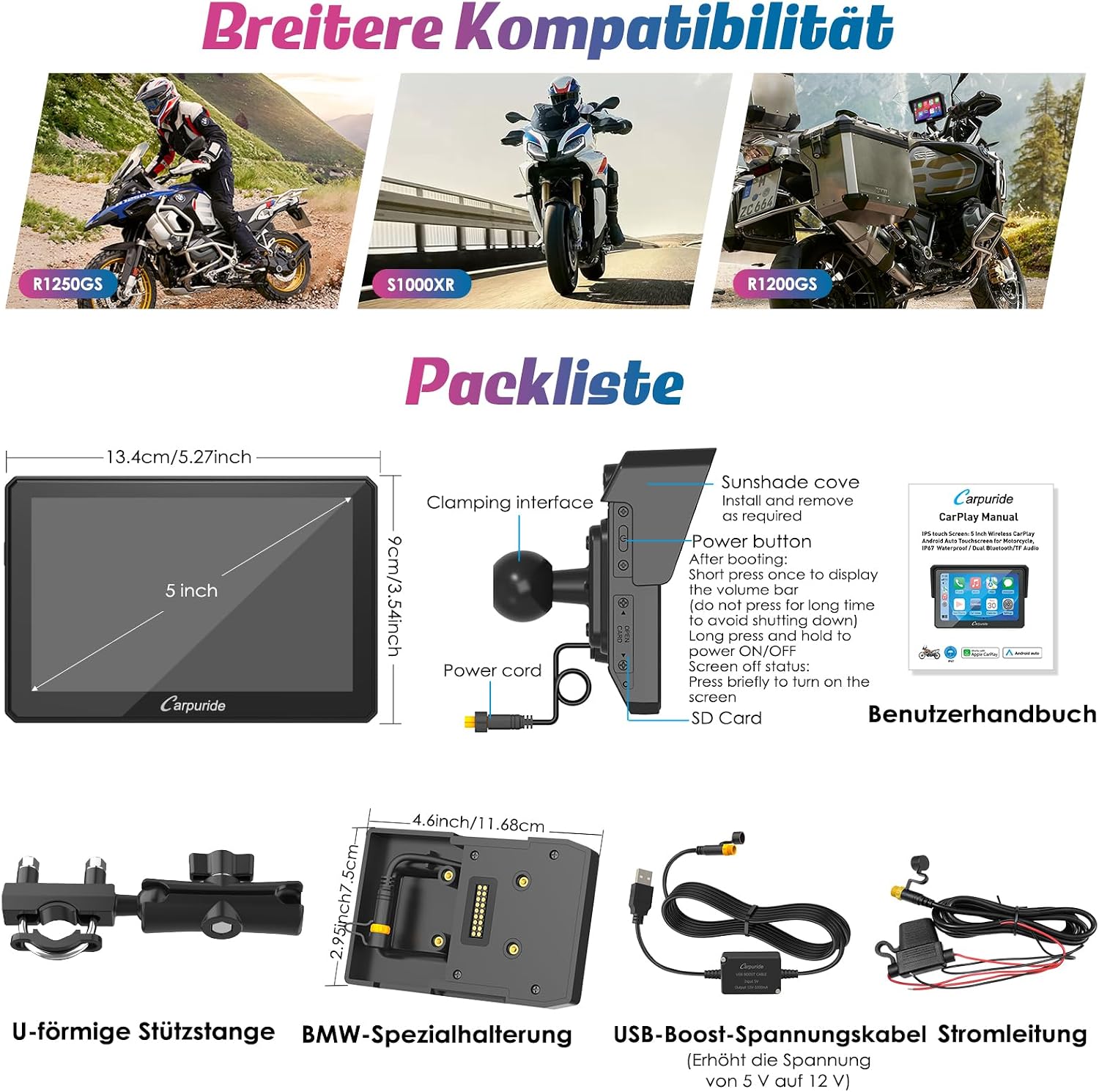
Image: Power connection options for the W502B.
4. Operating Instructions
4.1 Connecting to CarPlay / Android Auto
The W502B supports wireless Apple CarPlay and Android Auto. Ensure your smartphone meets the compatibility requirements:
- CarPlay: iPhone with iOS 6 or later. Requires CarPlay system and Siri voice activation.
- Android Auto: Phone supporting 5GHz Wi-Fi and Android 11 or later. Requires the Android Auto app to be installed and updated to the latest version.
- Note: Not compatible with phones running HarmonyOS. Not perfectly compatible with Samsung Note and S series.
CarPlay Connection Steps
- Open the CarPlay application on the W502B.
- On your iPhone, search for the device's Bluetooth name (e.g., "carpuride xxxx") and pair.
- Confirm the connection prompt on your iPhone.
- The CarPlay connection is now established.

Image: Apple CarPlay connection guide.
Android Auto Connection Steps
- Open the Android Auto application on the W502B.
- On your Android phone, search for available devices and select the W502B.
- Add the new device and confirm pairing.
- The Android Auto connection is now established.

Image: Android Auto connection guide.
4.2 Dual Bluetooth Connectivity
The W502B features dual Bluetooth. This allows you to pair your smartphone to the display and simultaneously connect Bluetooth-enabled headphones or a helmet communication system for hands-free calls and music playback.
- Connect your phone to the W502B via Bluetooth for CarPlay/Android Auto.
- Go to the 'Audio Output' interface on the W502B and select 'BT Trans'.
- Put your Bluetooth headset/helmet into pairing mode and search for 'Carpuride Moto BT Trans' on the W502B to pair.
- Once connected, audio from the W502B will be routed to your headset.

Image: Dual Bluetooth connection diagram.
4.3 Navigation and Voice Control
Once connected to CarPlay or Android Auto, you can utilize your smartphone's navigation applications (e.g., Apple Maps, Google Maps, Waze) directly on the W502B display. Use Siri or Google Assistant for voice commands to control navigation, make calls, or play music, enhancing safety and convenience while riding.

Image: Navigation map displayed on the W502B.

Image: Voice control functionality with Siri and Google Assistant.
4.4 Music Playback and EQ Settings
The W502B allows music playback through connected smartphone apps (Spotify, YouTube Music) or locally stored files on an SD card. The integrated EQ features a 16-band custom HD EQ with 12 adjustable frequency sections. You can also activate or deactivate the bass effect ('Loud') and choose from preset sound effect modes like rock, classical, or jazz.

Image: Music playback interface with app integration.
5. Maintenance
The CARPURIDE W502B is designed for durability and ease of maintenance.
- Waterproof Design: The IP67 waterproof rating ensures normal operation even in rain.
- Temperature Range: The device functions perfectly in temperatures ranging from -20°C to 70°C.
- Cleaning: Use a soft, damp cloth to clean the screen and exterior. Avoid harsh chemicals.
- Anti-Theft: The removable support allows you to easily detach the screen for security when leaving your motorcycle unattended.

Image: W502B operating in various weather conditions.
6. Troubleshooting
- Device not powering on or shutting down unexpectedly:
- Ensure the power connection is secure.
- If using the motorcycle battery, verify the output is 12V, 1A.
- If using a USB port, confirm it provides 5V, 2.5A or higher. Insufficient power can cause shutdowns.
- CarPlay/Android Auto connection issues:
- Check smartphone compatibility (iOS 6+, Android 11+, no HarmonyOS, potential issues with Samsung Note/S series).
- Ensure Bluetooth and Wi-Fi are enabled on your phone.
- Try forgetting the device in your phone's Bluetooth settings and re-pairing.
- Restart both the W502B and your smartphone.
- Software Update Issues:
- The 64 GB TF card does not support software updates.
- For software updates, use a smaller capacity TF card (32 GB, 16 GB, 8 GB, or 4 GB).
- Poor screen visibility in bright sunlight:
- The screen has a maximum brightness of 1000 nits, designed for clear visibility. Ensure the screen brightness setting is at its maximum.
7. Specifications
| Feature | Specification |
|---|---|
| Brand | CARPURIDE |
| Model Name | W502B |
| Screen Size | 5 Inches |
| Screen Resolution | 1024x600 (HD IPS) |
| Connectivity Technology | Bluetooth, Wi-Fi |
| Special Features | Android Auto, GPS Navigation, Apple CarPlay, Voice Synthesis, Touchscreen |
| Operating Systems | Android, iOS |
| Waterproof Rating | IP67 |
| Supported Navigation System | GPS |
| Compatible Flash Memory | microSD (up to 64GB for media, smaller for updates) |
| Control Method | App, Touch, Voice |
| Dimensions (L x W x H) | 13.4L x 2.8W x 8.9H cm |
| Power Input | 12V, 1A (battery) or 5V, 2.5A+ (USB) |
8. Warranty and Support
8.1 Warranty Information
The CARPURIDE W502B comes with a 1-year product warranty from the date of purchase. Please retain your proof of purchase for warranty claims.
8.2 Customer Support
For technical assistance, troubleshooting, or warranty inquiries, please contact CARPURIDE customer support through their official website or the retailer where the product was purchased. Provide your model number (W502B) and a detailed description of the issue to facilitate support.


