
1. Introduction
Thank you for choosing the Nasitip Licensed BMW M4 12V Ride-On Car. This manual provides important information for the safe assembly, operation, and maintenance of your new ride-on car. Please read it thoroughly before use and keep it for future reference.

Image: The Nasitip Licensed BMW M4 12V Ride-On Car.
2. Safety Information
WARNING: To reduce the risk of injury, adult supervision is required. Never use in roadways, near motor vehicles, on or near steep inclines or steps, swimming pools or other bodies of water. Always wear shoes, and never allow more than one rider.
- Always ensure the child is securely fastened with the adjustable seat belt.
- Recommended age: 3-7 years.
- Maximum speed: 5 mph.
- Operate only on flat, dry surfaces. Avoid grass, sand, or loose gravel.
- Keep hands, hair, and clothing away from moving parts.
- Do not allow children to stand in the vehicle.
- Regularly inspect the vehicle for damage or loose parts before each use.
3. Product Features
The Nasitip Licensed BMW M4 Ride-On Car offers an engaging driving experience with several key features:
- Licensed BMW M4 Design: Authentic sports car appearance for an immersive play experience.
- Dual Operation Modes: Child-driven via steering wheel and accelerator pedal, or parent-controlled using the remote control.
- Adjustable Seat Belts: Ensures child safety during operation.
- LED Lights: Modern LED headlights for enhanced visibility and realistic play.
- Three Speed Settings: Allows for varied driving experiences up to 5 mph.
- Dual 25W Motors: Provides sufficient power for smooth operation.
- 12V Battery: Offers 1-2 hours of playtime per charge.
- Double Door Design: Adds to the realistic and fashionable appeal.
- USB Port: For connecting external media.
- Storytelling Button/Volume Control: Integrated entertainment features.

Image: Front view of the BMW M4 ride-on car showcasing its main features.
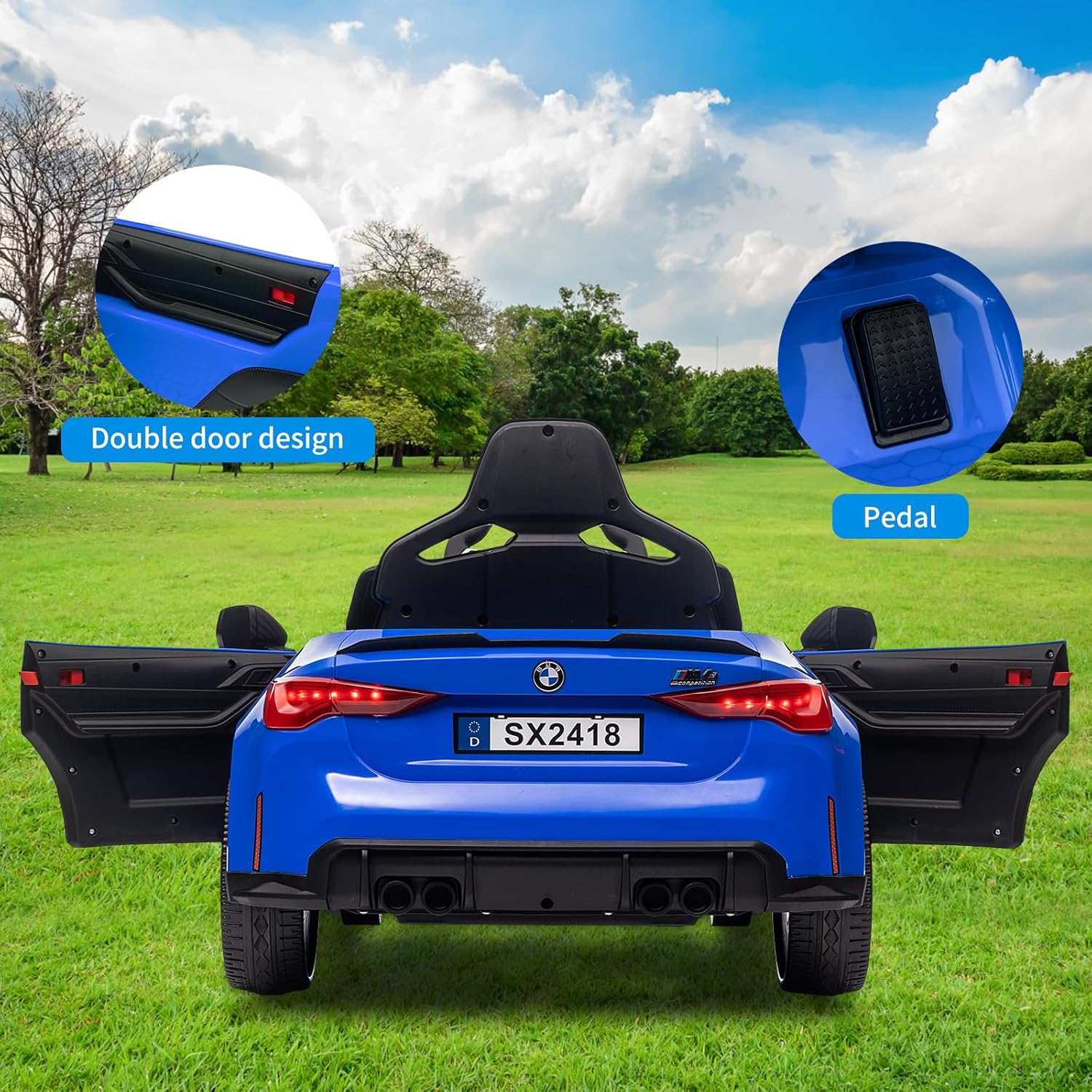
Image: Double door design and foot pedal.
4. Components List
Please ensure all components are present before beginning assembly:
- 12V Ride On Car Body (Main Unit)
- Steering Wheel
- Wheels (4)
- Seat
- Windshield
- Rearview Mirrors (2)
- Remote Control
- Charger
- Assembly Hardware (screws, washers, etc.)
- Instruction Manual
5. Assembly Instructions
Follow these steps carefully to assemble your ride-on car. Adult assembly is required.
- Prepare the Car Body: Place the car body upside down on a soft, stable surface to prevent scratches.
- Install Rear Wheels: Attach the rear wheels to the axle, ensuring they are securely fastened with the provided washers and nuts.
- Install Front Wheels: Attach the front wheels to the front axle, securing them in the same manner as the rear wheels.
- Connect Battery: Locate the battery compartment, usually under the seat or hood. Connect the battery terminals (red to red, black to black).
- Attach Steering Wheel: Connect the steering wheel's electrical connector to the corresponding port on the dashboard. Then, slide the steering wheel onto the steering column until it clicks into place.
- Install Seat: Place the seat into its designated position and secure it with the screws provided. Ensure the seat belt is accessible.
- Attach Windshield and Mirrors: Secure the windshield and rearview mirrors to their respective slots on the car body.
- Final Checks: Ensure all connections are secure and all screws are tightened.
Video: Detailed assembly process for the ride-on car, including wheel installation, steering wheel attachment, and seat securing.

Image: Product dimensions and scale reference.
6. Operating Instructions
6.1 Child Manual Operation
- Power On: Press the Power Switch to turn on the car.
- Select Speed: Use the High/Low Speed button to select the desired speed.
- Direction: Use the Forward/Reverse switch to select driving direction.
- Drive: Press the accelerator pedal to move the car. Release to brake.
- Steering: Turn the steering wheel to control direction.
- Lights: Press the Light Button to activate the LED headlights.
- Entertainment: Use the USB Port for music or the Storytelling Button for pre-loaded content. Adjust volume with the Volume control.
6.2 Parent Remote Control Operation
The remote control allows parents to override child operation for safety and guidance.
- Pairing: Follow the remote control's specific instructions to pair it with the car.
- Control: Use the remote to control forward/reverse movement, steering, and speed settings.
- Emergency Stop: The remote control typically includes an emergency stop button for immediate halting of the vehicle.

Image: Dashboard controls and remote control.

Image: Car suitable for various road types.
7. Charging Instructions
To charge the 12V battery:
- Ensure the car is turned OFF before charging.
- Locate the charging port (refer to the car's specific design, often near the battery compartment or under the seat).
- Plug the charger into the charging port, then plug the charger into a standard wall outlet.
- The charging indicator light on the charger will typically show red during charging and turn green when fully charged.
- Initial charge time is usually 8-12 hours. Subsequent charges should be 8-10 hours. Do not overcharge.
- Do not operate the car while it is charging.
8. Maintenance
- Cleaning: Wipe the car with a soft, damp cloth. Do not use abrasive cleaners or solvents.
- Storage: Store the car in a dry, cool place away from direct sunlight. If storing for extended periods, charge the battery fully every 30 days to prolong its life.
- Battery Care: Do not allow the battery to completely drain. Recharge after each use.
- Inspection: Regularly check all screws, connections, and moving parts for tightness and wear.
9. Troubleshooting
| Problem | Possible Cause | Solution |
|---|---|---|
| Car does not move | Battery low or disconnected; Loose wiring; Blown fuse. | Charge battery; Check battery connections; Check all wiring; Replace fuse if necessary. |
| Car runs slowly | Low battery; Overloaded vehicle; Operating on unsuitable surface. | Recharge battery; Reduce load; Operate on flat, hard surfaces. |
| Remote control not working | Remote batteries dead; Not paired correctly; Interference. | Replace remote batteries; Re-pair remote control; Move away from sources of interference. |
| Lights not working | Loose connection; Damaged LED. | Check wiring to lights; Contact customer support for replacement parts. |
10. Specifications
- Product Dimensions: 44.09 x 22.83 x 11.22 inches
- Item Weight: 38.6 pounds
- Item Model Number: qz14ijFaV2ukgWBXVpfzbQx8B
- Manufacturer Recommended Age: 3 - 7 years
- Battery: 12V (specific capacity not detailed, but typically 7Ah or 4.5Ah based on images)
- Motors: 2 x 25W
- Max Speed: Up to 5 mph
- Play Time: 1-2 hours (approximate, depends on usage)
- Manufacturer: Nasitip
11. Warranty & Support
For warranty information, technical support, or replacement parts, please contact Nasitip customer service. Refer to your purchase documentation for specific warranty terms and contact details.
Customer Service: Please visit the official Nasitip website or refer to the contact information provided with your purchase.

