
1. Introduction
This manual provides essential information for the Ditec 61E1 230V Electronic Control Board. This board is designed for use with Ditec E1-E1BOX control panels and is compatible with various Ditec gate automation systems, including Cross5E, Box3, Box4, Box30, and Box40 models.
Important Safety Notice: This is a professional product. Installation and maintenance must be performed by a qualified professional installer. It is not suitable for "do-it-yourself" installation.
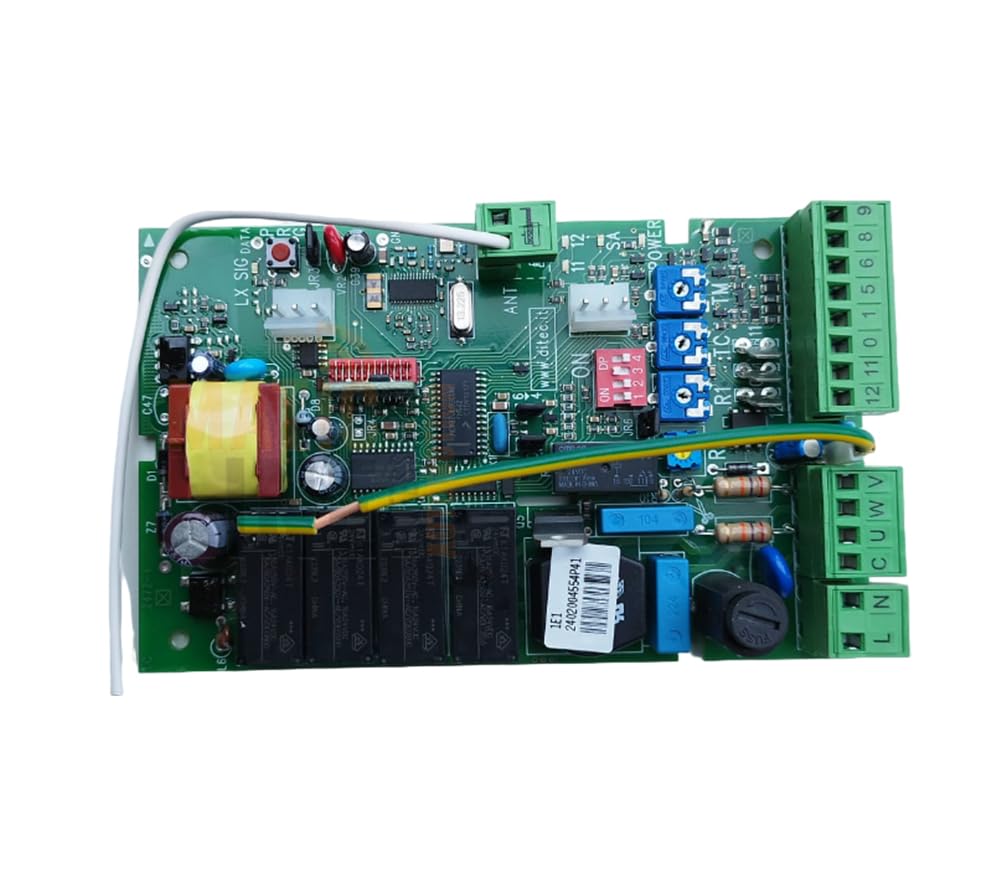
Figure 1: Ditec 61E1 230V Electronic Control Board. This image shows the main control board, typically used in gate automation systems.
2. Setup and Installation
The Ditec 61E1 control board is a critical component of an automated gate system. Due to the complexity of electrical connections and safety requirements, installation must be carried out exclusively by a certified and experienced professional.
The package includes the central control unit. The professional installer will integrate this board into your existing or new Ditec E1-E1BOX control panel, ensuring all electrical connections, safety devices, and operational parameters are correctly configured according to local regulations and manufacturer guidelines.
- Professional Installation Required: Do not attempt to install this product yourself.
- Power Supply: Ensure the main power supply is disconnected before any installation or maintenance work.
- Compatibility: Verify compatibility with your specific Ditec gate automation system model (Cross5E, Box3, Box4, Box30, Box40).
3. Operating Instructions
Once installed and configured by a professional, the Ditec 61E1 control board manages the operation of your automated gate system. User interaction typically occurs through external devices such as remote controls, keypads, or sensors, which send signals to the control board.
The control board processes these signals to activate the gate motor, manage opening and closing cycles, and integrate safety features like obstacle detection. For specific operational details of your gate system, refer to the user manual provided with your complete gate automation system (e.g., Cross5E, Box3).
- Power On/Off: The system is typically powered on continuously. For complete shutdown, disconnect the main power supply.
- Remote Control: Use your gate's remote control to send open/close commands.
- Safety Features: Ensure all safety photocells and sensors are clear and functioning correctly before operating the gate.
4. Maintenance
Regular maintenance is crucial for the longevity and safe operation of your Ditec gate automation system, including the 61E1 control board. All maintenance procedures should be performed by a qualified professional.
- Annual Inspection: Schedule annual inspections with a professional to check all electrical connections, wiring, and component integrity.
- Environmental Protection: Ensure the control board enclosure remains sealed and protected from moisture, dust, and extreme temperatures.
- Cleaning: If necessary, a professional can carefully clean the board using appropriate electronic cleaning solutions, ensuring power is disconnected.
- Battery Check: If your system uses backup batteries, have them checked and replaced by a professional as recommended by the manufacturer.
5. Troubleshooting
If your Ditec gate automation system experiences issues, it is recommended to contact a professional installer or service technician. Attempting to troubleshoot or repair the control board without proper training can be dangerous and may void your warranty.
Common issues and general advice (for professional reference):
- No Power: Check the main power supply and circuit breakers.
- Gate Not Responding: Verify remote control battery, check for obstructions in safety sensor paths.
- Erratic Operation: May indicate sensor issues, motor problems, or control board malfunction. Requires professional diagnosis.
Always disconnect power before any inspection or service work.
6. Specifications
| Manufacturer: | DITEC |
| Model Number: | 61E1 |
| Voltage: | 230 V |
| Included Components: | Control Unit |
| Batteries Required: | Yes |
| Batteries Included: | No |
| Product Weight: | 1 kg |
| ASIN: | B0D2HD8YSR |
| First Available Date: | April 23, 2024 |
7. Warranty and Support
Specific warranty terms for the Ditec 61E1 Electronic Control Board are typically provided by the seller or the manufacturer at the time of purchase. Please retain your proof of purchase for warranty claims.
For technical support, service, or warranty inquiries, please contact the professional installer who installed your system or refer to the official Ditec website for authorized service centers and contact information. As this is a professional product, direct end-user support may be limited, and assistance through a qualified technician is generally required.


