
1. Introduction
This manual provides comprehensive instructions for the safe and efficient operation and maintenance of your Petsuper Automatic Pet Dryer Box, Model PD01. Please read this manual thoroughly before first use and retain it for future reference.
Key Features:
- 360° Efficient Drying: Innovative internal airflow circulation system with 3-side ventilation for accelerated air circulation. Ring-around wind reaches difficult-to-dry areas, reducing drying time.
- Ultra Quiet Operation: Low noise level (40dB) for a comfortable drying experience. Built-in negative ion generator (20 million ions) neutralizes static, smooths frizz, and enhances hair fluffiness and shine.
- 75L Large Capacity: Inner size of 19.7 x 14.6 x 16.2 inches, accommodating cats and small dogs with ample space for movement, reducing stress.
- Efficient and Safe Drying: Safety thermostat technology with a built-in intelligent thermostat chip and real-time temperature sensor. Adjustable temperature from room temperature up to 108°F/42°C, with precise 1°C control.
- Smart Control Panel: Intuitive touch control panel for adjusting temperature, drying time, and blowing speed.
- APP Intelligent Control: Mobile Petsuper APP allows for precise temperature regulation and multiple mode selection, with real-time data and history viewing.
2. Product Overview

Figure 1: Petsuper Automatic Pet Dryer Box, showcasing its design and suitability for both cats and small dogs.
The Petsuper Automatic Pet Dryer Box is designed to provide a safe, efficient, and comfortable drying experience for your pets after bathing. Its intelligent features and spacious design ensure optimal pet comfort and convenience for pet owners.
3. Setup Instructions
3.1 Unpacking and Placement
Carefully remove the dryer box from its packaging. Place the unit on a stable, flat surface in a well-ventilated area. Ensure there is adequate space around the unit for proper airflow.
3.2 Power Connection
Connect the power cord to the designated port on the back of the unit, then plug it into a standard electrical outlet. Ensure the power switch on the back of the unit is in the OFF position before plugging in.
3.3 Initial Inspection
Before first use, open the main door and inspect the interior for any packaging materials or debris. Ensure the drainage panel and filter are correctly installed.
4. Operating Instructions
4.1 Powering On/Off
Press and hold the Power button on the control panel to turn the device on or off. Double-press the Power button to automatically open the main door.
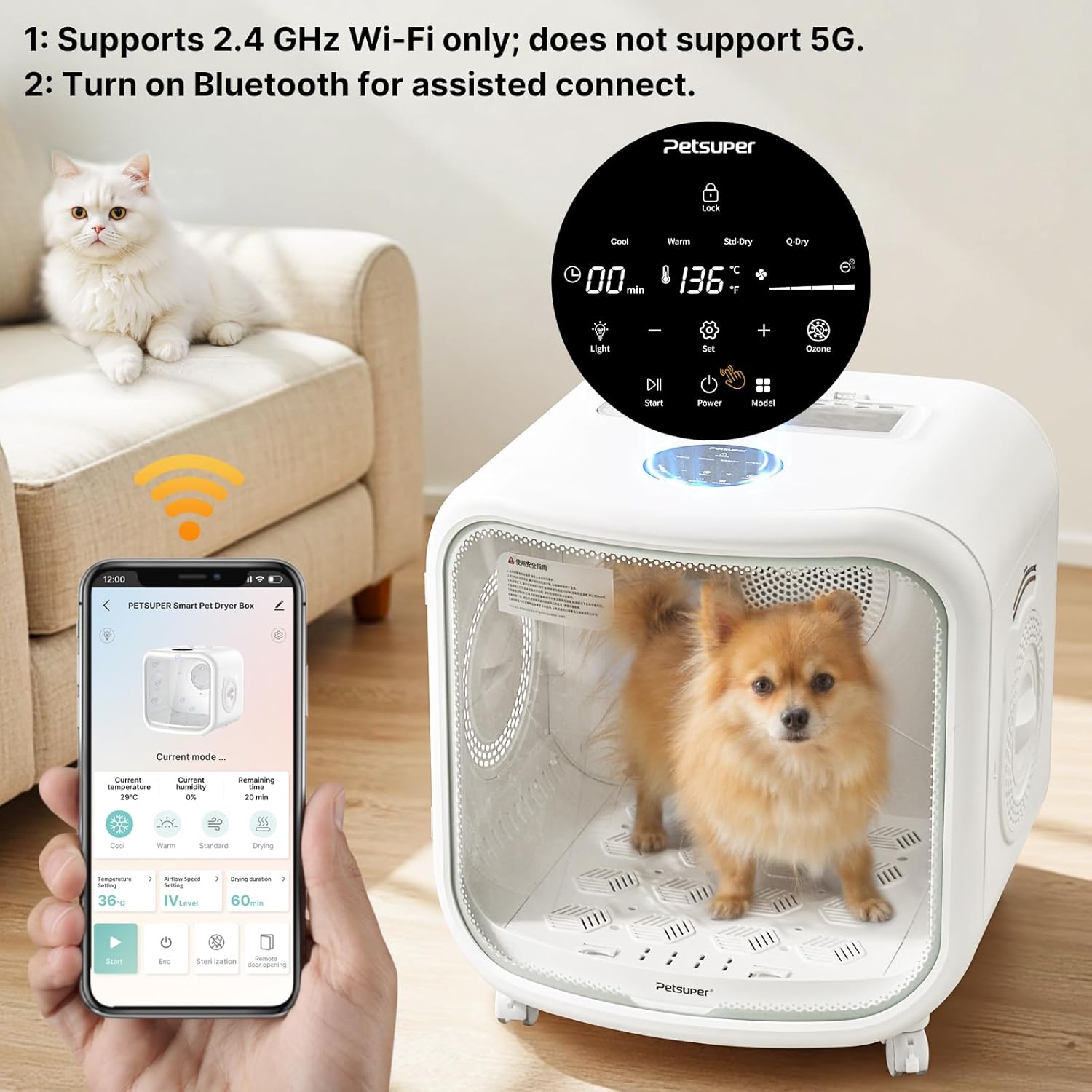
Figure 2: The smart control panel and mobile app interface for operating the dryer box.
4.2 Placing Your Pet
Gently place your pet inside the dryer box. Ensure the pet is comfortable and the door is securely closed before starting any drying cycle. The 75L large capacity provides ample space for cats and small dogs.

Figure 3: A cat comfortably seated inside the spacious 75L interior of the dryer box.
4.3 Selecting Drying Modes
Press the Mode button to cycle through available drying modes: Comfortable, Fast Drying, Cool, and Warmth. Adjust the temperature using the Temperature buttons (+/-) and fan speed using the Speed button.

Figure 4: The two primary drying modes: Standard Mode (36°C, Level 2, 60 min) and Quick-dry Mode (42°C, Level 4, 40 min).
4.4 Adjusting Settings
Use the Temperature and Time buttons (+/-) to fine-tune the drying temperature and duration. The dryer features 360° internal airflow and 16 air vents on the bottom for efficient drying.

Figure 5: The 360° internal airflow system ensures comprehensive drying.
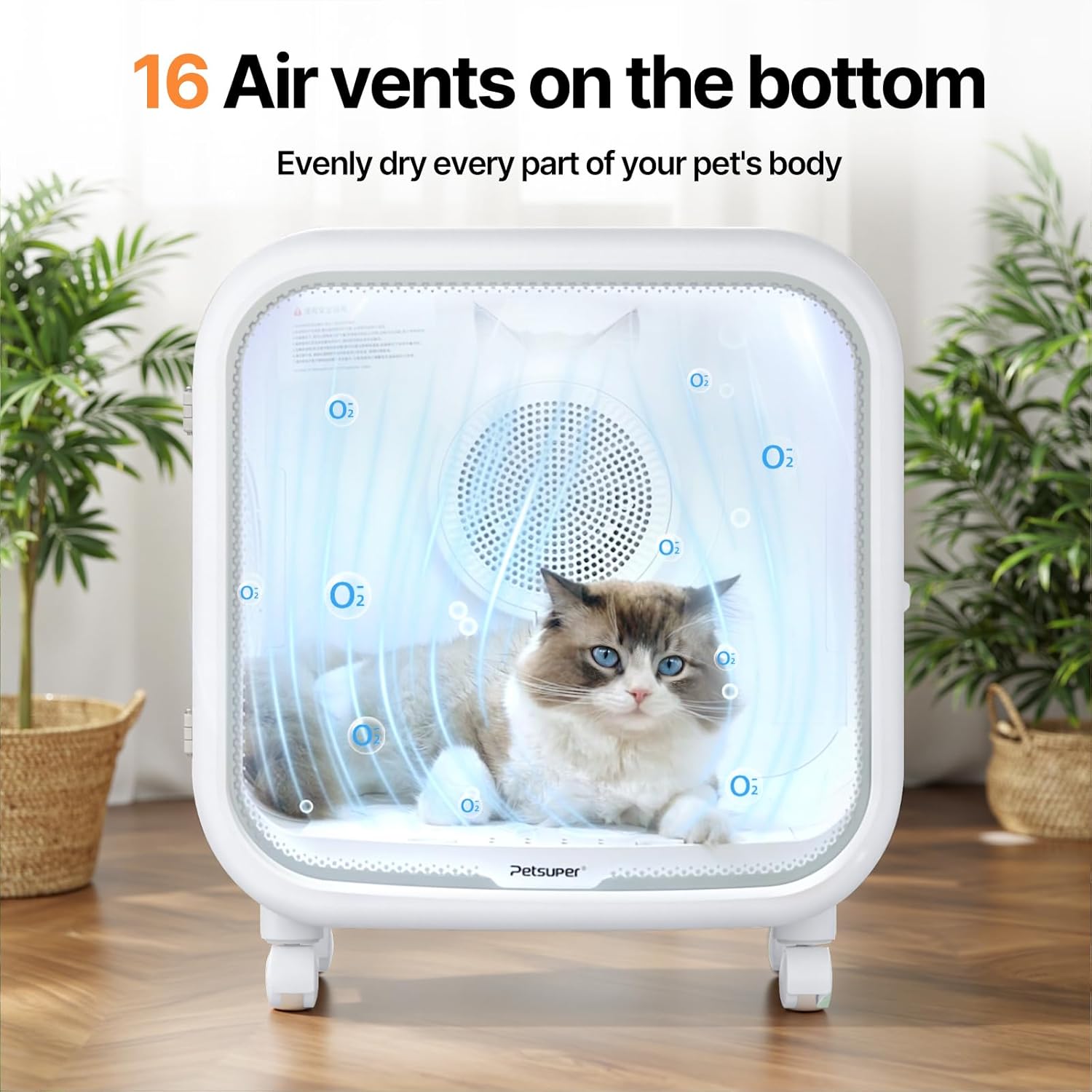
Figure 6: The 16 air vents on the bottom ensure even drying of all parts of your pet's body.
4.5 Using the Pet Window
The side ventilation window allows for interaction with your pet during the drying process, providing comfort and reassurance.

Figure 7: The pet window facilitates interaction and reduces pet anxiety during drying.
4.6 APP Control
Download the Petsuper APP to control the dryer remotely. The app allows for precise temperature regulation, mode selection, and real-time monitoring of drying data and history.
5. Maintenance
Regular cleaning ensures optimal performance and longevity of your Petsuper Automatic Pet Dryer Box.
5.1 Power Off and Unplug
Always turn off the unit and unplug it from the power outlet before performing any cleaning or maintenance.
5.2 Cleaning the Drainage Panel
Lift and remove the drainage panel from the bottom of the dryer. Wipe off any accumulated fur and debris with a soft cloth. Clean the area beneath the panel. Reinsert the clean drainage panel.
5.3 Cleaning the Filter
Remove the filter from the back panel. Rinse it thoroughly with water to remove any trapped fur or dust. Allow the filter to dry completely before reinstalling it. Ensure the filter is securely in place before closing the door.
5.4 Exterior Cleaning
Wipe the exterior surfaces of the dryer box with a soft, damp cloth. Avoid using abrasive cleaners or solvents that could damage the finish.
6. Troubleshooting
| Problem | Possible Cause | Solution |
|---|---|---|
| Unit does not power on. | Power cord not properly connected; power switch off; power outage. | Ensure power cord is securely plugged in. Check if the power switch on the back is ON. Verify power supply to the outlet. |
| Drying is not effective. | Incorrect mode/temperature setting; clogged filter; pet too large for optimal airflow. | Adjust temperature and fan speed. Clean the air filter. Ensure pet size is within recommended limits (for 75L capacity). |
| Unusual noise during operation. | Loose parts; foreign object inside; fan obstruction. | Turn off and unplug the unit. Inspect the interior for any loose items or obstructions. If noise persists, contact customer support. |
| APP connection issues. | Incorrect Wi-Fi settings; Bluetooth not enabled; app not updated. | Ensure your phone is connected to a 2.4 GHz Wi-Fi network (5G is not supported). Enable Bluetooth for assisted connection. Update the Petsuper APP to the latest version. |
7. Specifications
| Feature | Detail |
|---|---|
| Model Number | PD01 |
| Capacity | 75L |
| Inner Dimensions | 19.7 x 14.6 x 16.2 inches |
| Temperature Control | Room temperature up to 108°F/42°C (precise 1°C control) |
| Noise Level | 40dB |
| Connectivity | 2.4 GHz Wi-Fi, Bluetooth (for assisted connection) |
| Manufacturer | Shenzhen Petsuper Smart Technology Co.,Ltd. |
| Product Dimensions | 51.18 x 52.37 x 51.69 cm; 11.79 kg |
8. Warranty and Support
For warranty information, technical support, or service inquiries, please refer to the contact details provided with your product packaging or visit the official Petsuper website. Keep your purchase receipt as proof of purchase.

