
1. Introduction
The Kqcibz LD2420 is a 24G MmWave Human Presence Radar Sensor Induction Module designed for detecting human presence and movement. This module utilizes Frequency Modulated Continuous Wave (FMCW) technology to provide reliable detection within a specified range. It offers serial port and I/O level output for integration into various systems.
2. Setup and Installation
2.1 Power Supply Requirements
The module requires a power supply input voltage of 3.0V to 3.6V. Ensure the power supply ripple is within 100 kHz without significant peaks to maintain stable operation. Users should consider appropriate ESD and interface surge protection for electromagnetic compatibility.
2.2 Enclosure Considerations
If an enclosure is used, it must possess good wave-transmission characteristics in the 24 GHz band. The enclosure should not contain metals or materials that could shield electromagnetic waves, as this will interfere with the radar's performance.
2.3 Environmental Factors
Install the product in a suitable environment. The detection effect may be impacted by:
- Non-human objects with continuous movement in the sensing area, such as animals, continuously swinging curtains, or large green plants directly facing the wind.
- The presence of large, strong reflective planes or objects directly in front of the radar antenna, which can cause interference.
2.4 Installation Orientation
The module can be mounted from the top or on a wall. The recommended installation method is from the top for optimal performance. The orientation of the radar is defined as follows: the Y-axis direction is 0°, the X-axis direction is 90°, and the Z-axis is perpendicular to the X-Y plane (also known as the normal line direction).

Figure 1: Induction range diagram illustrating the X, Y, and Z axes for proper radar orientation during installation.
2.5 Pinout and Interface
The module features a 2.54mm x 5PIN row pin interface. The pin assignments are as follows:
- VCC: 3.3V power supply input
- GND: Power supply ground
- OT1: Induction output high level
- RX: TTL serial port reception
- OT2: TTL serial port transmission

Figure 2: Product diagram detailing the pin assignments for the LD2420 module.

Figure 3: Overview of the LD2420 module, highlighting the HLK-LD2420-V2.0 marking and pin headers.
3. Operating Instructions
The LD2420 module is designed for sensing human presence and movement. It supports multi-level intelligent parameter adjustment via serial ports, allowing for customization of detection sensitivity and other operational characteristics.
3.1 Detection Capabilities
The module offers an adjustable detection distance ranging from 0.75 meters to 6 meters. It operates with a detection angle of 60 degrees. The FMCW modulation mode enables precise human body sensing, including micromotion detection.
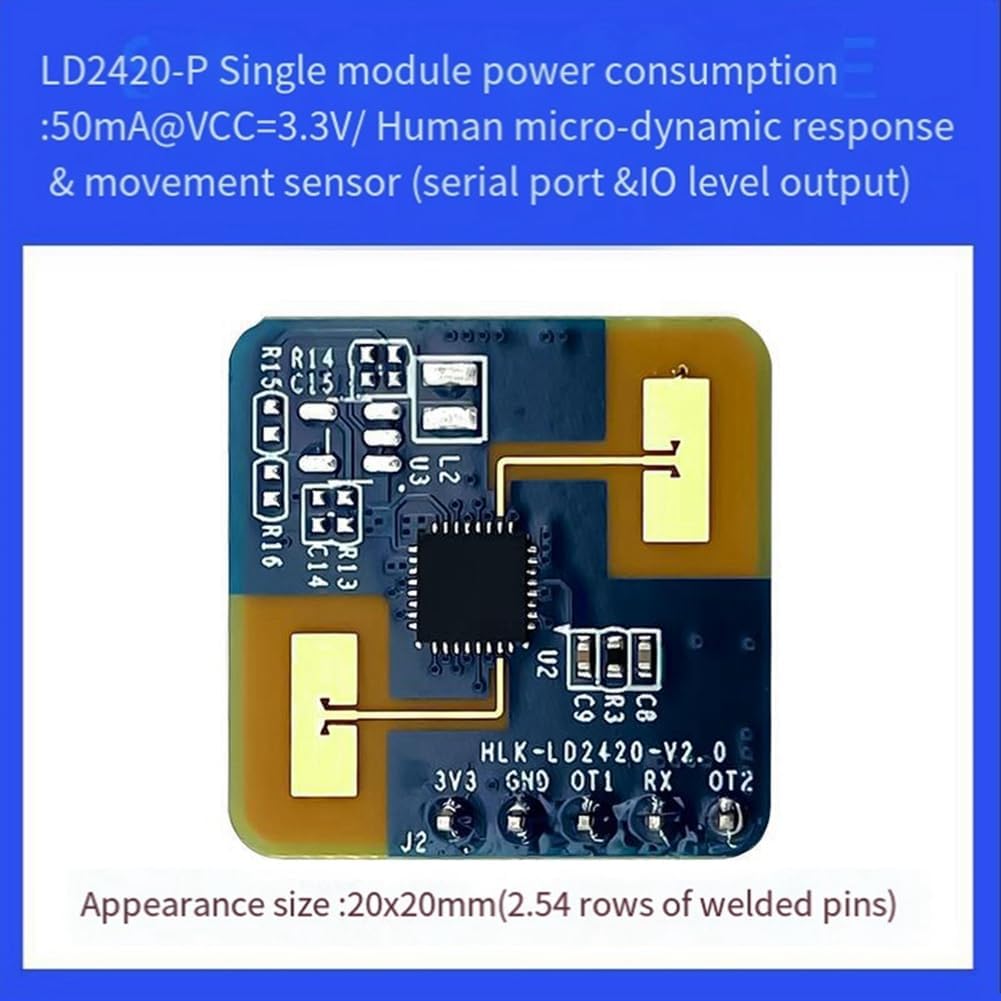
Figure 4: The LD2420 module, capable of multi-level intelligent parameter adjustment and human body sensing within 4 meters.
3.2 Data Output
The module provides data output through a serial port in ASCII format, or as high and low level (3.3V) signals via the OT1 pin for induction output and OT2/RX pins for TTL serial communication.
4. Maintenance
The LD2420 module is a robust electronic component. To ensure its longevity and optimal performance:
- Avoid exposing the module to extreme temperatures outside its specified operating range (-40°C to +85°C).
- Keep the module clean and free from dust and moisture.
- Ensure proper ESD (Electrostatic Discharge) precautions are taken during handling and installation to prevent damage to sensitive components.
- Regularly check power supply stability to prevent issues caused by voltage fluctuations or ripple.
5. Troubleshooting
If the radar sensor is not performing as expected, consider the following troubleshooting steps:
5.1 Detection Issues
- No detection or erratic detection: Check for continuous movement of non-human objects (e.g., pets, curtains, plants) within the sensing area. These can trigger false positives or interfere with human presence detection.
- Reduced detection range or sensitivity: Inspect the environment for large, strong reflective planes or objects directly in front of the radar antenna. These can cause signal interference.
- Wall mounting interference: When wall mounting, consider external interference factors such as air conditioners and electric fans located above the room, which can cause unwanted movement or reflections.
5.2 Power and Connectivity
- Module not powering on: Verify that the power supply input voltage is within the 3.0V to 3.6V range and that the connections to VCC and GND are secure.
- Unstable operation: Check the power supply ripple. Significant peaks within 100 kHz can affect module stability.
- Communication errors: Ensure correct wiring for RX and TX pins and that the serial communication parameters (baud rate, etc.) are correctly configured in your host system.
6. Specifications
| Feature | Specification |
|---|---|
| Frequency | 24G-24.25GHz |
| Modulation Mode | FMCW |
| Detection Distance | 0.75-6m (adjustable) |
| Detection Angle | 60° |
| Power Supply | 3.3V (Typical), Range: 3.0V ~ 3.6V |
| Current Consumption | 50mA |
| Output Serial Level | 3.3V |
| Sweep Bandwidth | 250MHz |
| Ambient Temperature | -40°C to +85°C |
| Data Format | Serial ASCII output / High and low level 3.3V |
| Interface Type | 2.54mm x 5PIN row pin |
| Module Dimensions | 20mm x 20mm |
| Weight | Approximately 0.124 ounces |

Figure 5: The LD2420 module, designed for inductive motion, standing, and micromotion detection, meeting CE/FCC certification requirements for roof/wall mounting.