
Bobtot K701S
Bobtot K701S 5.1/2.1 Channel Surround Sound System User Manual
Model: K701S
1. Introduction
Thank you for purchasing the Bobtot K701S 5.1/2.1 Channel Surround Sound System. This system is designed to provide a powerful and immersive audio experience for your home entertainment. With 800W peak power and a 6.5-inch subwoofer, it delivers clear, dynamic sound. This manual will guide you through the setup, operation, and maintenance of your new sound system.

Image 1.1: Bobtot K701S 5.1/2.1 Channel Surround Sound System with subwoofer, satellite speakers, and remote control.
2. Important Safety Instructions
Please read and follow these safety instructions carefully before operating the system to prevent electric shock, fire, or damage to the unit.
- Do not expose this appliance to rain or moisture.
- Do not block any ventilation openings. Install in accordance with the manufacturer's instructions.
- Do not install near any heat sources such as radiators, heat registers, stoves, or other apparatus (including amplifiers) that produce heat.
- Protect the power cord from being walked on or pinched, particularly at plugs, convenience receptacles, and the point where they exit from the apparatus.
- Only use attachments/accessories specified by the manufacturer.
- Unplug this apparatus during lightning storms or when unused for long periods of time.
- Refer all servicing to qualified service personnel. Servicing is required when the apparatus has been damaged in any way.
3. Package Contents
Carefully unpack the box and ensure all items are present and in good condition. If any items are missing or damaged, please contact customer support.
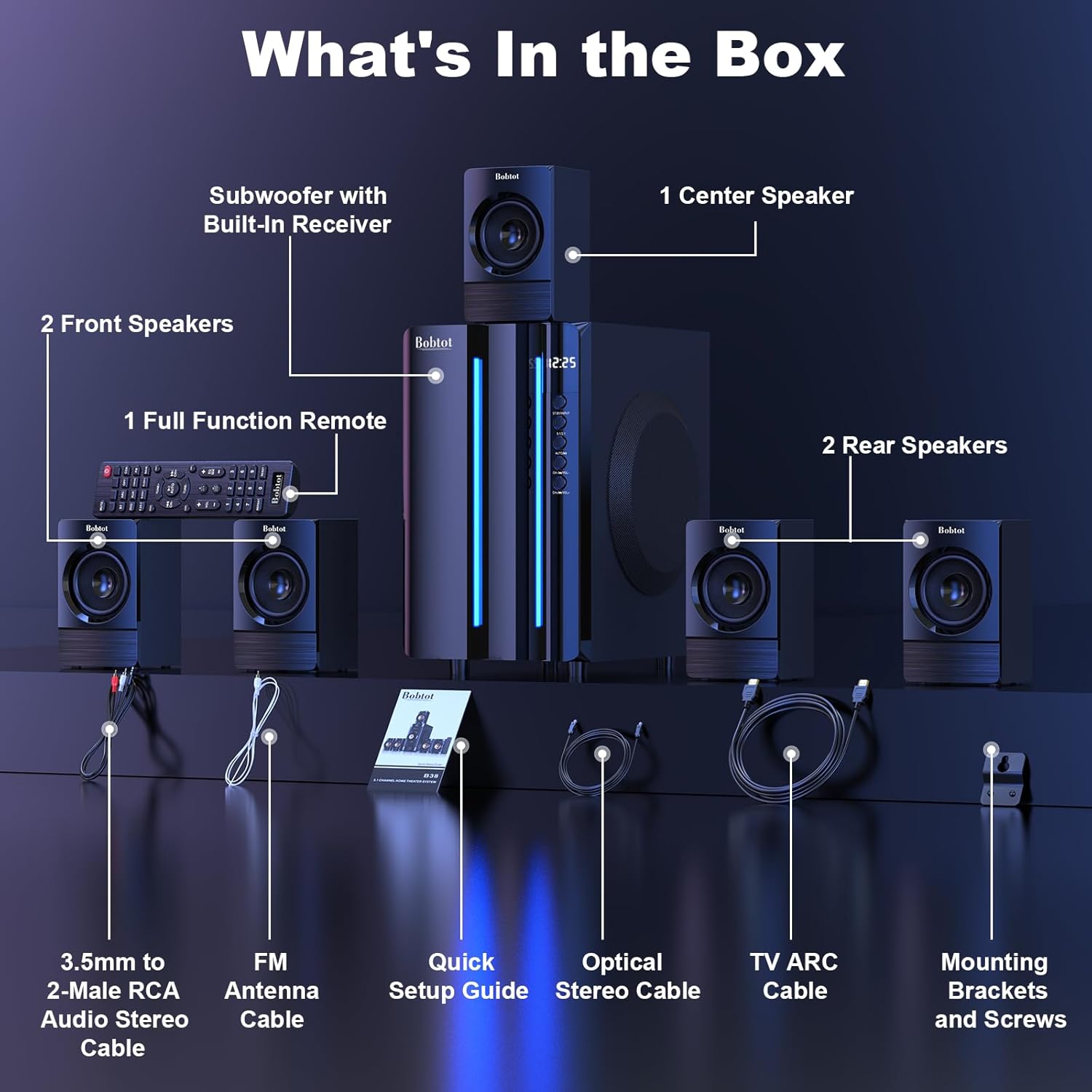
Image 3.1: Visual representation of all items included in the Bobtot K701S package.
- 1 x Subwoofer with Built-in Receiver
- 1 x Center Speaker
- 2 x Front Speakers
- 2 x Rear Speakers
- 1 x Full Function Remote Control
- 1 x 3.5mm to 2-Male RCA Audio Stereo Cable
- 1 x FM Antenna Cable
- 1 x Quick Setup Guide
- 1 x Optical Stereo Cable
- 1 x TV ARC Cable (HDMI)
- 1 x Coaxial Cable
- 1 x AUX Cable
- 1 x RCA Cable
- Mounting Brackets and Screws
- User Manual (this document)
4. Components Overview
4.1 Subwoofer (Main Unit)
The subwoofer houses the main receiver and amplifier for the entire system. It features a 6.5-inch driver for deep bass and includes all input/output ports.

Image 4.1: Detailed view of the 6.5-inch subwoofer, highlighting its internal components.
4.2 Satellite Speakers
The system includes five satellite speakers: one center, two front (left/right), and two rear (left/right). These speakers are wired and connect directly to the subwoofer unit.
4.3 Remote Control
The full-function remote control allows you to manage power, input modes, volume, channel selection, and other settings from a distance.
5. System Setup
Follow these steps to set up your Bobtot K701S surround sound system.
5.1 Speaker Connection
The five satellite speakers come with integrated cables. Connect each speaker to the corresponding "Audio Output" slot on the rear of the subwoofer unit. The cables are color-coded or labeled for easy identification (e.g., FL for Front Left, FR for Front Right, CEN for Center, SL for Surround Left, SR for Surround Right).
- Front Center and L/R speakers: Cables are approximately 13 feet long.
- Rear L/R speakers: Cables are approximately 31 feet long.
Place all speakers in the same room for optimal surround sound performance.

Image 5.1: Recommended speaker placement for a 5.1 channel surround sound experience.
5.2 Power On and Initial Test
- Connect the subwoofer to a power outlet using the provided power cable.
- Turn on the subwoofer using the power switch.
- Press the power button on the remote control or the front panel.
- Test the remote control functionality.
- Switch to "BT" (Bluetooth) mode and connect your mobile device to "B701D" via Bluetooth to ensure audio playback.
5.3 Connecting External Devices
Choose the appropriate input mode and connect your external device (e.g., TV, projector, DVD player, game console) to the subwoofer using the corresponding audio cables provided.
- Ensure the cable is securely plugged into the correct input slot on the subwoofer.
- Select the matching input mode on the system (e.g., HDMI ARC, OPT, COA, AUX, USB, DVD).

Image 5.2: Overview of the rear panel connections and supported multimedia inputs.
6. Operating Instructions
6.1 Remote Control Functions
The remote control provides full command over your sound system. Always press the power button before selecting an input mode when turning on the unit.

Image 6.1: Detailed diagram of the remote control buttons and their functions.
- Power On/Off: Turns the system on or off.
- Input Mode Select: Buttons for BT, ARC, OPT, COA, DVD, AUX, USB/SD, FM to switch between audio sources.
- 5.1/2.1 Channel Select: Toggles between 5.1 surround sound and 2.1 stereo mode (in 2.1 mode, only the two front speakers play).
- Volume Control (VOL +/-): Adjusts the overall system volume.
- Mic Volume Adjustment (MIC +/-): Adjusts the volume for connected microphones (supports wireless/wired microphones).
- Echo Control (ECHO +/-): Adjusts the echo effect for microphones.
- TUNE +/-: For FM radio tuning.
- CH +/-: For FM radio channel selection.
- MUTE: Mutes or unmutes the audio output.
6.2 Input Modes
The Bobtot K701S supports various input methods:
- Bluetooth (BT): For wireless connection to smartphones, tablets, and other Bluetooth-enabled devices.
- HDMI ARC: Connects to your TV's HDMI ARC port for high-quality audio transmission and TV remote control integration.
- Optical (OPT): Digital audio input for TVs, game consoles, and other devices with an optical output.
- Coaxial (COA): Digital audio input, similar to optical, for compatible devices.
- AUX: Analog audio input using a 3.5mm or RCA cable for a wide range of devices.
- USB/SD: Play audio files directly from USB drives or SD cards.
- FM Radio: Built-in FM tuner for listening to radio stations.
- DVD: Dedicated input for DVD players.
6.3 Channel Configuration (5.1 / 2.1)
The system offers two channel modes: 5.1 and 2.1. You can switch between these modes using the remote control or the front panel. In 5.1 mode, all five satellite speakers and the subwoofer are active, providing a full surround sound experience. In 2.1 mode, only the two front speakers and the subwoofer are active, suitable for stereo audio.
7. Connectivity Guide
This section details how to connect various devices to your sound system.
7.1 Bluetooth Connection
- Press the "BT" button on the remote control or front panel to select Bluetooth mode. The display will show "BT".
- On your mobile device, enable Bluetooth and search for available devices.
- Select "B701D" from the list to pair. Once connected, you will hear a confirmation sound.
7.2 HDMI ARC Connection
- Connect one end of the HDMI ARC cable to the "HDMI ARC" port on the subwoofer.
- Connect the other end to the "HDMI ARC" port on your TV.
- Select "ARC" input mode on the sound system.
- Ensure your TV's audio output is set to HDMI ARC or external speakers.
7.3 Optical/Coaxial Connection
- Connect an optical or coaxial cable from your device's digital audio output to the corresponding "OPT" or "COA" input on the subwoofer.
- Select "OPT" or "COA" input mode on the sound system.
- Ensure your device's audio output is set to PCM (Pulse-code modulation) for optical/coaxial connections, as some devices may default to other formats not supported by the system.
7.4 AUX Connection
- Use the provided 3.5mm to 2-Male RCA cable or a standard RCA cable.
- Connect the cable from your device's audio output (e.g., headphone jack, RCA L/R output) to the "AUX" input on the subwoofer.
- Select "AUX" input mode on the sound system.
7.5 USB/SD Playback
- Insert a USB flash drive or SD card containing audio files into the respective port on the subwoofer.
- Select "USB/SD" input mode. The system will automatically begin playing compatible audio files.
7.6 FM Radio
- Connect the FM antenna cable to the "FM ANTENNA" port on the subwoofer. Extend the antenna for better reception.
- Select "FM" input mode.
- Use the "TUNE +/-" or "CH +/-" buttons on the remote to scan for and select radio stations.
8. Specifications
| Feature | Specification |
|---|---|
| Model Number | K701S |
| Speaker Type | Satellite |
| Surround Sound Channel Configuration | 5.1 |
| Peak Output Power | 800 Watts |
| Subwoofer Diameter | 6.5 Inches |
| Frequency Response | 20 KHz |
| Wireless Communication Technology | Bluetooth 5.0 |
| Connectivity Technology | Bluetooth, HDMI ARC, Optical, Coaxial, AUX, USB, DVD, FM |
| Control Method | Remote Control |
| Power Source | Corded Electric |
| Input Voltage | 120 Volts |
| Product Dimensions (L x W x H) | 31.8 x 19.8 x 33 cm |
| Item Weight | 6.56 Kilograms |
| Material | Wood (MDF), Acrylonitrile Butadiene Styrene (ABS) |
| Special Feature | Bass Amplification |
9. Troubleshooting
If you encounter issues with your Bobtot K701S system, refer to the following common problems and solutions:
9.1 No Sound
- Check Power: Ensure the system is powered on and the power cable is securely connected.
- Volume Level: Increase the master volume on the system and your connected device.
- Input Mode: Verify that the correct input mode is selected on the system (e.g., BT, ARC, OPT).
- Cable Connections: Ensure all audio cables are securely connected to both the system and the source device.
- Source Device Output: Check the audio output settings on your source device (e.g., TV, DVD player) to ensure it's sending audio to the correct output port and format (e.g., PCM for optical/coaxial).
9.2 Poor Sound Quality / Distortion
- Volume Level: Reduce the volume if it's too high, causing distortion.
- Cable Integrity: Inspect audio cables for damage or loose connections.
- Speaker Placement: Ensure speakers are placed correctly and not obstructed.
- Source Quality: Test with a different audio source or file to rule out issues with the original content.
9.3 Remote Control Not Working
- Batteries: Replace the batteries in the remote control.
- Line of Sight: Ensure there is a clear line of sight between the remote and the system's IR receiver.
- Distance: Operate the remote within its effective range.
9.4 Bluetooth Connection Issues
- Pairing Mode: Ensure the system is in Bluetooth pairing mode.
- Device Proximity: Keep your Bluetooth device within a few meters of the system.
- Interference: Move away from other wireless devices that might cause interference.
- Forget Device: On your mobile device, "forget" or "unpair" the "B701D" and attempt to reconnect.
10. Care and Maintenance
- Cleaning: Use a soft, dry cloth to clean the surfaces of the system. Do not use liquid cleaners or aerosols.
- Ventilation: Ensure the subwoofer has adequate ventilation and is not placed in an enclosed space that could restrict airflow.
- Placement: Avoid placing the system in direct sunlight, near heat sources, or in areas with high humidity.
- Power Off: Turn off and unplug the system when not in use for extended periods.
11. Warranty and Customer Support
Bobtot is committed to providing a positive customer experience. If you encounter any issues with your B701D Home Surround Sound System, please refer to this user manual for initial troubleshooting.
For further assistance, please contact Bobtot customer support through the Amazon buyer-seller messaging service. Our support team is available to help you with any questions or concerns you may have.
Related documentsK701S


Ask a question about this manual
Ask about setup, troubleshooting, compatibility, parts, safety, or missing instructions. Manuals+ will review the question and use this page’s manual context to help answer it.