
Introduction
This manual provides detailed instructions for the setup, operation, and maintenance of your Osoeri Hummingbird Feeder with Camera (Model OS-BC03). This device combines a hummingbird feeder with a 2K HD camera, solar charging, and AI bird identification to enhance your bird-watching experience. Please read this manual thoroughly before using the product to ensure proper function and longevity.
Product Overview
The Osoeri Hummingbird Feeder with Camera is designed to attract hummingbirds while allowing you to observe and record them in high definition. Key features include:
- 2K HD Camera: Captures clear images and videos of visiting birds.
- AI Bird Identification: Advanced technology identifies over 11,000 bird species.
- Real-time Monitoring: View live footage and receive motion-activated notifications on your smartphone via the dedicated app.
- Solar Power & Battery: Equipped with a flexible solar panel and a built-in 5000mAh rechargeable battery for continuous operation.
- Ant & Bee-Proof Design: Features a built-in ant moat and specially designed feeding ports to deter pests.
- Easy to Clean: Removable swivel base and included brush set facilitate cleaning.
- Durable Construction: Made from BPA-free, anti-UV, and corrosion-resistant materials suitable for outdoor use.
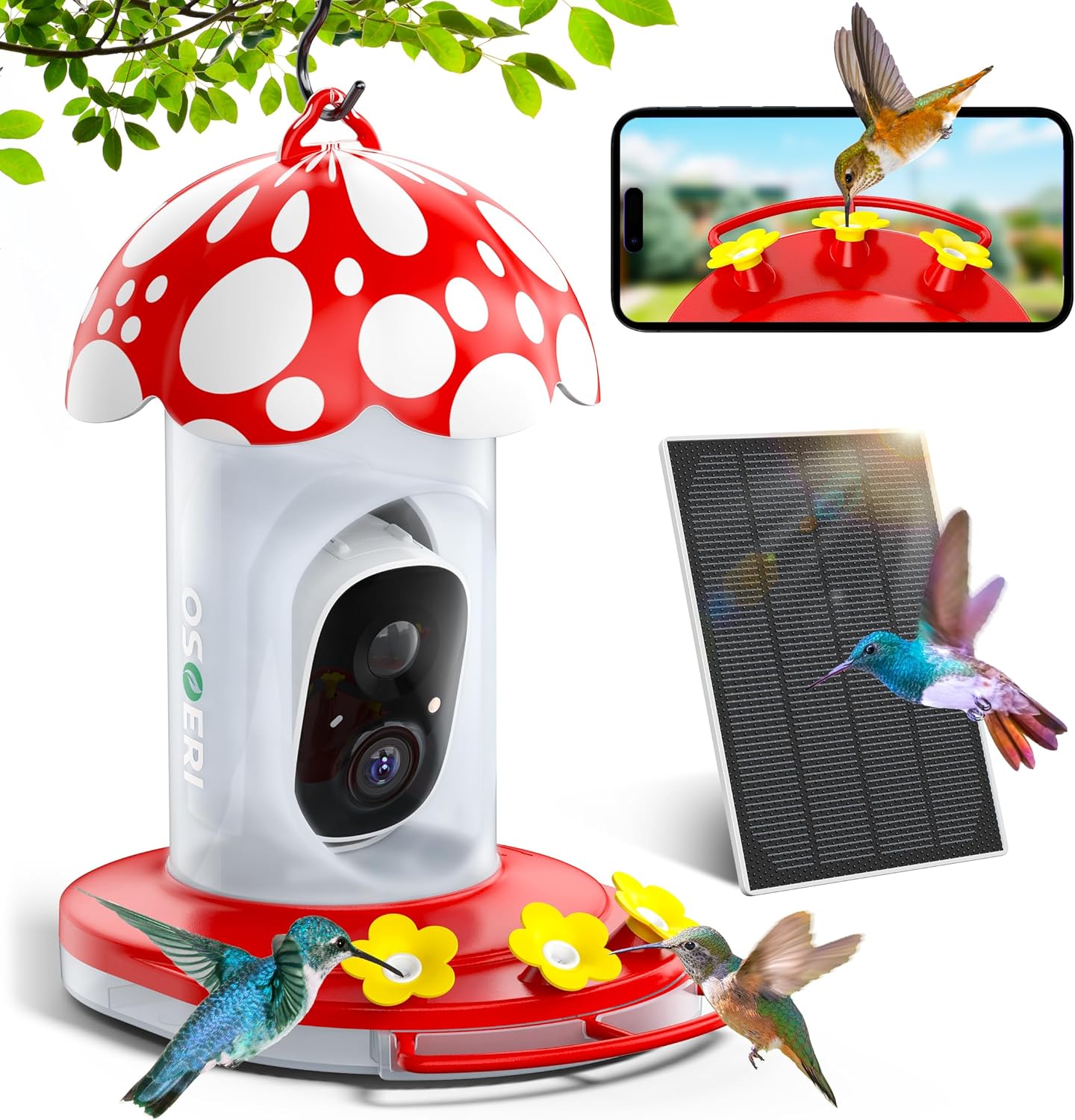
Image: The Osoeri Hummingbird Feeder with Camera, featuring its mushroom-shaped top, integrated camera, solar panel, and a visual representation of live bird viewing on a smartphone.
Setup Guide
1. Initial Charging
Before initial use, fully charge the camera's built-in 5000mAh rechargeable battery using a standard USB adapter (not included). This ensures optimal battery life and performance, especially when relying on the solar panel.
2. App Installation and Wi-Fi Connection
- Download the dedicated mobile application from your smartphone's app store.
- Follow the in-app instructions to create an account and add your new device.
- Connect the feeder camera to your 2.4GHz Wi-Fi network. Ensure a stable connection for real-time viewing and notifications. Note: The camera does not support 5GHz Wi-Fi networks.
3. Assembling and Filling the Feeder
Follow these steps to assemble and fill your hummingbird feeder:
- Unlock Feeder Base: Turn the feeder base to the "Open" position.
- Tighten Feeder Roof: Ensure the feeder roof is securely tightened before filling with nectar.
- Fill Nectar Container: Fill the nectar container. It must be kept upside down during this step to prevent spills.
- Attach Base: Attach the base and turn it to the "Lock" position.
- Insert Camera: Carefully push the camera into its designated slot within the bird feeder.
- Set Feeder Upright: Once assembled and filled, set the feeder upright.

Image: Step-by-step visual guide for filling the hummingbird feeder with nectar, from unlocking the base to setting the feeder upright.
4. Mounting the Feeder
The feeder is designed for hanging. Use the included mounting kit to securely hang the feeder in a location visible to hummingbirds and within range of your Wi-Fi network. Ensure the solar panel receives adequate sunlight for continuous charging.

Image: Examples of the feeder mounted in a garden, on a shepherd's hook, and under a patio cover, demonstrating versatile placement options.
Operating Instructions
1. Real-time Bird Watching
Once connected to Wi-Fi, open the mobile application to view live 2K HD video footage from your feeder. The app allows you to monitor hummingbirds in real-time from anywhere.
Image: A smartphone showing the live feed from the feeder, capturing a hummingbird in action, illustrating the real-time viewing capability.
2. Motion Detection and Notifications
The feeder camera features precise motion detection. When a hummingbird visits, the camera automatically captures and records HD video, sending real-time notifications to your phone. This ensures you never miss a moment.

Image: A smartphone displaying a notification for a detected bird, including AI identification, demonstrating the instant alert feature.
3. AI Bird Identification
Leverage the advanced AI technology to identify over 11,000 bird species. The app will provide information about the detected birds, enhancing your bird-watching knowledge.
Important Note: The AI identification function includes a 30-day free trial. After this period, a subscription fee is required to continue using this feature.
4. Sharing Moments
The mobile application allows you to share access to the device with multiple users. This enables family and friends to also enjoy the live bird-watching experience and recorded moments.
Recorded videos and images can be stored via cloud service (30-day free trial, then subscription) or on a local SD card (up to 128GB, not included).

Image: Family and friends viewing hummingbird footage on their devices, highlighting the ease of sharing bird-watching moments.
Maintenance
1. Cleaning the Feeder
Regular cleaning is essential to prevent mold and bacteria growth, which can harm hummingbirds. The feeder's design allows for easy cleaning:
- Remove the camera module before cleaning.
- Detach the removable swivel base.
- Use the included brush set and warm soapy water to thoroughly clean all parts of the feeder.
- Rinse all components thoroughly with clean water to remove any soap residue.
- Allow all parts to dry completely before reassembling and refilling.

Image: Visual representation of the feeder being cleaned, emphasizing the ease of maintenance and the design of the feeding ports.
2. Nectar Refilling and Ant/Bee Prevention
- Refill the nectar regularly, especially in warm weather, to ensure freshness.
- Utilize the built-in ant moat by filling it with water or any liquid to deter ants from reaching the nectar.
- The feeder's unique bee-proof design with small feeding ports helps prevent bees from accessing the nectar.
Image: Detailed view of the ant moat and bee-proof feeding ports, explaining how they protect the nectar.
Troubleshooting
- No Power/Camera Not Turning On:
Ensure the camera's internal battery is fully charged. While the solar panel provides continuous charging, an initial full charge via USB is recommended for optimal performance. Check USB connection if charging manually.
- Wi-Fi Connection Issues:
Verify that your Wi-Fi network is 2.4GHz. The camera does not support 5GHz networks. Ensure the feeder is placed within a strong Wi-Fi signal range. Try restarting your router and the camera.
- No Video Recording/AI Identification:
Remember that the cloud storage service and AI identification feature include a 30-day free trial. After this period, a subscription is required. If using an SD card, ensure it is correctly inserted and formatted (up to 128GB, not included).
- Nectar Leaking:
Ensure all parts of the feeder, especially the base and roof, are securely tightened and properly aligned after refilling. Check for any cracks or damage to the feeder components. If issues persist, contact customer support.
- Poor Image/Video Quality:
Clean the camera lens regularly to remove dust or debris. Ensure adequate lighting in the feeder's location. Check your Wi-Fi connection speed, as a slow connection can affect streaming quality.
Specifications
| Brand | Osoeri |
| Model Number | OS-BC03 |
| Target Species | Hummingbird |
| Material | Plastic (BPA-free, anti-UV, corrosion-moat) |
| Special Features | Bee Resistant, Built-In Ant Moat, Long Lasting, Reusable, Weather Resistant |
| Mounting Type | Hanging Mount |
| Product Dimensions | 6.3"L x 10.1"W x 9"H |
| Power Source | Battery and Solar Powered |
| Battery Capacity | 5000mAh (Rechargeable) |
| Wi-Fi Connectivity | 2.4GHz (Not compatible with 5GHz) |
| Camera Resolution | 2K HD |
| Storage Options | Cloud Storage (subscription after 30-day trial), Max 128GB SD Card (not included) |
| Included Components | Feeder unit, Camera, Solar Panel, 2 Cleaning Brushes, 9 Feeding Ports, Mounting Kit |
| Capacity | 0.6 Liters |
| Item Weight | 3.43 pounds |
Warranty and Support
For any questions, suggestions, or issues regarding your Osoeri Hummingbird Feeder with Camera, please contact Osoeri customer support. Refer to the product packaging or the official Osoeri website for specific warranty details and contact information. The manufacturer is committed to assisting you with product-related inquiries.