
FOXWELL NT809BT Wireless Scan Tool Black
FOXWELL NT809BT Bidirectional Scan Tool User Manual
Model: NT809BT Wireless Scan Tool Black
Product Overview
The FOXWELL NT809BT is a state-of-the-art Android tablet-based diagnostic scan tool, engineered to provide fast, smart, and simplified vehicle diagnostics. It features advanced Bluetooth technology for wireless diagnosis, comprehensive all-system diagnostics, and extensive bidirectional control capabilities. With over 30 maintenance functions and support for more than 100 car manufacturers, the NT809BT is a versatile tool for various automotive needs.

Figure 1: FOXWELL NT809BT Bidirectional Scan Tool with VCI dongle.
Setup Guide
What's in the Box?
- 1X NT809BT Auto OBD2 Scanner
- 1X Bluetooth VCI Dongle
- 1X Handheld box
- 1X Quick Guide
- 1X User's Manual
- 1X USB TYPE C Cable
Initial Setup and Activation
Upon receiving your NT809BT, ensure the device is fully charged using the provided USB Type C cable. The device runs on Android 9.0 and requires initial activation and account registration. Connect the device to a Wi-Fi network to perform software updates. The NT809BT offers 3-year free software updates and lifetime technical support.

Figure 2: Overview of 30+ Maintenance Services available on NT809BT.
Operating Instructions
All-System & Bidirectional Diagnostics
The NT809BT provides comprehensive all-system diagnostics, allowing thorough inspection of various vehicle systems such as engine, ignition, A/C, and braking. It supports vehicle-wide bidirectional active tests, enabling users to command components like fuel pumps, ACM solenoids, and parking brakes directly from the tool. The wireless VCI dongle offers a 65.62-foot range for flexible operation.
Video 1: Demonstration of All Systems and Full OBD2 Functionality.
Video 2: Demonstration of 99% Active Test Support.
Full OBD2 Diagnosis & PDF Report
Beyond advanced tablet features, the NT809BT functions as a car code reader. It reads and clears fault codes, checks I/M Readiness for inspections, and displays real-time data charts. The DTC Lookup feature quickly identifies fault sources, eliminating the need for external searches. After diagnosis, a one-click PDF report can be generated and shared for convenient record-keeping or repair guidance.
Video 3: Quick overview of the NT809BT features.
Maintenance Functions
The NT809BT assists with common and essential reset tasks, including ABS Bleeding, Oil Light Reset, EPB Reset, SAS Calibration, Throttle Matching, Injector Coding, D-PF Regeneration, TPMS Reset, Windows-Door, Transmission Adaptation, Suspension Reset, and Battery Registration. These functions help reduce maintenance costs by allowing users to perform tasks typically requiring professional service.
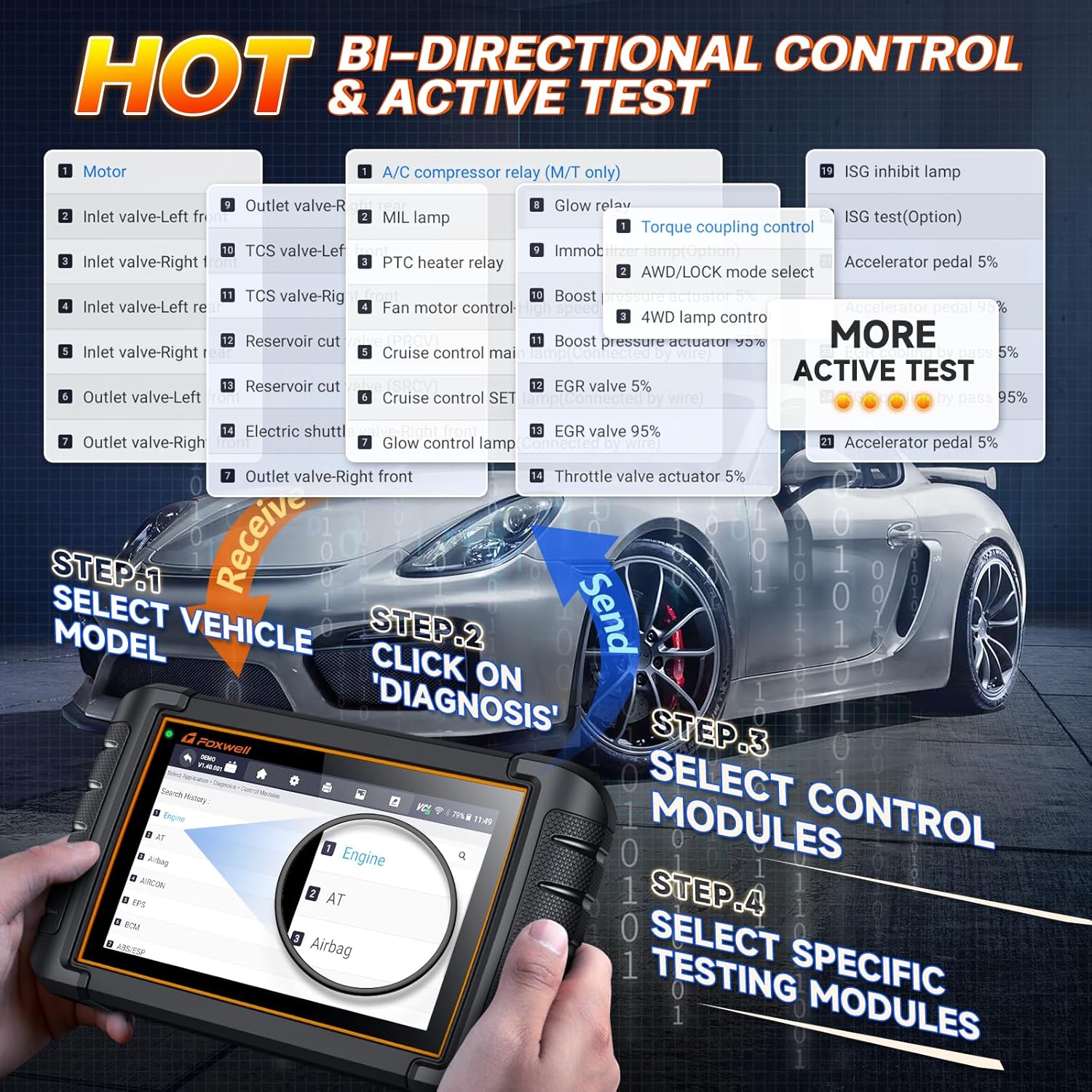
Figure 3: Bi-directional control and active test capabilities.
Video 4: Demonstration of 30 Key Maintenance Resets.
Troubleshooting
For common issues, ensure the device is fully charged. If the battery isn't charging, try wiping the metal plug of the charging cable with alcohol. If the device won't start, ensure it's sufficiently charged and press the power button firmly. For functional compatibility or technical support, contact FOXWELL customer service. Automatic VIN acquisition works for 99% of cars; if it takes too long, manually enter the VIN.
Specifications
- Product Dimensions: 9.84"L x 5.7"W x 1.5"H
- Operating System: Android 9.0
- Display Resolution: 1280x800
- Automotive Fit Type: Universal Fit
- Item Weight: 4.86 pounds
- Country of Origin: China
- Batteries: 1 Lithium Ion battery required (included)
Warranty and Support
FOXWELL provides a one-year after-sales service for orders beyond 30 days. For any usage or quality issues within one year of purchase, contact FOXWELL directly via Amazon Message for returns and exchanges. The product includes 3-year free software updates and lifetime technical support. If the VCI dongle is lost, it can be purchased separately. The NT809BT supports OE full system diagnosis but does not support ECU programming function.
Ask a question about this manual
Ask about setup, troubleshooting, compatibility, parts, safety, or missing instructions. Manuals+ will review the question and use this page’s manual context to help answer it.