1. Product Overview
The 24HOCL BD-613 Electric Piano Keyboard is designed to inspire musical interest, especially for beginners and children. It features 61 keys with LED lighting for guided learning, offering a game-like practice experience. This digital piano includes a microphone, music sheet stand, and various functions to support musical development from basic to advanced levels.

Figure 1.1: The 24HOCL BD-613 Electric Piano Keyboard with included accessories.

Figure 1.2: Key features and advantages of the keyboard.
2. Setup Guide
2.1 Power Supply
The keyboard can be powered by two methods:
- Corded Electric: Use the provided US-standard (DC 5V) power cable and plug it into a wall outlet.
- Battery Powered: Insert 4 AA batteries (not included) into the battery compartment located on the underside of the keyboard. Ensure correct polarity.

Figure 2.1: Power supply options and input ports.
2.2 Connecting Accessories
- Microphone: Connect the external microphone to the 'Micrphone Input' (MIC) port.
- Headphones: For private practice, connect headphones to the 'Headphone Inpu' (PHONE) port.
- External Audio: Connect external audio devices to the 'Audio In' (AUDIO IN) port.

Figure 2.2: Included accessories for the keyboard.
2.3 Key Sticker Application
For easier learning, apply the provided key stickers to the piano keys. Follow the order indicated on the sticker sheet, typically from left to right, starting with the lowest notes.

Figure 2.3: Applying key stickers for learning.
3. Operating Instructions
3.1 Basic Functions
- Power On/Off: Use the 'POWER' button to turn the keyboard on or off.
- Volume Control: Adjust the master volume using the dedicated volume buttons.
- Tones: Select from 100 different instrument tones. Refer to the tone list on the keyboard panel or in the manual for specific numbers.
- Rhythms: Choose from 100 rhythms to accompany your playing.
- Demo Songs: Play one of the 10 built-in demo songs for listening or practice.

Figure 3.1: Control panel with tone, rhythm, and demo song selection.
3.2 Advanced Features
- Recording & Playback: Use the 'RECORD' button to record your performance and 'PLAY' to listen back. This function helps in reviewing and improving your playing.
- Dual Speakers: The keyboard features dual speakers for enhanced stereo surround sound.
- LED Screen Display: The digital LED screen displays current settings such as tone, rhythm, and tempo.
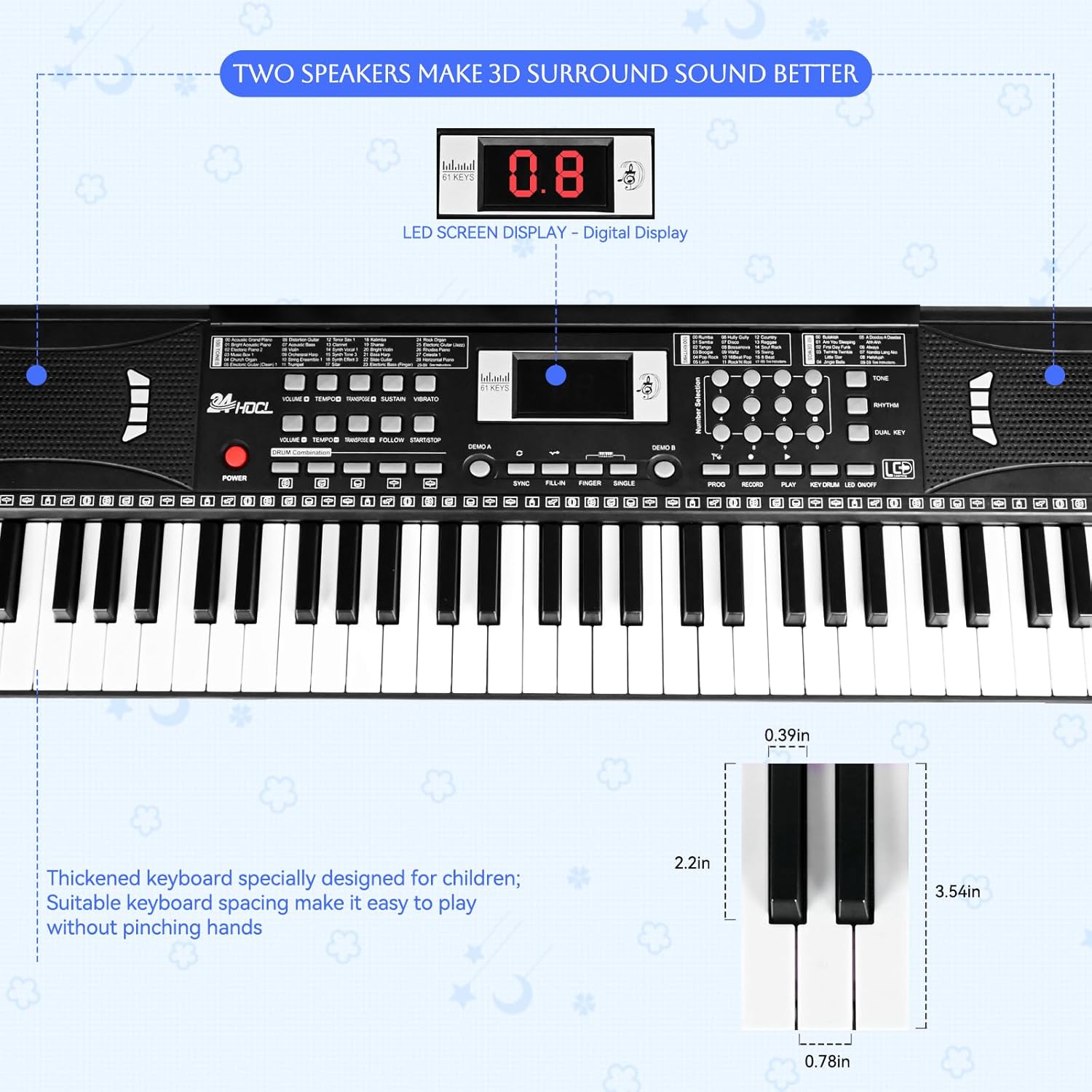
Figure 3.2: LED screen and dual speaker system.

Figure 3.3: Stereo surround sound capabilities.
3.3 Teaching Modes
The keyboard offers three teaching modes with LED lighted keys to guide beginners:
- One Key for One Note: Simplifies playing by allowing any key press to play the correct note of a song.
- Follow: The keyboard waits for you to play the correct note before proceeding to the next.
- Play: Provides a full accompaniment while you play the melody.
Keys light up in the demo note order, and tempo is controllable, guiding users from beginner to advanced levels.
4. Care and Maintenance
- Cleaning: Wipe the keyboard surface with a soft, dry cloth. Avoid using abrasive cleaners or solvents.
- Storage: Store the keyboard in a cool, dry place away from direct sunlight and extreme temperatures.
- Handling: Handle the keyboard with care to prevent damage to keys or internal components.
- Battery Care: If using batteries, remove them if the keyboard will not be used for an extended period to prevent leakage.
5. Troubleshooting
| Problem | Possible Cause | Solution |
|---|---|---|
| Keyboard does not power on. | No power supply or low batteries. | Ensure power adapter is securely connected or replace AA batteries with new ones. |
| No sound from speakers. | Volume is too low or headphones are connected. | Increase volume. Disconnect headphones if not needed. |
| Microphone not working. | Microphone not properly connected. | Ensure microphone is fully plugged into the MIC input. |
| Keys not lighting up in teaching mode. | Teaching mode not activated or specific demo song not selected. | Refer to the operating instructions to properly activate teaching modes and select a compatible demo song. |
6. Technical Specifications
| Feature | Specification |
|---|---|
| Model Name | BD-613 |
| Number of Keys | 61 |
| Product Dimensions | 3"D x 14"W x 30"H |
| Item Weight | 2.2 pounds (1 Kilogram) |
| Power Source | Battery Powered (4 AA batteries required), Corded Electric |
| Connectivity Technology | Auxiliary |
| Connector Type | 3.5mm Jack (for Microphone, Headphones, Audio In) |
| Material Type | Plastic |
| Skill Level | All |
| Tones | 100 |
| Rhythms | 100 |
| Demo Songs | 10 |
| Special Features | LED Lighted-key with 3 teaching modes, Dual Speaker, Recording & Playback Function, External Microphone, Music Sheet Stand |

Figure 6.1: Product dimensions with stand.
7. Warranty and Support
For warranty information and customer support, please refer to the product packaging or contact the manufacturer directly. Keep your purchase receipt as proof of purchase for any warranty claims.
Manufacturer: 24HOCL


